Key Takeaways

- Point-in-Time restore creates automatic snapshots every 24 hours, retained for 72 hours on consumer devices
- Unlike System Restore, this feature captures full system state including apps and user data
- Enterprise users can configure snapshots at 4, 6, 12, 16, or 24-hour intervals with matching retention
Microsoft released the KB5095093 preview cumulative update for Windows 11 on June 23, 2026, introducing Point-in-Time restore, a backup feature that lets users roll back their entire system to a previous state within minutes. The feature captures automatic snapshots every 24 hours and stores them locally for up to 72 hours, covering the operating system, applications, and user files.
This is an optional, non-security update available through Windows Update or the Microsoft Update Catalog. It applies to both Windows 11 24H2 and 25H2, bringing systems to build 26100.8737.
How Point-in-Time restore differs from System Restore
Windows has offered System Restore since Windows ME in 2000, but the scope was limited. System Restore captures system files and settings. App data and user files? Coverage varies, and users often discovered their personal documents weren't included after a failed recovery.
Point-in-Time restore takes a different approach. Microsoft describes it as capturing "full system state," meaning your apps, files, and settings all roll back together. The company says restore happens "in minutes" using Volume Shadow Copy Service (VSS).
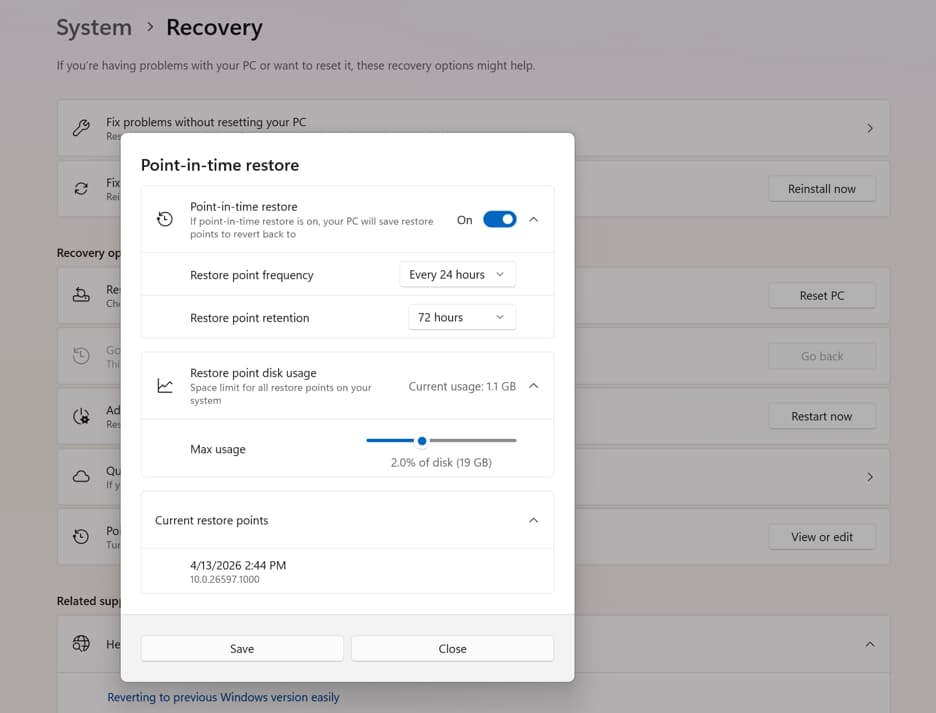
"Point-in-time restore helps recover faster from issues by restoring the full system state captured within the last 72 hours," Microsoft explains. "This feature is designed to help minimize downtime and simplify remediation, without the need for technical ability or lengthy troubleshooting."
| Capability | Point-in-Time Restore | System Restore |
|---|---|---|
| Configuration | System Settings | Control Panel |
| Restore triggers | Scheduled frequency (automatic) | Event-triggered or manual |
| Retention | Maximum 72 hours | Indefinite (disk space dependent) |
| Scope | Full system state | System files and settings only |
| Storage impact | Lower (reserved storage) | Higher (unmitigated) |
| Remote management | Full support | Limited |
Enterprise gets more control over snapshot frequency
Consumer devices create one restore point every 24 hours. Enterprise licenses unlock more granular options: snapshots at 4, 6, 12, 16, or 24-hour intervals, with retention matching those same periods.
The settings panel also lets users allocate more storage to the feature. More space means more snapshots survive before older ones get automatically deleted. For IT teams managing fleets of Windows devices, the remote management capabilities are the real draw. System Restore offered limited remote control. Point-in-Time restore was built with enterprise management in mind from the start.
Other fixes in KB5095093
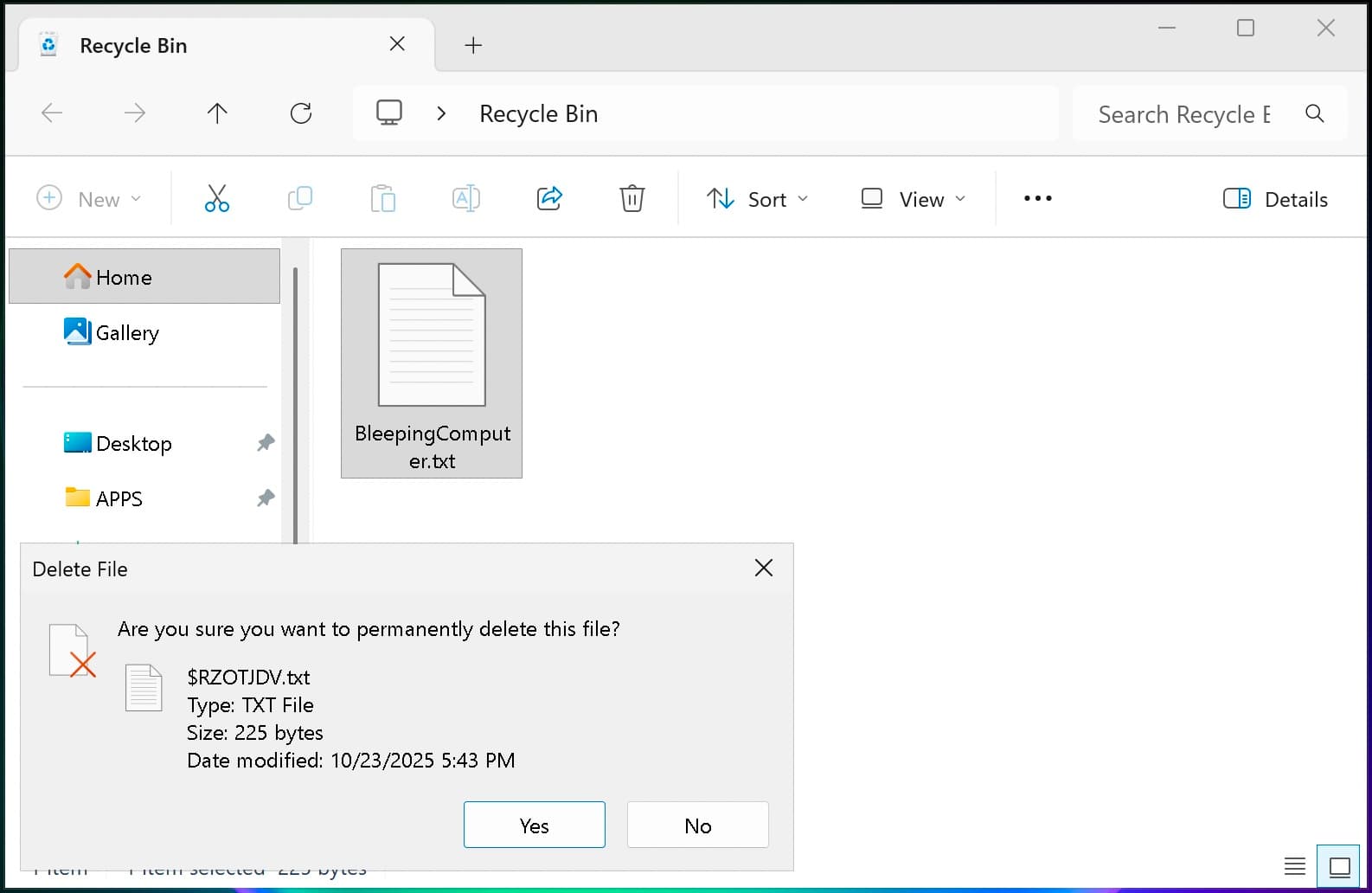
The update addresses a bug introduced in the June 2026 security update that caused the Recycle Bin to display internal file names instead of the original filename when deleting files. If you've seen garbled names in confirmation dialogs, this patch fixes it.
Additional changes include:
- Secure Boot updates that expand device eligibility for automatic certificate updates, using targeting data from successful update signals
- Netlogon authentication improvements for domain controller connections with pre-2025 member servers
- The emoji panel now uses GIPHY for GIF content after Google deprecated its Tenor API. Users must install updates by June 30, 2026, to keep GIF functionality working
How to install KB5095093
Open Settings, go to Windows Update, and click "Check for Updates." Because this is an optional preview update, you'll need to click "Download and install" manually. One exception: if you've enabled "Get the latest updates as soon as they're available," it installs automatically.
You can also grab it directly from the Microsoft Update Catalog if you prefer manual deployment.
Preview updates like KB5095093 don't include security patches. They're testing grounds for fixes and features headed to next month's Patch Tuesday. Installing them is optional, but doing so helps you spot compatibility issues before the mandatory update arrives.
Logicity's Take
Point-in-Time restore is Microsoft's answer to a 25-year-old pain point. System Restore never inspired confidence because it promised recovery without delivering completeness. By scoping the feature to a 72-hour window and requiring reserved storage, Microsoft sidesteps the disk-space conflicts that plagued the old approach. The real test is whether "minutes" holds up on machines with large data volumes, and whether the enterprise management tools integrate cleanly with Intune and Configuration Manager.
Frequently Asked Questions
Does Point-in-Time restore replace System Restore?
No. Both features coexist. Point-in-Time restore focuses on full system state with automatic scheduling, while System Restore remains available for event-triggered or manual restore points.
How much storage does Point-in-Time restore need?
Microsoft uses reserved storage to minimize impact. You can increase the allocation in settings if you want more frequent snapshots without risking automatic deletion.
Can I use Point-in-Time restore to recover files older than 72 hours?
No. Consumer restore points are deleted after 72 hours. Enterprise licenses allow different retention intervals, but all options cap at 72 hours per restore point.
Is KB5095093 a required security update?
No. It's an optional preview update that doesn't include security patches. Security fixes arrive separately on Patch Tuesday.
Another recent cybersecurity story on system vulnerabilities and data protection
Need Help Implementing This?
If you're managing Windows deployments at scale and want guidance on configuring Point-in-Time restore policies, reach out to our team at Logicity for enterprise IT consulting.
Source: BleepingComputer
Manaal Khan
Tech & Innovation Writer
Produced with AI assistance and reviewed by the Logicity editorial team. Learn more in our Editorial Policy.