Key Takeaways
- Windows 11 taskbar can now be docked to left, right, top, or bottom edges in the latest Insider Preview
- A new smaller taskbar option increases vertical screen space without hiding the bar completely
- Start menu sections (pinned apps, recommended, all apps) can now be toggled individually
When Windows 11 shipped in 2021, it looked good. Rounded corners, translucent menus, a cleaner vibe than Windows 10. But the taskbar lost features that power users had relied on for years. The most glaring omission: you could no longer dock it on the left, right, or top of your screen.
Microsoft is finally fixing that. A new Windows Insider Preview build, released to testers this week, brings back taskbar positioning along with several other quality-of-life improvements.
Taskbar goes where you want it
The headline feature: the Windows 11 taskbar can now sit on any edge of your screen. Left, right, top, bottom. This was standard behavior in Windows 10 and earlier versions, but Microsoft removed it when redesigning the taskbar for Windows 11.
Users can also configure different settings for each position. Prefer different icon alignment when the taskbar is vertical versus horizontal? Want different label and grouping options? Windows will remember your choices per position.
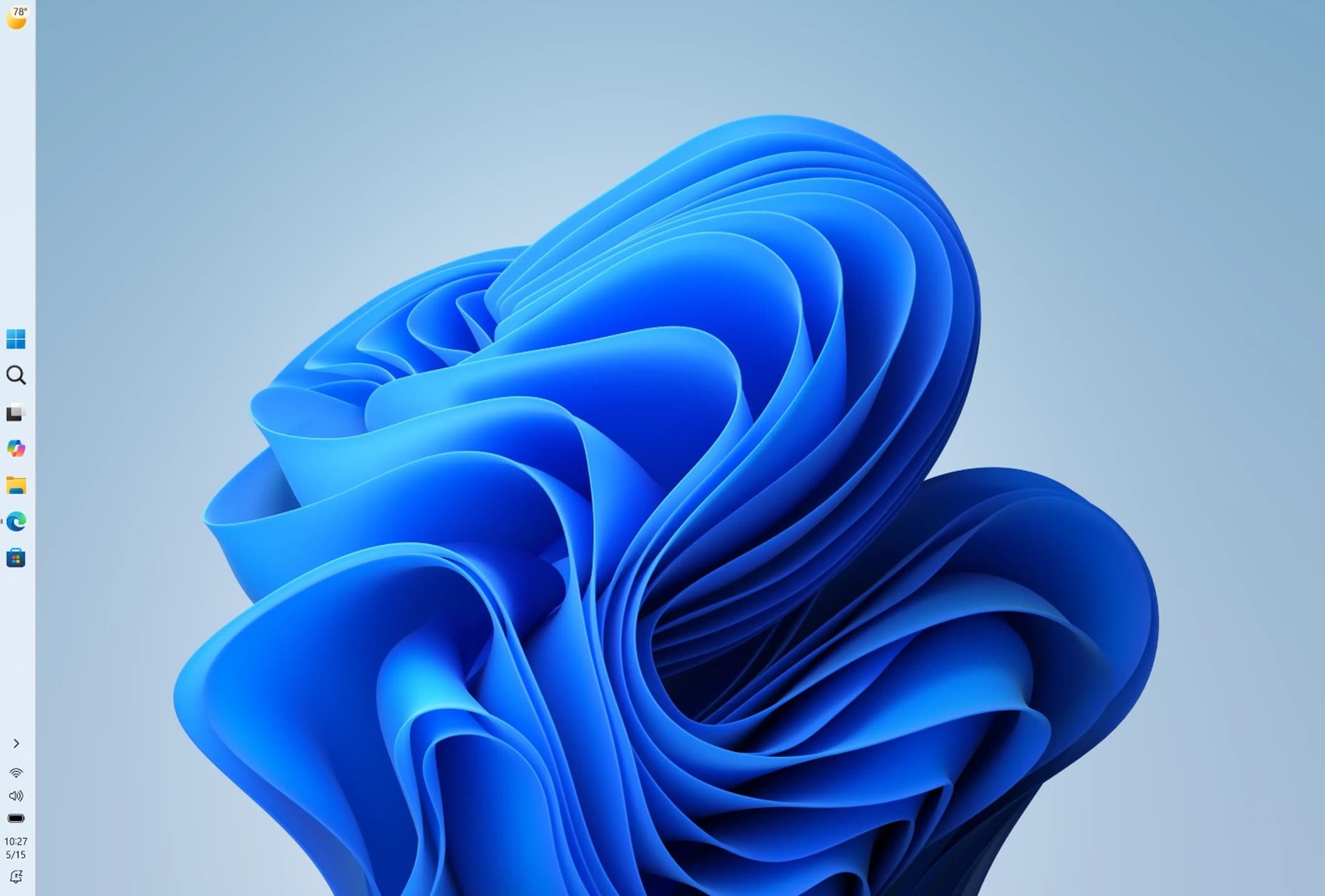
There are gaps, though. Auto-hide does not work yet when the taskbar sits on the left, right, or top. The tablet-optimized taskbar with larger, touch-friendly icons also is not supported in alternate positions. Touch gestures and the Search box are missing too. Microsoft says these features are coming but are not ready.
For multi-monitor users, Microsoft says it is "evaluating additional features like different taskbar positions per monitor." No timeline on that.
A smaller taskbar for smaller screens
Another change in testing: a compact taskbar mode. This shrinks the taskbar and all its icons, giving you more vertical screen space without hiding the bar entirely. It is aimed at laptops and smaller displays where every pixel counts.
Start menu gets granular controls
Microsoft is also tweaking the Start menu. Users can now set a specific size instead of letting Windows resize it based on display dimensions.
More importantly, each section of the Start menu can be toggled individually. The pinned apps section, the "recommended" section, and the "all apps" section are all separately controllable. If you hate the recommended section but want to keep jump lists and recent files in File Explorer, you can do that now.
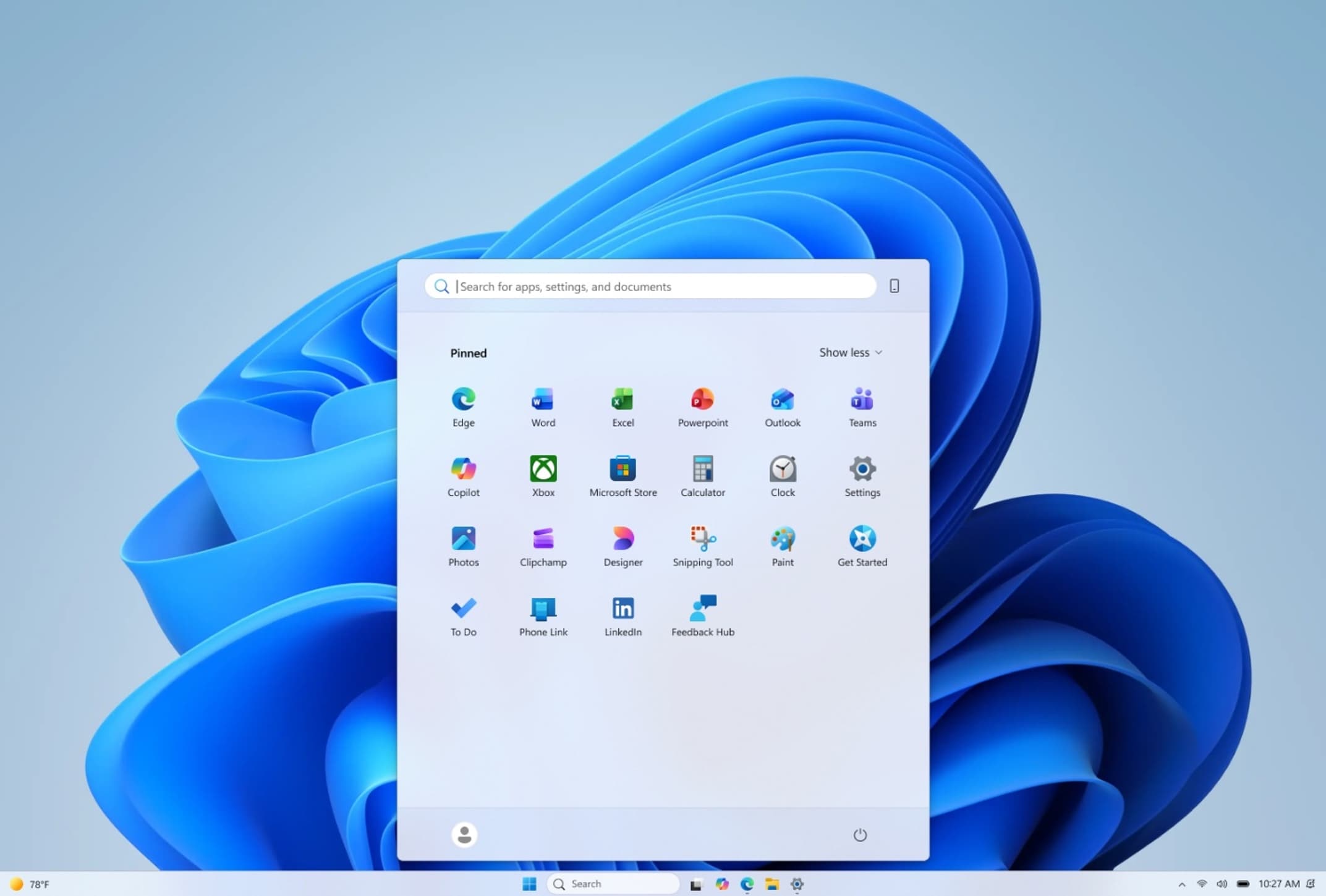
Users who keep the recommended section will see "improved file relevancy" that Microsoft says will better reflect what you have been working on. Whether that means fewer ads for Microsoft Store apps remains to be seen.
Why it took five years
Microsoft rebuilt the taskbar from scratch for Windows 11, prioritizing a centered layout and visual consistency over customization. The company addressed some complaints quickly, like adding taskbar ungrouping. Others, like taskbar positioning, languished.
The delay frustrated users who had workflows built around vertical taskbars, especially those with widescreen monitors where horizontal space matters more than vertical. Third-party tools like StartAllBack and ExplorerPatcher filled the gap, but they require ongoing maintenance and sometimes break with Windows updates.
Logicity's Take
When you can try it
These features are available now in the Windows Insider Preview. That means beta software with bugs. If you rely on your PC for work, wait for the stable release. Microsoft has not announced when these changes will reach the general public.
Frequently Asked Questions
Can I move the Windows 11 taskbar to the side now?
Yes, but only in the Windows Insider Preview build. The feature is not yet available in stable releases of Windows 11.
Does auto-hide work with the taskbar on the left or right?
Not yet. Microsoft says this feature is coming but is not ready in the current Insider build.
Can I disable the recommended section in the Start menu?
Yes. The new Insider build lets you toggle the pinned apps, recommended, and all apps sections individually.
When will these features come to the stable version of Windows 11?
Microsoft has not announced a release date. Features in Insider Preview typically take several months to reach stable builds.
Another look at how major tech companies ship incomplete features
Need Help Implementing This?
Source: Ars Technica
Huma Shazia
Senior AI & Tech Writer
Produced with AI assistance and reviewed by the Logicity editorial team. Learn more in our Editorial Policy.




