Key Takeaways
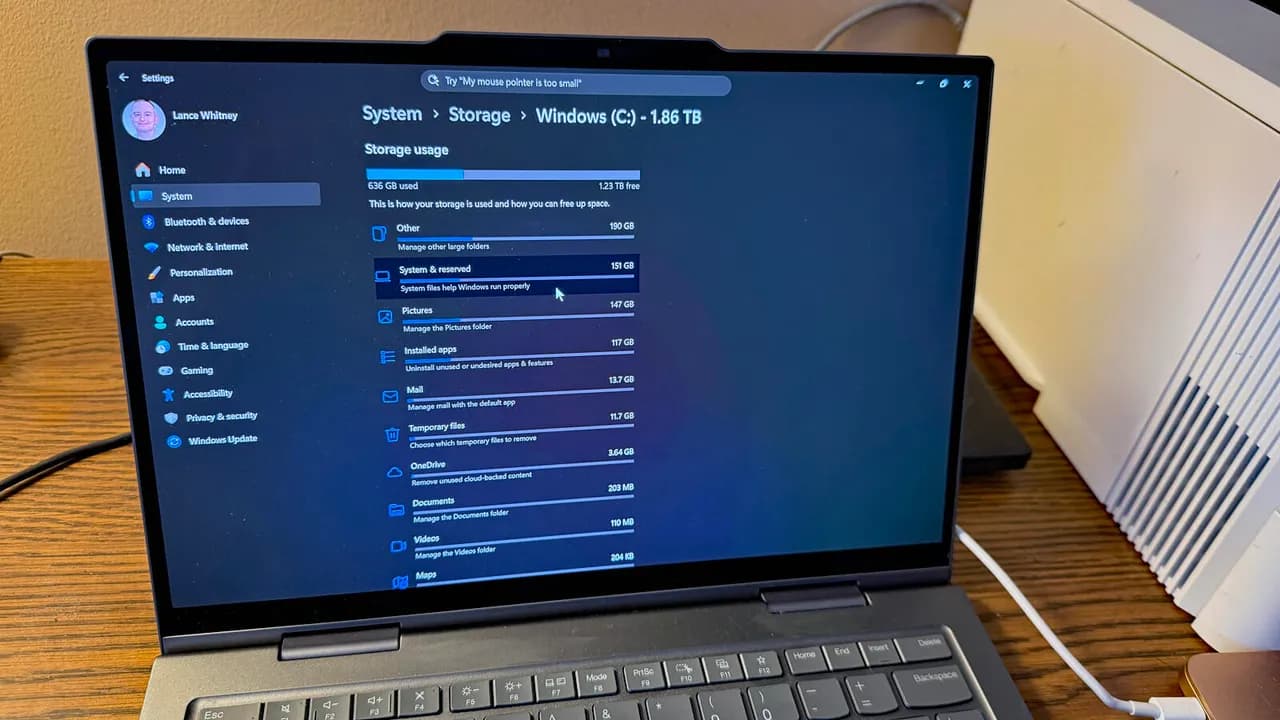
- A system file called CapabilityAccessManager.db-wal can balloon to 500GB due to a Windows 11 bug
- Check Settings > System > Storage > Show more categories to see if System & reserved exceeds 100GB
- Microsoft patched the bug in the June 23 preview update; the fix rolls out to all users on July 14
A bug in Windows 11 has been quietly consuming disk space on affected PCs, with one system file growing as large as 500GB. The culprit is CapabilityAccessManager.db-wal, a file that normally stays under a megabyte but can expand uncontrollably due to a flaw Microsoft only recently addressed.
The bug has existed for at least a year, according to Reddit posts, but Microsoft's fix arrived in the June 23 preview update. The patch will reach all Windows 11 users in the July 14 Patch Tuesday rollout.
What causes the Windows 11 storage bug?
The file in question belongs to the Capability Access Manager Service, which handles app permissions for the camera, microphone, location, and other privacy features. The db-wal extension indicates it's a write-ahead log, meaning it stores changes before they're committed to the main database.
Under normal operation, this file should never exceed a megabyte or two. The bug causes it to grow indefinitely instead of clearing old entries. One Reddit user reported their file reached 500GB before they caught it.
How to check if your PC is affected
The quickest check takes 30 seconds. Open Settings, select System, then click Storage. Under the storage bar, click "Show more categories." Look at the System & reserved category. If it shows 20 to 30GB, you're fine. If it exceeds 100GB, the bug has likely hit your system.
For a precise check, you can use the built-in Robocopy tool. Open a command prompt as administrator and run this command:
robocopy "C:\ProgramData\Microsoft\Windows\CapabilityAccessManager" "%TEMP%\CAMCheck" /L /B /R:0 /W:0 /BYTES /NPThe output will show the exact size of CapabilityAccessManager.db-wal. A healthy file runs around 57,000 bytes. Anything in the gigabyte range signals the bug is active.
Third-party tools like WizTree, TreeSize, or WinDirStat can also reveal the file size, though they require admin privileges to access the protected folder.
How to fix the 500GB storage bug
Microsoft's fix arrived in the June 23 optional preview update. The release notes state: "This update improves disk space usage for the CapabilityAccessManager.db-wal file."
To install it now, go to Settings > Windows Update. The 2026-06 Preview Update should appear as available. Click Download & Install.
Preview updates carry some risk. Microsoft designs them for IT admins and power users who want to test patches before general release. If your disk space isn't critical, waiting for the July 14 mandatory update is the safer path. The same fix will be included in that rollout.
Why did this bug persist for a year?
Reddit posts documenting the issue date back at least 12 months. The bug apparently flew under Microsoft's radar because it affects systems inconsistently. Some PCs never trigger it. Others accumulate hundreds of gigabytes before users notice.
The inconsistency likely stems from how frequently apps request permission checks. Systems with many apps accessing the camera, microphone, or location would generate more write-ahead log entries, accelerating the file's growth.
Logicity's Take
This bug highlights a persistent gap in Windows diagnostics: users have no native way to identify runaway system files. Storage Sense and Disk Cleanup don't flag protected system folders. IT teams managing fleets of Windows devices should add storage auditing to their endpoint monitoring. Tools like Microsoft Endpoint Manager can track disk space trends, but catching a specific file like this still requires manual checks or custom scripts. For organizations where 500GB of lost storage would matter, proactively deploying the June preview update beats waiting for July 14.
What happens after the fix?
The patch prevents future runaway growth, but it's unclear whether it automatically reclaims space already consumed. Users who installed the preview update report the file shrinking, though Microsoft hasn't confirmed whether the patch includes a cleanup routine or just stops new bloat.
If you've already patched and the file remains large, a system restart may trigger cleanup. Microsoft's documentation doesn't specify, so monitoring Storage settings after the update is the practical approach.
Frequently Asked Questions
Can the Windows 11 storage bug affect my data?
The bug consumes disk space but doesn't corrupt files. However, if your drive fills completely, Windows can become unstable and apps may fail to save data.
Does this bug affect Windows 10?
Reports so far focus on Windows 11. Microsoft's patch notes specifically reference Windows 11, suggesting Windows 10 either isn't affected or handles the file differently.
Can I delete CapabilityAccessManager.db-wal manually?
The file sits in a protected system folder. While technically possible to delete with admin privileges, doing so can break app permissions. Installing the official patch is the safer fix.
How do I free up space before the patch arrives?
Disk Cleanup won't touch this file. Your options are installing the June preview update or waiting for July 14. Moving large personal files to external storage can buy time.
More on Microsoft's recent Windows and software decisions
Need Help Implementing This?
Logicity helps tech teams stay ahead of platform issues and security updates. Subscribe to our newsletter for weekly briefings on what matters for your infrastructure.
Source: Latest news
Manaal Khan
Tech & Innovation Writer
Produced with AI assistance and reviewed by the Logicity editorial team. Learn more in our Editorial Policy.