
Key Takeaways

- Unpatched VS Code flaw allows GitHub token theft through a single malicious link
- Stolen tokens grant 100% read/write access to all victim's repositories
- Researcher published full exploit after negative experience with Microsoft's security response
What the Vulnerability Does
Security researcher Ammar Askar released exploit code on Tuesday for a Visual Studio Code zero-day that lets attackers steal GitHub authentication tokens. The attack requires just one click on a malicious link.
The flaw targets github.dev, the browser-based version of VS Code used to work directly on GitHub repositories. When users open github.dev, GitHub automatically sends an OAuth token to the editor. This token isn't scoped to any specific repository. It has full access to every repo the user can access, public and private.
“The token is not scoped to the particular repo you interacted with, meaning it has full access to every other repo that you have access to.”
— Ammar Askar, Security Researcher
Microsoft classifies a flaw as a zero-day when it's publicly disclosed or actively exploited before an official patch exists. This vulnerability has no patch and hasn't been assigned a CVE ID yet.
How the Exploit Works
The attack chains together 5 distinct steps to bypass VS Code's sandbox protections and extract the GitHub token. It exploits VS Code's sandboxed webview message-passing system.
Askar's proof-of-concept runs malicious JavaScript inside a webview. The code simulates keypresses in the main editor to install a malicious extension. That extension then extracts the GitHub OAuth token sent to github.dev and queries the GitHub API to list all private repositories the victim can access.
The stolen token grants 100% access. An attacker can read, modify, or delete code across all repositories the victim has permissions on. For developers with access to enterprise codebases, the exposure could be massive.

How to Protect Yourself
Since no patch exists, users need to take manual steps. Clear cookies and local site data for github.dev in your browser. Click the Settings icon in the URL bar, then go to Cookies and site data, then Manage on-device site data.
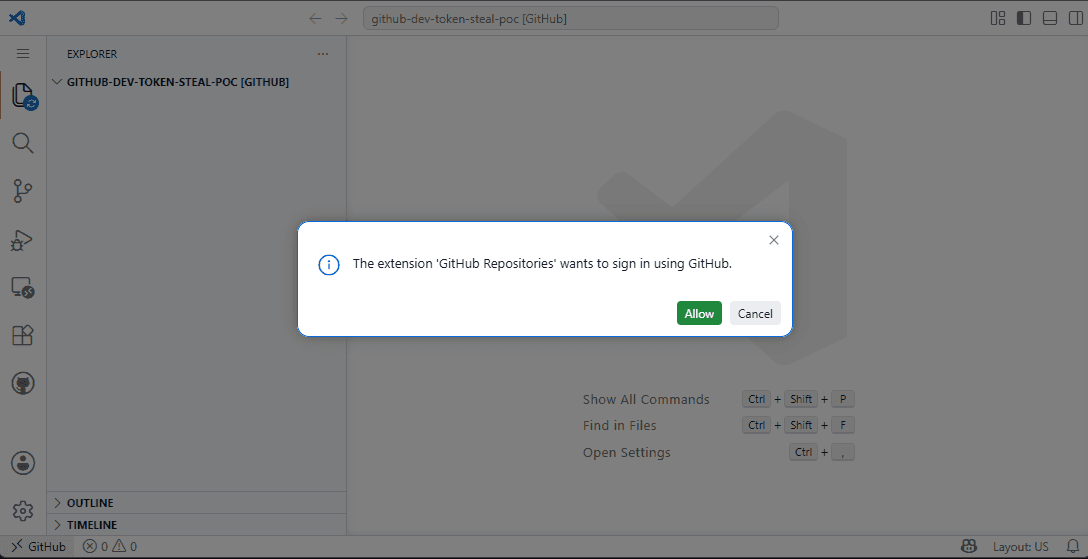
After clearing this data, you'll see a warning when clicking links that try to exploit this flaw. The dialog reads: "The extension 'GitHub Repositories' wants to sign in using GitHub." If you see this unexpectedly, don't approve it.
- Clear cookies and site data for github.dev in your browser settings
- Watch for unexpected extension sign-in requests
- Avoid clicking unfamiliar links that open github.dev
- Review which extensions have GitHub access in your VS Code installation
Why Askar Published Without Warning
Askar notified GitHub just one hour before disclosing the bug publicly. He chose immediate disclosure because of a bad prior experience with Microsoft's security response process.
“Microsoft's MSRC process has been a black hole for years. You report a critical bug, they fix it silently, and you get nothing—not even a CVE credit.”
— Ammar Askar, Security Researcher
In a previous case, Askar reported a VS Code bug that Microsoft fixed without crediting him or acknowledging any security impact. He said past github.dev reports were rejected as "out of scope" and redirected to MSRC, which he described as a "horrible experience."
"As I mentioned in that post, going forward I would be doing full public disclosure for any security bugs I found in VSCode," Askar wrote.
Community Reaction
Discussion on Hacker News and Reddit has split into two camps. Some focus on the architectural problem: github.dev uses a broad "god-token" that grants access to everything, not just the repository being edited. Others debate the ethics of publishing a working exploit without giving Microsoft the standard 90-day disclosure window.
Many developers are advising colleagues to clear github.dev site data immediately, regardless of where they stand on the disclosure debate.
Logicity's Take
What Happens Next
Microsoft hasn't announced a timeline for a patch. The vulnerability remains exploitable for anyone who hasn't cleared their github.dev session data. Organizations that rely on GitHub for sensitive code should alert their developers now.
The broader question is whether GitHub will redesign how github.dev handles OAuth tokens. Scoping tokens to specific repositories, rather than granting blanket access, would limit the damage from this class of attack.
Another story on developer tooling and unexpected security/cost risks in modern dev workflows.
Frequently Asked Questions
What is the VS Code zero-day vulnerability?
It's an unpatched flaw that lets attackers steal GitHub OAuth tokens by tricking users into clicking a malicious link. The attack exploits VS Code's webview message-passing system in github.dev.
How do I protect myself from the VS Code GitHub token exploit?
Clear cookies and site data for github.dev in your browser settings. This will make the sign-in warning appear when something tries to access your GitHub account through VS Code.
Why did the researcher publish the exploit without waiting for a patch?
Ammar Askar cited negative past experiences with Microsoft's security response process, including having a previous bug fixed without credit or acknowledgment of its security impact.
What access does the stolen GitHub token provide?
The token grants full read and write access to all public and private repositories the victim can access, not just the repository they were working on.
Has Microsoft released a patch for this VS Code vulnerability?
No. As of June 3, 2026, there is no patch available and the vulnerability has not been assigned a CVE ID.
Need Help Implementing This?
Source: BleepingComputer
Manaal Khan
Tech & Innovation Writer
Produced with AI assistance and reviewed by the Logicity editorial team. Learn more in our Editorial Policy.