Key Takeaways
- Your Algo replaces public Dear Algo requests with private feed customization for 1, 3, or 7 days
- Communities exits beta with dedicated hub, custom icons, and native-language tags in Japan, Korea, and Taiwan
- Live Chats expanding to all communities by July to support real-time event engagement
Threads crossed 500 million monthly active users this week, and Meta is celebrating with three feature updates: private algorithm controls, a full Communities rollout, and expanded Live Chats. The changes target two persistent complaints from power users. Feed customization required embarrassing public posts, and the Communities beta felt half-baked. Both problems get direct fixes.
Adam Mosseri, who leads Instagram and oversees Threads, announced the milestone on Tuesday. The user count positions Threads firmly as the primary X alternative, though the platform still trails X's claimed 600 million users.
What does Your Algo actually change?
The original Dear Algo system forced users to post publicly whenever they wanted to tweak their feed. You would write something like "Dear Algo, show me more NBA and tech content," and the algorithm would adjust. It worked. It was also performative and awkward, particularly for users who preferred not to broadcast their interests to followers.
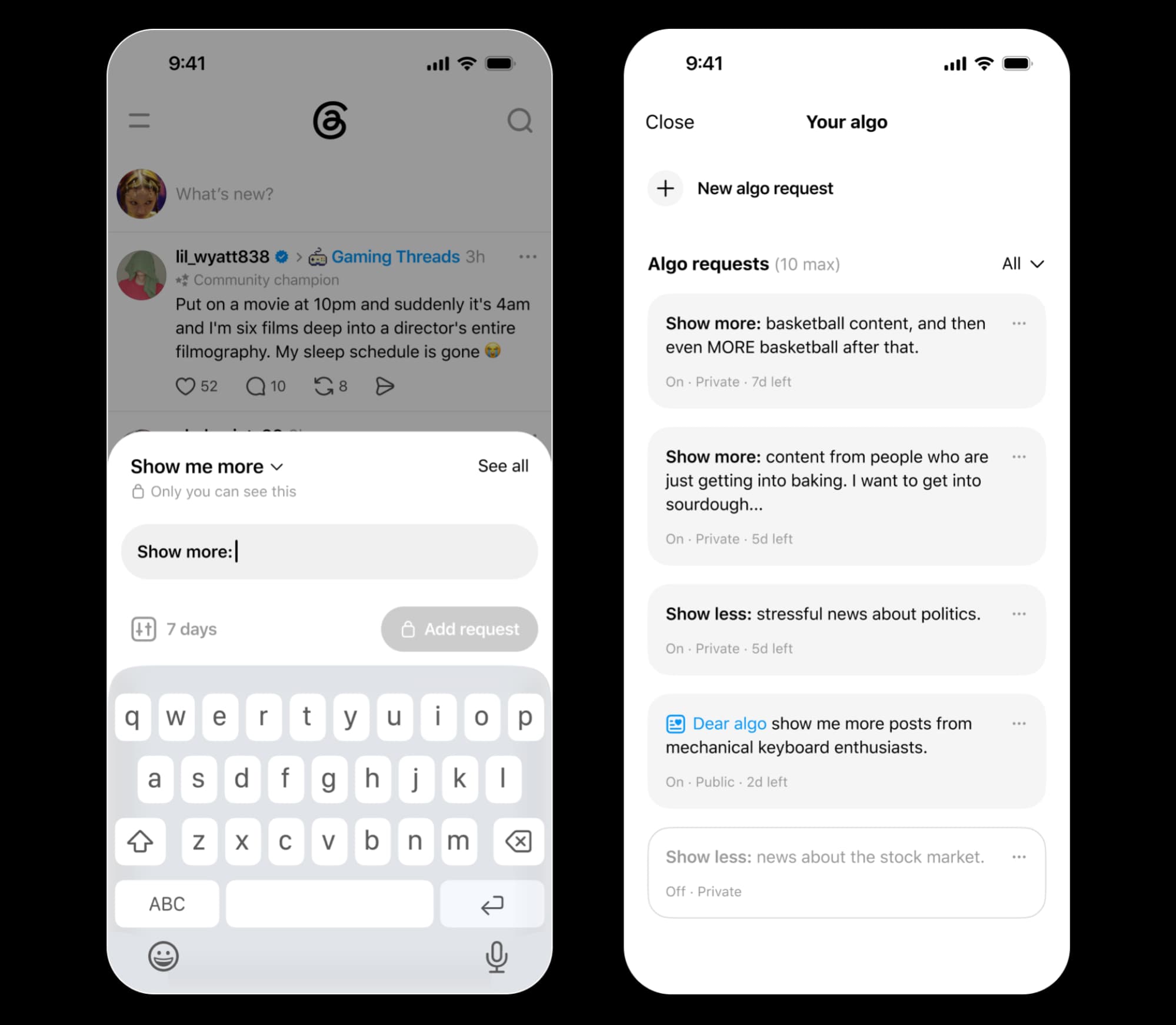
Your Algo moves this into a private hub in the sidebar. You can still post publicly if you want, but the default is now a settings page where you define what you want more or less of. The catch: adjustments are temporary. You pick a duration of one, three, or seven days. There is no permanent option.
The temporary duration is an odd choice. It suggests Meta wants users to return frequently to refresh their preferences, likely to gather more signal data. For users hoping to permanently suppress certain content types, this is a half-measure.
Your Algo is rolling out today in the U.S., Canada, UK, Australia, and New Zealand. Other markets will follow, though Meta has not specified when.
Communities gets a proper launch
Meta launched Communities in beta last year as an evolution of tags and topics. The idea: let users organize around specific subjects the way they might in a subreddit or Discord server. The beta started with 200 predefined topics. That limitation is now gone.
Communities can now form around any topic globally. Each gets its own space within Threads, complete with flairs, tags, and custom icons. Meta is also introducing "champions," users who engage frequently with a specific community and presumably get some form of elevated status or visibility.
A new Communities Hub appears in the left sidebar, letting you view and switch between groups you have joined. Native-language tags are launching in Japan, Korea, and Taiwan, which should make Communities more useful outside English-speaking markets.
The rollout is gradual. Meta says it will take time to reach all users globally, but the beta restrictions are officially lifted.
Live Chats target real-time events
Live Chats are Meta's attempt to capture second-screen conversations during major events. Think sports matches, award shows, or product launches. The feature lets communities tag events, comment in real time, and follow along with a Live indicator.
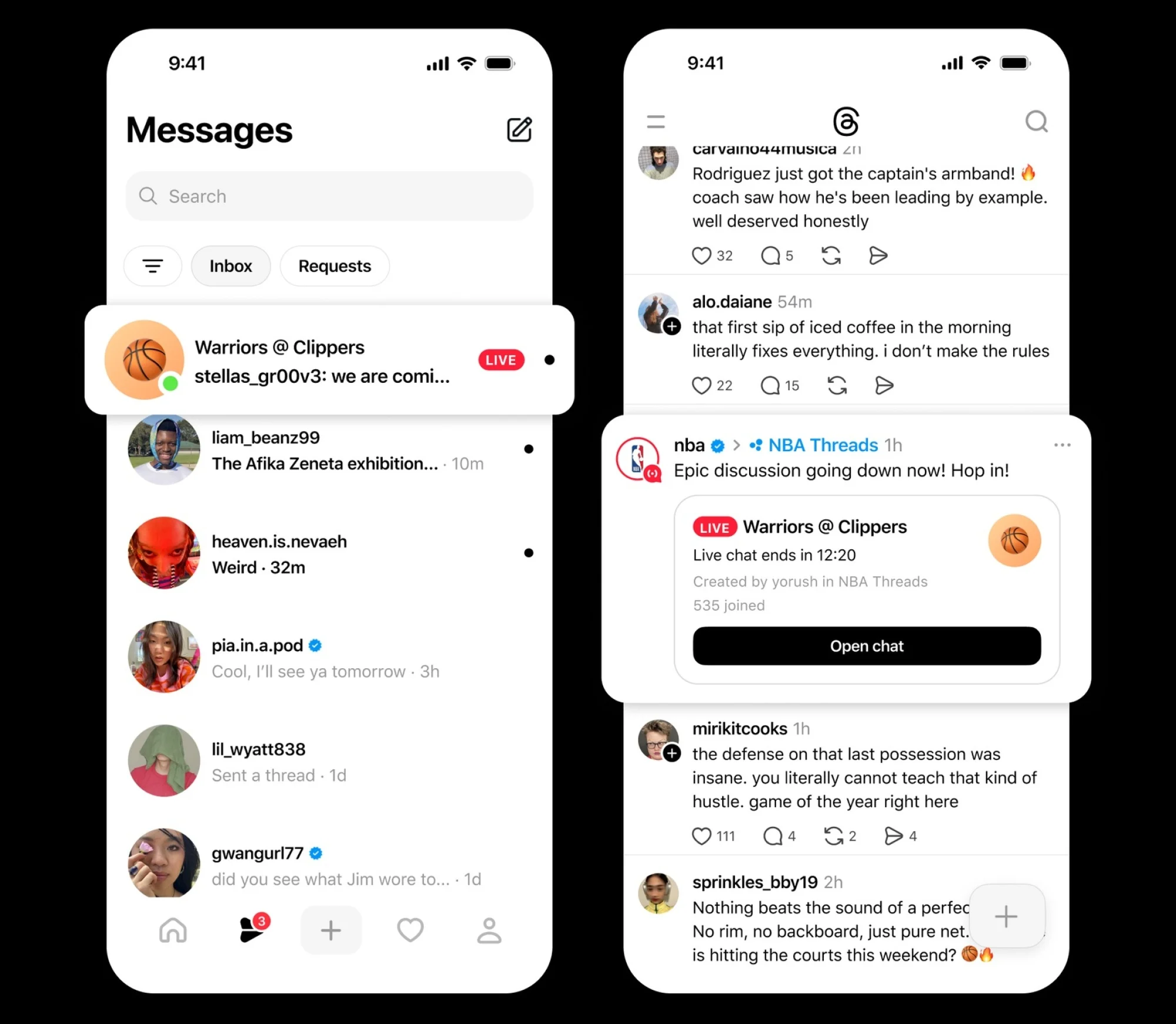
With the FIFA World Cup underway, Meta is pushing this feature hard. The plan is to expand Live Chats to all communities by July. For now, access remains limited to specific communities.
This is a direct play against X, which has long dominated real-time event conversation. Whether Threads can pull users away during live moments depends on whether their followers and communities have already migrated.
Why temporary algorithm controls?
The seven-day maximum for Your Algo adjustments is the most puzzling decision here. Reddit and Hacker News discussions show users are pleased with the privacy shift but skeptical about the temporary nature. Some speculate Meta wants to avoid users locking in preferences that reduce engagement with viral content.
There is also the bot problem. Threads has not provided a toggle to filter out bot accounts entirely. Your Algo lets you suppress specific content types, but sophisticated bot networks adapt their content to match trending topics. A user who asks for more tech content may still see bot-driven posts about tech.
Meta's official video walkthrough shows the feature in action, but does not address whether Your Algo actually helps with bot suppression or just content preference.
What 500 million users means for Threads
The milestone matters less as a vanity metric and more as a signal of platform viability. Advertisers care about scale. Developers building third-party tools care about whether the platform will exist in two years. Reaching half a billion monthly actives in roughly two years from launch suggests Threads has staying power.
For comparison, X claims around 600 million monthly users, though that figure is unaudited since the company went private. Threads is closing the gap faster than most analysts expected.
Frequently Asked Questions
How do I access Your Algo on Threads?
Your Algo appears in the left sidebar of the Threads app. You can set content preferences privately for one, three, or seven days at a time.
Can I permanently customize my Threads feed?
Not yet. Your Algo only supports temporary adjustments lasting up to seven days. You must renew your preferences after they expire.
When will Threads Communities be available globally?
The feature is exiting beta now with a gradual rollout. Native-language tags are launching first in Japan, Korea, and Taiwan.
Does Your Algo block bots on Threads?
No. There is no toggle to disable bots. Your Algo lets you suppress content types, but does not specifically filter bot accounts.
When do Live Chats launch for all communities?
Meta plans to expand Live Chats to all Threads communities by July 2026.
If you're thinking about platform privacy, this explains how tracking works beyond what any app setting can control.
Logicity's Take
The Your Algo temporary limit reveals Meta's tension between user control and engagement optimization. Permanent feed customization could let users opt out of viral content loops that drive time-on-platform metrics. By forcing resets every seven days, Meta ensures users either re-engage with the settings regularly or drift back to the default algorithm. It is a concession to user demands, not a surrender.
Need Help Implementing This?
Building community engagement strategies for your brand on Threads? Our team tracks platform changes daily. Reach out to discuss how the Communities feature could work for your audience.
Source: Lifehacker
Manaal Khan
Tech & Innovation Writer
Produced with AI assistance and reviewed by the Logicity editorial team. Learn more in our Editorial Policy.






