Key Takeaways
- Spotify's new Track Reactions feature lets contributors respond to playlist additions with six preset emojis
- Reactions are enabled by default only for playlists with fewer than 10 editors
- Only playlist owners and contributors can see reactions; outsiders cannot
Spotify has rolled out emoji reactions for collaborative playlists, letting contributors respond to each other's song additions with one of six preset emojis. The feature, called Track Reactions, sends notifications through Spotify Messages when someone reacts to a track you added.
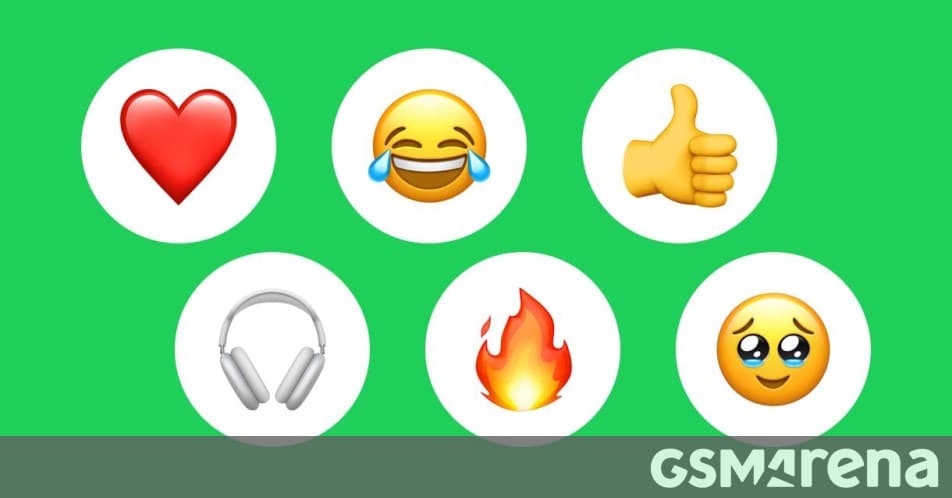
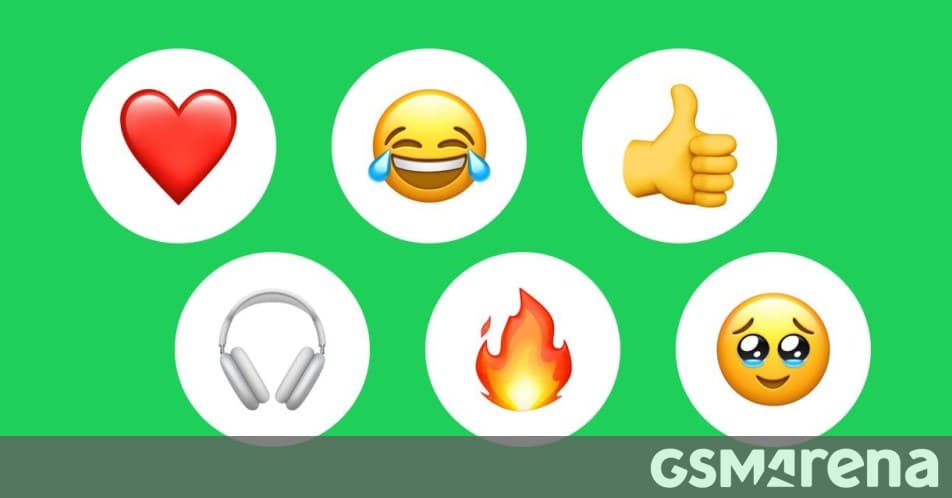
The available reactions are ❤️, 😂, 👍, 🎧, 🔥, and 🥹. It's a small set, but Spotify clearly chose emojis that cover the basics: approval, love, laughter, and that specific feeling when a song hits just right.
How do emoji reactions work in Spotify collaborative playlists?
When someone adds a song to a shared playlist, other contributors can tap to react. The person who added the track gets a notification. Simple enough. But there's a privacy angle worth noting: reactions are visible only to the playlist owner and contributors. If you share a playlist link with someone who isn't a collaborator, they won't see the emoji activity.
For playlists with fewer than 10 editors, reactions are on by default. Larger group playlists require the owner to manually enable the feature. This threshold makes sense. A small friend group sharing music is one thing; a 50-person playlist could generate notification noise that annoys more than it engages.
If you own a collaborative playlist and don't want reactions, you can turn them off entirely. Spotify gave playlist owners the kill switch, which should help if the feature becomes more distracting than useful.
Why is Spotify betting on social features?
Track Reactions is part of a broader push to make Spotify stickier through social interaction. The company has added playlist imports from competing services, AI-generated playlists, custom song transitions, and a Fitness hub in recent months. Each feature is designed to make Spotify harder to leave.
“We're always looking for new ways to make the Spotify experience more social and interactive for our listeners. Track Reactions are a fun, lightweight way to bring collaborators closer together through shared music taste.”
— Spotify Product Team
The logic is straightforward. If your friends are on Spotify and you've built shared playlists together, switching to Apple Music or YouTube Music means losing that social layer. Every reaction, every shared playlist, every inside joke about a terrible song addition becomes a switching cost.
What users are saying about the feature
Early feedback is mostly positive. Reddit users report that reactions make collaborative playlists feel more personal, though some want custom emoji options beyond the preset six. On Hacker News, the discussion centers on notification fatigue. The concern is fair: if you contribute to multiple active playlists, reaction notifications could pile up quickly.
The toggle option for playlist owners addresses part of this concern. But there's no apparent way for individual contributors to mute notifications for playlists they don't own. That could become a friction point for heavy users.
Who can use Spotify's Track Reactions?
The feature requires users to be at least 16 years old. This is consistent with Spotify's approach to social features, likely tied to messaging and notification functionality that has age-gating in various jurisdictions.
As for availability, the feature appears to be rolling out globally, though Spotify hasn't specified whether free-tier users have access or if it's limited to Premium subscribers. Given that collaborative playlists themselves work on free accounts, reactions likely do too.
Logicity's Take
Spotify's emoji reactions solve a real, if minor, problem: the silence after adding a song to a shared playlist. You add a track, and then... nothing. No feedback, no acknowledgment. Reactions fill that gap without requiring anyone to type a message. The bigger play here is retention. Spotify is layering social mechanics onto a utility product, betting that emotional engagement with friends will matter more than marginal audio quality differences or catalog gaps. It's the right bet, but the execution will determine whether reactions become a sticky habit or an ignored notification.
Frequently Asked Questions
How do I enable emoji reactions on my Spotify collaborative playlist?
For playlists with fewer than 10 editors, reactions are enabled by default. For larger playlists, the owner must manually enable them in playlist settings.
Can people outside the playlist see my emoji reactions?
No. Only the playlist owner and contributors can see reactions. Anyone viewing the playlist without contributor access won't see emoji activity.
How many emoji options are available for Spotify playlist reactions?
Six emojis are available: ❤️, 😂, 👍, 🎧, 🔥, and 🥹. Custom emojis are not currently supported.
Can I turn off emoji reactions on my Spotify playlist?
Yes. Playlist owners can disable reactions entirely through their playlist settings.
Apple is also betting on social and AI features in its audio products
Need Help Implementing This?
If you're building social features into your own product and want to understand how platforms like Spotify approach engagement mechanics, Logicity covers product strategy and implementation patterns. Subscribe to our newsletter for analysis on how major tech companies ship social features.
Source: GSMArena.com / Peter
Manaal Khan
Tech & Innovation Writer
Produced with AI assistance and reviewed by the Logicity editorial team. Learn more in our Editorial Policy.