Key Takeaways
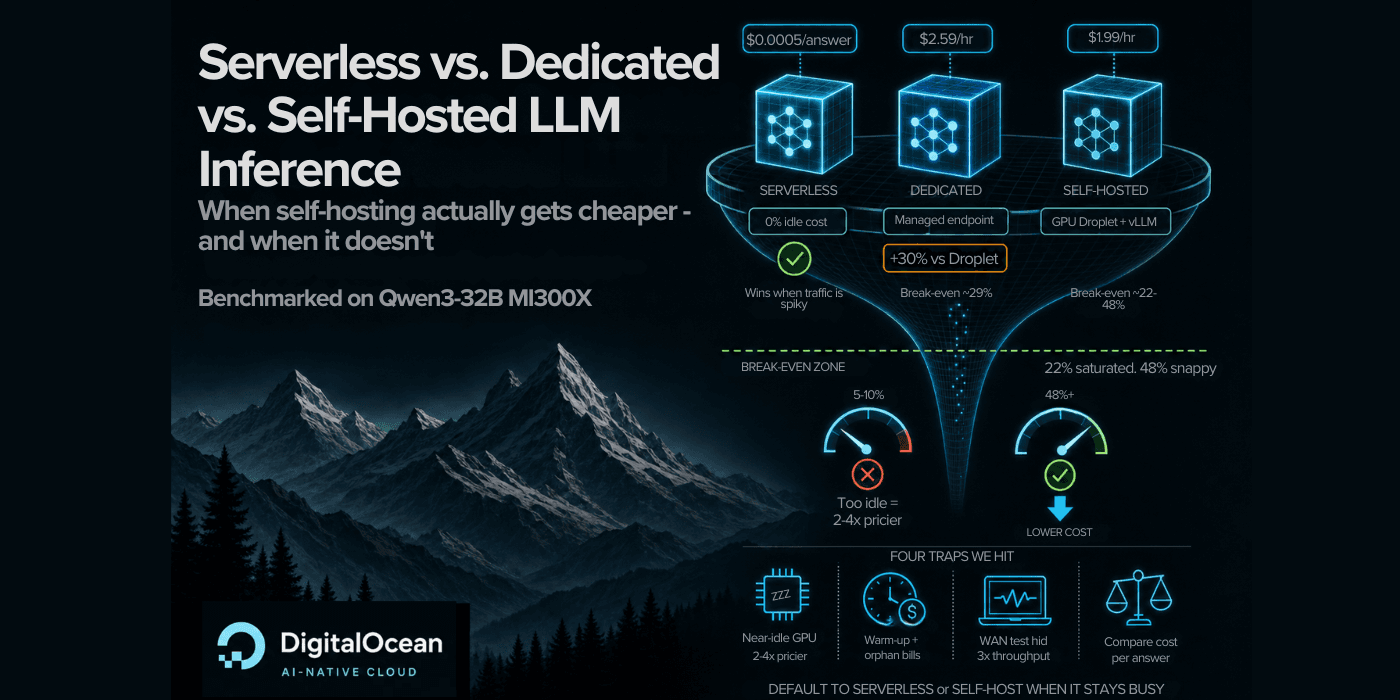
- Self-hosted GPU Droplets beat serverless pricing only when GPU utilization exceeds 22%
- Serverless inference delivers 25x slower time-to-first-token than self-hosted, but matches throughput at 32+ concurrent requests
- Dedicated inference costs 30% more than a raw GPU Droplet, pushing its breakeven to 29% duty cycle
The startup playbook says start with APIs, then self-host when you want to cut costs. DigitalOcean actually tested this advice. Running Qwen3-32B across three deployment options, same model, same prompts, real bills, they found the crossover point: self-hosted LLM inference beats serverless once your GPU stays at least 22% busy. Below that line, serverless costs two to four times less and requires zero ops work.
Disclosure
Some links in this post are affiliate links — Logicity earns a commission if you sign up, at no extra cost to you. We only link products we have used or actively recommend.
Most early-stage traffic is spiky. Five to ten percent GPU utilization is typical for startups experimenting with inference. At those levels, paying per token makes more sense than renting hardware that sits idle. The question was never serverless versus self-host. It was: how steadily busy will your GPU actually be?
What did the experiment actually measure?
The test compared three DigitalOcean products: Serverless Inference (pay per token, provider manages everything), Dedicated Inference (rent a whole GPU kept warm as a managed endpoint), and a GPU Droplet running a self-hosted model server. The model was Qwen3-32B. Two workload shapes simulated real use: a chat pattern (1,000 tokens in, 500 out) and a RAG pattern (2,000 in, 200 out).
Latency was measured over public internet from a single client. Throughput was measured on the box itself to remove network caps. One caveat: the self-hosted arm ran full bf16 precision on a 192GB MI300X, while the managed services likely serve FP8. That difference cuts against self-hosting in this comparison, a matched FP8 setup would probably be cheaper still.
How fast can you get each option running?
Serverless Inference serves requests within seconds. No setup, no provisioning. Dedicated Inference takes about 25 minutes to spin up a GPU. A GPU Droplet takes four minutes to provision, though you still need to install and configure your model server.
For prototyping or unpredictable traffic, serverless wins on convenience. For steady workloads where you need isolation, dedicated makes sense. For teams comfortable with ops, self-hosted gives the most control.
Where does latency actually differ?
A self-hosted GPU is 25 times faster to first token than serverless, until concurrency climbs past 32 requests. At that point, the advantage shrinks. The managed services optimize for throughput at scale. Self-hosting optimizes for single-request speed.
At the highest concurrency tiers, tail latencies reached around 40 seconds in some runs. The DigitalOcean team notes these figures come from single runs, not averages. Treat them as directional, not bankable.
Where is the cost crossover?
Self-hosting on a GPU Droplet beats Serverless Inference once the GPU runs at least 22% busy. Below that threshold, you pay for idle capacity. The math is straightforward: if your requests only keep the GPU working one-fifth of the time, you burn four-fifths of your spend on nothing.
Dedicated Inference costs 30% more than a raw GPU Droplet for the same hardware. That premium pushes the breakeven to 29% duty cycle. You get managed ops and isolation. You pay for that convenience.
| Deployment | Breakeven Utilization | Setup Time | Ops Burden |
|---|---|---|---|
| Serverless Inference | Always cheaper below 22% | Seconds | None |
| Dedicated Inference | 29% duty cycle | 25 minutes | Low |
| GPU Droplet (self-hosted) | 22% duty cycle | 4 minutes + config | Full |
When should a startup move off serverless?
The experiment suggests a clear decision tree. Default to Serverless Inference while traffic is unpredictable or low volume. Switch to Dedicated Inference when you need control or isolation but still want managed ops. Move to self-hosted when you have steady baseload that keeps the GPU genuinely occupied.
The trap is switching too early. A GPU sitting 90% idle costs more than paying per token. The savings only materialize when your workload actually fills the capacity you rent.
Four traps from running this experiment
- Precision mismatch: bf16 self-hosted versus probable FP8 managed makes apples-to-apples cost comparison imperfect.
- Single-run tail latencies: the 40-second figures at peak concurrency need more measurement runs to trust.
- Network bottlenecks: throughput measured on-box, latency measured over public internet, mixing these metrics requires care.
- Pricing changes: all numbers reflect rates at experiment time. DigitalOcean updates pricing, so check current rates before buying.
What about other cloud providers?
DigitalOcean ran this test on their own infrastructure, so the exact breakeven points apply there. Other providers like Cloudways, AWS, or GCP have different pricing structures and GPU availability. The principle holds: self-hosting beats per-token pricing only when utilization is high enough. The exact percentage shifts with pricing.
For teams using Vercel or Cloudflare for edge workloads, serverless inference from those providers follows similar economics. Low utilization favors pay-per-use. High, steady utilization favors dedicated capacity.
Logicity's Take
The 22% breakeven figure is lower than many teams assume, but hitting it consistently is harder than it looks. Most early products have traffic that clusters in bursts: a demo, a batch job, a marketing spike. Sustained 22% utilization means your application generates inference requests steadily throughout the day. For internal tools, that might mean dozens of employees using AI features during work hours. For consumer products, it means enough DAUs to smooth out peaks. If you're not tracking GPU utilization today, you're guessing. DigitalOcean, AWS CloudWatch, and open-source tools like DCGM all expose this metric. Measure before you migrate.
Frequently Asked Questions
At what GPU utilization does self-hosted LLM inference become cheaper?
Based on DigitalOcean's experiment with Qwen3-32B, self-hosting beats serverless pricing at 22% GPU utilization. Below that, serverless costs less because you avoid paying for idle capacity.
How much slower is serverless inference compared to self-hosted?
Serverless showed 25x slower time-to-first-token than self-hosted in low-concurrency scenarios. At 32+ concurrent requests, the gap narrows significantly.
Why does dedicated inference cost more than a raw GPU Droplet?
Dedicated inference includes managed ops, isolation, and a warm endpoint. That convenience adds a 30% premium over a raw GPU Droplet, pushing the breakeven utilization to 29%.
Should startups start with serverless LLM inference?
Yes, for most early-stage products. Serverless requires zero ops and costs less when traffic is spiky or low. Migrate to dedicated or self-hosted only when utilization consistently exceeds the breakeven threshold.
Another infrastructure decision with real numbers: when AI-assisted tooling changes the build-vs-buy calculus.
Need Help Implementing This?
Logicity works with engineering teams evaluating inference infrastructure. If you're trying to calculate your own breakeven or benchmark providers, reach out at hello@logicity.in.
Huma Shazia
Senior AI & Tech Writer
Produced with AI assistance and reviewed by the Logicity editorial team. Learn more in our Editorial Policy.