Windows still defaults to Edge after major upgrades, even if you previously set Chrome or Firefox as your browser. The fix takes under two minutes in both Windows 10 and Windows 11, though Microsoft buries the setting in different places depending on your OS version.

This guide covers the exact steps for Windows 10 22H2 and Windows 11 25H2, the current production builds. If you run an older version, the screens may differ slightly.
Why Edge keeps coming back
How To Change Microsoft Edge To Google Chrome Windows 11 (Easy Guide)
Every major Windows feature update prompts you to "try Edge." Click through too quickly, and you've switched. IT admins see this after each patch cycle: help desk tickets spike because links suddenly open in the wrong browser.
The original Edge deserved its reputation. It was slow, lacked extensions, and felt half-finished. But Microsoft rebuilt the browser on Chromium in January 2020, the same engine Chrome uses. That version ships with Windows 11 exclusively, and it runs Chrome extensions without modification.
In internal testing, Edge often uses less RAM than Chrome and loads pages faster. It also integrates Copilot directly, which matters for organizations standardizing on Microsoft's AI stack. Still, many enterprises standardize on Chrome for policy management, or Firefox for its privacy controls and cryptocurrency-mining detection.
Change the default browser in Windows 10
- Click Start, then the Settings gear icon on the left. Alternatively, type "settings" in the search box and press Enter.
- In the Settings app, select Apps > Default apps.
- Scroll down to the Web browser section. You'll see Microsoft Edge listed.
- Click the Edge icon. A pop-up displays every browser installed on the machine.
- Select Chrome, Firefox, or another browser. The change applies immediately — no restart required.
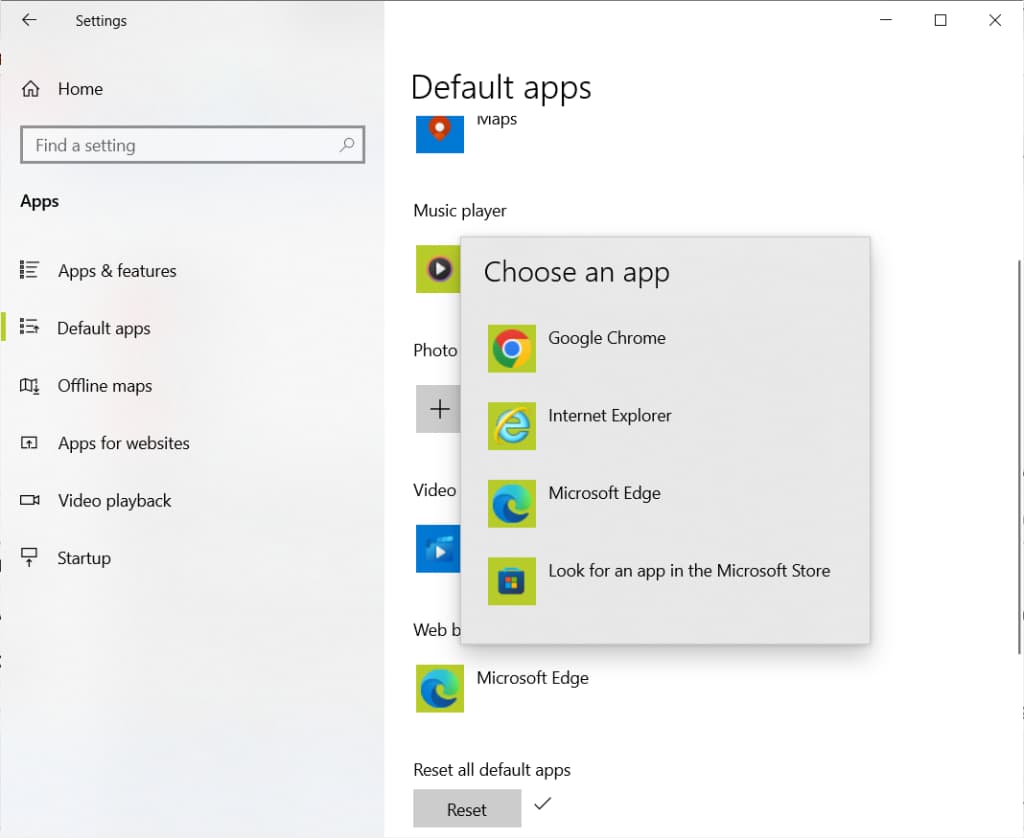
The pop-up includes a "Look for an app in the Microsoft Store" link, but don't expect much. Microsoft Store browsers are Windows Store apps, not full desktop applications. They lack the extension support and performance of Chrome or Firefox installed from their official sites.
Change the default browser in Windows 11
Windows 11 restructured the Default Apps screen. Instead of a single toggle, you assign browsers by file type and protocol. Microsoft simplified this after widespread criticism, but the layout still differs from Windows 10.
- Open Settings by clicking the Start button and then the Settings icon.
- Navigate to Apps > Default apps.
- Scroll to your preferred browser (e.g., Google Chrome) and click it.
- Click the Set default button at the top of the screen. Windows 11 assigns Chrome to all major web protocols and file types at once.
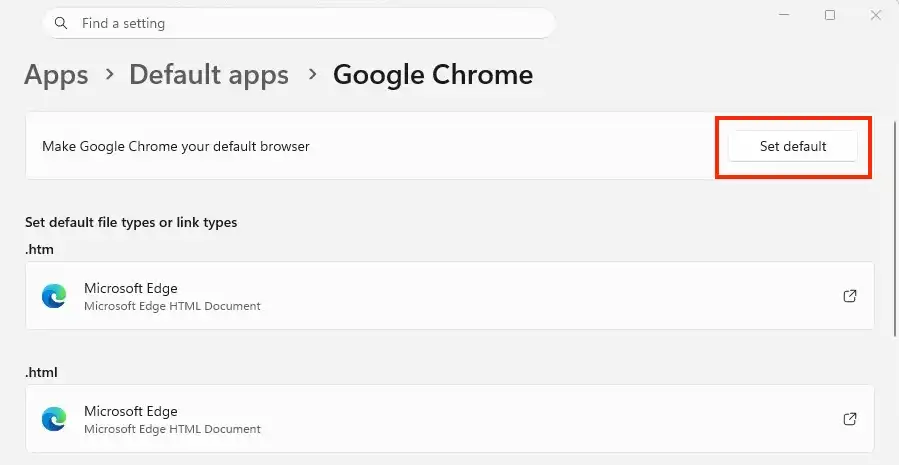
Before Microsoft added the "Set default" button, users had to change each file type individually: .htm, .html, HTTP, HTTPS, and so on. The button now handles all of them in one click.
Edge still opens PDFs and other file types
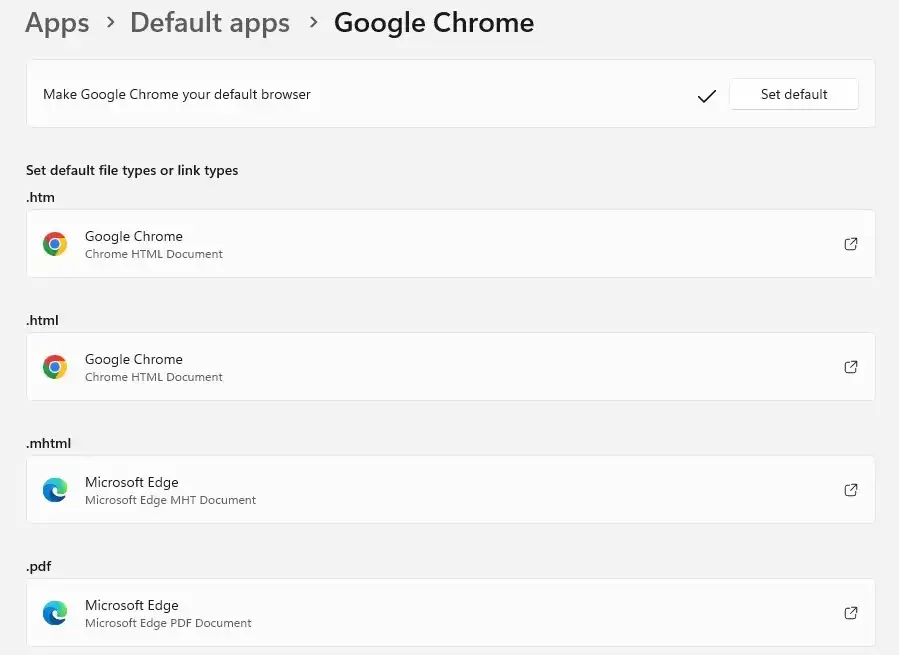
Changing the default browser doesn't change every file association. PDFs, for example, often remain mapped to Edge. Windows 10 and 11 both require manual adjustments if you want Chrome or Firefox to handle them.
In Windows 10, return to Settings > Apps > Default apps and scroll down to "Choose default apps by file type." Find .pdf in the alphabetical list and click the current default (usually Edge). Select your preferred browser or PDF reader.
In Windows 11, the same applies. Even after clicking "Set default" on Chrome, check the list of file types below. If .pdf still shows Edge, click it and choose another application.
Logicity's Take
For IT teams managing fleets, Group Policy or Intune makes more sense than relying on users to toggle settings. Chrome Enterprise and Firefox ESR both offer centralized policy templates. Edge has equivalent controls through Microsoft 365, which simplifies deployment for shops already paying for E3 or E5 licenses. The real question isn't which browser is better; it's which one your MDM already supports.
Should enterprises stick with Edge?
Edge's Chromium rebuild removed most technical objections. It renders pages the same way Chrome does, runs the same extensions, and syncs across devices via Microsoft accounts. For organizations deep in Microsoft 365, the Copilot integration and Entra ID single sign-on reduce friction.
Chrome remains the safer choice for web app compatibility testing, given its market share. Firefox appeals to privacy-conscious teams and offers built-in protection against cryptojacking scripts. The decision depends on what your IT stack already supports and what your compliance requirements demand.
Whichever browser you choose, document the policy centrally. Users will forget how to change it themselves, and the next feature update will prompt them to switch back to Edge.
Related context on enterprise IT planning constraints affecting deployment decisions
Frequently Asked Questions
Does changing the default browser affect all users on the PC?
No. Default app settings apply per user account. Each user must change their own default, or an admin must deploy the setting via Group Policy or Intune.
Will Windows updates reset my default browser?
Major feature updates often prompt users to switch to Edge. If you click through quickly, you may inadvertently accept. Smaller cumulative updates typically do not change browser settings.
Can I block Edge from opening certain links?
Windows forces Edge for some Microsoft services like Widgets and certain Start Menu links. Third-party tools exist to redirect these, but Microsoft does not officially support that behavior.
Why won't my PDF files open in Chrome after I changed defaults?
Changing the default browser only affects web protocols. PDFs are a separate file type association. You need to change the .pdf default manually in Settings > Apps > Default apps.
Need Help Implementing This?
Managing browser defaults across hundreds of endpoints? We can connect you with Microsoft 365 and endpoint management consultants who handle Group Policy and Intune deployments. Contact us at hello@logicity.in.
Source: Computerworld
Huma Shazia
Senior AI & Tech Writer
Produced with AI assistance and reviewed by the Logicity editorial team. Learn more in our Editorial Policy.