Key Takeaways
- Action Pan captures two photos simultaneously: one with motion blur effect and one original, so there's no risk
- The feature works best when you pan your camera to follow a moving subject for at least one second before pressing shutter
- Available on Pixel 6 and newer devices, Action Pan democratizes a technique that traditionally required expensive gear and skill
Pixel's Action Pan feature does something your mirrorless camera can't do automatically: it adds professional-looking motion blur to backgrounds while keeping moving subjects sharp. The feature, exclusive to Pixel phones, uses Google's Tensor chip to simulate a panning technique that sports photographers spend years mastering. One tech journalist tried it once and now reaches for it constantly.
Brady Snyder, writing for MakeUseOf, admits he usually ignores gimmicky camera modes. He sticks to default settings and prioritizes accurate colors over flashy effects. But Action Pan changed his approach. "With it, I can take more exciting photos than I'd ever get from my professional mirrorless camera or rugged action cameras," he writes.
How does Pixel Action Pan actually work?
The feature addresses a fundamental smartphone limitation: shutter lag. There's always a delay between tapping the screen and the camera capturing the image. Fast-moving subjects often end up blurry or distorted. Action Pan doesn't fix this by speeding up the shutter. Instead, it leans into the blur and makes it intentional.
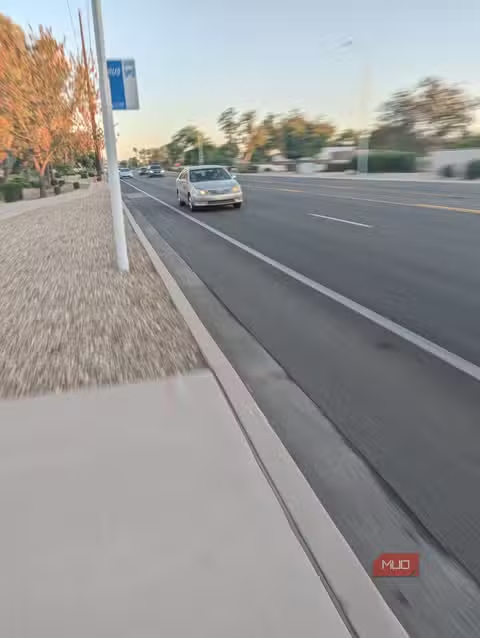
When you use Action Pan, swipe through your Pixel's camera modes until you find it alongside Long Exposure in the Motion Mode suite. Point at a moving subject, a car driving past, a cyclist, a running dog. Follow the subject with your phone for at least a second, keeping it centered in the viewfinder. Then tap the shutter.
The Pixel captures two photos simultaneously. The first applies computational motion blur to the background, making the subject pop with a sense of speed. The second is the original unprocessed shot. If the effect doesn't work, you still have a regular photo.
"The Pixel camera uses machine learning to understand what's moving in the frame and applies motion blur selectively," explained Isaac Reynolds, Group Product Manager for Pixel Camera, at a Google I/O presentation. "This is something that would take hours in Photoshop."
What's the trick to getting good Action Pan shots?
The "pan" in Action Pan is literal. You need to move the phone to track your subject, similar to how you'd sweep for a panorama. But unlike panorama mode, there's no on-screen guide. You're on your own to match the subject's speed and direction.
Google says the feature works best with people who have a visible face as the subject. Cars and bikes also produce reliable results. The key is lateral movement, subjects traveling parallel to your position rather than directly toward or away from you.
Reddit's r/GooglePixel community has tested Action Pan extensively. The consensus: it excels with predictable motion like vehicles on a road but struggles with erratic movement. Kids running or pets playing don't give the algorithm enough consistency to produce clean results. One frequently shared tip: subjects should move at a steady pace in a straight line.
Processing takes an extra second or two. You won't see the Action Pan version in your gallery immediately. This isn't a limitation you'd notice unless you're trying to quickly review a burst of motion shots.
Why does this matter beyond cool photos?
Traditional panning photography requires a camera with manual shutter speed control, a stable hand, and practice. Sports photographers use telephoto lenses, monopods, and shoot dozens of frames to get one keeper. Action Pan compresses that entire workflow into a tap.
Marc Levoy, the former Google engineer who created HDR+ and Night Sight, framed it this way: "Computational photography is no longer about capturing light. It's about understanding scenes and creating images that tell stories." Action Pan is a clear example. The phone isn't just recording photons. It's identifying the subject, predicting motion, and rendering an image that communicates speed.
The Pixel 6 and newer devices support Action Pan, running on Google's Tensor chips. These phones range from older models available at significant discounts to the current Pixel 9 Pro lineup priced between $899 and $1,179. The feature isn't a flagship exclusive, it works identically on the base Pixel models.
Will other phones get this feature?
Action Pan remains a Pixel exclusive. Google hasn't licensed it to other Android manufacturers, and the feature's reliance on Tensor's machine learning makes porting difficult. Samsung and OnePlus offer their own motion modes, but none replicate the two-photo capture that makes Action Pan risk-free.
Apple's iPhone has Live Photos and long exposure effects, but they work differently. They require post-capture editing rather than producing a finished motion-blur shot in real time. For now, if you want Action Pan, you need a Pixel.
Logicity's Take
Action Pan represents a broader shift in smartphone photography: features that used to require skill now require only recognition. Google isn't just adding filters. They're encoding professional techniques into silicon. The interesting question isn't whether Action Pan produces good photos, it does. It's whether these computational shortcuts will eventually make the underlying skills obsolete, or if they'll lower the barrier enough that more people develop an interest in learning them properly.
Frequently Asked Questions
Which Pixel phones support Action Pan?
Action Pan is available on Pixel 6 and all newer models, including Pixel 6a, Pixel 7 series, Pixel 8 series, and Pixel 9 series. The feature requires Google's Tensor chip for the machine learning processing.
Does Action Pan work with any moving subject?
It works best with subjects moving at a consistent speed in a straight line parallel to the camera. Cars, cyclists, and runners produce reliable results. Erratic movement like children playing or pets running unpredictably often yields inconsistent results.
Can I undo the Action Pan effect after taking a photo?
Yes. Every Action Pan shot automatically saves two versions: one with the motion blur effect and one original unprocessed photo. You can always access and share the original if you don't like the effect.
How is Action Pan different from Long Exposure mode?
Action Pan blurs the background while keeping the subject sharp, simulating a panning technique. Long Exposure does the opposite: it keeps the background sharp while creating light trails or blur on moving subjects, useful for waterfalls or traffic at night.
Why is Action Pan only available on Pixel phones?
The feature relies heavily on Google's Tensor chip and proprietary machine learning models trained to identify subjects and predict motion. Google hasn't licensed this technology to other Android manufacturers.
Samsung's latest mid-ranger takes a different approach to smartphone photography than Google's computational methods
Need Help Implementing This?
If you're a content creator or business looking to improve your mobile photography workflow, our team can help you identify the right tools and techniques. Contact Logicity for personalized guidance on leveraging smartphone camera features for professional results.
Source: MakeUseOf
Manaal Khan
Tech & Innovation Writer
Produced with AI assistance and reviewed by the Logicity editorial team. Learn more in our Editorial Policy.






