Key Takeaways

- Adding 'ask questions whenever in doubt' to Claude prompts forces the AI to gather context before responding
- The technique eliminates generic outputs by letting users specify audience, scope, and preferences upfront
- This works because Claude's default behavior relies on assumptions that often miss individual requirements
Claude users tired of receiving generic responses have a fix that takes 30 seconds to implement: tell the AI to ask questions instead of assuming what you want. The technique, detailed by MakeUseOf writer Abhijith N Arjunan, transforms Claude from a guessing machine into something closer to a collaborator.
The core problem is straightforward. When you ask Claude to create a PowerPoint presentation on a topic, it draws on your conversation history, stored preferences, and internal assumptions to generate something immediately. That output satisfies an average user. But if you have specific preferences about length, audience, or focus, you get a response that feels slightly off. Not wrong, just generic.
What's the exact prompt tweak?
Arjunan's solution is a prefix he adds before his actual request. Here's the full text:
“Ask questions whenever in doubt instead of providing formulaic responses. Do it when you think the go-to response is vague, and you could use some clarification to create a better response. Always use interactive (clickable) interface for questions instead of numbering them.”
— Abhijith N Arjunan, MakeUseOf
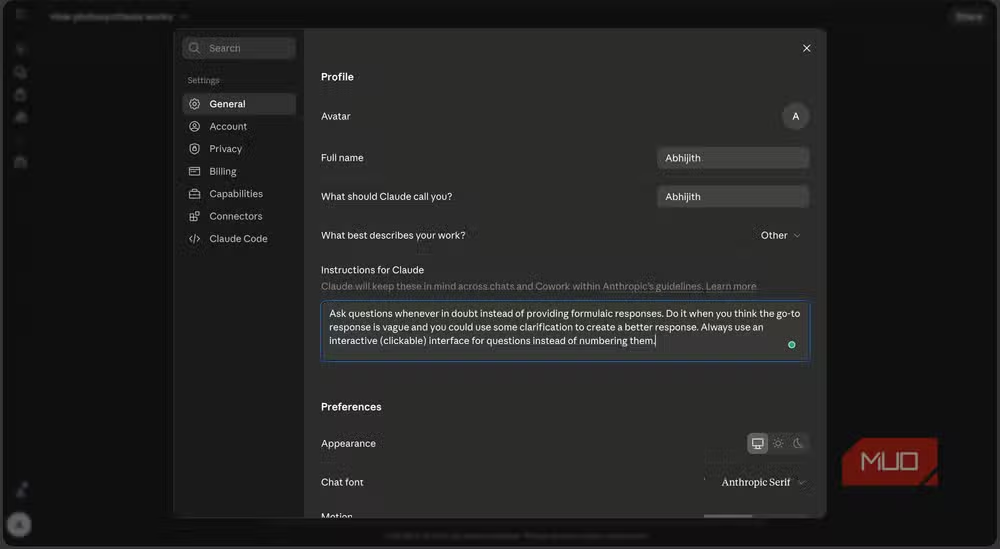
The instruction changes Claude's default behavior. Instead of generating output immediately, the AI pauses to ask about target audience, scope, number of slides, or whatever dimensions matter for your specific request. Sometimes it asks about aspects users forget to specify themselves.
Why does this work better than detailed prompts?
The obvious alternative is writing longer, more specific prompts upfront. Arjunan tried this first. The problem: you can't remember everything relevant in your initial request. You'll miss questions you didn't know to ask.
Flipping the dynamic puts the burden on Claude. The AI identifies gaps in your request and surfaces them before committing to an output direction. Two or three clarifying questions can completely change what you receive.
Consider a practical example. Asking Claude to explain a topic yields a general description pitched at some imagined middle audience. Add the questioning instruction, and Claude first asks about your starting knowledge and intended purpose. A response for a graduate student studying narratology looks nothing like one for a marketing manager who encountered the term in a meeting.
The output difference in practice
Arjunan reports that Claude now adjusts language complexity, structure, and examples based on the selections users make during the question phase. The result is spending more time actually using outputs and less time optimizing them after the fact.
This isn't prompt engineering in the complex sense. There's no elaborate system prompt or chain-of-thought scaffolding. It's a single behavioral override that makes the interaction feel more like working with a human collaborator who checks requirements before starting work.
Does this work with other AI chatbots?
The underlying behavior, relying on assumptions rather than asking for specifics, isn't unique to Claude. ChatGPT and Gemini both do this. The same instruction should theoretically produce similar results, though Arjunan's testing focused on Claude specifically.
Claude's custom instructions feature lets you add this tweak once rather than prefixing every prompt. Navigate to your settings, find the custom instructions section, and paste the text. Every future conversation will inherit the behavior.
When you might not want this
The technique adds friction. If you're asking simple factual questions or want quick answers without back-and-forth, the questioning behavior slows you down. It's most valuable for creative or structured outputs like presentations, reports, code projects, or explanatory content where getting the framing right matters more than speed.
You can toggle the behavior by removing the instruction from custom settings when you want fast responses, then adding it back for complex tasks.
Another look at how AI coding tools are evolving to better serve developer workflows
Frequently Asked Questions
Where do I add custom instructions in Claude?
Open Claude's settings menu and look for the Custom Instructions or Preferences section. Paste the questioning instruction there, and it will apply to all future conversations.
Will this prompt tweak work in ChatGPT or Gemini?
The same logic should apply since all major chatbots rely on assumptions by default. Test it in your preferred platform's custom instructions feature.
Does asking Claude to question me slow down responses?
Yes. The AI will ask 2-5 clarifying questions before generating output. This adds time but results in more targeted responses. Skip the instruction for quick factual queries.
Can I make Claude ask questions for some tasks but not others?
You can add or remove the instruction from custom settings as needed, or include it only in specific prompts rather than as a global instruction.
Logicity's Take
This hack works because it inverts the default LLM interaction model. Most users treat AI chatbots like search engines, expecting instant answers. But LLMs perform better when treated as junior colleagues who need a brief. The instruction essentially automates that briefing process. Expect to see AI platforms build this pattern into their interfaces natively. It's too useful to remain a user workaround.
Need Help Implementing This?
If you're building AI workflows for your team and want to optimize prompt patterns, reach out to us at Logicity. We cover the practical side of AI tool adoption for engineering and product teams.
Source: MakeUseOf
Huma Shazia
Senior AI & Tech Writer
Produced with AI assistance and reviewed by the Logicity editorial team. Learn more in our Editorial Policy.






