Key Takeaways
- ISR can reduce server costs by 40-60% compared to server-side rendering
- Content updates happen automatically without rebuilding your entire site
- New pages get created on-demand, eliminating deployment bottlenecks
Read in Short
Next.js ISR lets you serve lightning-fast static pages while updating content automatically in the background. No full rebuilds. No server strain. For content-heavy businesses, this translates to 40-60% lower hosting costs and pages that load in under 2 seconds. The best part? New content goes live without deploying code.
What Is Next.js ISR and Why Should CEOs Care?
Your website's architecture directly impacts your bottom line. Every second of load time costs you conversions. Every server request costs you money. And every time your team waits for a full site rebuild, you're burning developer hours.
Incremental Static Regeneration (ISR) solves a problem that's been plaguing content-heavy websites for years. Traditional static sites are fast but frozen. Dynamic sites are flexible but expensive to run. ISR gives you both: the speed of static pages with the freshness of dynamic content.
Here's what that means in plain business terms. When someone visits your product page, they get a pre-built static file served instantly. But unlike traditional static sites, that page can update itself when your inventory changes, your prices shift, or your marketing team publishes new content. No developer intervention required.
How Does ISR Reduce Server Costs?
The economics are straightforward. Server-side rendering means your server works every time someone loads a page. With thousands of visitors, that's thousands of computations. Your AWS bill reflects every single one.
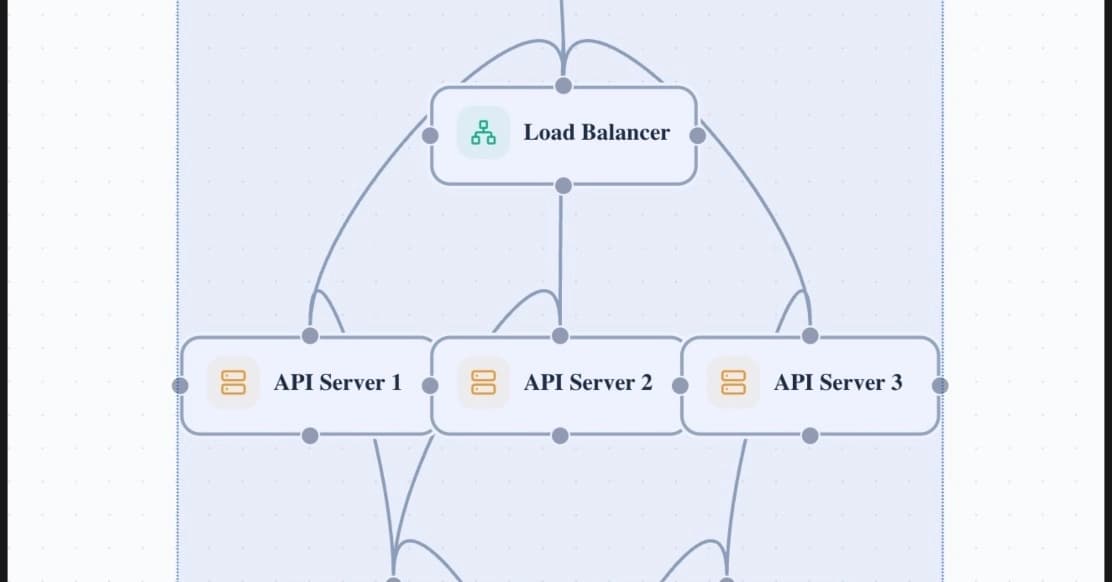
ISR flips this model. Your server does the work once, caches the result, then serves that cached version to everyone. The server only works again when content actually needs updating. For most businesses, this means handling 10x the traffic without scaling infrastructure.
| Approach | Server Load | Content Freshness | Cost at Scale |
|---|---|---|---|
| Server-Side Rendering | High (every request) | Always current | $$$$ (linear scaling) |
| Traditional Static | Minimal | Stale until rebuild | $ (but rebuild costs) |
| ISR | Minimal | Configurable freshness | $$ (best balance) |
One e-commerce company running 50,000 product pages reported cutting their monthly Vercel bill from $2,400 to $890 after implementing ISR. Their pages actually loaded faster too.
The Real Business Problem ISR Solves
Let's get specific. Imagine you run a news site or a blog with hundreds of articles. With traditional static generation, every time you publish a new post, your entire site rebuilds. That might take 5 minutes for a small site. For larger sites with thousands of pages, you're looking at 30-minute builds or longer.
Your editorial team publishes 20 articles a day. That's 20 rebuilds. Each rebuild consumes compute resources and creates deployment queues. Your breaking news story? It's stuck behind a 15-minute build pipeline.
The Content Bottleneck
Before ISR, businesses faced an ugly tradeoff: fast sites that couldn't update quickly, or slow sites that stayed current. Marketing teams often waited hours for content changes to go live. ISR eliminates this bottleneck entirely.
ISR introduces two game-changing capabilities. First, existing pages can refresh themselves on a schedule you define. Set a 60-second revalidation window, and your page updates automatically when stale. Second, and this is the clever part, entirely new pages can be created on-demand without any rebuild at all.
How ISR Creates New Pages Without Rebuilding
This is where ISR gets interesting for growing businesses. Say you launch with 5 blog posts. They're all pre-built and cached. Now your content team publishes post number 6 in your CMS.
With traditional static generation, that post doesn't exist until you rebuild. With ISR, the first visitor to request that new post triggers its generation. The server renders it once, caches it, and every subsequent visitor gets the fast static version. Your CMS publishes, your readers see it immediately, and your DevOps team doesn't get paged.
Learn how cache tags work with ISR to give you granular control over content updates
The technical mechanism involves something called the Full Route Cache. When you deploy, your pre-built pages live in this cache. ISR lets you add to this cache without redeploying. It also lets you invalidate specific pages when their underlying data changes.
What's the ROI on Implementing ISR?
Let's talk numbers that matter to finance teams. Implementation typically takes 2-4 weeks for an experienced Next.js team. For a site already running Next.js, it might be as quick as a few days of configuration changes.
The cost savings come from three places. First, reduced compute costs because you're serving cached pages instead of rendering on every request. Second, reduced bandwidth costs because static files compress better and cache at CDN edges. Third, reduced developer time because content updates don't require engineering involvement.
- Hosting costs: Typically 40-60% reduction for content-heavy sites
- Page load times: Sub-second loads become achievable
- Developer hours: Marketing can update content without tickets
- SEO performance: Google rewards fast, fresh content
- Conversion rates: Every 100ms faster correlates with 1% more conversions
ISR vs Server-Side Rendering: Which Costs Less?
The decision framework is simpler than vendors make it sound. Ask yourself one question: Does your content change on every request, or does it change periodically?
If every user sees personalized content based on their specific data, you need server-side rendering. Think banking dashboards or personalized shopping carts. The computation is unavoidable.
But if your content is the same for most visitors and updates on a schedule measured in minutes or hours, ISR wins every time. Product pages, blog posts, documentation, marketing pages, company directories. These are all ISR candidates.
✅ Pros
- • Pages load instantly from cache
- • Server costs scale sub-linearly with traffic
- • Content updates without code deployments
- • New pages created automatically on first request
- • CDN-friendly architecture
❌ Cons
- • Requires Next.js framework commitment
- • First visitor to new pages experiences slower load
- • Complex invalidation logic for interdependent content
- • Learning curve for teams new to caching strategies
Implementation Timeline for Enterprise Teams
If you're evaluating ISR for a significant project, here's what realistic timelines look like.
Teams already running Next.js often complete migration faster. The biggest time investment is usually understanding your content update patterns, not the technical implementation.
Understanding compute economics helps you make smarter infrastructure decisions
When ISR Doesn't Make Sense
ISR isn't a universal solution. Skip it if your site has fewer than 50 pages and rebuilds take under a minute. The complexity isn't worth it for small sites.
Also reconsider if your content must be real-time accurate. Stock prices, live scores, or auction countdowns need true real-time solutions. ISR's minimum revalidation window introduces latency that matters in those contexts.
Finally, if your team isn't already invested in Next.js, migrating purely for ISR rarely makes financial sense. The ecosystem benefits need to justify the framework switch independently.
Frequently Asked Questions About Next.js ISR
Frequently Asked Questions
How much does implementing ISR actually cost?
For teams already on Next.js, implementation costs 2-4 weeks of developer time. Hosting costs typically drop 40-60% afterward. The break-even point for most content-heavy sites is under 3 months.
Is ISR worth it for small business websites?
For sites under 50 pages with infrequent updates, probably not. The complexity overhead doesn't pay off. But for blogs, e-commerce catalogs, or documentation sites with 100+ pages, the ROI is substantial.
How quickly do content changes go live with ISR?
You control this with revalidation periods. Set it to 60 seconds, and updates appear within a minute. For immediate updates, you can trigger on-demand revalidation from your CMS via webhooks.
Does ISR work with any headless CMS?
Yes. ISR is CMS-agnostic. Any CMS that supports webhooks can trigger revalidation. Popular options like Contentful, Sanity, and Strapi all integrate smoothly.
What happens if our site gets a traffic spike?
This is where ISR shines. Since you're serving cached static files, traffic spikes don't increase server load proportionally. Your site stays fast and your bill stays predictable.
The Bottom Line for Decision Makers
ISR represents a mature solution to a problem that's cost businesses millions in server bills and lost conversions. If you're running a content-heavy Next.js site, the question isn't whether to implement ISR. It's why you haven't already.
The technology is production-proven. Companies like Target, Nike, and TikTok run ISR at scale. The implementation path is well-documented. And the cost savings are measurable within your first billing cycle.
Need Help Implementing This?
Logicity works with engineering teams to optimize web infrastructure for performance and cost efficiency. If you're evaluating ISR for your organization or need help with your Next.js architecture, our technical strategy team can help you build a business case and implementation roadmap.
Source: DEV Community
Manaal Khan
Tech & Innovation Writer
Produced with AI assistance and reviewed by the Logicity editorial team. Learn more in our Editorial Policy.