Key Takeaways
- Smart thermostat users save an average of 15% on annual heating and cooling costs
- AI-powered thermostats like Nest and Ecobee learn your routines and adjust automatically
- Motorized blinds with light sensors can reduce AC workload by blocking sunlight before rooms heat up
A well-tuned smart home doesn't just let you change the temperature from the couch. It watches weather forecasts, tracks when you're home, and learns how long your house takes to cool down. The result: your home prepares for a heatwave before you notice the mercury rising.
Smart thermostat users save an average of 15% on annual heating and cooling costs, according to industry data. With utility bills climbing and summer temperatures breaking records, that savings compounds quickly.
Start With a Smart Thermostat
If you're still controlling your home's climate with a dial, it's time for an upgrade. Modern smart thermostats do far more than remote temperature control. They serve as the brain of your summer optimization strategy.
The Ecobee Smart Thermostat Enhanced ($189.99) works with Apple Home, Google Home, and Alexa. It actively tracks your habits, monitors local weather reports, and learns how long your house takes to cool down. That means it can start pre-cooling before you get home from work.
The Google Nest Learning Thermostat (4th Gen) takes a different approach at $225. It uses AI to study your daily routines and automatically builds an energy-saving climate map for your home. You don't program schedules. You just live your life, and the thermostat figures out the rest.
“The key is to make it really easy and feel very similar to how other products work... You didn't have to know how the AI worked... literally just turn the dial, it will figure everything else out.”
— Matt Rogers, Co-founder at Nest
Installation Is Easier Than You Think
Installing a smart thermostat can seem intimidating, but modern kits are designed for standard homes. They come with straightforward guides to help you connect the right wires.
Before disconnecting anything, take a photo of your original wiring setup with your phone. Follow the directions closely. If you have any doubts about the electrical work, hire a professional. Most HVAC technicians can install a smart thermostat in under an hour.
| Feature | Ecobee Enhanced | Nest 4th Gen |
|---|---|---|
| Price | $189.99 | $225.00 |
| AI Learning | Yes | Yes |
| Apple HomeKit | Yes | No |
| Google Home | Yes | Yes |
| Alexa | Yes | Yes |
| Remote Sensor Included | Yes | Yes |
Automate Your Blinds to Block Heat
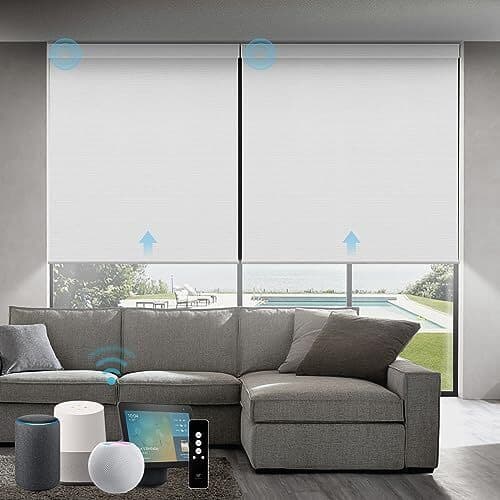
Smart blinds aren't just a convenience feature. They can cut your cooling costs by limiting sunlight before it heats your rooms. When blinds close before the afternoon sun hits your windows, your AC doesn't have to work as hard.
There are three approaches, depending on how deep you want to go.
Option 1: Schedule-Based Automation
The simplest approach is setting static schedules. Close the blinds on the western side of your house at 2 PM. Open them at 6 PM. It's a blunt instrument, but it works.
Yoolax motorized blinds work with Amazon Alexa, Google Home, and other major automation platforms. They ship with a 15-channel timing remote, so you can schedule them right out of the box without involving your smart home hub.
Option 2: Solar Schedule Sensing
Instead of picking a static time, you can tie your blinds to the shifting solar schedule. Create a rule in your smart home hub like: "Close the shades exactly three hours after sunrise." This way, your automation adjusts as days get longer or shorter.
SmartWings Motorized Roller Shades support Matter-over-Thread and HomeKit, making them compatible with most modern smart home setups. They offer 100% blackout capability for maximum heat blocking.
Option 3: True Light Sensing
Both schedule options break down on cloudy days. Why close the blinds at 2 PM if it's overcast? True light-sensing automation uses ambient light sensors to make real-time decisions.
If you already have blinds you like, the SwitchBot Blind Tilt can retrofit them with motorized control. It adds Bluetooth remote capability and can integrate with light sensors in your smart home ecosystem.
The Bigger Picture
Smart home adoption is shifting from luxury gadgetry to essential energy management. By 2026, 51.4% of U.S. households are expected to actively use smart home devices. The global smart home market is projected to reach $180 billion by the same year, driven largely by AI and energy efficiency features.
“Technology should fade into the background. It should free you from the chaos of everyday life and give you a place to feel relief—to focus on the things that really matter.”
— Stuart Lombard, Founder & CEO at ecobee
Modern devices use occupancy detection, humidity adjustment, and grid-responsive "pre-cooling" to automate comfort while reducing energy footprints. Some utilities even offer rebate programs for smart thermostat installation, helping you recoup the investment faster.
For Power Users: Local Control vs. Cloud
Technical communities on Hacker News and Reddit often debate "local control" versus "cloud reliance." Power users prefer home automation platforms like Home Assistant to manage thermostat logic locally, avoiding internet dependency and privacy concerns.
For most people, though, the cloud-based approach works fine. Many users report paying off their smart thermostat purchase in under two years through utility rebates and consistent energy savings.
Logicity's Take
Frequently Asked Questions
How much can a smart thermostat save on cooling costs?
Smart thermostat users save an average of 15% on annual heating and cooling costs. The exact savings depend on your local climate, home insulation, and how efficiently you used your previous thermostat.
Can I install a smart thermostat myself?
Yes, most modern smart thermostats are designed for DIY installation in standard homes. Take a photo of your existing wiring before disconnecting anything. If you have an older home or unusual HVAC setup, consider hiring a professional.
Do smart blinds work with Apple HomeKit?
Some do, some don't. SmartWings Motorized Roller Shades support HomeKit and Matter-over-Thread. Yoolax blinds work with Alexa and Google Home but not HomeKit directly. Check compatibility before purchasing.
What's the difference between Ecobee and Nest thermostats?
Both use AI to learn your habits. Ecobee works with Apple HomeKit, Google Home, and Alexa. Nest 4th Gen works with Google Home and Alexa but lacks native HomeKit support. Ecobee costs $189.99, Nest costs $225.
Are smart home devices worth the investment?
For energy management, yes. Many users report paying off a smart thermostat within two years through energy savings and utility rebates. The value increases if you add complementary devices like automated blinds.
If you're interested in AI automation at home, see how Microsoft is applying similar concepts to computing
Need Help Implementing This?
Source: Lifehacker
Manaal Khan
Tech & Innovation Writer
Produced with AI assistance and reviewed by the Logicity editorial team. Learn more in our Editorial Policy.






