Key Takeaways
Build Your SaaS Customer Support System

- Omnichannel differs from multichannel: channels share context so customers never repeat themselves
- Start by mapping your current channels, then unify customer data in one platform
- Measure success with first-contact resolution, channel-switch rate, and CSAT per channel
Omnichannel customer service connects every support channel, email, chat, phone, social, self-service, into a single view where conversation history and customer context follow the user. The result: customers stop repeating themselves, agents resolve issues faster, and SaaS companies see measurable gains in satisfaction and retention.
Disclosure
Some links in this post are affiliate links — Logicity earns a commission if you sign up, at no extra cost to you. We only link products we have used or actively recommend.
Most B2B SaaS teams already offer multiple channels. That is multichannel, not omnichannel. The distinction matters: multichannel means each channel runs its own inbox or ticketing queue. When a customer emails support, then follows up on chat, the agent sees two separate threads. The customer re-explains the problem. Time burns. Frustration builds.
Omnichannel service fixes that by linking every interaction into one customer record. A user can start a conversation in chat, switch to email when the workday ends, and resume on the phone without losing context. Agents see the full timeline before they say hello.
Why omnichannel support matters for SaaS retention
That stat alone explains why churn creeps up at companies with fragmented support. Customers do not distinguish between your product and your support experience. A frustrating ticket loop feels like a frustrating product. When context is carried across channels, customers pick up where they left off, resolution times drop, and agents handle higher volume without burning out.
Centralized data also changes how agents work. Instead of hunting through separate inboxes or asking the customer for order numbers, they open a unified record that shows purchase history, previous tickets, and account status. They prioritize urgent issues accurately. They resolve faster. They close more tickets per shift.
How to build an omnichannel customer service strategy
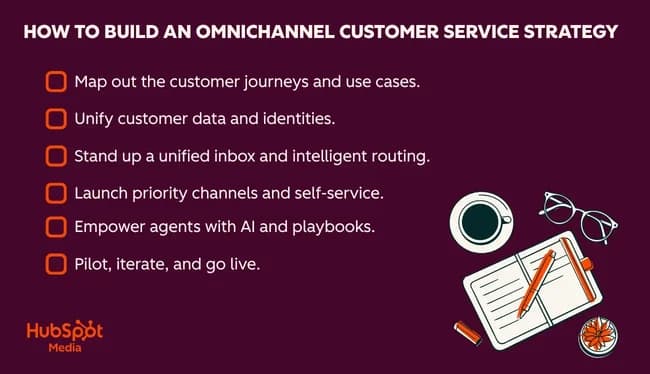
Building omnichannel support is not a platform purchase. It is an operational shift. The platform matters, but only after you map your current state, define success, and align your team. Here is the sequence.
- Audit your current channels. List every way customers reach you: email aliases, chat widgets, phone lines, social DMs, community forums, in-app messaging. Note which channels share data and which operate in silos.
- Map the customer journey. Identify where customers switch channels mid-issue. These handoff points are your biggest friction sources and your first targets for unification.
- Unify customer data in one record. This usually means connecting your support platform to your CRM so agents see billing status, product tier, and interaction history in a single view.
- Choose a platform that supports your channels. Evaluate based on native channel integrations, CRM sync depth, automation capabilities, and reporting granularity.
- Train agents on cross-channel workflows. The technology only works if agents know how to use the unified timeline and when to move a conversation to a different channel.
- Set governance rules. Define SLAs per channel, escalation paths, and ownership when a ticket spans departments.
What to look for in an omnichannel platform
Not every help desk that claims omnichannel actually delivers it. Some bolt on channels without true data unification. When evaluating platforms, check these capabilities:
- Shared inbox or ticketing queue that consolidates requests from all channels
- Unified customer record showing full conversation history, regardless of channel
- Native integrations with email, chat, phone, social, and self-service knowledge bases
- CRM sync that enriches tickets with account data, purchase history, and lifecycle stage
- AI-powered routing, tagging, and suggested replies
- Channel-level and agent-level reporting to measure performance granularly
HubSpot Service Hub, for example, ties support tickets to its Smart CRM, automatically enriching records with data from emails, calls, and web activity. Intercom focuses on in-app messaging and chat-first workflows, while Salesforce Service Cloud offers deep customization for enterprise teams with complex routing rules. Pricing varies widely: HubSpot's free tier covers basic ticketing, Intercom starts around $74/month per seat for its core plan, and Salesforce Enterprise runs $150+ per user per month.
Metrics to track omnichannel performance
Standard support metrics still apply, but omnichannel adds a few worth watching:
- Channel-switch rate: How often customers move between channels during a single issue. High rates may indicate gaps in your routing or self-service content.
- First-contact resolution by channel: Some channels naturally resolve faster. Use this to guide staffing and automation investments.
- CSAT per channel: Satisfaction can vary by channel. Phone might score higher than email because of immediacy. Compare and allocate accordingly.
- Agent utilization across channels: Identify bottlenecks. If chat agents are overloaded while email agents have capacity, rebalance or cross-train.
Governance matters as much as measurement. Define who owns a ticket when it crosses departments, what SLA applies to each channel, and how escalations work. Without clear rules, agents will default to their own habits, and customers will notice the inconsistency.
Logicity's Take
Most SaaS teams under 50 employees do not need a full-blown enterprise platform. Start with a tool that natively syncs with your CRM and covers your top three channels. Add automation gradually. The risk is not missing features; it is buying a complex system your team never fully adopts. HubSpot and Intercom cover most mid-market needs; Salesforce makes sense when you outgrow them or need deep customization.
Common mistakes when going omnichannel
The biggest failure mode is treating omnichannel as a tech project instead of an operations change. Teams buy a platform, connect channels, and assume the work is done. But if agents are not trained on the unified timeline, they still ask customers to repeat themselves. If routing rules are not set, tickets bounce between queues.
Another mistake: launching every channel at once. If you cannot staff a channel with SLA-compliant response times, do not open it. A slow Twitter DM response is worse than no Twitter support at all. Start with the channels your customers already use, unify those, then expand.
Frequently Asked Questions
What is the difference between omnichannel and multichannel support?
Multichannel means offering support on multiple channels that operate independently. Omnichannel connects those channels so customer history and context are shared across all of them.
How much does an omnichannel platform cost?
Free tiers exist for basic ticketing. Mid-market tools like HubSpot Service Hub start at $0-$90/month per seat depending on features. Enterprise platforms like Salesforce run $150+ per user per month.
How long does omnichannel implementation take?
For a 10-30 person support team, expect 4-8 weeks to connect channels, migrate data, and train agents. Enterprise deployments with custom integrations can take 3-6 months.
Which channels should I prioritize first?
Start with email and live chat if you are B2B SaaS. These cover most customer interactions. Add phone and social once your unified inbox is stable.
Need Help Implementing This?
Logicity helps SaaS teams design and deploy omnichannel support systems. Reach out if you need guidance on platform selection, CRM integration, or workflow automation.
Source: Marketing
Manaal Khan
Tech & Innovation Writer
Produced with AI assistance and reviewed by the Logicity editorial team. Learn more in our Editorial Policy.