Key Takeaways
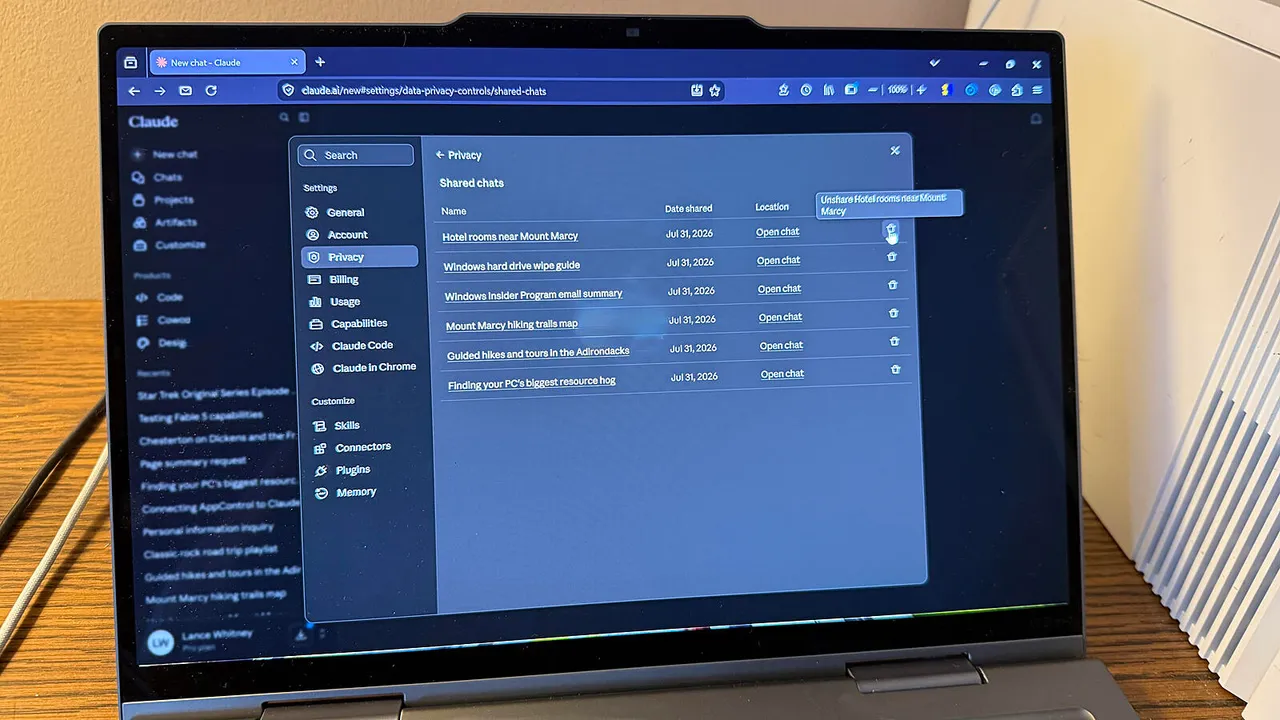
- Anthropic's Claude conversations were briefly exposed via Google search queries, highlighting how shareable AI chat links can become public
- All major AI chatbots offer privacy controls: disable model training, use temporary chats, and delete conversation history
- For truly sensitive queries, chat without an account or use a VPN to minimize data association
Your AI conversations are not as private as you think. Earlier this week, researchers discovered that conversations from Anthropic's Claude AI could be found through Google search queries. Users had shared these chats via links, never imagining anyone with basic search skills could stumble across them. Anthropic patched the issue quickly, but the incident raises a pointed question for anyone using AI assistants at work: what happens to the prompts you type?
The short answer: your conversations can be stored, used for training, and in some cases accessed by others if you share them carelessly. The longer answer is that every major chatbot offers controls to tighten your privacy, but the defaults often favor the AI company, not you. Here's how to reclaim control across ChatGPT, Claude, Microsoft Copilot, and Google Gemini.
Why AI chat privacy matters for business users
Most professionals now use AI assistants to draft emails, summarize documents, brainstorm strategy, and debug code. That means proprietary information, customer data, and internal communications flow into these systems daily. If that data trains a model, fragments could theoretically surface in responses to other users. If you share a conversation link, that link stays live as long as the chat exists.
Samsung learned this the hard way in 2023 when engineers pasted confidential source code into ChatGPT. The company banned internal use of generative AI tools shortly after. Three years later, the tools are better, but the underlying tension remains: convenience pulls users toward AI assistants; data governance pulls them back.
ChatGPT: the privacy controls you need to know
OpenAI's ChatGPT is the most widely used AI chatbot, which makes its privacy settings the most consequential for most readers. Here are five concrete steps.
First, you can chat without an account. Log out before submitting your query, and nothing ties that session to your identity. You lose some advanced features and hit lower usage limits, but for sensitive one-off questions, it works.
Second, use temporary chats. If you're signed in but don't want a particular conversation saved, click the circular "Turn on Temporary Chat" icon in the upper right. The prompt field turns black, and the chatbot won't remember anything from that session.
Third, disable model training. OpenAI trains ChatGPT partly on user conversations. To opt out, click your account name at the bottom of the left pane, select Settings, go to Data controls, and turn off "Improve the model for everyone." The data isn't linked to your name, but opting out removes your conversations from the training pool entirely.
Fourth, think twice before sharing. ChatGPT lets you share a conversation via X, LinkedIn, Reddit, or a direct link. That link stays active as long as the chat exists. If you discussed anything personal or proprietary, sharing creates a permanent URL pointing to it.
Fifth, delete old conversations. Hover over any chat in your history, click the three dots, and select Delete. For bulk deletion, go to Settings, Data controls, and choose "Delete all chats." Once deleted, those conversations are gone from your account and can no longer be accessed via any shared link.
Claude: what the Google indexing incident revealed
Anthropic's Claude positions itself as a safety-focused alternative to ChatGPT. The July 2026 incident showed that even safety-first companies can slip up. A Google dork, an advanced search query, let outsiders find Claude conversations that users had shared via links. Anthropic fixed it within days by disabling indexing, but the broader lesson stands: any shareable link is a potential leak.
Claude's privacy controls mirror ChatGPT's in structure. You can delete individual chats or your entire history. You can opt out of model training in settings. The platform does not currently offer a no-account mode for anonymous queries, so if you need that, use a different tool.
One edge Claude has: its enterprise API explicitly promises that customer data is not used for training. For companies with strict data governance, this matters more than consumer-facing toggles.
Microsoft Copilot: tied to your Microsoft account
Microsoft's Copilot integrates with Windows, Edge, and Microsoft 365, which means it often has access to more context than a standalone chatbot. That's useful for productivity. It's also a reason to pay attention to privacy settings.
Copilot offers a "Don't save my chat history" toggle in its settings. Turn it on, and your conversations won't persist between sessions. Microsoft also lets you clear all saved chats and disable personalization, which limits how much the system tailors responses to your past behavior.
For enterprise users on Microsoft 365, Copilot for Microsoft 365 operates under your organization's data policies. That means IT controls retention, and Microsoft's commercial data protection promises apply. Consumer Copilot does not have the same guarantees.
Practical guide for teams adopting AI tools while managing data governance
Google Gemini: the toggle buried in settings
Google's Gemini chatbot ties into your Google account, which means it can access your search history, Gmail, and Drive if you let it. That's powerful context, but it also raises the stakes for privacy.
To limit Gemini's data use, open your Google account settings, go to Data & privacy, and find the Gemini Apps Activity section. You can turn off the toggle to stop Google from saving your Gemini conversations. You can also delete past activity from this page.
Google Workspace users on paid plans get stronger protections: Gemini for Workspace promises that prompts and responses are not used to train models. But if you're on the free consumer tier, your conversations may feed into Google's broader AI training unless you opt out.
General practices that apply everywhere
Beyond platform-specific toggles, a few habits reduce risk across all AI assistants.
- Never paste API keys, passwords, or credentials into a chatbot prompt. Even with training disabled, these can end up in server logs.
- Anonymize sensitive data before pasting. Replace customer names with placeholders, strip identifiers from code snippets.
- Use a VPN if you want to obscure your IP address, though this does not hide your account identity if you're logged in.
- Review sharing settings before clicking any link button. Assume that once a link exists, it can spread.
Some teams route all AI interactions through a self-hosted intermediary or an API gateway that redacts sensitive patterns before they reach the model. Perplexity, for example, offers an enterprise tier with audit logs and data controls, making compliance easier for regulated industries.
Disclosure
Some links in this post are affiliate links — Logicity earns a commission if you sign up, at no extra cost to you. We only link products we have used or actively recommend.
What the Anthropic incident really means
The Claude exposure wasn't a hack. Users had voluntarily shared conversations via links. Google indexed those links because, until Anthropic blocked it, nothing told the crawler not to. The incident is less about Anthropic's security posture and more about a design pattern that every AI company uses: shareable links that stay active until manually deleted.
OpenAI, Google, and Microsoft all offer the same feature. The convenience is real. So is the risk. If you share a link today and forget about it, that conversation remains discoverable, potentially for years.
Logicity's Take
For enterprise teams, the real solution is not consumer toggles, it's enterprise contracts. ChatGPT Enterprise, Claude's API with data protection, Gemini for Workspace, and Copilot for Microsoft 365 all promise that your data stays out of training pools. These tiers cost more (ChatGPT Enterprise starts around $60 per user per month; Copilot for Microsoft 365 is $30 per user per month on top of your Microsoft 365 license). But if your employees are pasting proprietary code or customer data into AI assistants, that's the cost of doing it safely. Consumer toggles help, but they're not contractual guarantees. The Anthropic incident showed that even well-intentioned defaults can fail. For anything truly sensitive, assume the worst and design your workflows accordingly.
Practical next steps for decision-makers
If you're a CTO or IT lead, here's a concrete checklist.
- Audit which AI tools employees actually use. Shadow AI is common; survey your teams.
- Evaluate enterprise tiers for your primary chatbot. Compare ChatGPT Enterprise, Claude API, Gemini for Workspace, and Copilot for Microsoft 365 on price, data guarantees, and admin controls.
- Draft an acceptable-use policy. Specify what data can and cannot go into AI prompts. Make it part of onboarding.
- Consider an API gateway that redacts sensitive patterns before they reach external models.
- Train employees to use temporary chats and disable training by default on consumer tools.
AI assistants are too useful to avoid. But treating them like a private notepad is a mistake. The defaults assume you're comfortable with your conversations being stored, analyzed, and potentially used. If you're not, the controls exist. Use them.
Frequently Asked Questions
Does disabling model training delete my past conversations?
No. Disabling the toggle only stops future conversations from being used for training. To remove past data, you need to delete your chat history separately.
Can my employer see my ChatGPT conversations?
On consumer ChatGPT, no. On ChatGPT Enterprise or Team plans, workspace admins may have access to usage logs depending on your organization's settings.
Are API calls more private than using the web interface?
Generally, yes. OpenAI and Anthropic both state that API data is not used for training by default, unlike consumer web chat. Enterprise API contracts add further legal protections.
Need Help Implementing This?
If your team needs guidance on AI governance, data policies, or choosing enterprise AI tools, reach out to Logicity's consulting partners for a tailored assessment.
Source: Latest news
Manaal Khan
Tech & Innovation Writer
Produced with AI assistance and reviewed by the Logicity editorial team. Learn more in our Editorial Policy.