Key Takeaways
- Gemini in Chrome now available in 7 Asia-Pacific markets including Australia, Japan, Singapore, and South Korea
- Built-in AI assistant eliminates need for separate AI subscriptions or browser extensions
- Integration with Google Calendar and other Workspace tools creates seamless enterprise workflows
According to [Engadget](https://www.engadget.com/ai/google-brings-gemini-in-chrome-to-users-in-asia-and-the-pacific-220000698.html?src=rss), Google is rolling out its built-in Gemini chatbot to Chrome users across Asia and the Pacific, expanding AI assistant access to markets including Australia, Indonesia, Japan, the Philippines, Singapore, South Korea, and Vietnam.
Here's why this matters for your business: Google just made AI assistance a default browser feature for millions of enterprise users. No new software to install. No separate subscriptions to manage. No IT tickets to file. Your teams in seven major Asia-Pacific markets can now access AI-powered research, writing, and scheduling directly from Chrome's interface.
What Is Gemini in Chrome and How Does It Work?
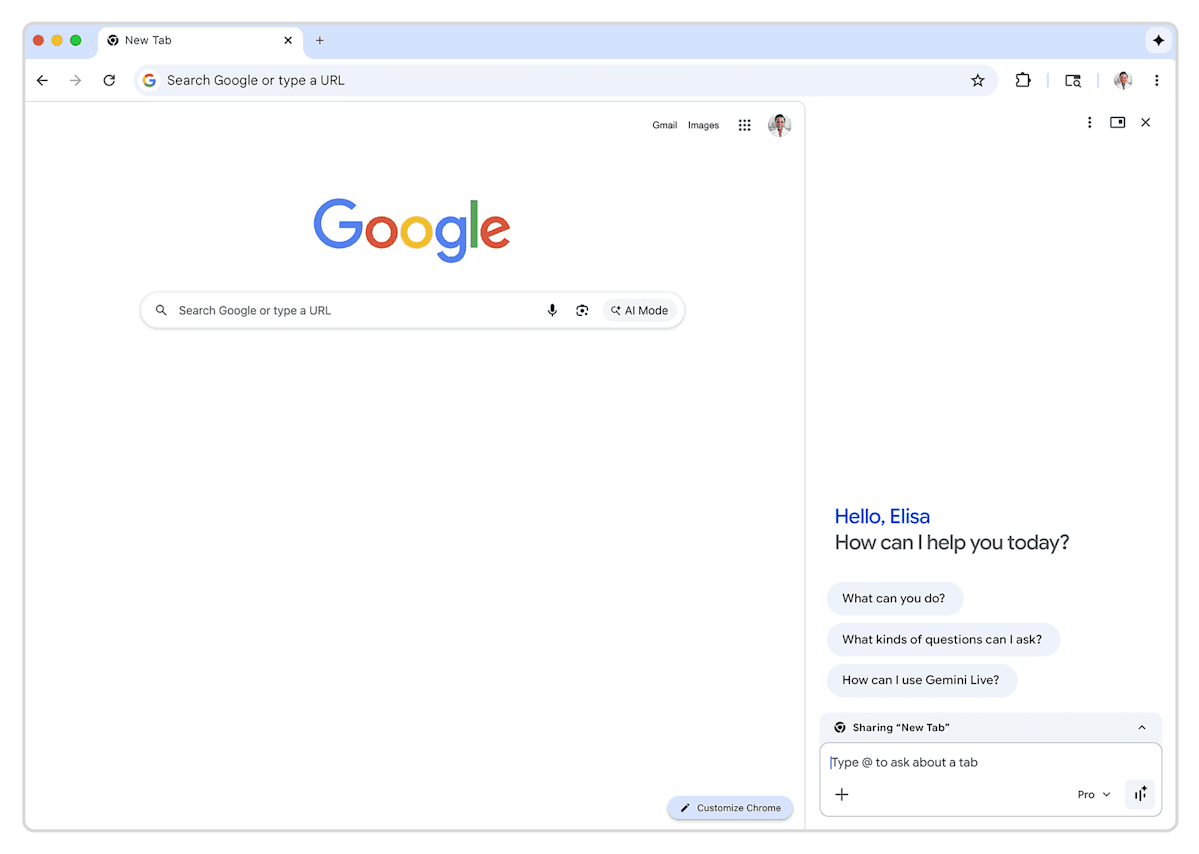
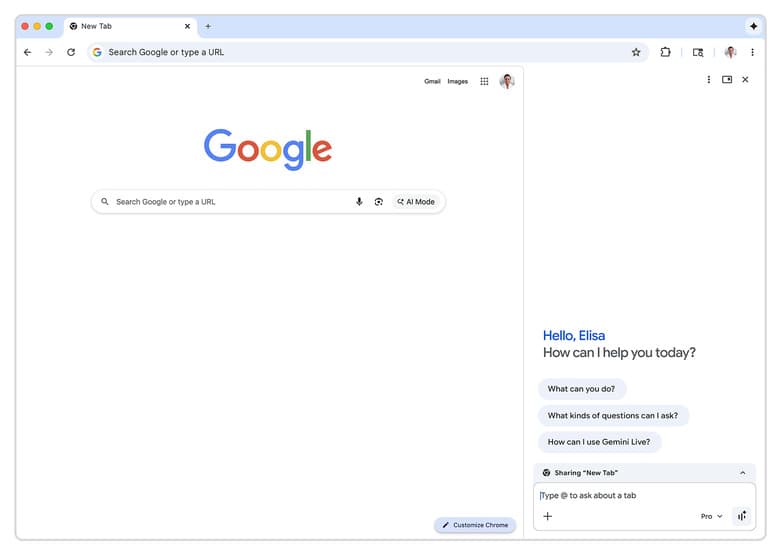
Gemini in Chrome isn't a separate app or extension. It's a built-in sidebar that appears when you click the 'Ask Gemini' icon in your browser's top right corner. The AI assistant works across every open tab, meaning your team can research in one tab, draft content in another, and have Gemini provide context-aware assistance throughout.
The rollout covers desktop browsers and mobile apps on iPhone and iPad, with one exception: Japan users won't see iOS support initially. For businesses with distributed teams across the region, this means consistent AI access whether your employees are at their desks or working from mobile devices.
Executive Summary
Gemini in Chrome brings AI assistance directly into your browser with no additional setup. Key features include cross-tab chat functionality, image generation through Nano Banana 2, and native Google Workspace integrations. Available now in Australia, Indonesia, Japan (desktop only), Philippines, Singapore, South Korea, and Vietnam.
Why Should Business Leaders Care About Browser AI?
The browser is where work happens. Your sales team researches prospects in Chrome. Your marketers draft content in Chrome. Your developers search documentation in Chrome. By embedding AI directly into this workflow, Google eliminates the friction that kills adoption of productivity tools.
Think about how your organization currently uses AI. Employees probably switch to ChatGPT, Claude, or another tool in a separate tab. They copy and paste context. They lose their train of thought. Gemini in Chrome removes those steps. The AI sees what you're looking at and responds accordingly.
- No context-switching between browser and AI tools
- AI assistance available on any website or web app
- Direct integration with Google Calendar for scheduling
- Image generation capabilities built in
- Works across desktop and mobile Chrome
How Does Gemini in Chrome Compare to Other AI Tools?
For CTOs evaluating AI productivity tools, the competitive picture just shifted. Microsoft has been pushing Copilot across its ecosystem. OpenAI offers ChatGPT Pro subscriptions. But Google's move puts AI in the browser itself, the one application every employee uses regardless of their role or tech stack.
| Feature | Gemini in Chrome | ChatGPT | Microsoft Copilot |
|---|---|---|---|
| Browser Integration | Native sidebar | Separate tab/app | Edge sidebar |
| Cross-tab Context | Yes | Manual copy-paste | Limited |
| Calendar Integration | Google Calendar | Via plugins | Outlook |
| Image Generation | Nano Banana 2 | DALL-E | Designer |
| Asia-Pacific Availability | 10 markets now | Global | Global |
| Enterprise Cost | Included with Workspace | $20-30/user/month | Varies by plan |
The cost advantage is significant for organizations already on Google Workspace. You're getting AI capabilities bundled into your existing subscription rather than layering on per-seat AI costs that can run $20-30 per user monthly.
Deep dive into market-specific rollout details and adoption strategies
What Are the Enterprise Security Considerations?
Browser-based AI raises immediate questions for security-conscious organizations. What data does Gemini see? Where does it go? Can employees accidentally share confidential information with an AI that's always available?
Google's enterprise controls for Gemini follow the same governance model as other Workspace products. IT administrators can disable the feature org-wide, control it by organizational unit, or let individual users opt out by right-clicking the shortcut to unpin it. For regulated industries, these controls matter.
✅ Pros
- • Centralized admin controls through Google Workspace console
- • Same data governance as existing Workspace products
- • Users can disable individually if preferred
- • No third-party data sharing outside Google ecosystem
❌ Cons
- • AI sees content across all tabs when active
- • Employee training needed on appropriate use
- • Audit logging capabilities still maturing
- • Regional data residency may vary
The security conversation connects to broader concerns about AI in the enterprise. Recent incidents across the tech sector highlight why CTOs should verify vendor claims rather than assume compliance.
Understanding vendor security claims in the AI era
How Should You Roll Out Gemini in Chrome to Your Team?
A phased rollout makes sense for most organizations. Start with teams that spend the most time in research-heavy workflows: sales development, market research, content creation. These groups will generate the clearest productivity data you can use to justify broader adoption.
- Audit current AI tool usage and costs across your organization
- Identify pilot teams with measurable productivity metrics
- Configure Workspace admin controls before enabling
- Train pilot users on appropriate use cases and data handling
- Measure impact over 30-60 days before expanding
- Document best practices from pilot for org-wide rollout
What Does This Mean for Google's Enterprise AI Strategy?
The Asia-Pacific expansion follows Google's pattern of testing in the US, then rolling out to English-speaking markets like Canada and Australia, before hitting major Asian economies. Japan's exclusion from iOS support suggests localization complexity, particularly around language models and local integrations.
For enterprises making long-term platform decisions, this signals Google's commitment to making Gemini a core productivity layer rather than an optional add-on. Microsoft has taken a similar approach with Copilot integration across Office 365. The platform war for enterprise AI is being fought in the browser and productivity suite, not in standalone AI apps.
Frequently Asked Questions About Gemini in Chrome
Frequently Asked Questions
How much does Gemini in Chrome cost for businesses?
Gemini in Chrome is included with Google Workspace subscriptions at no additional per-seat cost. This contrasts with standalone AI tools like ChatGPT Team ($25-30/user/month) or Microsoft Copilot add-ons. Organizations already on Google Workspace get immediate value without incremental licensing.
Is Gemini in Chrome worth switching from ChatGPT or other AI tools?
The value depends on your current tech stack. If your organization runs on Google Workspace, Gemini's native integrations with Calendar, Drive, and other apps create workflow efficiency that standalone tools can't match. If you're on Microsoft 365, Copilot may offer similar advantages. The browser-native approach reduces context-switching regardless of ecosystem.
How long does it take to deploy Gemini in Chrome across an organization?
Deployment is immediate since Gemini is built into Chrome itself. The real timeline is around governance and training. Expect 1-2 weeks for IT policy configuration through Workspace admin controls, plus 30-60 days for a proper pilot program before org-wide rollout.
Can IT administrators disable Gemini in Chrome for certain employees?
Yes. Google Workspace admins can control Gemini availability at the organizational unit level, meaning you can enable it for some departments while keeping it disabled for others. Individual users can also unpin the feature themselves by right-clicking the shortcut.
What languages does Gemini in Chrome support in Asia-Pacific?
Google hasn't specified language support for each market, but the rollout includes countries with diverse language needs including Japanese, Korean, Vietnamese, and Indonesian. The delayed iOS rollout in Japan suggests ongoing localization work for certain markets.
The Bottom Line for Business Leaders
Google just made AI a browser feature, not a separate purchase decision. For organizations in Asia-Pacific markets, this means your teams can start using AI assistance today without procurement cycles, IT deployment, or per-seat negotiations. The competitive pressure on Microsoft and OpenAI is real. The question for your business isn't whether to adopt AI productivity tools. It's whether to pay extra for them or use what's now built into the browser your employees already use.
“The platform war for enterprise AI is being fought in the browser and productivity suite, not in standalone AI apps. Google's Gemini expansion is a strategic move to make AI the default, not an option.”
— Logicity analysis
How platform decisions ripple through user ecosystems
Logicity's Take
We've been building AI agent systems using Claude and similar models for enterprise clients, and Google's browser integration strategy is smart but carries trade-offs businesses should understand. The convenience of browser-native AI is undeniable. Your teams won't need separate logins or context-switching. But there's a reason we often recommend Claude-based agents or custom implementations for sensitive workflows: control. When AI is baked into your browser, you're trusting Google's data handling for everything your employees research, write, or schedule. For general productivity tasks, that's probably fine. For competitive intelligence, M&A research, or sensitive HR matters, organizations should think carefully about which AI sees what. From our work with Indian enterprises adopting AI tools, the winning approach is usually layered: browser AI for everyday tasks, custom agents for sensitive workflows, and clear policies so employees know which tool fits which situation. Google making Gemini 'just there' will accelerate adoption, but adoption without governance creates risk. If you're a CTO in one of these new markets, our advice is to pilot thoughtfully rather than enable org-wide immediately.
Need Help Implementing This?
Logicity helps businesses build AI-powered workflows that go beyond browser features. From custom Claude agents to n8n automation pipelines, we create AI systems tailored to your specific business processes. Get in touch to discuss how AI can transform your team's productivity.
Google Launches Deep Research Agents for Complex Workflows
Google has launched Deep Research and Deep Research Max, autonomous agents powered by Gemini 3.1 Pro designed for complex research automation. These agents are available via the Gemini API, support the Model Context Protocol (MCP), and can perform thorough asynchronous analysis of both open web and proprietary data.
Strategic Growth: New $750M Enterprise Fund and Startup Partnerships
Google has announced a $750 million initiative to fund AI agent deployments for enterprise partners. The update also highlights that major startups like Notion and Gamma are now using Gemini models and the new Nano Banana 2 image generator for their services.
Google Unveils 'Auto Browse' Agentic Features for Chrome Enterprise
The new article introduces 'auto browse' agentic capabilities, which allow Gemini to perform cross-tab tasks like inputting data into CRMs, comparing vendor pricing, and summarizing portfolios. It also specifies that these features are debuting for Workspace users in the U.S. with a mandatory 'human in the loop' review process.
Cloud Next '26: 8th-Gen TPUs and the Agentic Enterprise Platform
The new article introduces Google's 8th-generation TPUs (TPU 8t and 8i), the Gemini Enterprise Agent Platform for autonomous agents, and 'Workspace Intelligence' for cross-app data integration. These infrastructure and platform-level announcements from Cloud Next '26 represent a major shift toward an 'Agentic Enterprise' strategy.
Google Doubles AI Infrastructure Investment to $185 Billion
Google has committed to a massive $185 billion capital expenditure for AI infrastructure in 2026, doubling its 2025 investment. The update includes the introduction of TPU 8t and 8i chips, and the revelation that 75% of Google's new code is now AI-generated.
Huma Shazia
Senior AI & Tech Writer
Produced with AI assistance and reviewed by the Logicity editorial team. Learn more in our Editorial Policy.