Key Takeaways
Install This Free Firewall App to Stop Data Leaks on Your Mac [FireWally]
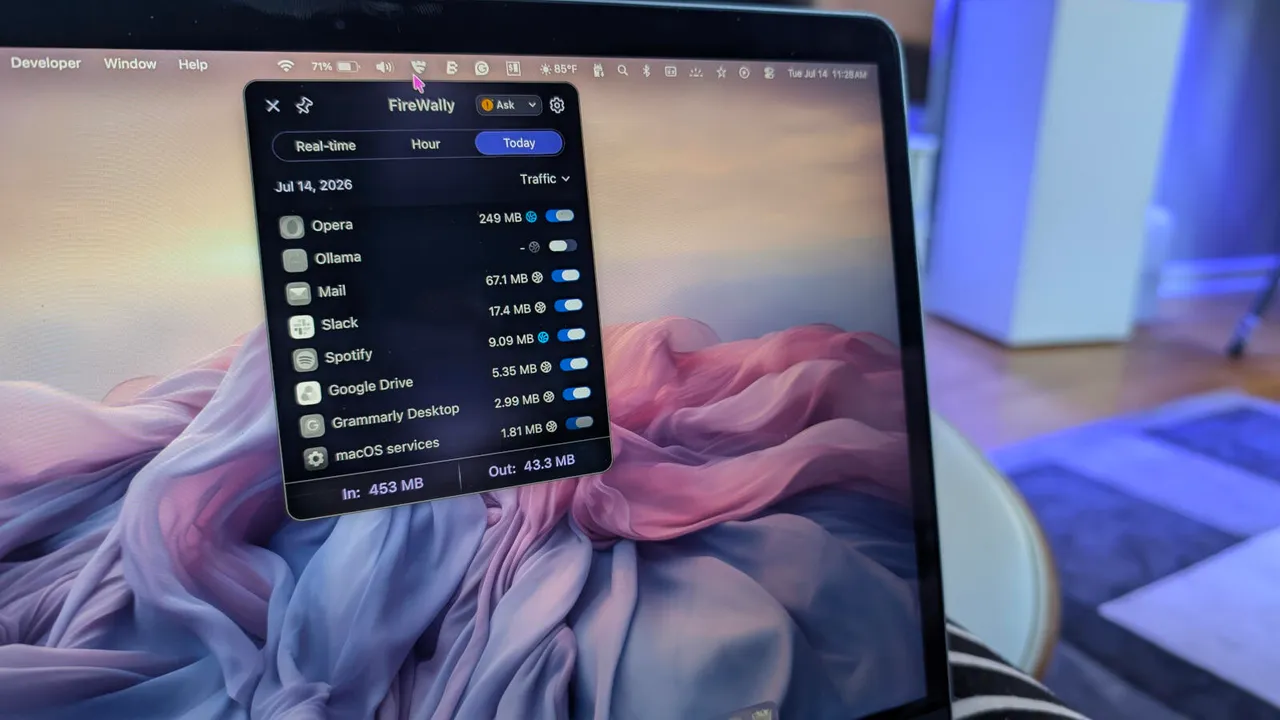
- Firewally is a free Mac app available on the App Store that monitors and controls which apps access the internet
- Users can set default policies to ask permission before new apps connect online, or block them entirely
- The tool includes AI-generated summaries explaining why each app needs network access
Your Mac has a built-in firewall, but it only filters incoming traffic. It won't tell you when Spotify, Zoom, or that PDF reader you downloaded last month quietly connects to a server in another country. A free app called Firewally fills that gap.
Available on the Apple App Store, Firewally sits in your menu bar and displays real-time internet traffic for every running application. You can block any app's network access with a single click. For privacy-conscious users, especially those running local AI tools or handling sensitive data, that visibility matters.
What does Firewally actually do?
Firewally monitors outbound connections from your Mac and gives you control over which apps can reach the internet. The interface splits into three tabs: Hourly (traffic in the past hour), Real Time (apps currently connected), and Today (all apps that have accessed the network today).
For each app, you can toggle internet access on or off. Hover over an icon to see real-time traffic statistics. The app also generates AI summaries explaining why a particular app might need network access, which helps when you're deciding whether to block something unfamiliar.
The most useful setting is the default policy. By default, Firewally is set to "Pass," meaning new apps automatically get internet access. Switch it to "Ask," and any new application must request permission before connecting. That's the safer option for anyone who installs software frequently.
Why would you want to block an app's internet access?
Not every app needs to be online. Take Ollama, a locally installed AI tool. It only needs network access to download or update language models. The rest of the time, it runs entirely offline. With Firewally, you can disable Ollama's internet access by default and enable it only when needed. That guarantees the privacy you expected when you chose a local AI solution in the first place.
The same logic applies to note-taking apps, media players, or any software that works offline but phones home with telemetry data. Studies suggest over 30% of apps transmit data to servers without explicit user notification. Firewally makes those connections visible.
How does Firewally compare to Little Snitch and Lulu?
Firewally isn't the first outbound firewall for Mac. Little Snitch has been the go-to option for years, but it costs $69 for a license. Lulu, developed by Objective-See, is free and open-source. Firewally lands in the middle: free like Lulu, but distributed through the App Store and designed for users who want simplicity over configurability.
Little Snitch offers deeper customization, including per-domain rules and detailed network maps. Lulu appeals to security researchers who want to inspect the source code. Firewally targets users who just want to know which apps are online and block the ones that shouldn't be. If you've never used an application firewall, Firewally is the easiest place to start.
How to install and set up Firewally
Open the App Store on your Mac, search for "Firewally," and click Get. After installation, a setup wizard walks you through granting the app network permissions. Enable it to start at boot so you don't have to remember to launch it manually.
Once running, Firewally appears as a small shield icon in your top menu bar. Click it to open the pop-up. I'd recommend immediately switching the default policy from Pass to Ask. That single change forces every new app to request permission before accessing the internet.
Logicity's Take
For IT teams managing fleets of Macs, Firewally is too manual. It's designed for individual users who want to see what's happening on their own machine. Enterprise environments will still need solutions like Little Snitch's Network Monitor or MDM-based firewall rules. But for founders, developers, or anyone who installs third-party software regularly, Firewally provides a free, frictionless way to audit outbound traffic. The App Store distribution also means it passes Apple's notarization, which matters if your security policy restricts unsigned apps.
Frequently Asked Questions
Is Firewally really free?
Yes. Firewally is free to download and use from the Apple App Store with no in-app purchases required for the core features.
Does macOS have a built-in firewall?
macOS includes a firewall, but it only filters incoming connections. It doesn't monitor or block outbound traffic from apps, which is what Firewally does.
Can Firewally block malware from phoning home?
If you set the default policy to Ask, any new app including potential malware must request permission before connecting to the internet. This adds a layer of protection against unknown software.
What's the difference between Firewally and Little Snitch?
Little Snitch offers more advanced features like per-domain rules and detailed traffic visualizations, but costs $69. Firewally is free and simpler, designed for users who want basic outbound traffic control without complexity.
Need Help Implementing This?
If you're evaluating security tools for your team's Mac fleet or need guidance on application-level firewall policies, reach out to our team at Logicity. We help startups and growth-stage companies build security practices that scale.
Source: Latest news
Huma Shazia
Senior AI & Tech Writer
Produced with AI assistance and reviewed by the Logicity editorial team. Learn more in our Editorial Policy.




