Key Takeaways
- Microsoft 365 Excel now includes three native regex functions: REGEXTEST, REGEXEXTRACT, and REGEXREPLACE
- These functions replace complex nested formulas and VBA scripts for text parsing and data validation
- Availability depends on your M365 subscription tier and build version
Microsoft Excel now supports native regex functions for all Microsoft 365 subscribers, ending years of workarounds involving nested MID, FIND, and LEN formulas. The three new functions, REGEXTEST, REGEXEXTRACT, and REGEXREPLACE, let users describe patterns rather than specify positions, a fundamental shift in how Excel handles text parsing.
"The addition of Regex in Excel is arguably the biggest productivity boost for data wranglers since the introduction of XLOOKUP," said Sarah Jenkins, Lead Data Analyst at TechStream Solutions.
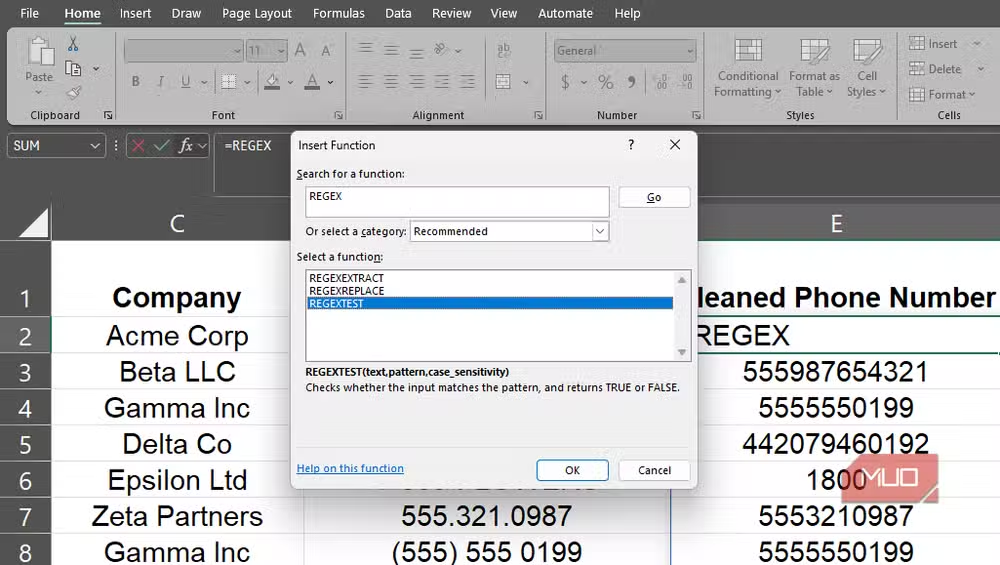
Microsoft first introduced these functions to Insider builds in mid-2024, with a broader rollout through 2025. If the functions don't appear in your version, check your M365 subscription tier and update channel.
What do the three regex functions actually do?
The core idea: instead of telling Excel where something is in a string, you describe what it looks like. Each function approaches pattern matching differently.
REGEXTEST is the simplest. It takes a cell reference and a pattern, returning TRUE or FALSE. Want to flag order IDs that don't match the format ABC1234 (three uppercase letters, four digits)? The formula looks like this:
=REGEXTEST(G2:G100, "^[A-Z]{3}[0-9]{4}$")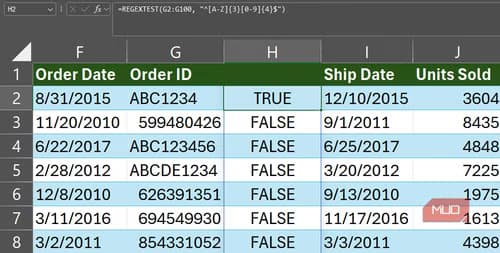
The caret (^) anchors to the string's start, [A-Z]{3} matches exactly three uppercase letters, [0-9]{4} matches four digits, and the dollar sign ($) anchors to the end. ABC1234 returns TRUE. ABCD12345 returns FALSE. You can then sort, filter, or apply conditional formatting based on the results.
REGEXEXTRACT pulls matching text out of a string. To grab just the four digits from those order IDs:
=REGEXEXTRACT(G2:G100, "\d{4}")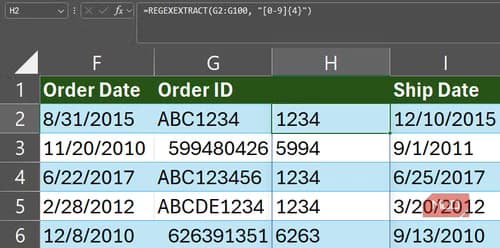
The \d shorthand matches any digit. By default, REGEXEXTRACT returns only the first match. A return_mode argument lets you capture all matches or specific capture groups when a cell contains multiple values. One catch: these functions always return text. Wrap the result in VALUE() if you need a number.
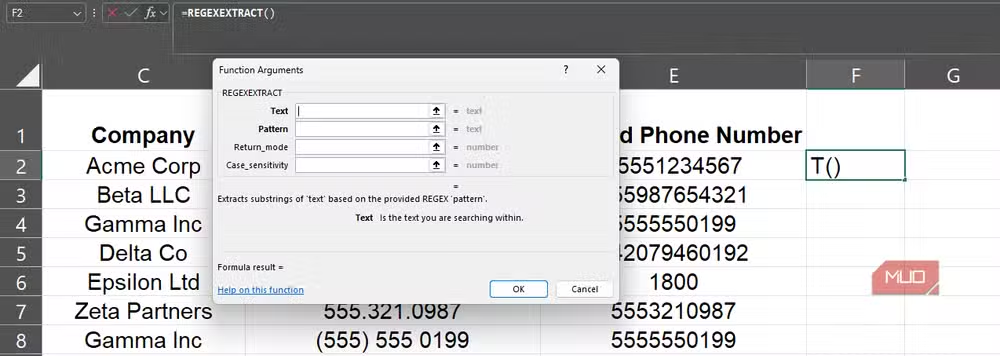
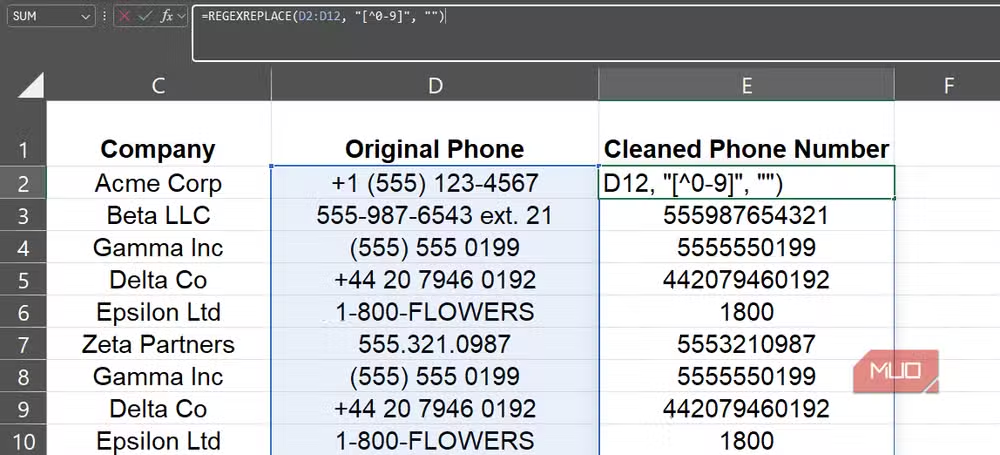
REGEXREPLACE finds matching text and swaps it for something else. This is where pattern-based find-and-replace gets interesting. You can strip inconsistent formatting, normalize phone numbers, or remove trailing characters, all in one formula.
Why did Excel users wait this long?
Google Sheets has supported regex for years. Excel users, meanwhile, relied on VBA user-defined functions, Power Query transformations, or convoluted formulas combining LEFT, MID, FIND, and LEN. A single text extraction task could require five or six nested functions.
The new functions follow the PCRE2 standard, the same syntax used in most programming languages. This means patterns you write in Python, JavaScript, or Google Sheets will work in Excel with minimal changes.
What's the learning curve like?
Regex syntax isn't intuitive. Reddit threads on r/excel and r/datascience show users sharing before-and-after formulas with obvious enthusiasm, but a recurring theme emerges: beginners struggle with the syntax itself.
The payoff is real. A 15-character regex pattern can replace a 200-character nested formula. But you need to invest time learning anchors (^ and $), character classes ([A-Z], \d), quantifiers ({3}, +, *), and capture groups. Regex errors also fail silently or return unexpected results, making debugging harder than with traditional functions.
When should you skip regex?
Not every text problem needs pattern matching. If you're extracting the first five characters of a string, LEFT(A1, 5) is clearer and faster. Regex shines when data is inconsistent: phone numbers in four formats, product codes with variable prefixes, or email validation across thousands of rows.
Power Query remains the better choice for transformations that need to be repeated on refreshed data or when you're chaining multiple cleanup steps. The new regex functions fill the gap between simple string functions and full-blown ETL workflows.
Logicity's Take
This update matters more for workflow than for headlines. Excel's regex support removes a friction point that pushed power users toward Python scripts or Google Sheets. For teams standardizing on Microsoft 365, it's one less reason to context-switch. The real test comes when non-technical users start encountering regex patterns in inherited spreadsheets. Expect a spike in "what does this formula do" support tickets.
Frequently Asked Questions
Which Excel versions support the new regex functions?
REGEXTEST, REGEXEXTRACT, and REGEXREPLACE are available in Excel for Microsoft 365. Availability depends on your subscription tier, build version, and update channel. They rolled out to Insider builds in mid-2024 and reached general availability through 2025.
Do Excel regex functions work the same as Google Sheets?
Largely yes. Both use PCRE2-compatible syntax, so most patterns transfer directly. Minor differences may exist in edge cases involving Unicode handling or specific escape sequences.
Can I use regex in Excel on Mac or Excel Online?
Microsoft has been rolling out these functions across platforms, but availability varies. Check your specific build version. Excel Online support typically lags behind the desktop application.
Why does REGEXEXTRACT return text instead of numbers?
All three regex functions return text values. If you need a numeric result, wrap the formula in VALUE() to convert it. This is consistent with how other Excel text functions behave.
Is regex faster than nested Excel formulas?
For complex pattern matching, regex typically performs comparably or faster than deeply nested traditional formulas. The bigger gain is readability and maintainability, not raw calculation speed.
Need Help Implementing This?
If your team is looking to modernize Excel workflows or automate data cleanup processes, reach out to Logicity for consultation on productivity tools and workflow optimization strategies.
Source: MakeUseOf
Huma Shazia
Senior AI & Tech Writer
Produced with AI assistance and reviewed by the Logicity editorial team. Learn more in our Editorial Policy.






