Key Takeaways
- Easy Effects is a free, open-source audio processing tool for Linux desktops
- The app works with PipeWire to apply real-time effects to both speakers and microphones
- Users can apply equalizers, compressors, limiters, and noise reduction without paid software
What Is Easy Effects?
Easy Effects is a free, open-source application that adds professional-grade audio processing to Linux desktops. The app works with PipeWire, the modern audio server that has replaced PulseAudio on most current Linux distributions. It applies effects in real time to any audio passing through your system.
The software handles both output (speakers, headphones) and input (microphones). You can run an equalizer on your music while simultaneously applying noise reduction to your microphone during video calls. All of this happens without touching your hardware or paying for commercial audio software.
Key Features That Improve Sound Quality
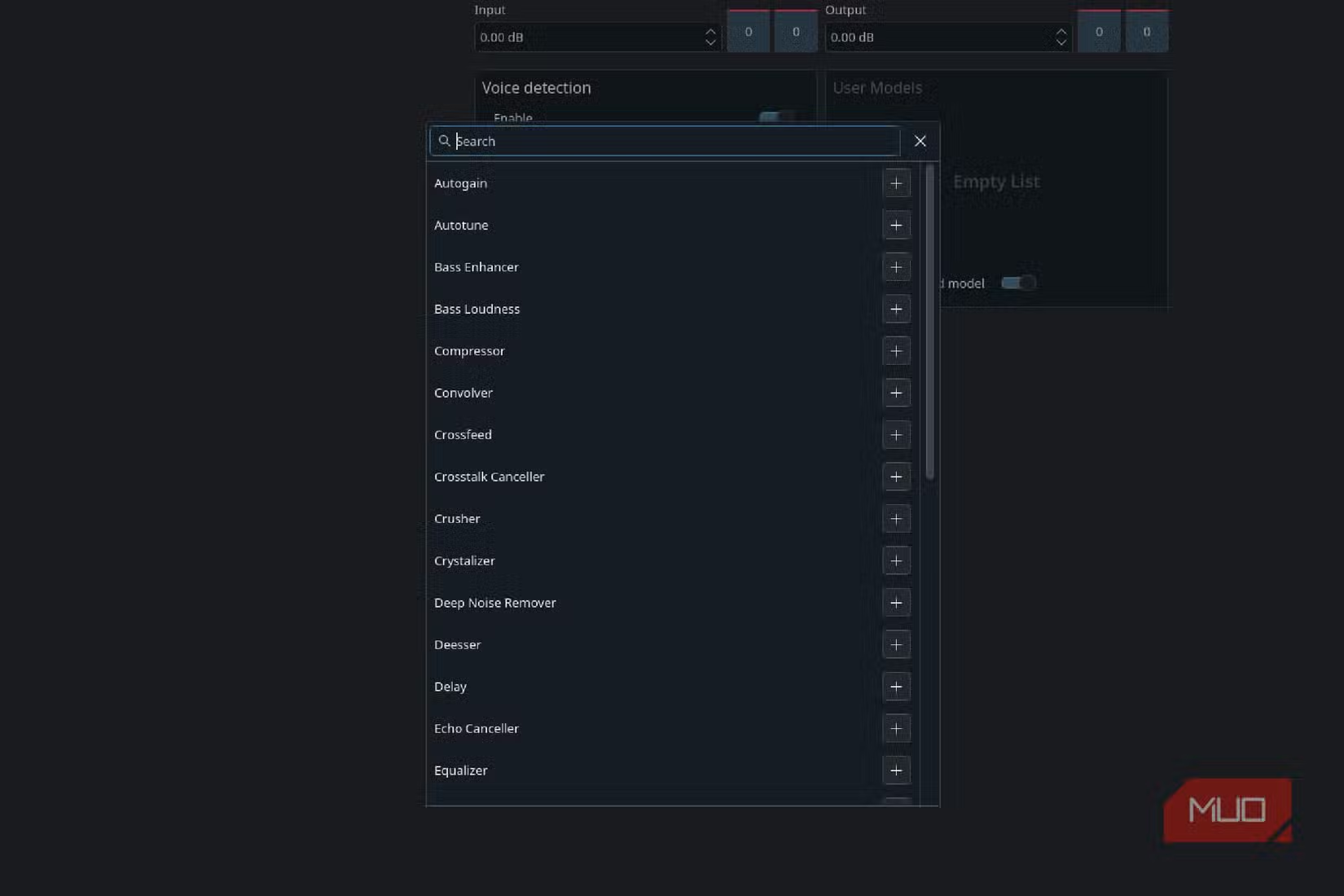
Easy Effects packs a surprising number of audio tools into its interface. The core features include a parametric equalizer, compressor, limiter, and bass enhancer for output audio. For microphone input, you get noise reduction, de-esser, and gate effects.
- 31-band parametric equalizer with presets for different headphones and speakers
- Multiband compressor for evening out volume differences
- Limiter to prevent audio clipping and distortion
- Bass and stereo enhancement tools
- Noise gate and reduction for cleaner microphone input
- Convolver for applying room reverb profiles
The app comes with presets, but the real power is in customization. You can tweak every parameter and save your own profiles for different use cases. One profile for music listening, another for gaming, a third for video calls.
Installation and Setup
Easy Effects is available in most Linux distribution repositories. On Ubuntu and Fedora, you can install it through the software center or via Flatpak. The Flatpak version tends to be more current and works across distributions.
The main requirement is PipeWire. If you're running a recent version of Fedora, Ubuntu 22.10 or later, or most other modern distributions, PipeWire is already your default audio server. Older systems using PulseAudio will need to migrate first.
Once installed, Easy Effects runs in the background and processes audio automatically. You can set it to launch at startup so your preferred sound profile is always active.
Practical Use Cases
The obvious use is improving music playback. Cheap laptop speakers and budget headphones often have weak bass and harsh highs. A few minutes with the equalizer can make a noticeable difference. The app includes presets for popular headphone models that compensate for their specific frequency responses.
For remote workers, the microphone effects matter more. The noise reduction can eliminate keyboard clatter, fan noise, and background sounds from your audio feed. The compressor evens out your voice so you don't blast colleagues when you laugh or fade out when you lean back.
Gamers benefit from the spatial audio and bass enhancement features. You can also use the equalizer to boost footstep frequencies in competitive shooters, though whether that counts as an unfair advantage is debatable.
Another Linux-based tool that extends hardware capabilities
Limitations to Consider
Easy Effects requires PipeWire, which means it won't work on older Linux installations still running PulseAudio without some migration effort. The interface also has a learning curve. The sheer number of options can overwhelm users who just want better sound without becoming audio engineers.
There's also CPU overhead. Running multiple effects simultaneously consumes processing power. On modern hardware this is negligible, but older machines might notice impact during demanding tasks.
Logicity's Take
More Linux security and software news
Frequently Asked Questions
Does Easy Effects work with PulseAudio?
No. Easy Effects requires PipeWire as your audio server. Most modern Linux distributions from 2022 onward use PipeWire by default, but older systems may need to migrate.
Will Easy Effects slow down my computer?
The CPU impact is minimal on modern hardware. Running multiple complex effects chains can consume some processing power, but most users won't notice any slowdown.
Can I use Easy Effects for gaming?
Yes. The app can enhance spatial audio, boost bass, and even adjust specific frequency ranges. Some users tweak equalizer settings to hear in-game sounds like footsteps more clearly.
Is Easy Effects available on Windows or macOS?
No. Easy Effects is Linux-only and relies on PipeWire, which is a Linux audio framework. Windows and macOS have their own alternatives like Equalizer APO and eqMac.
How do I get presets for my specific headphones?
The AutoEq project maintains equalizer presets for hundreds of headphone models. You can import these into Easy Effects to compensate for your headphones' frequency response.
Need Help Implementing This?
Source: MakeUseOf
Huma Shazia
Senior AI & Tech Writer
Produced with AI assistance and reviewed by the Logicity editorial team. Learn more in our Editorial Policy.