Key Takeaways

- DriveSurge has compromised thousands of legitimate websites to redirect visitors to malware distribution infrastructure
- The campaign uses two social engineering tactics: fake browser update prompts and deceptive 'fix' scripts that execute malicious PowerShell commands
- Both Windows and macOS users are targeted through a traffic distribution system that profiles victims
How DriveSurge Operates
Security researchers at SilentPush have uncovered a large-scale malware distribution operation run by a threat actor they call DriveSurge. The group functions as an initial access broker operating on a pay-per-install model. They compromise legitimate, high-reputation websites and use them as launchpads for malware delivery.
The attack chain starts when visitors land on a compromised site. They get silently redirected through zTDS, an open-source traffic distribution system that has been around since at least 2015. DriveSurge has been using zTDS since at least September 2025.
zTDS profiles each visitor and decides which social engineering lure has the best chance of success. The system then serves either a ClickFix attack or a FakeUpdate prompt based on that assessment.
Two Attack Methods, Same Goal
The FakeUpdate approach impersonates browser update notices. SilentPush found bogus update prompts for Chrome, Firefox, Edge, Safari, Opera, Brave, Yandex, Vivaldi, Samsung Internet, and UC Browser. The fake prompts look convincing enough to trick users into downloading malicious files.
In one case highlighted by the researchers, a fake Firefox update downloaded a ZIP archive containing multiple DLLs and a malicious executable named 'Browser Update.exe.'

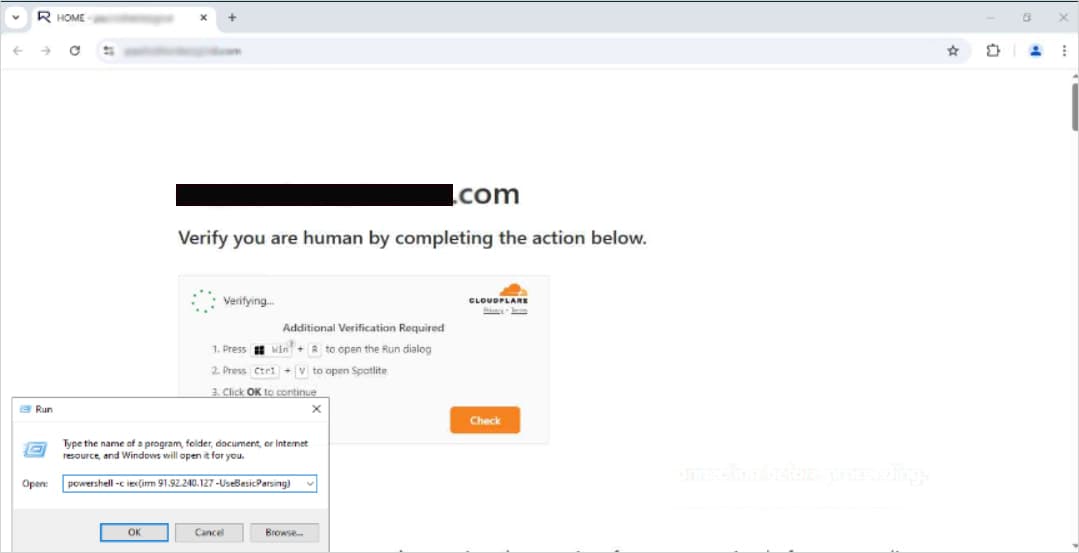
The ClickFix method is more insidious. It presents victims with what appears to be a technical issue, then instructs them to copy and paste commands into their system. These commands are actually malicious PowerShell scripts. The technique works because users believe they are fixing a problem on their computer. In reality, they are executing malware with their own hands.
macOS Users Are Also Targets
This is not just a Windows problem. SilentPush discovered an obfuscated JavaScript payload specifically designed to target macOS desktop systems. The macOS attacks use verification-themed ClickFix lures that hijack the clipboard. When a macOS user thinks they are pasting a verification code or fix command, they are actually pasting malware instructions.
The cross-platform approach makes DriveSurge more dangerous than typical malware campaigns that focus only on Windows. Organizations with mixed device fleets face risk on both fronts.
Why Traditional Security Misses This
These attacks bypass traditional email-based security filters entirely. The malware does not arrive via phishing email. It comes from legitimate websites that users have no reason to distrust.
Security discussions on HackerNews and Reddit highlight a painful truth about ClickFix attacks. They require no browser vulnerability. They work by tricking users into authorized, malicious system execution. The user gives permission. The system complies.
Website owners often have no idea their sites have been compromised. The malicious JavaScript injection follows a specific pattern that SilentPush identified: 't.js?site=<id>' where each compromised website gets a unique identifier. Through analysis of this pattern, researchers discovered more than 80 malicious injection domains and additional pre-weaponized domains not yet active in attacks.
How to Protect Yourself
The most important defense is simple: never download browser updates from popups or website prompts. Legitimate browser updates come from within the browser itself.
- Update browsers only through the built-in settings menu (About > Check for Updates)
- Never copy and paste commands from websites into your terminal or command prompt
- Be suspicious of any website that claims you have a technical problem requiring immediate action
- If a site suddenly asks you to 'verify' something by pasting code, close the tab
For organizations, user education remains the critical defense. Employees need to understand that pasting commands into a terminal at a website's request is never safe. No legitimate website will ever ask for this.
Logicity's Take
Frequently Asked Questions
What is a ClickFix attack?
A ClickFix attack tricks users into copying and pasting malicious commands into their system terminal or PowerShell. The attack presents itself as a solution to a technical problem, but the commands actually install malware.
How do I know if a browser update prompt is fake?
Legitimate browser updates never appear as website popups or prompts. Real updates come from within your browser's settings menu. If a website tells you to download an update, it is almost certainly a scam.
Can antivirus software detect DriveSurge attacks?
Traditional antivirus may catch known malware payloads, but ClickFix attacks are harder to stop because the user manually executes the malicious commands. The best defense is recognizing and avoiding the social engineering lure.
Are Macs safe from these attacks?
No. SilentPush discovered macOS-specific payloads in the DriveSurge campaign. The attacks use verification-themed prompts that hijack the clipboard to deliver malware to Mac users.
How can website owners check if their site is compromised?
Look for unfamiliar JavaScript injections, particularly those following the 't.js?site=<id>' pattern. Regular security scans and monitoring for unexpected redirects can help detect compromise early.
Need Help Implementing This?
Source: BleepingComputer
Manaal Khan
Tech & Innovation Writer
Produced with AI assistance and reviewed by the Logicity editorial team. Learn more in our Editorial Policy.