Key Takeaways
- Customer support chatbots can deflect 60-80% of routine tickets when connected to your knowledge base
- HR and IT teams use chatbots for onboarding, policy lookup, and password resets — the repetitive queries that eat hours
- Lead qualification chatbots route prospects to sales only when they meet your criteria, cutting noise from the pipeline
Chatbots have moved past the scripted, button-mashing bots of five years ago. Modern versions, powered by large language models, can pull real-time data from your CRM, answer nuanced questions from your knowledge base, and hand off to a human when they hit their limits. For operations and RevOps teams, the question is no longer whether chatbots work. It's which use case delivers the fastest payoff.
Disclosure
Some links in this post are affiliate links — Logicity earns a commission if you sign up, at no extra cost to you. We only link products we have used or actively recommend.
This guide covers seven chatbot use cases across support, sales, HR, and IT, with examples of how teams are deploying them. We'll also break down the three main chatbot types so you can pick the right architecture for each job.
What kind of chatbot do you actually need?
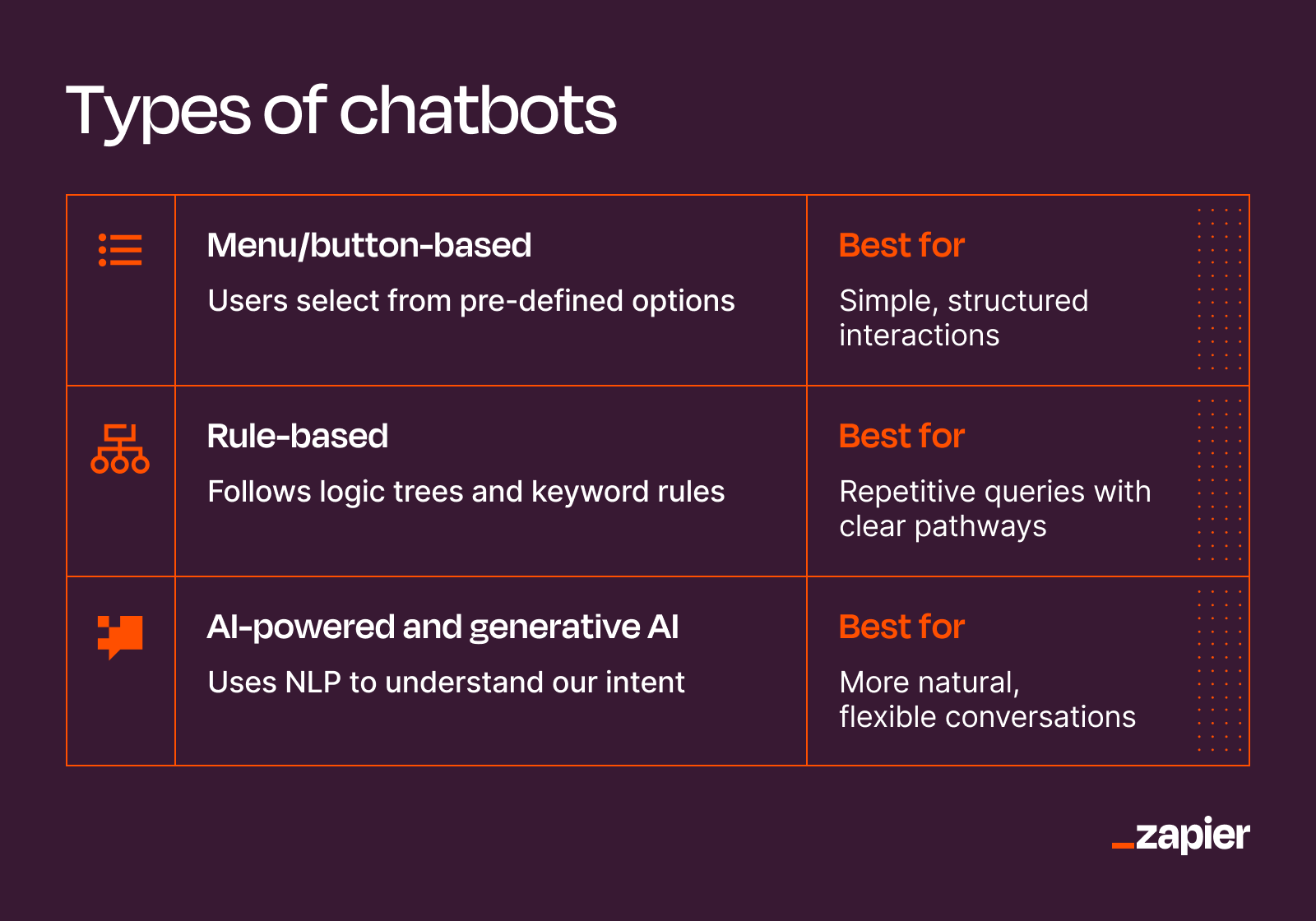
Not all chatbots are built the same. The architecture you pick determines what your bot can handle and how much maintenance it requires.
Menu-based chatbots are the simplest. Users tap buttons or quick replies to navigate a fixed decision tree. They're fast to build and cheap to run, ideal for routing requests or surfacing FAQs. But they can't handle anything outside their script.
Rule-based chatbots match keywords to pre-written responses. They handle predictable, repetitive queries well, but stumble when the input doesn't match their training. Maintenance scales with the number of rules you write.
AI chatbots use natural language processing to interpret intent and context. The generative variety, built on LLMs, don't just retrieve answers. They generate responses on the fly. These are the bots that can summarize a support thread, compose a follow-up email, or answer a question your team never anticipated. They cost more to run and require guardrails to prevent hallucinations, but they're the only option for complex, dynamic interactions.
1. Customer support: deflecting tickets with self-serve answers
Support teams repeat themselves constantly. Order status, return policies, password resets. A well-connected chatbot can answer these queries instantly, pulling from your knowledge base or eCommerce platform.
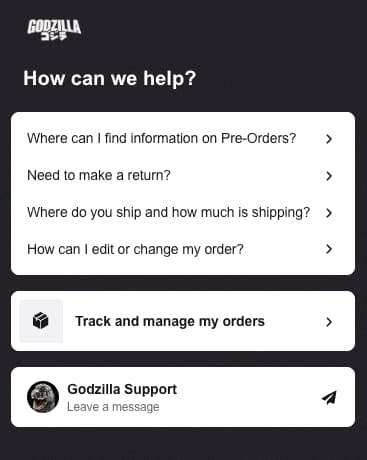
The Godzilla store, for example, uses a menu-based bot as a self-serve portal. Customers tap through five common questions without waiting for an agent. Simple, but effective for high-volume, low-complexity queries.
For more nuanced support, help desk platforms like Intercom and Zendesk offer built-in AI chatbots that read your knowledge base and generate contextual answers. When the bot can't resolve an issue, it escalates to a human agent, passing along the conversation history. The handoff matters: nothing frustrates customers more than repeating themselves after a failed bot interaction.
2. B2B sales: qualifying leads before they reach your reps
Sales teams lose hours chasing leads who were never going to buy. A chatbot on your pricing page or demo request form can ask qualifying questions (company size, budget, timeline) and route only the matches to your pipeline.
The best implementations connect directly to your CRM. When a visitor answers the bot's questions, the data flows into HubSpot, Salesforce, or Pipedrive as a new lead record, tagged with the qualification score. Your rep sees the full context before the first call.
This isn't just about filtering out bad leads. It's about speed. A bot can respond in seconds at 2 AM. A human can't. And response time correlates directly with conversion rates in B2B sales.
3. IT helpdesk: password resets and ticket triage
Internal IT teams field the same requests on loop. Password resets, VPN setup, software access. A chatbot integrated with your identity provider can handle these without human intervention.
For more complex issues, the bot can create a ticket in your ITSM system, collect the relevant details (error message, device type, urgency), and assign it to the right queue. The IT team starts with context instead of chasing it.
Platforms like Slack make this seamless. An employee types a question in a support channel; the bot responds in-thread. No portal, no form, no context switching.
4. HR onboarding: answering policy questions at scale
New hires have endless questions. Where's the expense policy? How do I enroll in benefits? When's the next payday? HR teams spend a disproportionate amount of time on these basics.
An HR chatbot trained on your employee handbook and internal wiki can handle the bulk of these queries. The interaction stays in Slack or Teams, where employees already work. The bot surfaces the relevant policy section, links to forms, or walks through a process step by step.
This scales beyond onboarding. PTO balances, performance review timelines, org chart lookups, all handled without a ticket or a meeting.
5. Internal ops: automating repetitive Slack requests
Operations teams answer the same internal questions repeatedly. What's the status of that order? Can you pull last week's metrics? Where's the latest version of the deck?
A custom chatbot, built with Zapier or Make, can connect to your data sources and respond to these queries automatically. Someone asks "What's the status of order #4521?" in Slack. The bot queries your order management system and replies in seconds.
The key is integration. A chatbot that just echoes your FAQ is a glorified search bar. One that pulls live data from Airtable, your CRM, or your analytics platform becomes genuinely useful.
Logicity's Take
Most teams overthink their first chatbot. Start with the single question your team answers most often, then measure deflection rate before expanding. Zapier's pricing starts at $29.99/month for basic automations; Intercom's AI add-ons run significantly higher. The ROI calculation should be time saved per query multiplied by query volume, not feature count.
6. Marketing: lead capture without the form
Traditional lead capture forms are friction. Chatbots can replace them with a conversational flow that feels faster, even if it collects the same information.
A visitor lands on your pricing page. Instead of filling out a form and waiting for a response, they chat with a bot. It asks what they're looking for, answers basic questions, and collects their email only after demonstrating value. The conversion rate often improves because the interaction feels like a conversation, not a transaction.
These leads can flow directly into your email marketing platform. Mailchimp, ActiveCampaign, or Customer.io can trigger a welcome sequence the moment the bot captures an email, tagged with the context of what the visitor was asking about.
7. eCommerce: product recommendations and order tracking
eCommerce chatbots handle two jobs well: helping customers find products and answering post-purchase questions.
On the discovery side, an AI chatbot can ask what the customer is looking for, parse the response, and recommend products from your catalog. It's a more natural interface than filters and search bars for customers who don't know exactly what they want.
Post-purchase, the same bot can answer "Where's my order?" by querying your Shopify backend and returning tracking information. This deflects a significant chunk of support tickets and reduces the time to resolution for the customer.
Relevant for ops teams evaluating payment infrastructure alongside customer-facing automation
How to measure whether your chatbot is working
Deploying a chatbot is the easy part. Knowing if it's delivering value requires tracking the right metrics.
- Containment rate: the percentage of conversations the bot resolves without human escalation. A well-tuned support bot should hit 60-80%.
- First response time: how quickly the bot engages. This should be near-instant.
- CSAT for bot interactions: most chatbot platforms let you collect a thumbs up/down after resolution. Track the trend.
- Escalation reasons: when the bot hands off to a human, why? This tells you where to improve the bot's training or expand its capabilities.
- Conversion rate: for sales and marketing bots, measure how many conversations result in a qualified lead or purchase.
Review these weekly for the first month, then monthly. A bot that seemed to work at launch can drift as your products, policies, or customer base change.
Frequently Asked Questions
How much does a business chatbot cost?
Menu-based bots on platforms like ManyChat or Chatfuel start free or under $15/month. AI chatbots with CRM integrations (Intercom, Drift) typically run $50-500/month depending on volume and features.
Can chatbots integrate with my existing tools?
Yes. Most modern chatbot platforms offer native integrations with CRMs, help desks, and eCommerce platforms. For custom setups, Zapier or Make can bridge the gap.
Do customers actually like talking to chatbots?
Customers like fast answers. A bot that resolves their issue in 30 seconds beats a 10-minute hold time. But a bot that loops endlessly or fails to escalate frustrates users quickly.
How long does it take to set up a chatbot?
A simple menu-based bot can be live in an afternoon. An AI chatbot trained on your knowledge base takes 1-2 weeks to configure and test properly.
Need Help Implementing This?
If you're evaluating chatbot platforms for your operations stack, reach out to Logicity's team for vendor comparisons and implementation guidance tailored to your use case.
Source: The Zapier Blog
Huma Shazia
Senior AI & Tech Writer
Produced with AI assistance and reviewed by the Logicity editorial team. Learn more in our Editorial Policy.