Key Takeaways
- Linux updates all apps and the OS with a single command, no forced reboots required
- Bulk uninstalling apps on Linux needs no third-party tools and leaves no registry junk
- A broken Linux system can often be recovered without a full OS reinstall
Linux handles several routine computing tasks better than Windows. Software updates, bulk app removal, and system recovery are all simpler on modern Linux distributions. That's the core argument from How-To Geek's Faisal Rasool, and after testing the claims, they hold up.
Windows remains the default desktop OS for most users. But default doesn't mean optimal. The way Windows handles certain workflows, from patching apps to cleaning up uninstalls, creates friction that Linux distributions solved years ago. With Linux's desktop market share hitting an all-time high of 5.33% on Steam in March 2026, more users are discovering these differences firsthand.
How does Linux update all apps at once?
On Windows, each app is responsible for updating itself. Some apps check for updates on launch. Others require you to download a new installer manually. The Microsoft Store handles its own apps, but most software lives outside that walled garden.
Linux takes a different approach. Every distribution ships with a package manager, a command-line tool that connects to central software repositories. The distribution maintainers vet these packages for safety before adding them. When you want to update, one command handles everything.
sudo apt update && sudo apt upgradeThat single line updates every installed package on a Debian-based system like Ubuntu. On Arch Linux, the equivalent is:
sudo pacman -SyuRolling-release distributions like Arch deliver the absolute latest versions as soon as developers push them. Fixed-release distributions like Ubuntu wait until maintainers verify stability. Either way, the operating system updates alongside your apps. No separate Windows Update. No reboot forced at 2 AM during a deadline.
Why is bulk app removal cleaner on Linux?
Windows delegates uninstallation to each app's developer. If that developer wrote a sloppy uninstaller, you're left with ghost processes, orphaned registry entries, and junk files scattered across your system. Cleaning up requires third-party tools like BCUninstaller.
Linux handles removal through the same package manager that installed the software. The system knows exactly which files belong to each package and removes them completely.
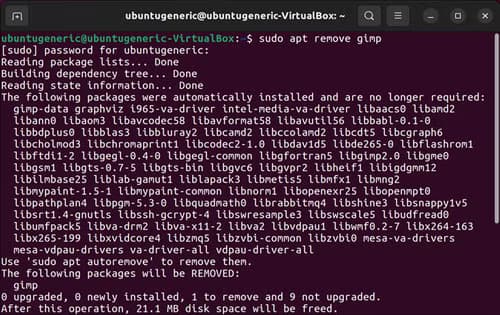
sudo apt purge firefox thunderbird gimp vlcThat command removes four apps simultaneously. No clicking through uninstaller wizards. No leftover configuration files. The purge flag ensures even settings are deleted. Try doing that on Windows without installing additional software.
How does Linux recovery beat Windows?
When Windows encounters a critical error, you get the recovery screen. Your options are limited: run startup repair, restore from a checkpoint (if you set one up), or reset the PC entirely. Without a restore point, reinstallation is often the only path forward. Accessing your files from recovery mode means wrestling with command-line tools in a stripped-down environment.
Linux distributions typically include a live USB recovery option. You can boot into a full graphical environment from a USB drive, access your files normally, and repair the broken installation. Because the package manager tracks every system file, you can often reinstall corrupted packages without touching user data.
Most breakages on Linux stem from misconfigured boot files or driver issues. Both are fixable from a live environment without wiping the system. The modular nature of Linux, where the kernel, display server, and desktop environment are separate components, means you can repair one layer without disturbing others.
What about hardware support?
Older hardware often runs better on Linux than Windows. Microsoft drops support for aging processors, famously excluding many capable machines from Windows 11. Linux distributions have no such restrictions. A ten-year-old laptop that struggles with Windows 10 can run a lightweight distribution like Xubuntu or Linux Mint smoothly.
The Raspberry Pi ecosystem, running entirely on Linux, demonstrates how little hardware modern software actually requires. The same kernel powering tiny single-board computers runs on 96.3% of the world's top million web servers and 90% of public cloud workloads. Linux scales from a $35 Pi to hyperscale data centers.
Where does Linux still lag?
Not everything favors Linux. Adobe Creative Cloud doesn't run natively. Certain enterprise accounting packages require Windows. Gaming has improved dramatically, especially with the Steam Deck pushing Proton compatibility, but anti-cheat software in some multiplayer titles still blocks Linux users.
The learning curve exists. Configuring printers, setting up some Wi-Fi drivers, or troubleshooting Nvidia graphics can still frustrate newcomers. But for the core tasks Rasool identifies, software management and system maintenance, Linux genuinely requires less effort once you know the basics.
Logicity's Take
The real story here isn't that Linux is better. It's that Windows chose a different design philosophy, one that prioritizes app developers' autonomy over system-level consistency. That choice made sense when the Microsoft Store didn't exist and the web was the primary software distribution channel. In 2026, it creates unnecessary friction. Microsoft could adopt a unified package management approach for win32 apps, but that would require developers to cede control. Don't hold your breath.
Frequently Asked Questions
Is Linux really easier than Windows for beginners?
For specific tasks like software updates and app removal, yes. For general computing, the learning curve depends on your existing habits and which distribution you choose. Ubuntu and Linux Mint are designed for Windows switchers.
Can I run Windows apps on Linux?
Many Windows apps work through Wine or Proton. Steam's Proton layer handles most games. Professional software like Adobe products typically doesn't work reliably, though alternatives like GIMP and Kdenlive exist.
How do I update all my Linux apps at once?
Use your distribution's package manager. On Ubuntu and Debian, run 'sudo apt update && sudo apt upgrade' in the terminal. On Fedora, use 'sudo dnf upgrade'. Graphical software centers also offer one-click update options.
Will switching to Linux void my warranty?
Installing Linux doesn't typically void hardware warranties. However, manufacturers may not provide technical support for Linux-specific issues. Always back up data before switching operating systems.
Which Linux distribution should I try first?
Linux Mint or Ubuntu are the standard recommendations for Windows users. Both offer familiar desktop layouts and extensive documentation. Fedora suits those who want newer software versions without Arch's manual setup.
Another productivity workflow that removes manual drudgery from a common task
Need Help Implementing This?
If you're considering migrating workstations to Linux or want to evaluate where it makes sense for your team, contact Logicity's editorial team for vendor-neutral guidance on enterprise Linux adoption strategies.
Source: How-To Geek
Huma Shazia
Senior AI & Tech Writer
Produced with AI assistance and reviewed by the Logicity editorial team. Learn more in our Editorial Policy.






