Key Takeaways
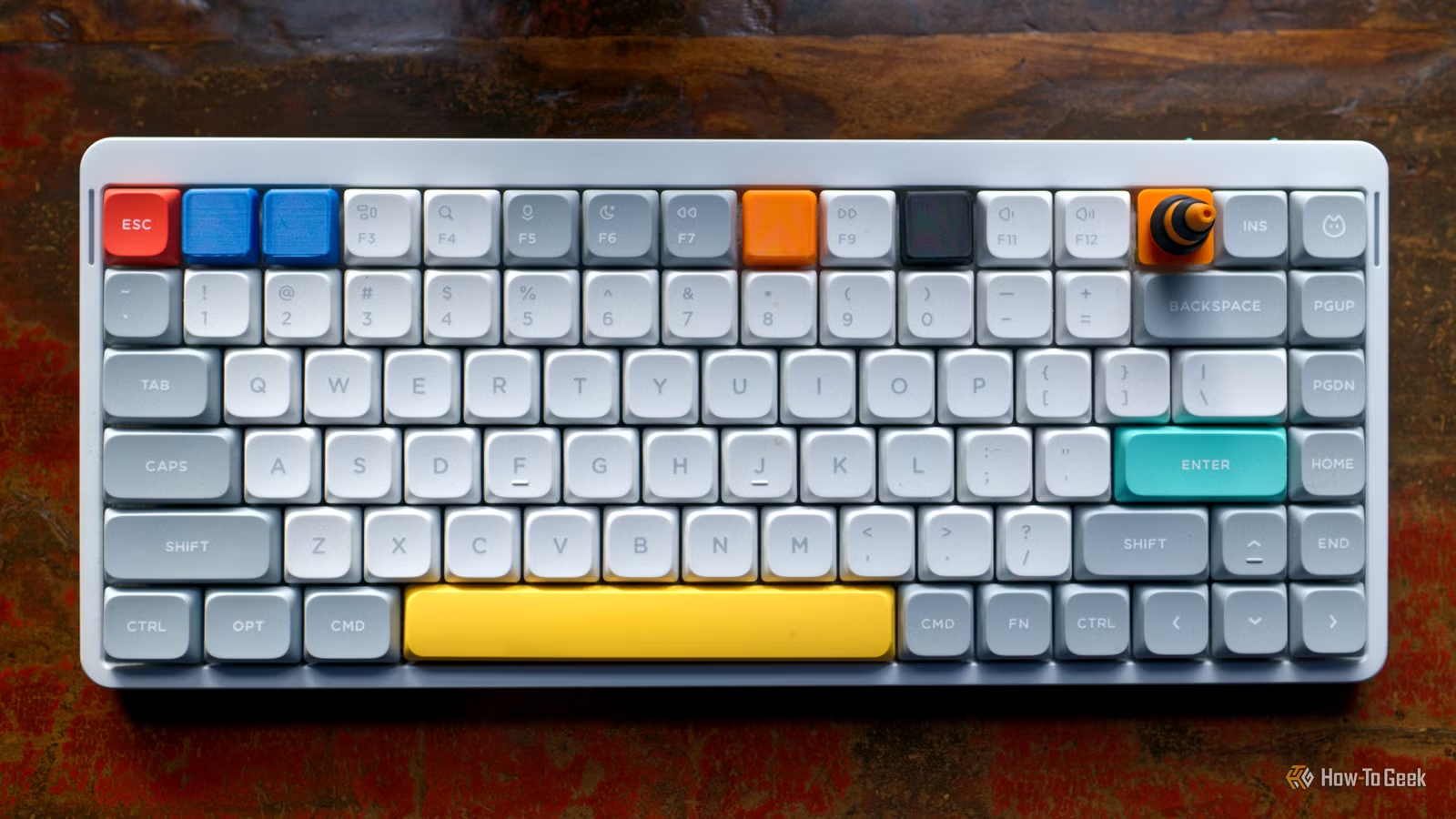
- Custom 3D printed keycaps can reduce costs by 10x compared to artisan storefronts
- Over 15,000 community-made keyboard designs are available on Printables for free
- FDM printing works for prototypes, but resin printing delivers smoother finishes for daily use
Tim Brookes, senior editor at How-To Geek, 3D printed custom keycaps for his function row to display the actual shortcuts he uses daily. The project swaps generic F1-F12 labels for icons showing volume controls, screenshots, and app launchers. It's a small modification that solves a real annoyance: staring at blank function keys while trying to remember which one does what.
The mechanical keyboard community has been moving in this direction for years. What started as expensive group buys for artisan keycaps has become a maker movement built on open-source CAD files and consumer-grade 3D printers. Brookes' approach represents the practical end of this shift: not chasing aesthetics, but improving daily workflow.
Why print your own keycaps instead of buying them?
The economics are compelling. Custom keycap sets from artisan storefronts often run $50 to $150 for a single row of specialty caps. A spool of PLA filament costs around $20 and can produce dozens of keycaps. That's roughly a 10x cost reduction for anyone willing to learn basic CAD.
Beyond cost, there's the customization angle. Commercial keycap sets lock you into someone else's idea of useful shortcuts. If you've remapped F5 to open your terminal and F9 to trigger a custom macro, good luck finding a keycap set that reflects that. Printing your own means the physical keys match your actual workflow.
What you need to get started
The barrier to entry is lower than most people assume. You need a 3D printer (FDM works fine for prototypes, though resin produces smoother results), access to keycap CAD files, and basic slicing software. The community has done most of the hard work already.
Printables hosts over 15,000 community-made mechanical keyboard designs, including parametric keycap generators that let you specify profile, stem type, and legend placement. KeyV2, an OpenSCAD library, remains the go-to tool for generating custom cap profiles. It handles Cherry, DSA, SA, and OEM profiles out of the box.
For legends (the symbols on top of the keycap), you have two options: print them as raised or recessed features, or apply vinyl stickers after printing. Raised legends work best with multi-color printing or a filament change mid-print. Recessed legends can be filled with paint or left as-is for a subtle look.
FDM vs resin: which printing method works better?
Reddit's r/MechanicalKeyboards community debates this constantly. FDM (filament-based) printing is cheaper and faster, but produces visible layer lines. For function row keys you glance at occasionally, this might be acceptable. For daily-driver keycaps you touch constantly, the texture becomes noticeable.
Resin printing delivers smooth, injection-molded-quality surfaces. The tradeoff: resin is messier, requires post-processing (washing and curing), and the printers cost more to operate. Most hobbyists start with FDM to prototype designs, then move to resin for final prints they'll actually use.
Material choice matters too. Standard PLA is fine for testing fit, but ABS or ASA handles the oils from your fingers better over time. Resin users typically reach for ABS-like resins that combine durability with the smooth finish the process is known for.
The firmware connection: QMK and VIA
Hacker News discussions around custom keycaps often pivot to firmware. If you're printing custom function row caps with specific icons, you probably want those keys to do specific things. That's where QMK and VIA come in.
QMK is open-source firmware that runs on most custom mechanical keyboards. It lets you remap any key to any function, create layers, and build complex macros. VIA provides a graphical interface for the same functionality. Together, they mean your physical keycap labels can match exactly what the keys do.
Where to find designs and community support
The mechanical keyboard community is unusually generous with designs. Printables and Thingiverse host thousands of free keycap models. GitHub repositories like KeyV2 and ai03's keyboard design resources provide parametric tools that generate caps to your exact specifications.
For troubleshooting, r/MechanicalKeyboards and the QMK Discord are active daily. Common issues like stem fit (too tight or too loose), warping during printing, and legend readability have been solved repeatedly, with documented fixes.
YouTube creators like Joe Scotto and Taeha Types have produced comprehensive build guides. Scotto's hand-wiring tutorials are particularly relevant for anyone building a fully custom board to go with their custom caps.
Frequently Asked Questions
Can any 3D printer make keycaps?
Most FDM printers can produce functional keycaps, though quality varies. A 0.4mm nozzle and 0.1mm layer height are the minimum for usable results. Resin printers produce significantly better surface finish.
Do 3D printed keycaps feel different from commercial ones?
Yes. FDM keycaps have a slight texture from layer lines. Resin-printed caps feel smoother and closer to commercial PBT or ABS keycaps. Material choice also affects feel and durability.
What keycap profiles can I 3D print?
All common profiles are available as printable models: Cherry, OEM, DSA, SA, and XDA. KeyV2 and similar tools can generate custom profiles if standard ones don't fit your needs.
How long does it take to print a keycap?
A single keycap takes 20-45 minutes on FDM depending on profile height and print settings. Resin is faster per cap but requires batch printing and post-processing time.
Will 3D printed keycaps fit my keyboard?
If your keyboard uses MX-style switches (the most common type), standard 3D printed keycaps will fit. Check your switch type before printing. Low-profile switches require different stem designs.
Logicity's Take
This is the quiet side of the maker movement that actually sticks. While 3D printing hype cycles through novelty items, the mechanical keyboard community has built real infrastructure: parametric design tools, material guides, firmware integration. The function row is the perfect entry point because the stakes are low (you're not replacing your daily-driver alphas) and the payoff is immediate. If you own a 3D printer and a programmable keyboard, this is a weekend project worth trying.
Related hardware upgrade for your custom keyboard setup
Need Help Implementing This?
Want guidance on 3D printing keycaps, setting up QMK firmware, or choosing the right materials for your build? Contact the Logicity team at hello@logicity.in for personalized recommendations.
Source: How-To Geek
Manaal Khan
Tech & Innovation Writer
Produced with AI assistance and reviewed by the Logicity editorial team. Learn more in our Editorial Policy.






