Key Takeaways

- C++ stores 2D arrays in row-major order, making row iteration significantly faster than column iteration
- std::vector<std::vector<int>> offers memory safety at a small performance cost versus raw arrays
- C++23's std::mdspan provides a modern, zero-overhead abstraction for multidimensional data
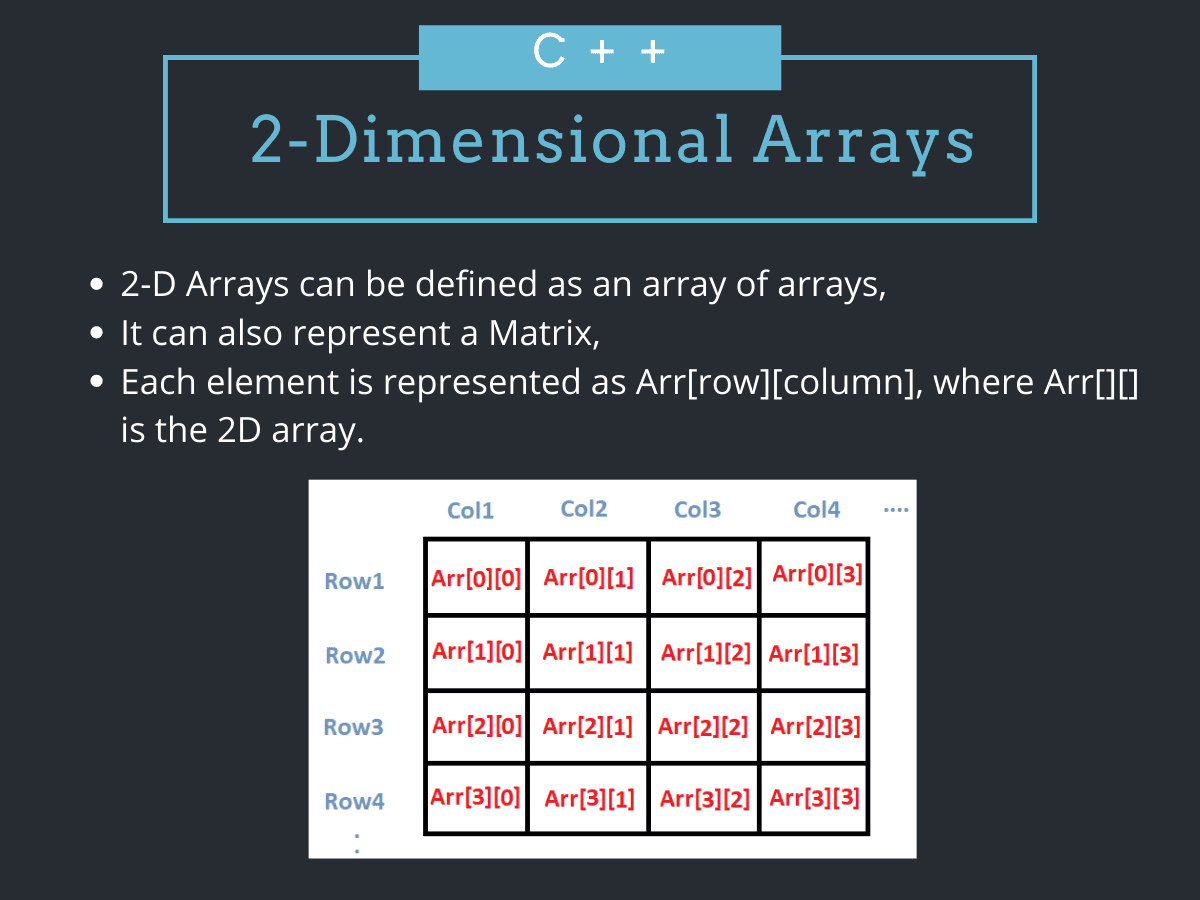
A 2D array in C++ is a contiguous block of memory organized into rows and columns. The compiler stores elements row by row, so iterating across a row is fast while jumping between columns thrashes the cache. Understanding this layout separates code that runs from code that crawls.
This guide covers declaration, initialization, and common operations on 2D arrays. We'll compare raw arrays against std::vector and look ahead to C++23's std::mdspan. By the end, you'll know which approach fits your project.
How C++ stores a 2D array in memory
C++ inherited its array model from C. A 2D array like int arr[2][3] is not a grid floating in abstract space. It's six integers packed consecutively in RAM: arr[0][0], arr[0][1], arr[0][2], arr[1][0], arr[1][1], arr[1][2]. This arrangement is called row-major order.
Row-major order means the CPU's cache line can prefetch an entire row in one go. Access patterns that follow this layout can be 10 to 100 times faster than patterns that jump across columns. When you see slow matrix code, the first suspect is usually an inner loop iterating over the wrong dimension.
Declaring and initializing a 2D array
You declare a static 2D array by specifying its type and both dimensions. The column size must always be provided; the row count can be inferred from the initializer.
int arr[4][2] = {
    {1234, 56},
    {1212, 33},
    {1434, 80},
    {1312, 78}
};
The nested braces make each row explicit. You can flatten the values into a single list, but doing so invites off-by-one bugs and makes the code harder to read.
// Less readable, same result
int arr[4][2] = {1234, 56, 1212, 33, 1434, 80, 1312, 78};
If you supply fewer values than the array holds, the remaining elements are zero-initialized. If you supply more, the compiler will refuse to build.
Printing and iterating over a 2D array
Nested loops are the standard way to traverse a 2D array. The outer loop walks the rows; the inner loop walks the columns. Keeping this order matches the memory layout and keeps the cache happy.
for (int i = 0; i < rows; ++i) {
    for (int j = 0; j < cols; ++j) {
        std::cout << arr[i][j] << ' ';
    }
    std::cout << '\n';
}
Swapping i and j compiles fine but defeats prefetching. On large matrices, the wrong loop order can be the difference between milliseconds and seconds.
Reading user input into a 2D array
Collecting values from the console follows the same nested-loop pattern. Validate the expected dimensions before entering the loop; raw arrays have zero bounds checking, so reading past the end corrupts memory silently.
Code sample: for (int i = 0; i < rows; ++i) {
for (int j = 0; j < cols; ++j) {
std::cin >> arr[i][j];
}
}
Matrix operations: addition and transposition
Matrix addition requires two matrices of the same dimensions. You iterate through both in lockstep and sum the corresponding elements.
Code sample: for (int i = 0; i < rows; ++i) {
for (int j = 0; j < cols; ++j) {
result[i][j] = A[i][j] + B[i][j];
}
}
Transposition swaps rows and columns. The output array has dimensions reversed: if A is 3×4, its transpose is 4×3.
Code sample: for (int i = 0; i < rows; ++i) {
for (int j = 0; j < cols; ++j) {
transposed[j][i] = original[i][j];
}
}
Passing a 2D array to a function
Raw arrays decay to pointers when passed to functions. For a 2D array, this means you must specify the column size in the function signature; the row size can remain unknown.
Code sample: void print(int arr[][3], int rows) {
// function body
}
This syntax is awkward and error-prone. It's one of the main reasons developers migrate to std::vector or templated functions that deduce dimensions at compile time.
Dynamic 2D arrays with pointers
When dimensions are unknown at compile time, you can allocate a 2D array on the heap. The classic approach uses a pointer-to-pointer: one array of row pointers, each pointing to its own column array.
Code sample: int arr = new int*[rows];
for (int i = 0; i < rows; ++i) {
arr[i] = new int[cols];
}
This structure is flexible but scatters memory across the heap, breaking the contiguous layout that makes row traversal fast. Each row allocation is a separate system call, and each row may land on a different cache line. For large matrices, the performance penalty is severe.
You must also remember to delete each row before deleting the outer array. Forgetting any step leaks memory. Modern C++ discourages this pattern.
std::vector for 2D arrays
std::vector<std::vector<int>> offers automatic memory management, bounds-checked access (via .at()), and resizable rows. You declare it in one line.
Code sample: std::vector<std::vector<int>> grid(rows, std::vector<int>(cols, 0));
Each inner vector is a separate heap allocation, so you lose the strict contiguity of a raw 2D array. For most applications, this tradeoff is acceptable. For high-performance numerical code, you can flatten the structure into a single vector and compute indices manually: index = row * cols + col.
“Modern C++ is about managing complexity, not just memory. If you're still using raw 2D arrays, you're missing the safety and convenience of the Standard Library.”
— Bjarne Stroustrup, Creator of C++
Static vs. dynamic vs. vector: picking the right tool
| Approach | Memory layout | Bounds checking | Best for |
|---|---|---|---|
| Static array | Contiguous, stack | None | Fixed-size, hot loops |
| Pointer-to-pointer | Scattered, heap | None | Legacy codebases |
| std::vector<vector> | Per-row heap | .at() available | General-purpose code |
| Flattened vector | Contiguous, heap | .at() available | Performance-critical grids |
Choose static arrays when dimensions are compile-time constants and you need maximum speed. Prefer vectors for everything else. Avoid pointer-to-pointer unless you're maintaining old code that already uses it.
Optimizing 2D array performance
Three rules cover most optimization scenarios. First, iterate row-first. Second, flatten your data when inner-loop speed matters. Third, align your allocation to cache-line boundaries (64 bytes on most x86 CPUs) if you're chasing the last few percent.
Compilers can vectorize contiguous loops automatically. A scattered pointer-to-pointer layout blocks this optimization. If profiling shows cache misses, a flattened representation is the first fix to try.
Common errors and how to avoid them
- Off-by-one indexing: arrays are zero-indexed, so valid indices run from 0 to size-1.
- Wrong loop order: iterating columns in the outer loop hurts cache locality.
- Forgetting to delete: dynamic arrays require manual cleanup or smart pointers.
- Passing arrays without size: always pass row and column counts alongside the array.
Looking ahead: std::mdspan in C++23
C++23 introduces std::mdspan, a non-owning view over multidimensional data. It wraps any contiguous memory, adds bounds-checked indexing, and lets you specify row-major or column-major layout as a template parameter.
Code sample: std::mdspan<int, std::extents<std::dynamic_extent, std::dynamic_extent>> view(data.data(), rows, cols);
mdspan brings zero-overhead abstractions to multidimensional arrays. It doesn't own memory, so you still need a vector or raw buffer underneath, but it standardizes what libraries have been doing ad hoc for years.
Another deep dive on searching through collections, useful for polyglot developers.
Frequently Asked Questions
What is the difference between a 1D and a 2D array in C++?
A 1D array is a single row of elements. A 2D array is an array of arrays, conceptually a grid of rows and columns, stored contiguously in row-major order.
Why does loop order matter for 2D array performance?
C++ stores 2D arrays row by row. Iterating columns in the inner loop follows memory layout, enabling cache prefetching. Reversing the order causes cache misses.
Should I use a raw 2D array or std::vector?
Use raw arrays for fixed-size, performance-critical code. Use std::vector for general-purpose work where safety, resizing, and bounds checking outweigh the small overhead.
How do I pass a 2D array to a function?
Specify the column size in the function signature: void func(int arr[][N], int rows). Alternatively, use std::vector or a templated function to avoid hardcoding dimensions.
What is std::mdspan?
Introduced in C++23, std::mdspan is a non-owning, multidimensional view over contiguous memory. It provides zero-overhead indexing and supports both row-major and column-major layouts.
Logicity's Take
Raw 2D arrays still matter for hot paths, but their footgun potential is high. For anything exposed to user input or outside a tight numerical kernel, std::vector wins on safety alone. C++23's mdspan is the best of both worlds once compilers catch up. Plan your migration now.
Need Help Implementing This?
If your team is modernizing legacy C++ or optimizing matrix-heavy code, Logicity can connect you with engineers who specialize in performance tuning and safe memory management. Reach out via our contact page.
Manaal Khan
Tech & Innovation Writer
Produced with AI assistance and reviewed by the Logicity editorial team. Learn more in our Editorial Policy.