Key Takeaways
Windows 11's major context menu upgrades are INSANELY good (hands-on)
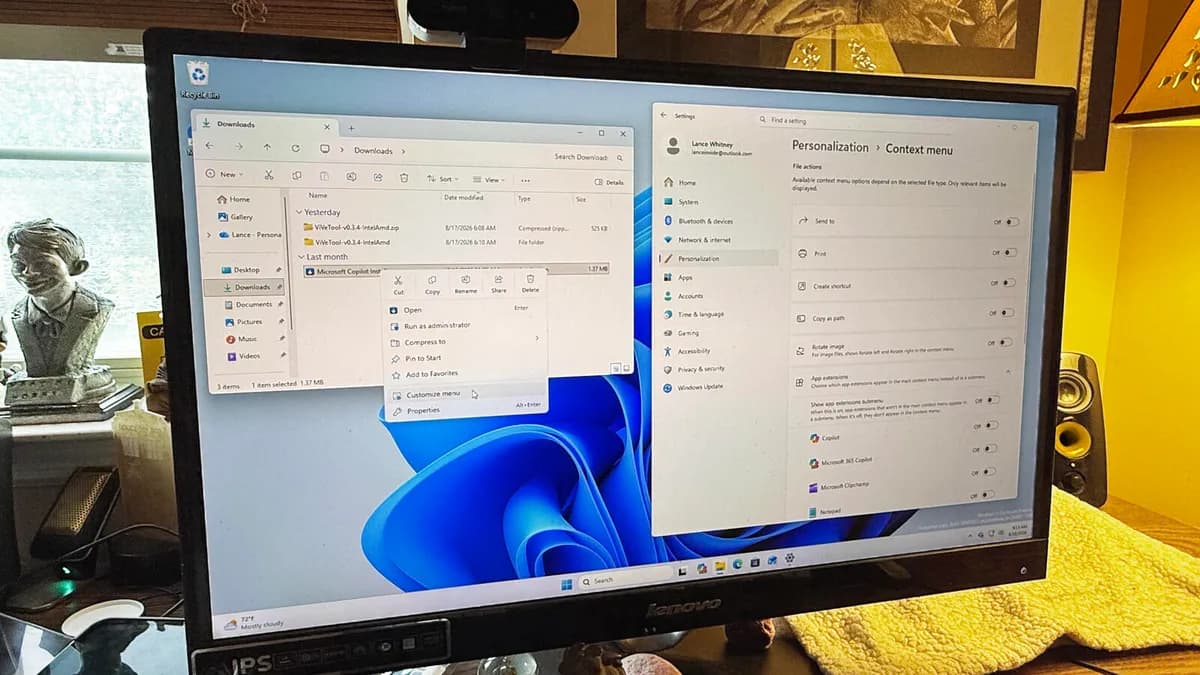
- Windows 11 build 26340.9212 includes a new customizable context menu, but you need Vivetool to unlock it
- You can add or remove commands, hide app extensions, and control where Cut/Copy/Paste appear
- The feature is Insider-only for now, with no confirmed public release date
Microsoft is finally letting Windows 11 users customize the right-click context menu. You'll be able to add commands you use constantly and remove the ones cluttering your workflow. The feature isn't officially live yet, even for Insiders, but you can enable it today with a free utility.
What's changing in the context menu
The Windows 11 context menu has been a compromise since launch. Microsoft replaced the sprawling legacy menu with a cleaner, modern version. The trade-off: if you needed a command that wasn't in the new menu, you had to click "Show more options" to access the old one. Installing more apps made the problem worse.
The new customizable menu fixes this by letting you decide what appears. You can toggle core Windows commands like Send to, Print, Create shortcut, Copy as path, and Rotate image. You can show or hide app extensions from Copilot, Clipchamp, Notepad, Paint, OneDrive, and Photos. You can move Cut, Copy, Paste, Rename, Share, and Delete inline or keep them in a row. You can even push cloud storage commands to their own section and relocate Properties to the bottom.
“The new design reduces top-level clutter, keeps commonly used actions easy to access, and introduces a new Settings experience that gives you more control over what appears in the menu.”
— Microsoft Windows Insider blog
For users who've installed dozens of apps over the years, this is overdue. The more applications you run, the more options appear in Settings for adding or removing menu items.
Requirements before you start
You'll need Windows 11 Insider build 26340.9212 or later. Insider builds can be unstable, so run this on a test machine or a virtual machine, not your daily driver. You'll also need Vivetool, a free utility that unlocks hidden Windows features. Download it from the project's GitHub page.
Logicity's Take
This is a quality-of-life fix, not a major feature. But for power users who've been annoyed by the two-menu system since Windows 11 launched, it removes real friction. The fact that Microsoft still requires a third-party tool to enable it suggests it's not fully baked. Expect rough edges.
How to enable the customizable context menu
- Join the Windows Insider Program and update to build 26340.9212 or later.
- Download Vivetool from GitHub and extract it to a folder you can navigate to easily.
- Open Command Prompt as Administrator.
- Navigate to the Vivetool folder using cd (e.g., cd C:\Users\YourName\Downloads\Vivetool).
- Run: vivetool /enable /id:60813048
- Reboot your PC.
After rebooting, open File Explorer and right-click any file or folder. You'll see a new command called "Customize menu." Click it, and Windows opens the Settings app where you can toggle items on or off.
What you can configure
The Settings screen breaks down into several sections. Windows commands like Send to, Print, and Create shortcut each get their own toggle. App extensions show which installed apps have added context menu entries. You can hide the entire app extension submenu if you want a minimal menu.
You also control layout. The Cut, Copy, Paste, Rename, Share, and Delete commands can appear in a horizontal row at the top or inline with the rest of the menu. Cloud storage commands can move to their own section. You can keep access to the legacy menu or hide it entirely. Properties can sit at the bottom of the menu instead of mixed in.
If you want the sparsest possible menu, turn off everything except the commands you actually use. If you prefer a fuller menu that's still organized, pick your apps and commands selectively.
When will this reach everyone?
Microsoft hasn't announced a public release date. The feature is still hidden behind Vivetool even in Insider builds, which suggests it's early in testing. Microsoft's blog says timing depends on user feedback and internal priorities. A reasonable guess is late 2026, but nothing is confirmed.
Related look at Microsoft's Copilot integration across Windows
Frequently Asked Questions
Do I need to join Windows Insider to try this?
Yes. The feature requires build 26340.9212 or later, which is only available in the Insider Program.
Is Vivetool safe to use?
Vivetool is open-source and widely used by power users to enable hidden Windows features. It modifies feature flags, not system files. Still, use it on a test machine since Insider builds can be unstable.
Can I revert the changes?
Yes. Run vivetool /disable /id:60813048 and reboot to turn the feature off.
Will this remove third-party app entries from my context menu?
You can hide app extensions, but this controls visibility in the new menu. It doesn't uninstall or disable the apps themselves.
Need Help Implementing This?
If you're deploying Windows 11 across a team and want to standardize context menu configurations, contact us for guidance on scripting Vivetool across endpoints or waiting for Group Policy support.
Source: Latest news
Manaal Khan
Tech & Innovation Writer
Produced with AI assistance and reviewed by the Logicity editorial team. Learn more in our Editorial Policy.