Key Takeaways
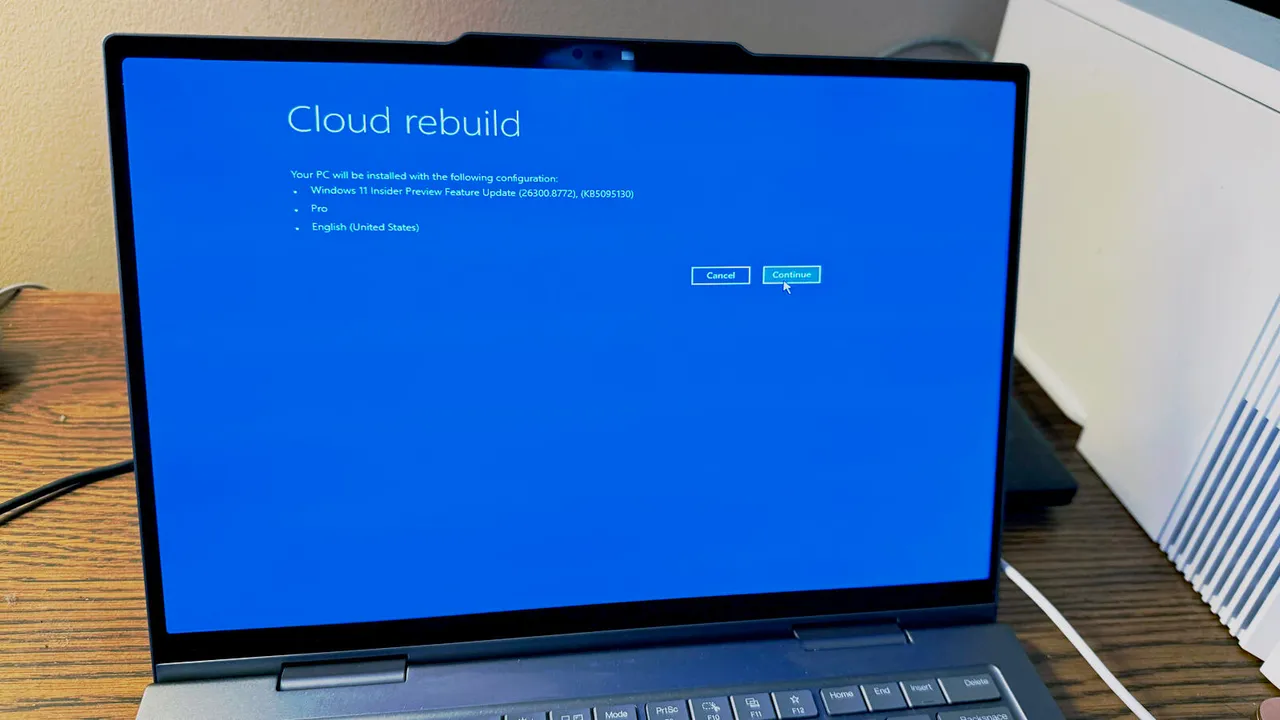
- Cloud Rebuild downloads a fresh Windows 11 image plus drivers from Microsoft's servers, no USB media required
- The feature works even when Windows won't boot, addressing a longstanding gap in Windows recovery
- Personal files, apps, and settings are wiped; backups remain essential before any system failure
Microsoft is testing a new recovery option called Cloud Rebuild that can reinstall Windows 11 from scratch, even when the operating system refuses to boot. The feature, now available to Windows Insiders, downloads a clean OS image and device drivers directly from Microsoft's servers. No USB drive, no recovery partition, no praying your local files aren't corrupted.
For anyone who has stared at a black screen or a boot loop on a production machine, this closes a real gap. Apple introduced Internet Recovery for Macs over a decade ago. Windows users have been stuck with "Reset this PC," which depends on the health of the installed OS. If the OS is too broken to reset itself, you're hunting for installation media or calling IT.
What Cloud Rebuild actually does
Cloud Rebuild pulls both the Windows 11 image and your device's specific drivers from Windows Update. That means the reinstalled system boots fully functional, with hardware support intact. It also applies the latest security patches and cumulative updates automatically. You skip the post-install ritual of downloading dozens of updates before the machine is usable.
"Unlike Reset this PC, Cloud rebuild downloads both the target Windows image and the device's drivers from Windows Update, so the device comes back fully functional without USB media, without a custom image, and without depending on the health of the currently installed OS," Microsoft said in documentation describing the feature.
The tradeoff is straightforward. Personal files, installed applications, and customized settings are wiped. This is a scorched-earth recovery, not a repair. Microsoft expects users to have backups or cloud sync in place.
How to access Cloud Rebuild (preview)
Cloud Rebuild requires Windows 11 Insider Preview Build 26300.8772 or higher. If you're testing on a non-production machine or VM, here's the path:
- Connect to the internet via Ethernet or Wi-Fi.
- Open Settings > System > Recovery.
- Under Recovery options, click "Restart now" next to Advanced startup.
- At the Windows Recovery Environment screen, select Troubleshoot > Recovery and uninstall > Cloud rebuild.
- Review the target Windows build, edition, and language. Click Continue.
- Acknowledge that all personal files, accounts, apps, and settings will be removed. Click Install.
After the rebuild completes, Windows boots to a clean desktop with current updates applied. You'll need to sign in and reinstall your applications.
When will it reach stable Windows 11?
Microsoft hasn't committed to a date. The company wants to validate reliability across hardware configurations and network conditions before a broad rollout. If testing goes smoothly, expect the feature to land for all Windows 11 users within the next few months, almost certainly before the end of 2026.
How Cloud Rebuild compares to other recovery options
Windows 11 already offers several recovery paths, each with different tradeoffs:
| Method | Requires bootable OS? | Preserves files? | Includes latest updates? |
|---|---|---|---|
| Cloud Rebuild | No | No | Yes |
| Reset this PC | Yes | Optional | No |
| Recovery Drive | No | No | No |
| Quick Machine Recovery | Partial | Yes | No |
| Point-in-Time Restore (preview) | Partial | Yes | N/A (snapshot) |
Quick Machine Recovery, another recent addition, tries to troubleshoot boot issues without wiping data. Point-in-Time Restore, also in preview, automatically creates system snapshots and can roll back to a previous state if something breaks. Cloud Rebuild is the nuclear option for when nothing else works.
Logicity's Take
Cloud Rebuild fills a real hole in Windows endpoint management. For IT teams managing fleets of devices, the ability to recover a bricked machine without imaging servers or USB keys simplifies disaster response. The feature won't replace proper backup solutions, but it reduces the scenarios where hardware has to be shipped back to IT or wiped manually. Enterprises already using Microsoft Endpoint Manager or Intune should watch for integration options as the feature matures. For small teams without dedicated IT, this is one less reason to panic when a laptop won't start.
The backup question remains
Cloud Rebuild handles the operating system. It does not handle your data. If your Documents folder isn't synced to OneDrive, Google Drive, or a backup service, those files are gone after a rebuild. The feature is a safety net for the OS, not a substitute for file backup.
This matters more for organizations with compliance requirements. A recovery that wipes all local data may trigger data-loss reporting obligations if users stored sensitive files locally without backup. IT policies should account for this.
Frequently Asked Questions
Does Windows 11 Cloud Rebuild delete all my files?
Yes. Cloud Rebuild wipes personal files, installed applications, and settings. It reinstalls Windows from Microsoft's servers with a clean slate. Back up your data before any major system issue occurs.
Can I use Cloud Rebuild if my PC won't boot?
Yes. The feature is designed for exactly this scenario. It works from the Windows Recovery Environment, which loads even when the main OS is corrupted or won't start.
When will Cloud Rebuild be available to everyone?
Microsoft hasn't announced a specific date. The feature is in preview now. If testing goes well, it could reach all Windows 11 users within the next few months, likely before the end of 2026.
Do I need internet access to use Cloud Rebuild?
Yes. The feature downloads the Windows image and drivers from Microsoft's servers. You need an active Ethernet or Wi-Fi connection during the process.
How is Cloud Rebuild different from Reset this PC?
Reset this PC relies on local recovery files and a partially functional OS. Cloud Rebuild downloads a fresh image from Microsoft, includes drivers and updates, and works even when the installed OS is completely broken.
Microsoft's broader strategic shifts affecting Windows and enterprise products
Need Help Implementing This?
If you're preparing your organization for Windows 11 recovery options or need to update your IT disaster recovery policies, reach out to Logicity's consulting partners for implementation guidance.
Source: Latest news
Manaal Khan
Tech & Innovation Writer
Produced with AI assistance and reviewed by the Logicity editorial team. Learn more in our Editorial Policy.