Key Takeaways
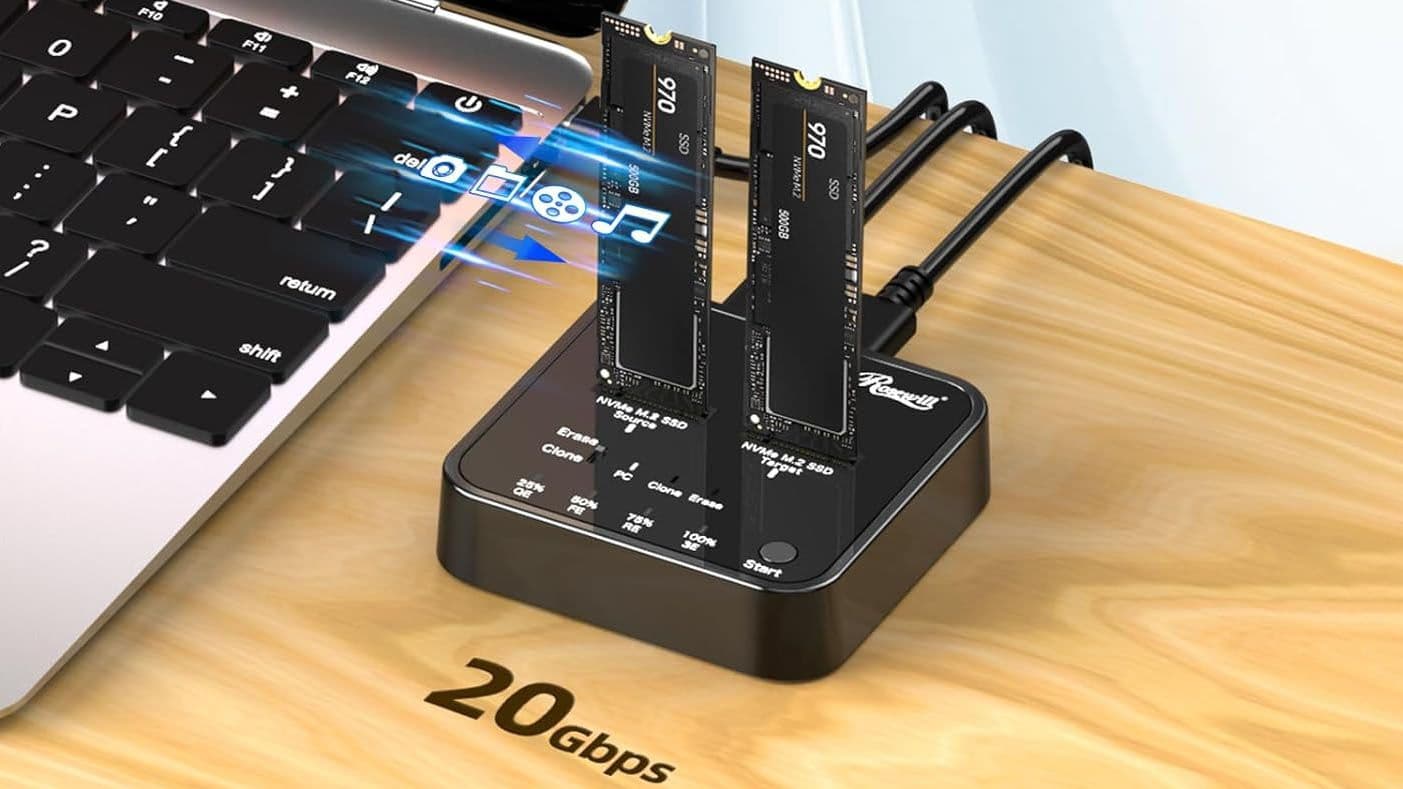
- Rosewill's M.2 NVMe Cloner + Eraser hit $47, its lowest recorded price
- The device supports 20 Gbps USB and includes four offline erase modes
- Hardware cloners eliminate the software headaches of traditional drive upgrades
Rosewill's M.2 NVMe Cloner + Eraser dropped to $47 on Amazon, marking its lowest recorded price. The device lets you duplicate NVMe drives without booting a computer, and adds four one-touch secure erase modes that the basic model lacks.
For IT admins swapping drives across a fleet of machines, or anyone upgrading an old laptop's cramped boot drive, hardware cloners remove the friction of juggling USB enclosures and finicky cloning software. You slot the source drive on the left, the destination on the right, press a button, and wait.
Why hardware cloners beat the old USB enclosure shuffle
The traditional route to cloning a drive involves removing the original SSD, mounting it in an external enclosure, connecting both drives to a PC, running cloning software, and resizing partitions afterward. Each step introduces potential failure points. Software misreads the partition table. The USB adapter doesn't support your drive's protocol. The PC goes to sleep mid-clone.
A standalone cloner sidesteps most of that. Rosewill's unit supports 20 Gbps USB when connected to a computer for partition work, and can run offline clones with no PC at all. Tom's Hardware's Matt Safford described using the device with free DiskGenius software to clone a 110 GB drive to a 512 GB Team Group SSD, resize the partition, and finish in minutes.
The secure erase feature matters too. If you're recycling old drives or prepping machines for resale, a one-button wipe beats booting into specialized utilities or trusting software to actually overwrite data.
What the $47 price point gets you
The upgraded Rosewill cloner includes dual M.2 slots, a USB-C power adapter, a USB-C data cable for tethered operation, and indicator LEDs showing clone progress. The plastic shell isn't premium, but it's functional. The stepped-down model without erase capabilities is also on sale at $39.
Alternatives exist. Sabrent and ORICO sell similar docking stations in the $25-50 range. A basic NVMe enclosure runs around $20 if you only need to read drives, not clone them. But for the specific use case of duplicating drives quickly, the all-in-one cloner design saves time.
Timing matters: Windows 10 end-of-life looms
Microsoft ends Windows 10 support in October 2025. Millions of PCs will either need hardware upgrades to meet Windows 11's requirements, or their owners will need to migrate data to newer machines. Drive cloning becomes more relevant as that deadline approaches.
For small IT shops managing dozens of older workstations, a $47 cloner pays for itself after a handful of drive swaps. The alternative, hours spent per machine with USB adapters and software troubleshooting, doesn't scale.
What to watch for
The offline clone function only works when the destination drive is the same size or larger than the source. If you need to clone to a smaller drive, you'll have to connect the device to a PC and use software to shrink partitions first.
Also, the device only supports M.2 NVMe drives. SATA M.2 drives, 2.5-inch SSDs, and spinning hard drives won't work. If your upgrade path involves mixed drive types, you'll need additional adapters or a different dock.
Logicity's Take
The M.2 cloner market has quietly matured into a genuine productivity category. What used to require a desktop PC and patience now fits in a pocket-sized dock. At $47, Rosewill's device sits at the sweet spot where casual users can justify owning one, rather than renting a friend's time. The secure erase feature also positions it as a compliance tool for organizations that need documented drive sanitization.
Frequently Asked Questions
Can I clone a smaller SSD to a larger one with this device?
Yes. Offline cloning works when the destination drive is equal to or larger than the source. For partition resizing, connect the cloner to a PC via USB-C and use software like DiskGenius.
Does the Rosewill M.2 cloner work with SATA drives?
No. It only supports M.2 NVMe drives. SATA M.2, 2.5-inch SSDs, and HDDs require different adapters.
How long does cloning an M.2 SSD take?
Speed depends on drive size and data volume. With 20 Gbps USB support, a 500GB drive with light data can clone in under 30 minutes. Larger drives with more data take longer.
What are the secure erase modes for?
The device includes four one-touch erase modes for sanitizing drives before disposal or resale. This ensures data isn't recoverable without needing to boot specialized software.
Need Help Implementing This?
Planning a fleet-wide drive upgrade or Windows 11 migration? Logicity.in covers enterprise IT tooling, procurement strategies, and implementation guides. Subscribe for updates on deals and technical deep dives.
Source: Latest from Tom's Hardware
Manaal Khan
Tech & Innovation Writer
Produced with AI assistance and reviewed by the Logicity editorial team. Learn more in our Editorial Policy.