Key Takeaways
DeepTech Briefing #116 — [Multi Model LLM Routing]

- Multi-model routing adds ~200ms latency overhead per request, which matters more for real-time apps than batch workloads
- The same latency tax is invisible on a 1000ms budget but disqualifying on a 100ms one — know your budget first
- Routing is infrastructure, not a feature toggle: wrong routing decisions happen silently and repeatedly
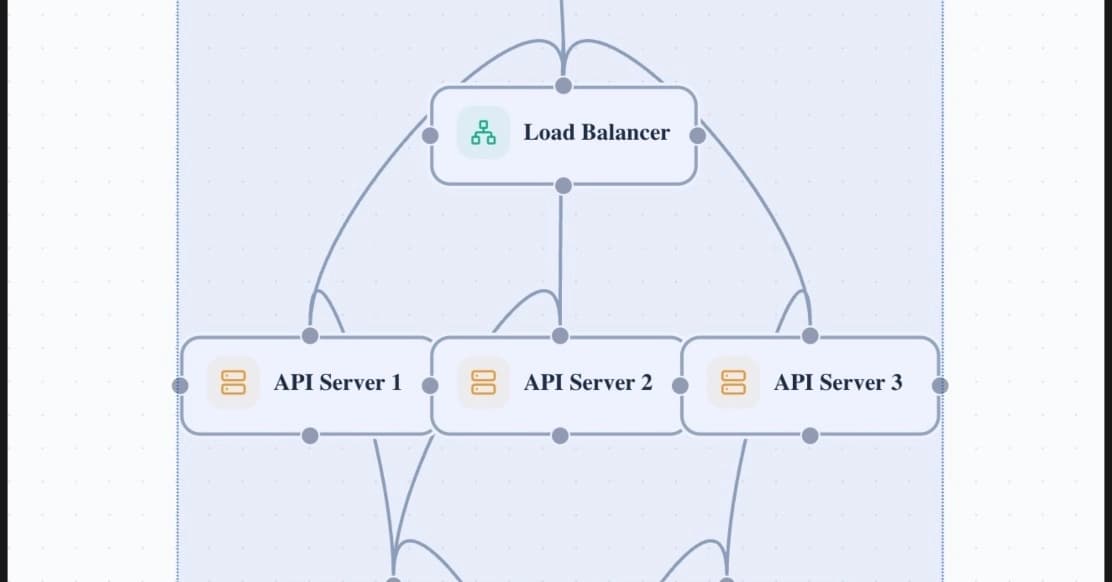
Multi-model routing promises to cut costs, lift quality, and keep your AI stack online when a model goes down. What the vendors don't publish: every router inserts roughly 200 milliseconds of latency into every request, and a wrong routing decision, made silently and repeatedly, creates a risk profile that hardcoded single-model calls never carried.
DigitalOcean published a detailed breakdown on July 21 explaining why multi-model routing is an infrastructure decision, not a feature checkbox. The piece is worth reading because it does something rare in vendor documentation: it states the costs upfront.
Disclosure
Some links in this post are affiliate links — Logicity earns a commission if you sign up, at no extra cost to you. We only link products we have used or actively recommend.
What does 200ms of routing overhead actually cost you?
According to DigitalOcean's documentation, using their Inference Router adds approximately 200 milliseconds of latency compared to calling a model directly. The classifier doing that work, Plano-Orchestrator, resolves intent in roughly that time window. A smaller, faster variant exists when speed matters more than precision.
200 milliseconds sounds small. Whether it is depends entirely on your latency budget.
Chat interfaces treat time-to-first-token under 200-300ms as instant, 300-600ms as tolerable, and anything past a second as noticeably slow. Code-completion tools need to come in well under 100ms to avoid interrupting typing rhythm. Put a 200ms tax next to those targets and you get very different bills.
| Use Case | Latency Budget | 200ms Overhead Impact | Verdict |
|---|---|---|---|
| Batch processing | 5000ms+ | 4% increase | Negligible |
| Chat assistant | 1000ms | 20% increase | Tolerable |
| Real-time chat | 300ms | 67% increase | Painful |
| Code completion | 100ms | 200% increase | Disqualifying |
The pattern matters more than the specific numbers. The same fixed cost is nearly invisible on a generous budget and disqualifying on a tight one. Know your own budget before judging whether routing overhead is a rounding error or a dealbreaker.
Routing accuracy is not 100%, and misroutes fail silently
DigitalOcean's earlier classifier, Arch-Router, achieved roughly 93.17% route-selection accuracy in published benchmarks. The newer Plano-Orchestrator shows 87.84% cross-domain performance. These metrics measure different things and aren't directly comparable, but neither hits 100%.
A misrouted request doesn't throw an error. It returns a valid response from the wrong model. If you're routing high-complexity reasoning queries to a cheaper model 6-12% of the time, you're degrading output quality in ways your monitoring won't catch unless you're explicitly tracking routing decisions against downstream metrics.
This is the risk the pitch decks skip. Single-model architectures have predictable failure modes. Routing architectures have a new category: the silent misroute.
Shows how routing decisions affect real-world automation rates in production AI systems
Fallback logic is not free infrastructure
The sales pitch for routing includes automatic failover: when one model goes down, traffic shifts to another. True. But fallback logic introduces its own complexity.
Your fallback model may have different rate limits, different pricing, different context windows, or different output formats. A routing layer that handles failover doesn't automatically handle the downstream consequences of that failover. Your application code still needs to account for the fact that Model A and Model B behave differently.
Teams that treat fallback as a checkbox often discover this during an outage, not before one.
When multi-model routing is worth it
Routing shines in specific scenarios. High-volume workloads with mixed complexity benefit most. If 60% of your traffic is simple queries that a fast, cheap model handles well, routing saves real money by not burning expensive tokens on easy work.
- Cost optimization at scale: directing simple queries to cheaper models can cut inference costs 40-60%
- Availability requirements: automatic failover matters when uptime SLAs are contractual
- Multi-provider hedging: reducing dependency on a single vendor's capacity or pricing changes
Routing is harder to justify for low-volume applications, latency-sensitive real-time features, or workloads where query complexity is uniformly high. If every request needs your best model anyway, the router is just adding latency.
Context on why AI infrastructure spending is accelerating and driving routing decisions
How to evaluate routing for your workload
Before adding a router, answer three questions.
- What's your p95 latency budget? If it's under 400ms, routing overhead eats a significant chunk.
- What's your query complexity distribution? Routing saves money when complexity varies. If it's uniform, the classifier adds cost without benefit.
- How will you detect misroutes? If you don't have a plan to measure routing accuracy against output quality, you're flying blind.
DigitalOcean's documentation is unusually transparent about these tradeoffs. Other providers, including Anthropic's routing features, OpenAI's model selection, and open-source options like LiteLLM, have their own overhead profiles. Benchmark your actual traffic, not synthetic demos.
Logicity's Take
Most teams adopting multi-model routing treat it like a product feature when it's actually infrastructure that touches every request. The 200ms overhead is acceptable for most web apps but disqualifying for real-time features. Before committing, run your actual traffic through the classifier and measure both latency impact and misroute rate. If you're building on DigitalOcean, their Inference Router is competitively priced; alternatives include Portkey, Martian, and self-hosted LiteLLM. The winner depends on your latency budget and how much routing control you need.
Enterprise AI deployments increasingly require multi-model infrastructure decisions
Frequently Asked Questions
How much latency does multi-model routing add?
DigitalOcean's Inference Router adds approximately 200ms of overhead per request. Their earlier Arch-Router achieved ~50ms. The exact overhead varies by provider and classifier complexity.
What happens when a router picks the wrong model?
Misrouted requests return valid responses from a suboptimal model. This degrades output quality silently — there's no error to catch. Teams need explicit monitoring to detect routing accuracy issues.
Is multi-model routing worth it for small-scale applications?
Usually not. Routing overhead and implementation complexity outweigh benefits at low volume. It becomes worthwhile when you have enough traffic that cost optimization or availability improvements justify the infrastructure investment.
Can I use routing for automatic failover between AI providers?
Yes, but fallback models may have different rate limits, pricing, context windows, and output formats. Your application code needs to handle these differences — routing alone doesn't solve compatibility issues.
What's a good routing accuracy threshold?
Published benchmarks show 87-93% accuracy depending on the classifier. Whether that's acceptable depends on your tolerance for sending complex queries to simpler models. For high-stakes applications, anything under 95% may warrant concern.
Need Help Implementing This?
If you're evaluating multi-model routing for production workloads, start by benchmarking your actual traffic distribution against your latency budget. Logicity covers AI infrastructure decisions weekly — subscribe to get implementation guides and architecture teardowns in your inbox.
Huma Shazia
Senior AI & Tech Writer
Produced with AI assistance and reviewed by the Logicity editorial team. Learn more in our Editorial Policy.