Key Takeaways
- Gemini can now adjust picture, audio, and display settings on Google TV through natural language commands
- You can describe problems like 'the screen is too dark' and Gemini will fix the underlying settings
- Only five TCL premium models have access for the first 60 days, with wider rollout expected this summer
Google announced on June 11 that Gemini can now control hardware settings on Google TV. Instead of hunting through nested menus to adjust brightness or fix muddy dialogue, you can tell your TV what's wrong in plain English.
The feature was first teased at CES in January. Five months later, it's finally shipping, though only to a handful of devices.
What Gemini Can Actually Do
The new voice controls fall into four categories, each solving a different pain point with traditional TV interfaces.
First, direct settings adjustments. You can say things like "Set picture mode to sport" or "Increase the bass." Gemini translates your request into the specific setting changes, no menu navigation required.
Second, and probably most useful: troubleshooting. You describe a problem rather than a solution. Say "The screen is too dark" or "I can't hear the dialogue clearly," and Gemini figures out which settings to tweak. This is the feature that matters most for people who don't know the difference between gamma and contrast.
“We're moving beyond simple voice commands to a conversational interface that understands both the intent and the technical context of your viewing experience.”
— Product Lead, Google TV Team
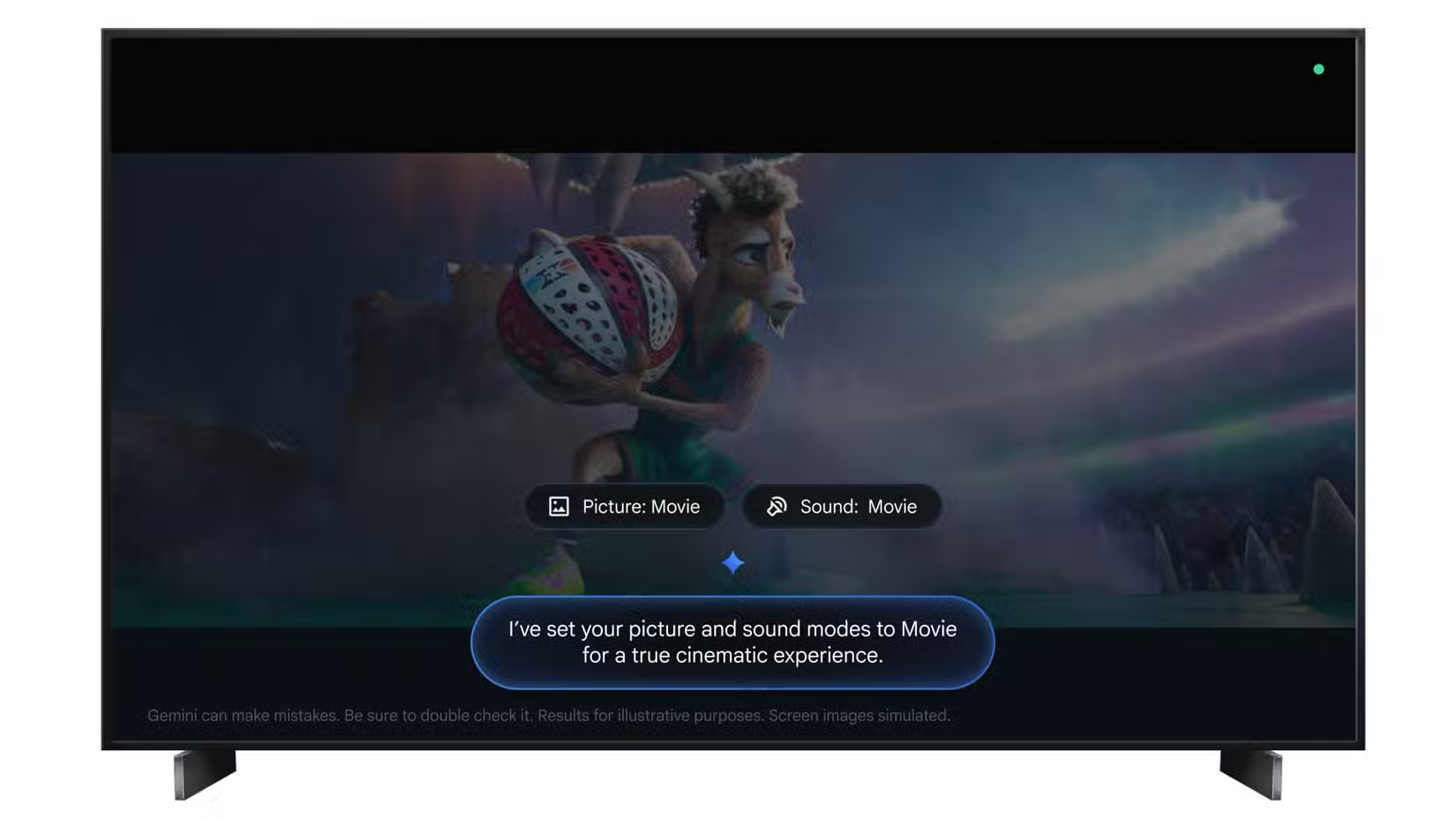
Third, content optimization. Tell Gemini "It's movie night, help make this feel like a cinematic experience," and it adjusts multiple settings at once. This is essentially smart picture modes that respond to context rather than requiring you to remember which preset does what.
Fourth, menu shortcuts. If you prefer manual control but hate hunting through settings, you can say "Open display settings" and jump directly there.
The Availability Problem
Here's where the announcement loses momentum. Right now, only five TCL models with "Gemini for Google TV" branding can use these features. Google hasn't published the exact model list, but they're all premium-tier sets.
The initial rollout period runs 60 days. After that, Google says broader availability will come "later this summer." There's also a hardware floor: devices need at least 2 GB of RAM to run the new Gemini features. That cuts out a lot of older Google TV hardware and budget streaming sticks.
Reddit's r/GoogleTV community has been predictably split. Accessibility advocates see real potential here, especially for users who struggle with complex menu navigation. Power users are frustrated that another AI feature launched with artificial scarcity.
Why This Matters Beyond Convenience
TV settings interfaces haven't fundamentally changed in decades. You get a tree of menus, some sliders, and picture mode presets named things like "Vivid" and "Cinema" that may or may not match what you actually want. Most people never touch them because the effort exceeds the payoff.
Gemini's approach inverts this. Instead of learning your TV's settings taxonomy, you describe what you want or what's wrong. The AI handles the translation. This is what Google means by "multimodal capabilities" in practice: the model understands both what you're saying and how TV display systems work.
The troubleshooting feature is particularly interesting. "I can't hear the dialogue clearly" is a common complaint that could stem from center channel levels, dynamic range compression, dialogue enhancement settings, or just overall volume. Gemini can evaluate multiple possibilities and apply fixes, which is more than most people would do on their own.
Limitations to Watch For
Google notes that "not all TVs offer the same features and settings," which means Gemini's capabilities will vary by device. A command that works on one TCL model might not work on another Google TV when the rollout expands. This could create user confusion as people expect consistent behavior across the platform.
There's also the broader question of AI-driven device fragmentation. HackerNews discussions have flagged this concern: if different manufacturers implement Gemini integration differently, the Android TV ecosystem could become even more inconsistent than it already is.
Logicity's Take
When You'll Actually Get This
If you own one of the five supported TCL models, the feature should be rolling out now. Check for a system update.
For everyone else, "later this summer" is the official timeline. Expect August or September. Your device will also need that 2 GB RAM minimum, so older Chromecast with Google TV units (which ship with 1.5 GB or 2 GB depending on generation) may or may not make the cut.
More on how AI is reshaping device interfaces
Frequently Asked Questions
Which TVs support Gemini voice controls for settings?
Currently only five TCL premium models with "Gemini for Google TV" branding. Wider availability is expected later this summer after a 60-day exclusive period.
What settings can Gemini adjust on Google TV?
Brightness, contrast, volume, picture modes, sound modes, bass levels, and similar display and audio parameters. You can also describe problems like "the screen is too dark" and Gemini will determine which settings to change.
Does my Google TV have enough RAM for Gemini settings control?
You need at least 2 GB of RAM. Older streaming devices and budget hardware may not meet this requirement.
Can Gemini open specific settings menus on Google TV?
Yes. You can say commands like "Open display settings" to jump directly to a menu instead of navigating through the interface manually.
Need Help Implementing This?
Source: MakeUseOf
Huma Shazia
Senior AI & Tech Writer
Produced with AI assistance and reviewed by the Logicity editorial team. Learn more in our Editorial Policy.






