Key Takeaways
- Google Maps now defaults to fuel-efficient routes even when they're slower than the fastest option
- Toggle off 'Prefer fuel-efficient routes' in Settings > Navigation to always get the quickest path
- You can also override the default on a trip-by-trip basis by manually selecting a different route before tapping Start
Google Maps has been quietly routing you on slower roads to save fuel, and most users have no idea. The app's "fuel-efficient routes" feature, which became the default in 2021, prioritizes flat terrain and consistent speeds over the fastest path. The result: trips that can run several minutes longer than necessary. Turning it off takes about ten seconds.
Why Google Maps picks the scenic route
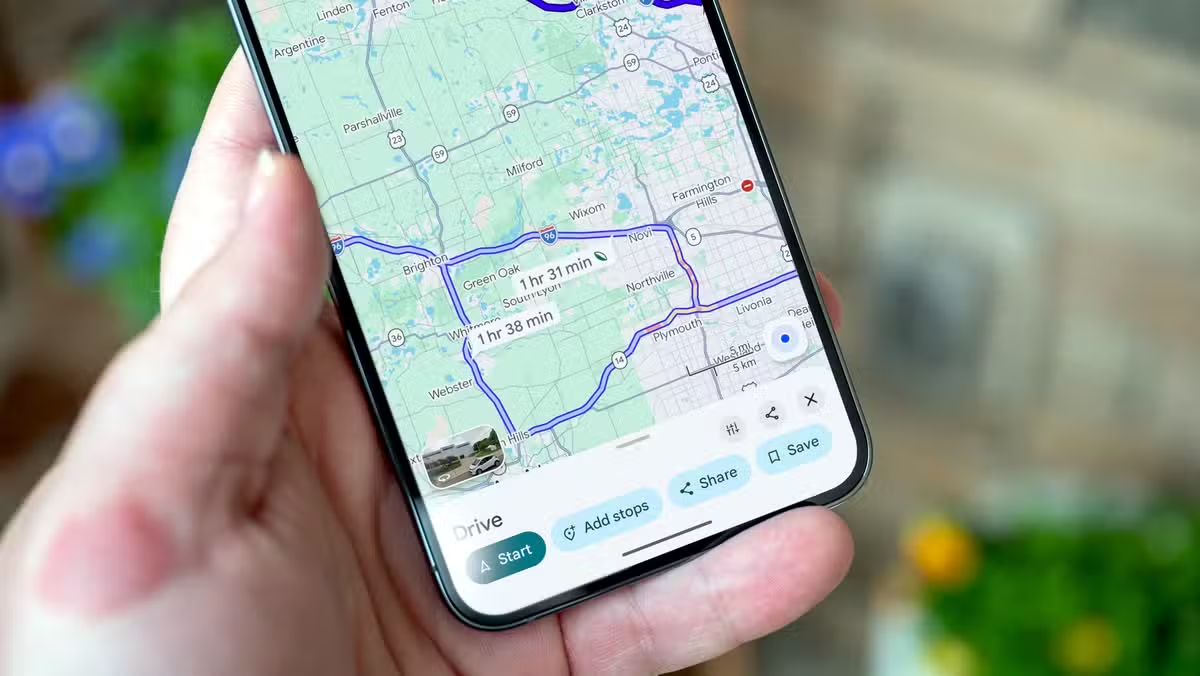
When Google first rolled out eco-friendly routing, the feature flagged fuel-efficient options with a leaf icon but did not select them automatically. That changed. Maps now defaults to these routes "when arrival times are similar," according to Google's own documentation. The problem is that "similar" is doing a lot of work in that sentence.
Fuel-efficient routes favor flat roads, consistent speed limits, and fewer stops. That sounds fine until the app sends you around a hill instead of over it. The detour might save a few cents in gas but costs you real minutes. Google claims eco-routing has prevented over 2.4 million metric tons of carbon emissions since launch, equivalent to pulling 500,000 cars off the road for a year. Whether that trade-off is worth it depends on how much you value your time.
How to disable fuel-efficient routes permanently
The fix works on both Android and iPhone. Open Google Maps, tap your profile picture, and go to Settings. Navigate to the "Navigation" section. Scroll until you find "Prefer fuel-efficient routes" and toggle it off. From now on, Maps will default to the fastest route, not the greenest one.
The setting sticks across sessions, so you only need to do this once. Google syncs preferences to your account, meaning the change should carry over if you switch devices.
Override the default on a single trip
If you prefer to keep eco-routing on most days but want to override it occasionally, you can do that trip by trip. Enter your destination and tap "Directions." Before hitting "Start," look at the routes displayed on the map. The fuel-efficient option shows a leaf icon. Compare arrival times, pick the route you want, and then start navigation.
This approach works well for commutes where you know the roads. You can spot when Maps is trying to send you through a neighborhood instead of the highway.
Is the fuel-efficient route ever the right call?
Google claims savings of up to 50 percent on fuel when using eco-friendly routes. That figure sounds inflated for typical drives, but flat terrain and fewer stops do reduce consumption. If you drive a hybrid or EV, regenerative braking makes the difference even smaller. The bigger factor is often traffic. A route with fewer stops might actually be faster during rush hour.
The honest answer: test both options on your regular routes. If the eco route adds only a minute or two, the fuel savings might be worth it. If it adds ten, probably not.
What this says about default settings
Navigation apps shape how more than a billion people drive. Google choosing eco-friendly routing by default is a policy decision dressed up as a feature. Most users never open settings menus, so defaults determine behavior at scale. Google gets to claim environmental impact; users lose a few minutes here and there without knowing why.
This is not unique to Maps. Defaults in software are rarely neutral. They reflect what the company wants you to do, not necessarily what you would choose if asked directly.
Logicity's Take
Google's eco-routing default is a textbook example of nudge economics: good for aggregate emissions, invisible to individual users, and quietly reshaping behavior at scale. The feature launched with opt-in labeling and shifted to opt-out defaults once adoption was established. If you value transparency, that bait-and-switch matters more than the extra minutes on any single trip.
Frequently Asked Questions
Does turning off fuel-efficient routes affect Google Maps accuracy?
No. Disabling the setting only changes which route Maps selects by default. Traffic data, ETAs, and turn-by-turn directions remain the same.
Will Google Maps still show eco-friendly route options after I disable the setting?
Yes. The leaf icon still appears on fuel-efficient routes when you preview directions. You can manually select them anytime.
Does the fuel-efficient setting affect routes for electric vehicles?
Technically yes, but the impact is smaller. EVs with regenerative braking recover energy on hills, so the terrain trade-offs differ from gas vehicles.
Can I enable fuel-efficient routes in one city and disable them in another?
Not currently. The setting applies globally to your Google account. You would need to toggle it manually when switching contexts.
Another look at how platform defaults and algorithms shape consumer behavior at scale
Need Help Implementing This?
If your fleet or logistics operation relies on Google Maps APIs and you need to ensure fastest-route defaults programmatically, reach out to Logicity for guidance on route optimization settings at scale.
Source: How-To Geek
Manaal Khan
Tech & Innovation Writer
Produced with AI assistance and reviewed by the Logicity editorial team. Learn more in our Editorial Policy.






