Anthropic is switching Claude Code to run in Auto Mode by default, giving its AI coding agent permission to edit files and run shell commands without asking for confirmation on each action. The change, reported by The New Stack on August 7, shifts the tool from an opt-in autonomy model to opt-out, betting that experienced developers trust the agent enough to let it work unsupervised.
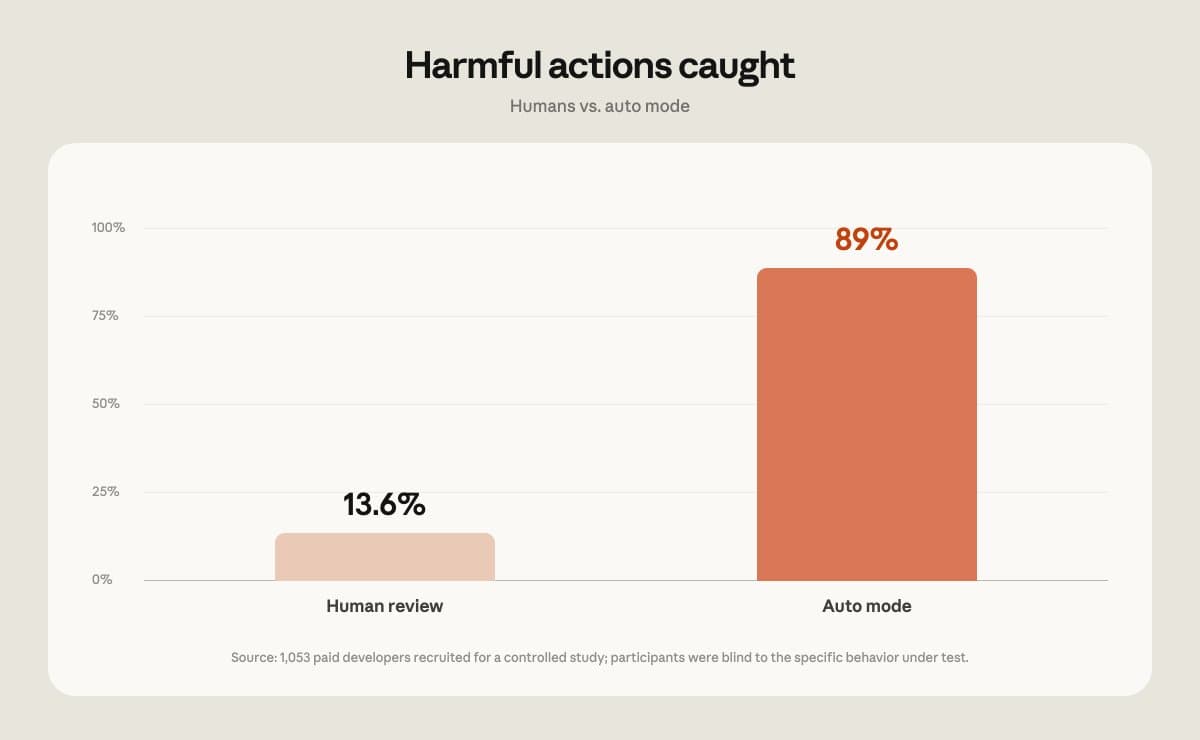
Auto Mode removes the confirmation dialog that currently appears before Claude Code touches a file or executes a terminal command. With the toggle flipped, the agent chains actions together until a task is complete or it hits an error it cannot resolve. Users who want the old guardrails can still disable Auto Mode in settings.
Why Anthropic is making the switch
How auto mode works with Claude Code
The decision reflects a larger pattern in agentic tooling: once users confirm trust, per-action prompts slow them down more than they protect them. Power users already clicked "yes" reflexively, making the dialog a formality. Anthropic's data apparently showed that developers who kept Auto Mode off still approved the vast majority of proposed actions.
There is also competitive pressure. GitHub Copilot's agent features, Cursor, and other AI coding assistants have been racing to reduce friction. A tool that asks fewer questions can finish tasks faster, which matters when teams measure productivity in commits per hour.
What this changes for engineering teams
For solo developers on personal projects, the change is mostly convenience. For teams with shared codebases and CI pipelines, it raises the stakes. An autonomous agent with write access can introduce bugs, break tests, or inadvertently expose secrets if the context window misses a gitignore pattern.
Ops leads will want to audit which team members run Claude Code with Auto Mode enabled and whether those sessions touch production configs. Logging and rollback discipline matter more when the agent moves fast.
Logicity's Take
Defaults shape behavior. Most users never change them. Anthropic is signaling confidence in Claude Code's judgment, but the real test is how gracefully it fails. Teams should treat Auto Mode the way they treat sudo: fine for people who know what they are doing, dangerous for everyone else. If your org uses Claude Code, now is a good time to document acceptable-use policies before the update ships.
The trust-versus-speed tradeoff
Anthropic has long emphasized safety research, so a default that grants more autonomy might seem contradictory. The company's framing, however, is that Claude Code targets professional developers who already accept responsibility for their tools. A confirmation dialog does not stop a careless operator from running destructive code; it just adds a click.
The broader question is whether other vendors follow. If Auto Mode defaults become standard across AI coding assistants, the industry effectively decides that humans are the bottleneck, not the safeguard.
Related Anthropic policy context on AI safety and openness.
When the change takes effect
Anthropic has not announced an exact rollout date, only that Auto Mode will become the default "soon." Developers who want to preview the behavior can enable Auto Mode manually today. Those who prefer explicit confirmation should check their settings after the next Claude Code update lands.
Need Help Implementing This?
If your team needs guidance on AI coding assistant policies, security audits, or developer-tooling strategy, reach out to our consulting partners at Logicity.
Source: The New Stack / Frederic Lardinois
Huma Shazia
Senior AI & Tech Writer
Produced with AI assistance and reviewed by the Logicity editorial team. Learn more in our Editorial Policy.