Key Takeaways

- Scale-out triggers now fire in 86 seconds vs 363 seconds, a 76% improvement
- Total time to provision new tasks dropped from 386 to 109 seconds
- Feature is free, but 20-second CloudWatch metrics carry additional costs
Amazon ECS auto scaling can now respond to traffic spikes 4.2 times faster. AWS announced support for 20-second high-resolution metrics, cutting scale-out trigger time from 363 seconds to 86 seconds in internal benchmarks. The update applies to all ECS compute options: Fargate, Managed Instances, and EC2.
For engineering teams running containerized workloads, this changes the math on capacity planning. Faster scaling means you can run leaner baseline task counts and let auto scaling handle demand spikes, rather than paying for idle headroom around the clock.
What changed in ECS metrics?
Previously, ECS service auto scaling relied on standard CloudWatch metrics published at 60-second intervals. The new option publishes CPU and memory utilization data every 20 seconds. This tighter feedback loop lets target tracking policies detect load changes and trigger scaling actions much sooner.
AWS ran benchmarks comparing the two configurations. With high-resolution metrics enabled, the time to trigger a scale-out event dropped 76%, from 363 seconds to 86 seconds. Total time to scale and provision new tasks fell 72%, from 386 seconds to 109 seconds. That's the difference between users hitting errors during a traffic spike and the system absorbing the load transparently.
How to enable 20-second metrics on your ECS service
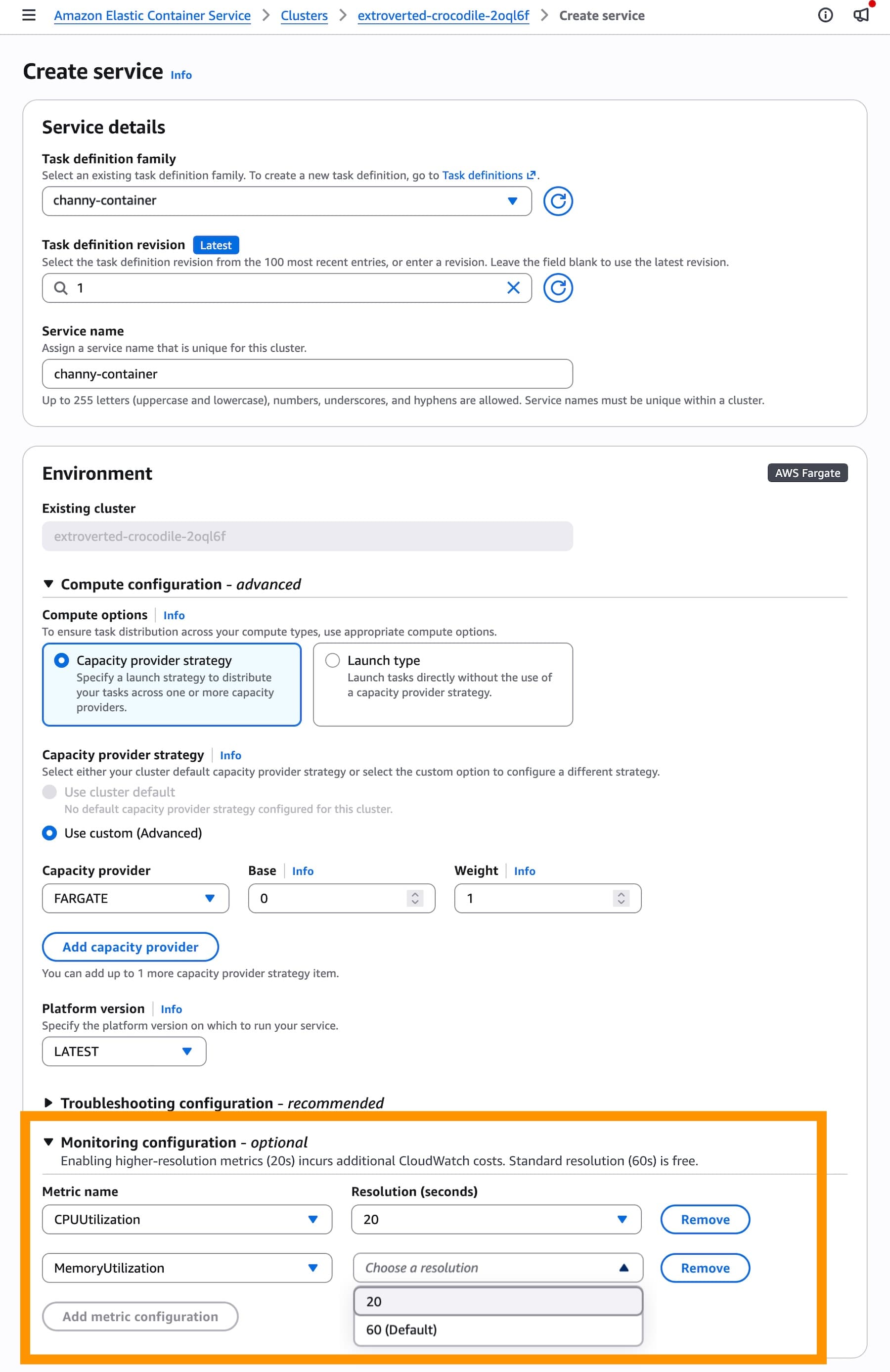
You can configure high-resolution metrics when creating or updating an ECS service through the console, AWS SDKs, CLI, or CloudFormation. In the console, the setting lives in the Monitoring configuration section when you create a service.
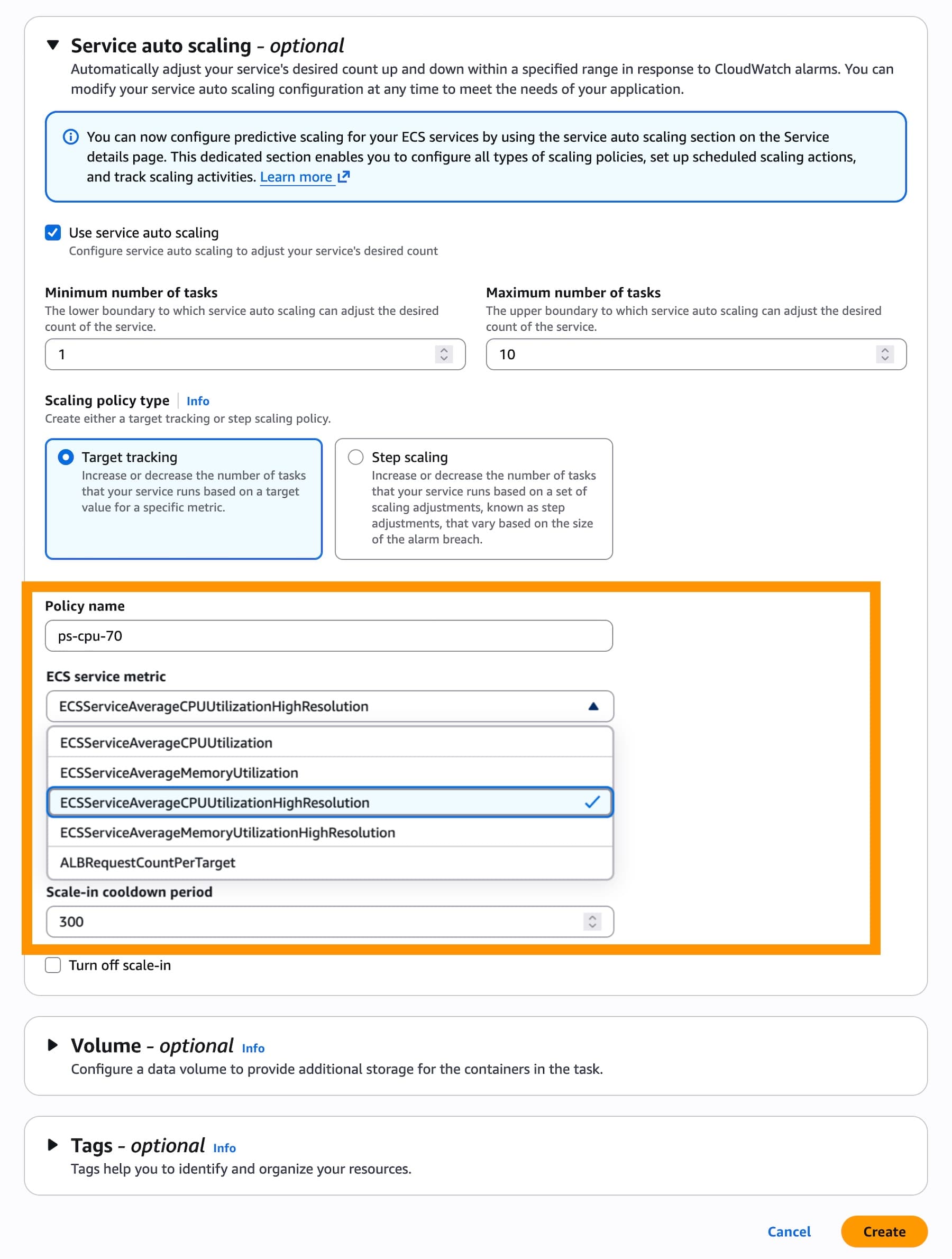
After enabling the metrics, configure a target tracking scaling policy in the Service auto scaling section. Two new metric options appear: ECSServiceAverageCPUUtilizationHighResolution and ECSServiceAverageMemoryUtilizationHighResolution. Select one of these instead of the standard-resolution equivalents.
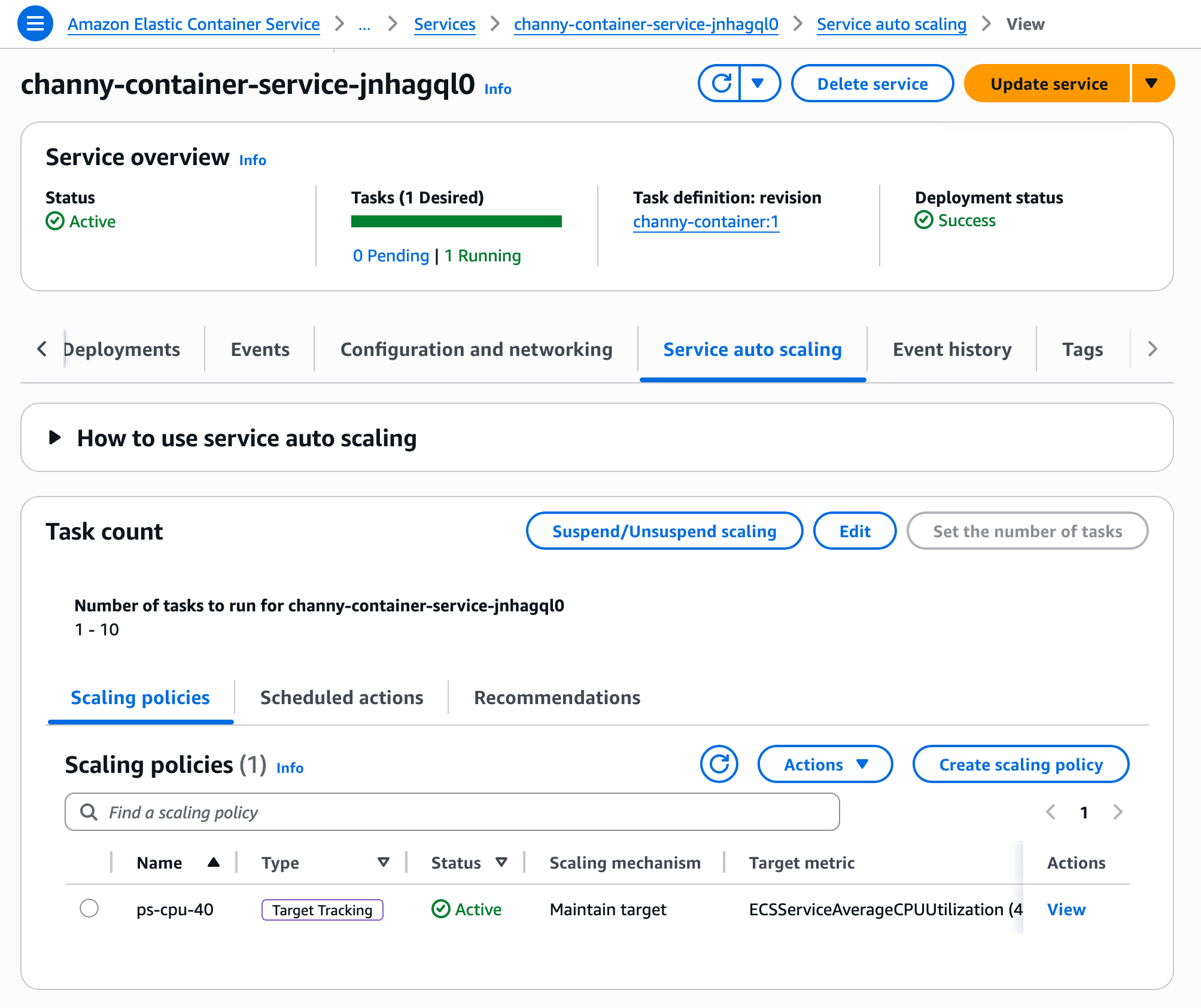
For existing services, you need to update the service to enable high-resolution metrics first. Once deployment completes and the service generates the new metrics, navigate to the Service and auto scaling tab to update your scaling policy.
What does this cost?
The faster auto scaling feature itself carries no charge. However, the 20-second CloudWatch metrics do. Standard 60-second resolution metrics are free. High-resolution metrics add a cost per metric per month, detailed on the CloudWatch pricing page.
Whether the trade-off makes sense depends on your workload. Services with predictable traffic patterns may not need sub-minute scaling. Services facing frequent spikes, flash sales, game launches, or anything with bursty demand will see real benefits. The cost of a few extra CloudWatch metrics is likely less than running extra baseline capacity you rarely use.
Three practical benefits for production workloads
AWS highlights three use cases. First, improved reliability during traffic surges. When scale-out happens in under two minutes instead of six, fewer requests hit overloaded containers. Users experience lower latency and fewer errors.
Second, reduced baseline costs. If you currently over-provision tasks to handle potential spikes, faster scaling lets you trim that buffer. The savings compound across dozens or hundreds of services.
Third, simpler configuration. Target tracking with high-resolution metrics delivers aggressive scaling behavior that previously required custom step-scaling policies. One configuration change replaces manual engineering work.
Why this matters beyond ECS
Container orchestration platforms compete partly on how gracefully they handle variable load. Kubernetes users have had access to custom metrics and tight scaling loops for years, though configuring them correctly requires expertise. AWS is betting that a managed, one-click solution appeals to teams that want results without building custom HPA configurations.
The announcement also signals AWS is investing in ECS at a time when Kubernetes dominates the conversation. ECS remains popular for teams that want container orchestration without the operational overhead of running Kubernetes clusters, even managed ones like EKS.
Logicity's Take
This update quietly solves a real pain point. Teams often over-provision ECS services because they don't trust auto scaling to react fast enough. Six minutes is an eternity during a traffic spike. Cutting that to under two minutes changes the calculus. The bigger signal: AWS is making ECS a more compelling alternative to EKS for teams that don't need Kubernetes' flexibility but do need responsive scaling. Expect more ECS improvements aimed at closing that gap.
Frequently Asked Questions
Do high-resolution ECS metrics work with Fargate?
Yes. The feature works across all ECS compute options: AWS Fargate, ECS Managed Instances, and Amazon EC2.
Are 20-second CloudWatch metrics free?
No. Standard 60-second resolution metrics are free, but high-resolution 20-second metrics incur additional CloudWatch charges. See the CloudWatch pricing page for current rates.
Can I use high-resolution metrics with predictive scaling?
The announcement focuses on target tracking policies. Predictive and scheduled scaling use different mechanisms. Check AWS documentation for compatibility with other policy types.
How do I enable this for an existing ECS service?
Update your service to enable high-resolution metrics first. After deployment completes, update your scaling policy to use the new ECSServiceAverageCPUUtilizationHighResolution or ECSServiceAverageMemoryUtilizationHighResolution metrics.
What scaling policy types support high-resolution metrics?
Target tracking policies support the new high-resolution metrics. This includes CPU and memory utilization targets.
Need Help Implementing This?
If you're running ECS at scale and want to optimize your auto scaling configuration, reach out. We can help you evaluate whether high-resolution metrics make sense for your workloads and implement them correctly.
Source: AWS News Blog
Huma Shazia
Senior AI & Tech Writer
Produced with AI assistance and reviewed by the Logicity editorial team. Learn more in our Editorial Policy.