Key Takeaways
- ChatGPT's image generation model produced unusable screenshot annotations with arrows pointing at nothing or wrong elements
- Claude's computer use feature also failed despite having direct control over mouse and keyboard
- Current AI excels at text tasks but struggles with spatial reasoning needed for image annotation
Claude and ChatGPT both failed spectacularly when tested on a straightforward task: adding annotation arrows to screenshots. How-To Geek writer Adam Davidson ran both AI chatbots through the same workflow, uploading screenshots, step-by-step instructions, and example images. Neither produced a single usable result.
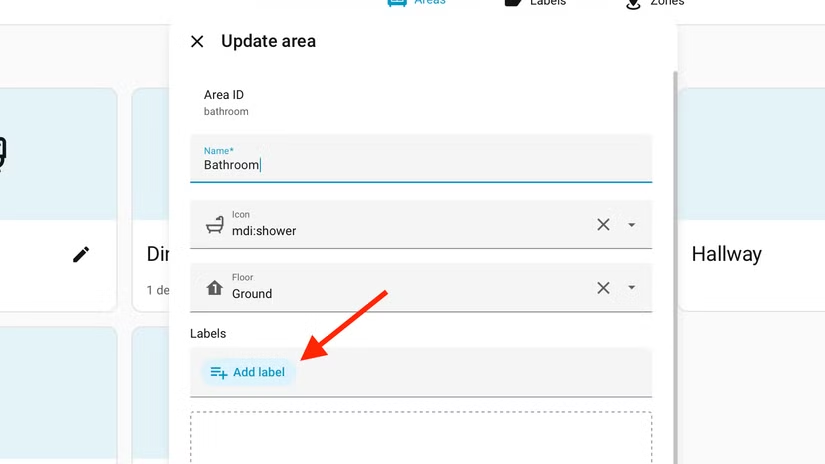
The task itself is tedious but not complex. When creating how-to guides, writers annotate screenshots with arrows pointing to specific buttons or menus. It takes time, not skill. Davidson figured this was exactly the kind of mundane work that AI should handle well.
Why did ChatGPT's image generation fail?
ChatGPT uses the GPT Image 2 model, which can generate photorealistic images that are hard to distinguish from photographs. Davidson assumed this capability would translate to adding simple arrows to existing screenshots.
It didn't. The arrows pointed to completely wrong elements or to nothing at all. Some arrows came out mangled and distorted. Davidson refined his prompts multiple times, making them more explicit about where annotations should appear. The results stayed consistently poor.
The failure reveals a gap between image generation and image editing. Generating a new image from a text prompt requires different capabilities than understanding an existing image's layout and adding precise graphical elements to it. ChatGPT can create a convincing photo of a sunset, but it cannot reliably identify where the Settings button sits in a screenshot.
Claude's computer use couldn't save it
After ChatGPT failed, Davidson turned to Claude. Anthropic's chatbot lacks native image generation, but it offers a feature called computer use. This lets Claude view screenshots, move the mouse cursor, and type on the keyboard, essentially controlling a computer directly.
The approach seemed promising. Claude could theoretically open an image editor, look at the screenshot, identify the relevant UI element, and draw an arrow pointing to it. With full control over the machine, it should have been able to complete the task.
It failed anyway. Davidson's article notes the results were equally unusable. Even with the ability to see and interact with a computer like a human would, Claude could not reliably identify which element in a screenshot corresponded to a written instruction and place an arrow accordingly.
What does this reveal about AI limitations?
Both failures point to the same underlying problem: spatial reasoning combined with visual understanding remains difficult for current AI models. The chatbots can read instructions. They can identify objects in images with reasonable accuracy. But connecting "click the blue button in the top right corner" to the actual pixel coordinates where an arrow should point, that bridge is shaky.
Davidson quotes author Joanna Maciejewska to frame his frustration: "I want AI to do my laundry and dishes so that I can do art and writing, not for AI to do my art and writing so that I can do my laundry and dishes." The irony is sharp. AI companies have poured resources into generating creative content. Meanwhile, the boring mechanical tasks, the digital equivalent of washing dishes, remain stubbornly manual.
This isn't to say AI chatbots are useless. Davidson notes he relies on them daily for research, proofreading, and fact-checking. They handle text manipulation well. But visual precision tasks expose a weakness that marketing materials tend to gloss over.
Will future updates fix screenshot annotation?
Both OpenAI and Anthropic continue shipping updates to their models. Image understanding has improved significantly over the past two years, and computer use is still a beta feature for Claude. There's reason to expect these specific failures might be addressed.
But the test is instructive regardless. Before trusting an AI tool for a workflow, run it against real examples. The gap between demo capabilities and production reliability can be substantial. Davidson's screenshots weren't edge cases. They were standard UI elements with clear visual cues. If AI stumbles here, it will stumble in your own workflows too.

Logicity's Take
This failure matters more than it appears. Screenshot annotation is a proxy for countless enterprise workflows that require visual understanding plus spatial precision: identifying UI elements for automated testing, parsing scanned documents, quality control on production lines. Companies betting on AI to automate these tasks should budget for verification layers. The models are closer than they've ever been, but 'close' and 'production-ready' are not the same thing.
Frequently Asked Questions
Can ChatGPT add arrows to screenshots?
ChatGPT can attempt to annotate screenshots, but current testing shows the arrows frequently point to wrong elements or appear distorted. The results are generally unusable without manual correction.
What is Claude computer use?
Claude computer use is a feature from Anthropic that allows Claude to control a computer by viewing screenshots, moving the mouse, and typing. It's designed for automating desktop tasks but has limitations with precision visual work.
Why do AI chatbots struggle with image annotation?
AI chatbots have difficulty connecting written instructions to precise pixel locations in images. While they can identify objects and generate images, the spatial reasoning required for accurate annotation remains a weakness.
What tasks are Claude and ChatGPT actually good at?
Both chatbots perform well at text-based tasks including research, proofreading, fact-checking, and content drafting. They struggle more with tasks requiring precise visual-spatial coordination.
Need Help Implementing This?
If you're evaluating AI tools for visual workflows at your organization, Logicity can connect you with implementation specialists who understand both the capabilities and current limitations. Contact our team for vendor-neutral guidance.
Source: How-To Geek
Huma Shazia
Senior AI & Tech Writer
Produced with AI assistance and reviewed by the Logicity editorial team. Learn more in our Editorial Policy.






