Key Takeaways
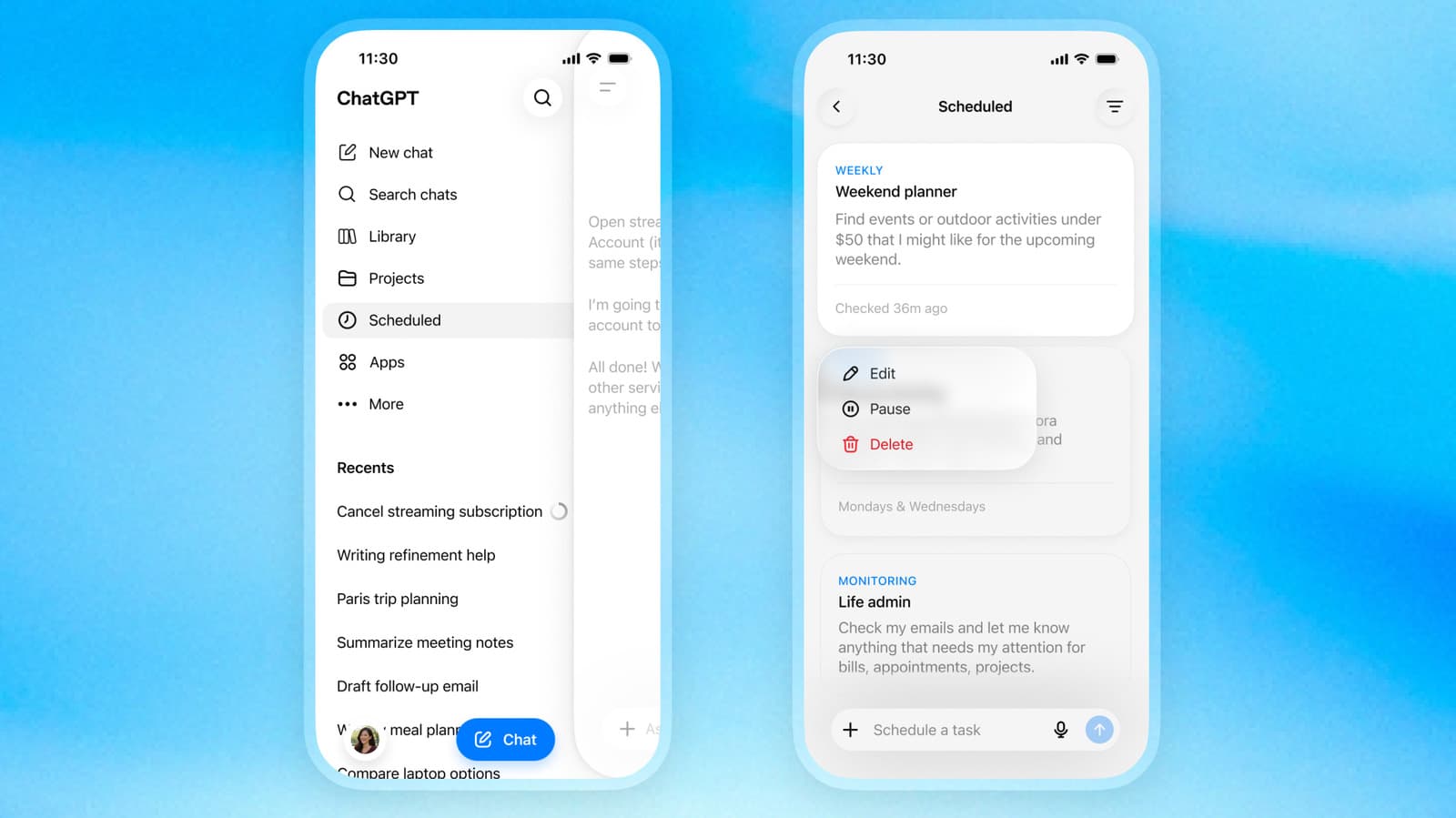
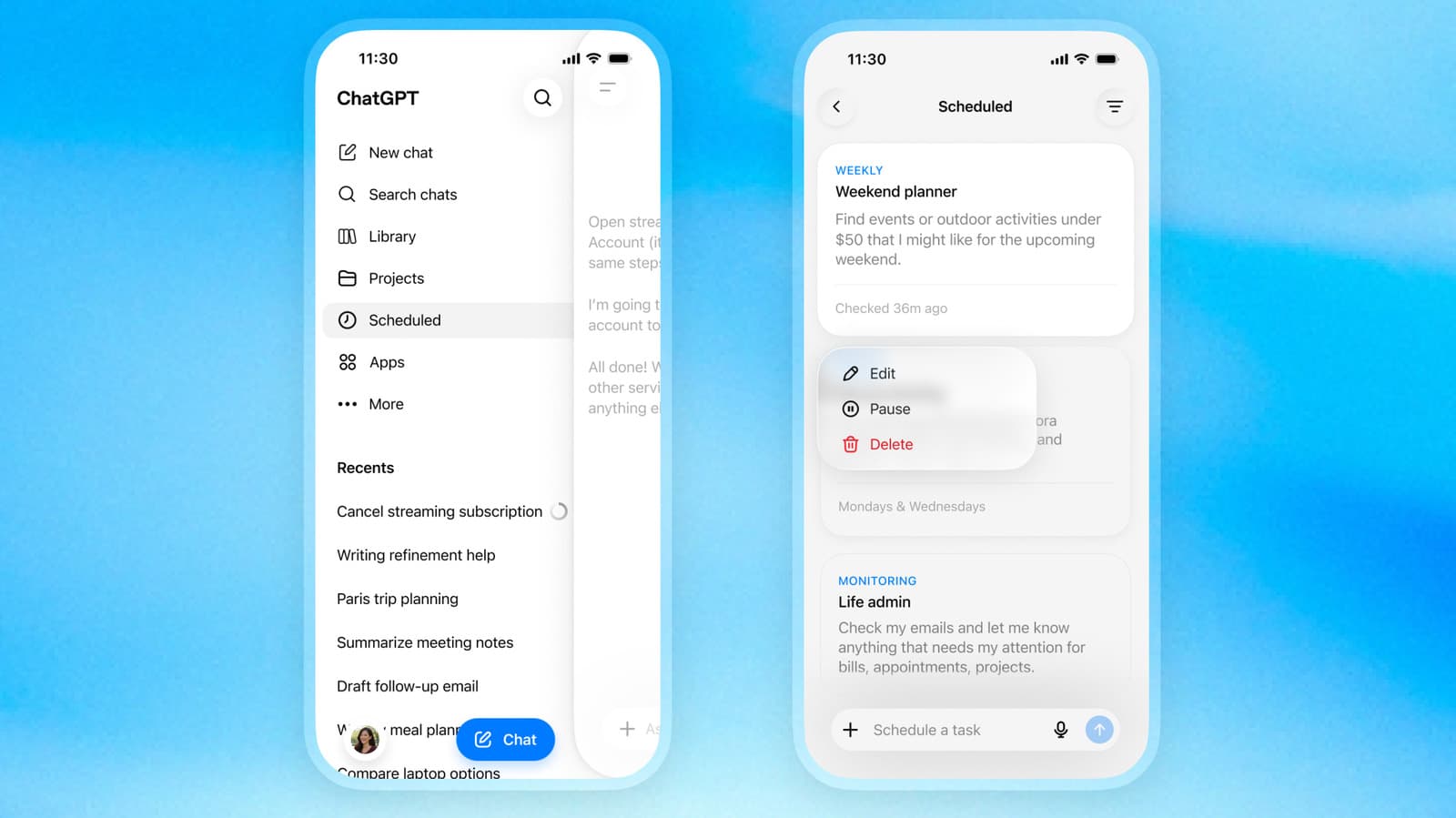
- OpenAI is rolling out a Scheduled hub in ChatGPT's sidebar for managing future and recurring prompts
- The feature supports monitoring tasks that proactively search the web or connected apps
- Pulse daily summaries are being sunset; Pro users have 14 days before the transition
OpenAI has added a Scheduled hub to ChatGPT's sidebar, giving paying users a central place to create, view, and manage tasks set to run in the future. The update, rolling out now to Plus, Pro, Business, and Enterprise tiers, also kills Pulse, the daily summary feature OpenAI launched last year.
The timing is no accident. With 1.1 billion monthly active users and 50 million paying subscribers, OpenAI is under pressure to justify those subscriptions. A chatbot that only answers when you ask is table stakes. A chatbot that works while you sleep is a different product category.
What does the Scheduled hub actually do?
The new Scheduled page appears in ChatGPT's sidebar and lists every active task you have queued. From there, you can pause, edit, or delete upcoming requests. OpenAI says the underlying infrastructure is now faster and more reliable, though the company did not publish benchmarks.
You can schedule a prompt to run at a specific time, say 9:15 a.m. on Tuesday, or you can specify a vaguer window like "morning" or "evening." ChatGPT picks a slot within that range. This flexibility matters for tasks where precision is less important than consistency, like a daily news digest or a weekly project status check.
Monitoring tasks turn ChatGPT into a watcher
Beyond one-off scheduled prompts, the hub supports monitoring tasks. These instruct ChatGPT to proactively search the web or connected apps on your behalf, then notify you when conditions change. Think of it as a customizable alert system: "Tell me when Apple announces new MacBooks" or "Flag any Slack messages mentioning the Q3 budget."
Sarah Chen, Head of Product at OpenAI, framed the shift plainly: "We are shifting ChatGPT from a reactive tool to a proactive agent, with the new scheduler serving as the control center for your automated digital life." That is a significant repositioning. ChatGPT is no longer just a question-answering machine; it is now competing with workflow automation tools like Zapier and dedicated monitoring services.
Pulse is dead. Here's how to migrate.
Pulse, the personalized daily summary feature OpenAI introduced last year, is being sunset. Pro users have a 14-day grace period to continue using it. After that, the feature disappears, and OpenAI expects users to recreate similar functionality using the new scheduling hub.
In practice, this means setting up a scheduled prompt that generates a summary at your preferred time. The output should be equivalent, but you now control the cadence and scope. Want a summary twice a day instead of once? That's now possible. Want to exclude certain topics? You can specify that in the prompt.
Who gets access and who doesn't
The Scheduled hub is available on web and mobile for Go, Plus, Pro, Business, and Enterprise users. Free-tier users are left out, at least for now. OpenAI has not announced a timeline for broader access.
This tiering makes business sense. Scheduled tasks consume compute resources even when the user is not actively engaged. Running billions of background jobs for free users would strain infrastructure and erode margins. Keeping the feature paid incentivizes upgrades and ensures the heaviest users pay for the load they create.
The infrastructure question nobody is asking
On Hacker News, discussion centered on a quieter concern: how does OpenAI plan to scale this? If even 10% of the 50 million paying subscribers set up five recurring tasks each, that is 25 million scheduled jobs running on a cadence. Add monitoring tasks that poll external APIs, and the compute bill balloons fast.
OpenAI's projected $29.4 billion in annual revenue for 2026 gives it runway to absorb these costs. But the economics of agentic AI, where the model works in the background without user prompting, are fundamentally different from the economics of a chatbot that only fires when you type. This update is a bet that the product value justifies the compute spend.
What users are saying
Early reactions on Reddit's r/ChatGPT are mostly positive. Users highlight recurring work tasks, like weekly reporting or daily standup notes, as obvious use cases. The main complaints focus on granularity: some want more control over recurring frequencies, like "every third Thursday" or "the last business day of the month."
These are solvable gaps. The question is whether OpenAI prioritizes them or moves on to the next feature. Either way, the Scheduled hub represents a meaningful step toward ChatGPT as an autonomous assistant rather than a passive tool.
Logicity's Take
This update matters less for what it adds than for what it signals. OpenAI is explicitly positioning ChatGPT as a background worker, not just a conversational interface. That puts it in direct competition with workflow automation platforms, calendar assistants, and monitoring tools. The winners will be users who figure out high-value recurring prompts early. The risk is that OpenAI discovers, as others have, that most users set up automations once and forget them, making retention dependent on habitual engagement that scheduled tasks may not generate.
Frequently Asked Questions
How do I access the ChatGPT Scheduled hub?
Open ChatGPT on web or mobile and look for the Scheduled shortcut in the sidebar. You need a Plus, Pro, Go, Business, or Enterprise subscription to access it.
Can free ChatGPT users schedule tasks?
Not yet. OpenAI has not announced when or if the Scheduled hub will be available to free-tier users.
What is happening to ChatGPT Pulse?
Pulse is being discontinued. Pro users have 14 days to transition. After that, you can use the Scheduled hub to create similar daily summaries manually.
What are ChatGPT monitoring tasks?
Monitoring tasks instruct ChatGPT to proactively search the web or connected apps and notify you when specific conditions are met, like price drops or news mentions.
Can I schedule a prompt for a vague time like 'morning'?
Yes. You can specify a broad timeframe such as morning, afternoon, or evening, and ChatGPT will pick a slot within that window.
Another underused feature hiding in plain sight that most users never configure
Need Help Implementing This?
Our consulting team helps businesses design ChatGPT workflows, from scheduled reporting to proactive monitoring. Reach out at consulting@logicity.in to discuss your automation needs.
Source: Engadget
Huma Shazia
Senior AI & Tech Writer
Produced with AI assistance and reviewed by the Logicity editorial team. Learn more in our Editorial Policy.




