Key Takeaways
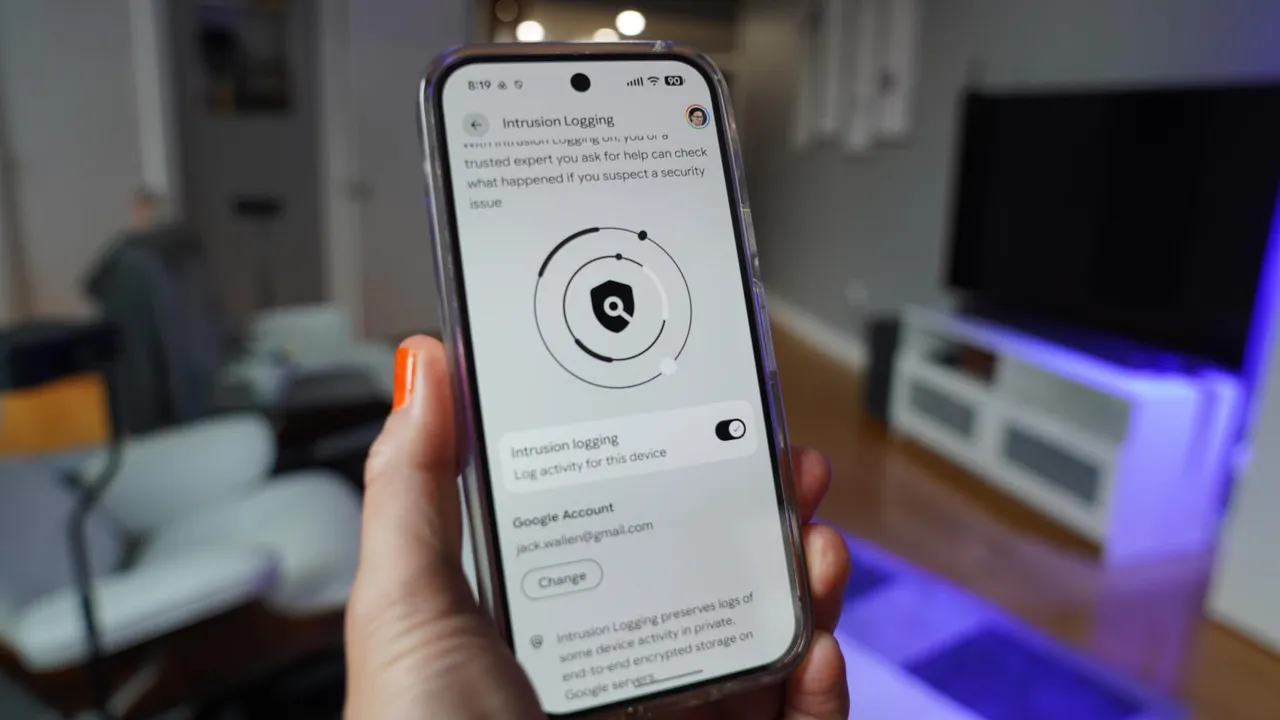
- Android 17 introduces Intrusion Logging, which records security events including app installs, network connections, and file transfers
- Logs are end-to-end encrypted and stored on Google Cloud, accessible only with your account password and screen lock
- The feature is free and available now in Settings > Security & privacy > Advanced Protection
Android 17 now lets you see exactly what's happening on your phone behind the scenes. A new feature called Intrusion Logging records security events, from app installations to network connections, and stores them in encrypted logs only you can access. The feature shipped in a recent security update and is available now.
For IT teams managing corporate Android devices or security-conscious users who want visibility into what apps are doing, this fills a gap that's existed since Android's inception. Linux users have had access to comprehensive system logs for decades. Android phones, until now, kept that information largely hidden.
What does Intrusion Logging actually track?
The feature pulls data from Android's SecurityLog API and records several categories of events:
- App activity, including installations, deletions, and updates
- Network connections: DNS queries, IP addresses, Wi-Fi and Bluetooth status
- File transfers via Bluetooth
- Modifications to system certificates
- Phone locking and unlocking events
The logs use end-to-end encryption and are stored on Google Cloud servers. The decryption key is tied to your account password and screen lock, so Google can't read them. Neither can anyone who gains access to your Google account without also having your device.
How to enable Intrusion Logging
The setting is buried in Android's Advanced Protection menu. Go to Settings > Security & privacy > Advanced Protection, then scroll to the bottom and tap Intrusion Logging. Toggle it on and verify it's associated with the correct Google account.
You'll need to authenticate via biometrics, PIN, or password. Once enabled, the feature runs silently in the background. There's no performance penalty mentioned in Google's documentation, and the logs don't count against your Google storage quota.
Viewing and exporting the logs
When you suspect something's wrong, go back to the Intrusion Logging page and tap Access logs at the bottom, then Download & decrypt. Authenticate again, and the logs download as a zip file containing multiple .txt files.
Reading these logs on a phone isn't practical. The files are plain text, verbose, and meant for analysis. Send the zip to a computer where you can use a text editor to search for strings like "security_event" or filter by timestamp. If you're troubleshooting a specific incident, you'll want the precision a desktop provides.
Understanding breach patterns helps contextualize why device-level logging matters
Who benefits from this feature?
For enterprises, Intrusion Logging offers audit capabilities that previously required third-party MDM solutions. If an employee's phone is compromised or a rogue app exfiltrates data, these logs provide a forensic trail. The encryption model means even IT can't access logs without the user's credentials, which cuts both ways depending on your compliance requirements.
Individual users tracking down battery drain, unexpected data usage, or suspicious app behavior now have a tool that doesn't require root access. It's not a real-time monitoring dashboard, but it's a record you can examine after the fact.
Another example of why security logging and forensics matter across platforms
Logicity's Take
This is a welcome addition, but it's a reactive tool, not a preventive one. You'll only know something happened after the fact. For proactive mobile security, enterprises should still pair Intrusion Logging with MDM solutions like Microsoft Intune, VMware Workspace ONE, or Google's own Android Enterprise. The real value here is forensics: when something goes wrong, you'll have evidence instead of guesswork. Enable it now so you're not wishing you had three months from now.
Limitations worth noting
The logs are only as useful as your ability to interpret them. These aren't user-friendly dashboards with color-coded threat levels. They're raw text files that assume some technical literacy. Google provides no analysis tools, no summaries, no alerts. You're on your own.
There's also no indication of how far back the logs go or how much storage they consume on Google's servers. The feature is free, which suggests Google is absorbing the storage cost, but that could change. For now, it's a no-cost addition to your security posture.
Frequently Asked Questions
Does Android 17 Intrusion Logging affect battery life?
Google hasn't documented any significant performance or battery impact. The feature runs passively, logging events that already occur on your device.
Can IT departments access Intrusion Logging data on managed devices?
No. The encryption key is tied to the user's account password and screen lock. Even with MDM access, IT cannot decrypt the logs without the user's credentials.
What Android versions support Intrusion Logging?
The feature is exclusive to Android 17 and arrived in a recent security update. Older Android versions do not have access to this functionality.
Where are the Intrusion Logging files stored?
Logs are stored encrypted on Google Cloud servers. When you download them, they arrive as a zip file containing .txt files in your device's Intrusion Logging folder.
Can Intrusion Logging detect malware in real time?
No. It's a logging feature, not a scanner. It records events for later review but doesn't block or alert you to threats as they happen.
Need Help Implementing This?
Rolling out Android 17 security features across your organization? Logicity can connect you with mobile security consultants and MDM experts. Contact us for vendor-neutral guidance on enterprise mobile security strategies.
Source: Latest news
Manaal Khan
Tech & Innovation Writer
Produced with AI assistance and reviewed by the Logicity editorial team. Learn more in our Editorial Policy.