Key Takeaways
- Reduce your flyer's message to one sentence before prompting any AI tool
- Upload reference designs and explicitly tell the AI what to copy and what to ignore
- Constrain fonts to two maximum and specify whitespace requirements in your prompt
AI-generated flyers are easy to spot. Too much text. Clashing fonts. Imagery that aims for realistic but lands in uncanny valley. The tools have improved at handling text and layouts, but most outputs still look machine-made because the prompts feeding them are vague. These eight techniques fix the specific problems that make AI flyers fail.
Why AI flyers still look wrong
Most people asking AI to make a flyer aren't graphic designers. They lack experience with Photoshop, Illustrator, or even Canva. Hiring a professional isn't always possible for a school fundraiser, community event, or high school reunion. So they turn to AI, type a vague prompt, and get back exactly what you'd expect from a vague prompt.
The problems are consistent: competing typefaces, information crammed into every corner, decorative elements that overwhelm the message. These aren't AI limitations. They're prompt failures.
Start with a one-sentence message
Before generating anything, reduce what the flyer needs to communicate to a single sentence. Adobe's design guidelines call this the "3-second message": the headline and main visual should communicate it instantly.
Try this framework: "This design is for [audience] and it should get people to [action]." A high school reunion flyer might become: "This design is for Class of 2006 alumni and it should get them to save the date for August 15."
Once you've hammered out that sentence, include it in your prompt. The AI needs that constraint.
Upload a reference design
This isn't about copying someone else's work. It's about showing the AI what you mean instead of describing it poorly.
Find professional flyer designs you like on Etsy, Pinterest, or even Facebook. Upload an example to your AI tool and tell it specifically what to borrow: the layout structure, the color palette, the amount of whitespace. Be explicit about what to ignore. "Use a similar two-column layout but ignore the color scheme" is better than "make something like this."
Constrain fonts and colors in the prompt
The fastest way to make a flyer look amateur is competing typefaces. AI tools default to variety. Override that.
Include explicit constraints: "Use only two fonts maximum: one sans-serif for headlines, one for body text." Specify a color palette by name or hex code. If the event has brand colors, state them. "Use only black, forest green (#228B22), and white" gives the AI no room to add clashing accents.
Demand whitespace
AI fills space. Every time. If you don't tell it to leave room, it will cram decorative elements into every corner.
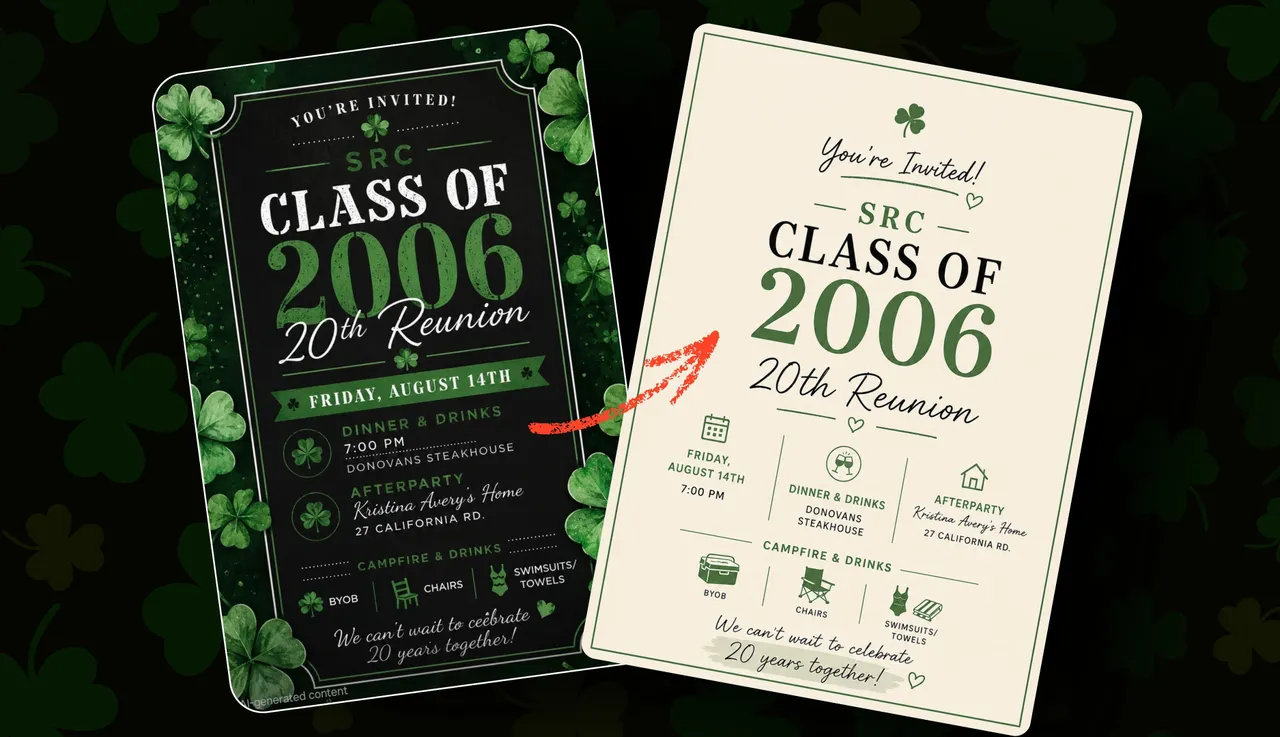
Add explicit instructions: "Leave at least 20% of the design as negative space. Do not fill corners with decorative elements." For a reunion flyer overloaded with shamrocks, the fix was simple: "Include one shamrock icon near the logo. No other decorative elements."
Logicity's Take
The real skill here isn't using AI. It's knowing enough about design to constrain it properly. These prompting techniques work because they force specificity: one message, two fonts, limited colors, mandatory whitespace. Tools like Canva offer templates that already encode these constraints. For anyone producing flyers regularly, a $13/month Canva Pro subscription may be more reliable than wrestling with image generators.
Separate text from imagery
AI-generated text in images still fails regularly. Letters merge, spacing goes wrong, words misspell themselves. The workaround: generate the visual elements separately, then add text in a design tool.
Prompt for an image with placeholder text areas: "Create a flyer background with a blank rectangular space in the lower third for text overlay." Then add your event details in Canva, Photoshop, or even PowerPoint. The text will be editable, legible, and spelled correctly.
Iterate with specific corrections
The first output is never final. When something's wrong, name it precisely.
"The date is too small" is vague. "Make the date text 50% larger and move it above the location" is actionable. "Too busy" doesn't help. "Remove the background pattern and reduce the number of icons from six to two" gives the AI something to execute.
Treat iteration like code review. Point at the specific line that's wrong.
When to hire a designer anyway
These techniques work when hiring a professional isn't an option. But if budget allows, a designer brings something AI can't: originality, accessibility expertise, and judgment about what will actually work in context.
Platforms like Fiverr offer flyer design starting around $20. For anything with real stakes (a product launch, a conference, a fundraiser targeting thousands), that's worth it. For a casual community event where "good enough" is fine, these prompts get you there.
Understanding how AI models process prompts helps explain why specific constraints improve output quality
Frequently Asked Questions
Which AI tools work best for generating flyers?
ChatGPT with DALL-E, Midjourney, and Adobe Firefly all handle flyer generation. The differences matter less than your prompts. Constrain fonts, colors, and whitespace regardless of which tool you use.
How do I fix AI-generated text that's misspelled or garbled?
Generate the image without text, or with placeholder areas marked for text. Then add your actual event details in a design tool like Canva or Photoshop where text remains editable.
Can I use a competitor's flyer as a reference?
You can use it to show the AI a layout structure or color approach you like. But specify what to copy (the grid, the font pairing) and what to ignore. Don't recreate someone else's design wholesale.
What's the minimum prompt length for a decent flyer?
Length matters less than specificity. A good prompt includes: the one-sentence message, target audience, color constraints, font limits, whitespace requirements, and what decorative elements to include or avoid. That's typically 50-100 words.
Need Help Implementing This?
Logicity works with founders and marketing teams on AI-assisted content and design workflows. If you're producing visual assets at scale and want to systematize quality, reach out at hello@logicity.in.
Source: Latest news
Huma Shazia
Senior AI & Tech Writer
Produced with AI assistance and reviewed by the Logicity editorial team. Learn more in our Editorial Policy.