كل المقالات
Trending Tech

How to turn off AI in Google Docs: a step-by-step guide

Huma Shazia18 June 2026 at 7:11 am4 دقيقة للقراءة
How to turn off AI in Google Docs: a step-by-step guide

Key Takeaways

How to turn off AI in Google Docs: a step-by-step guide
Source: TechCrunch
  • You can disable the Gemini bottom bar directly from the Gemini menu in Google Docs
  • To disable all AI features across Workspace, navigate to Gmail Settings and toggle off 'Google Workspace smart features'
  • 78% of enterprise users report 'AI fatigue' from intrusive UI prompts in 2026

Google's aggressive rollout of Gemini AI across Workspace has left millions of users hunting for an off switch. The "write with Gemini" pop-up that now greets you in Google Docs is persistent, garish, and lacks an obvious dismiss button. Here's how to remove it and disable AI features across your entire Google Workspace.

The frustration is widespread. According to research from the Digital Workplace Institute, 78% of enterprise users now report experiencing "AI fatigue" due to intrusive UI prompts. An estimated 45 million Google Workspace users have attempted to disable these suggestions since early 2026.

How do you remove the Gemini bottom bar in Google Docs?

The quickest fix targets the floating AI box at the bottom of your document. Click "Gemini" in the top menu bar above your document. In the dropdown, select "bottom bar preferences." Toggle it off. The AI prompt box disappears.

TechCrunch's Amanda Silberling, who documented this process, noted that she initially missed the option entirely because she was "so enraged." She tried asking Gemini itself for help removing the feature. The AI's response? Click the X icon. That doesn't remove Gemini. It just closes the conversation window. The AI, it seems, has a survival instinct.

What about the 'help me write' cursor feature?

Some users encounter an even more aggressive feature: a "help me write" prompt that hovers near your cursor as you type. Disabling individual features one by one feels like whack-a-mole. There's a better approach.

How to turn off AI across all Google Workspace apps

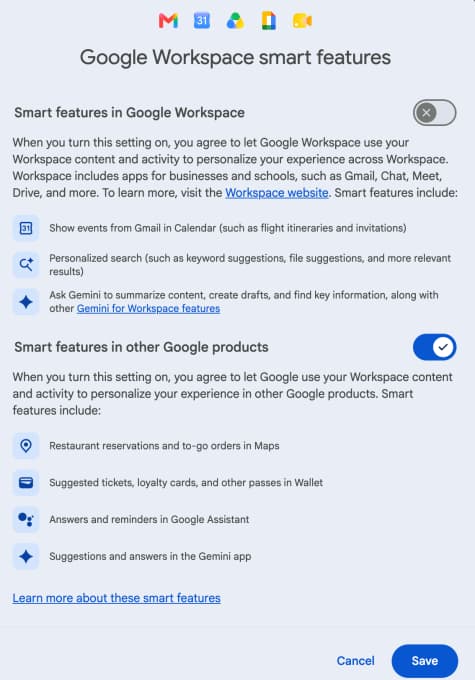
To disable smart features across your entire Workspace, you need to go through Gmail. Navigate to your Gmail inbox, click the gear icon for Settings, then click "See all settings." Scroll about halfway down the page until you find "Google Workspace smart features." Click "Manage Workspace smart feature settings."

Image (Source: TechCrunch)

You'll see two options. The first toggles off smart features in Google Workspace, including those Gemini pop-ups in Docs. The second controls other smart features like automatic calendar event creation from flight emails. If the first option is your only annoyance, toggle that one off and leave the second alone.

Why is Google making this so difficult?

The design choice is deliberate. Google wants users to adopt Gemini. Burying the off switch in Gmail settings, rather than placing a clear toggle in Docs itself, increases friction for anyone trying to opt out. Enterprise software analyst Mark Thompson put it bluntly: "When software starts trying to 'help' you before you ask, it's not an assistant; it's an interruption."

On Reddit and Hacker News, users are sharing workarounds that go beyond official settings. Some edit hidden account preferences. Others block specific script elements through browser extensions. The common thread in these discussions is a demand for a "classic mode" toggle. Many users complain that disabling AI features also turns off genuinely useful tools like smart spell check.

Will Google add a simpler off switch?

Google has not announced plans to simplify the opt-out process. The company's official Workspace account continues to promote Gemini integration, though replies to these posts are dominated by users requesting better controls. The gap between Google's vision and user preference remains wide.

Frequently Asked Questions

Can I turn off Gemini AI in Google Docs without affecting other features?

You can disable the bottom bar specifically through the Gemini menu in Docs. For broader control, the Gmail settings toggle affects multiple Workspace smart features, though some users report it also disables non-AI tools they want to keep.

Why is the AI off switch in Gmail instead of Google Docs?

Google manages Workspace smart features centrally through Gmail settings. This design means you control features across Docs, Sheets, and other apps from one location, but it also makes the toggle harder to find.

Will disabling smart features affect smart spell check?

Some users report that toggling off Workspace smart features disables certain spell check and grammar suggestions. The exact behavior varies by account and organization settings.

Is there a browser extension to block Gemini in Google Docs?

Community members on Reddit and Hacker News have shared workarounds using browser extensions to block specific script elements, though these are unofficial and may break with future updates.

ℹ️

Logicity's Take

Google is betting that user frustration is a short-term cost worth paying for long-term AI adoption. The problem is that power users, the exact audience Workspace targets for enterprise deals, value control over their tools. Forcing them to navigate a multi-app settings maze to disable a feature they never asked for is a product design failure, not a growth strategy. If Microsoft offers a cleaner opt-out in Copilot, Google risks losing the users who care most about their productivity environment.

Also Read
How to escape Amazon's Kindle ecosystem without buying a new e-reader

Another guide to reclaiming control from tech platforms that prioritize their ecosystem over user preference

ℹ️

Need Help Implementing This?

Struggling to manage AI feature rollouts across your organization's Workspace deployment? Contact Logicity's consulting partners for enterprise-level guidance on productivity tool configurations and user training.

Source: TechCrunch / Amanda Silberling

H

Huma Shazia

Senior AI & Tech Writer

مقالات ذات صلة

Clair Health تجمع 11.6 مليون دولار لتتبع الهرمونات عبر جهاز قابل للارتداء
Trending Tech·4 د

Clair Health تجمع 11.6 مليون دولار لتتبع الهرمونات عبر جهاز قابل للارتداء

أعلنت شركة Clair Health الناشئة عن جمع تمويل بقيمة 11.6 مليون دولار لتطوير جهاز قابل للارتداء يُحدث نقلة نوعية في مجال تتبع الهرمونات الأنثوية. الجهاز الذي يشبه الإكسسوار الأنيق يعد بتقديم رؤى فورية ح

Google تعيد اختراع السماعات الذكية: Google Home Speaker بتقنية Gemini AI بسعر 99 دولاراً
Trending Tech·4 د

Google تعيد اختراع السماعات الذكية: Google Home Speaker بتقنية Gemini AI بسعر 99 دولاراً

أعلنت Google عن إطلاق Google Home Speaker، أول سماعة ذكية مستقلة من الشركة منذ خمس سنوات، مدمج فيها نظام الذكاء الاصطناعي Gemini بسعر 99.99 دولاراً. يمثل هذا الإطلاق تحولاً جذرياً في فلسفة السماعات ال

تيليغرام تقاضي الهند بعد حظر التطبيق: معركة حرية التعبير تصل للمحاكم
Trending Tech·5 د

تيليغرام تقاضي الهند بعد حظر التطبيق: معركة حرية التعبير تصل للمحاكم

في تصعيد قانوني غير مسبوق، رفعت شركة تيليغرام دعوى قضائية أمام محكمة دلهي العليا ضد قرار الحكومة الهندية بحظر التطبيق على مستوى البلاد، معتبرةً أن هذا الإجراء ينتهك الحقوق الدستورية لـ 150 مليون مستخد

اقرأ أيضاً

OpenAI تختبر اشتراك ChatGPT للعلوم: هل يُغيّر قواعد البحث الأكاديمي؟
Cybersecurity·4 د

OpenAI تختبر اشتراك ChatGPT للعلوم: هل يُغيّر قواعد البحث الأكاديمي؟

رصد مطوّرون سلاسل برمجية داخلية على واجهة الويب الخاصة بـ ChatGPT تُشير إلى فئة اشتراك جديدة تحمل اسم ChatGPT for Science، ما يؤكد أن OpenAI تتجه نحو تقسيم قاعدة مستخدميها إلى شرائح عمودية متخصصة بدلا

عمر حسن·
هاتف أندرويد في جيبك: مقياس صوت ومستشعر حرارة لم تكن تعرفه
Hacks & Workarounds·4 د

هاتف أندرويد في جيبك: مقياس صوت ومستشعر حرارة لم تكن تعرفه

ربما تستخدم هاتف أندرويد يومياً للتصفح والتواصل ومشاهدة الفيديو، لكن ما قد يفوتك أن هذا الجهاز الصغير يحمل ترسانة من المستشعرات قادرة على تحويله إلى أدوات قياس حقيقية. مستشعرات هاتف أندرويد ليست مجرد

عمر حسن·