أبرز النقاط
- استفسارات DNS التقليدية تُرسَل بنص واضح، ما يتيح لمزود الإنترنت رؤية كل موقع تزوره حتى لو كان يستخدم HTTPS.
- تفعيل DoH في ويندوز 11 لا يحتاج برامج خارجية؛ الإعدادات المدمجة تكفي.
- التشفير ينقل الثقة من مزود الإنترنت إلى مزود DNS الذي تختاره أنت، لكنه لا يُخفيك تماماً.
قبل أن تفتح أي صفحة ويب، يطرح جهازك سؤالاً بسيطاً على خادم DNS: ما عنوان IP لهذا الموقع؟ المشكلة أن هذا السؤال يُرسَل عادةً بنص مكشوف عبر المنفذ 53، فيستطيع مزود خدمة الإنترنت (ISP) قراءة كل استفسار وربطه باشتراكك. تفعيل DNS over HTTPS في Windows 11 يغلّف هذه الاستفسارات داخل اتصال HTTPS مشفّر، ويمنع مزودك من الاطلاع على قائمة المواقع التي تتصفحها.
لماذا لا يكفي قفل HTTPS الأخضر في المتصفح؟
القفل الأخضر يحمي البيانات بعد الاتصال بالموقع، لكن استفسار DNS يحدث قبل ذلك بالكامل. حين تكتب عنوان موقع توظيف أو منتدى صحي أو منصة مقارنة قروض، يُسجَّل اسم النطاق في سجلات مزود الإنترنت بصرف النظر عن تشفير الصفحة ذاتها. وفق بيانات Cloudflare، أكثر من 85% من استفسارات DNS عالمياً كانت حتى وقت قريب غير مشفرة.
خطوات تفعيل DoH في ويندوز 11
لا تحتاج إلى برنامج خارجي ولا إلى تعديل السجل (Registry). الميزة متاحة مباشرة في واجهة الإعدادات منذ الإصدار المستقر لويندوز 11، بعدما ظهرت تجريبياً في إصدارات Insider لويندوز 10 عام 2020 دون أن تصل للنسخة المستقرة.
- افتح الإعدادات بالضغط على Win + I ثم انتقل إلى Network & Internet.
- اختر اتصالك النشط (Wi-Fi أو Ethernet) ثم اضغط Hardware properties.
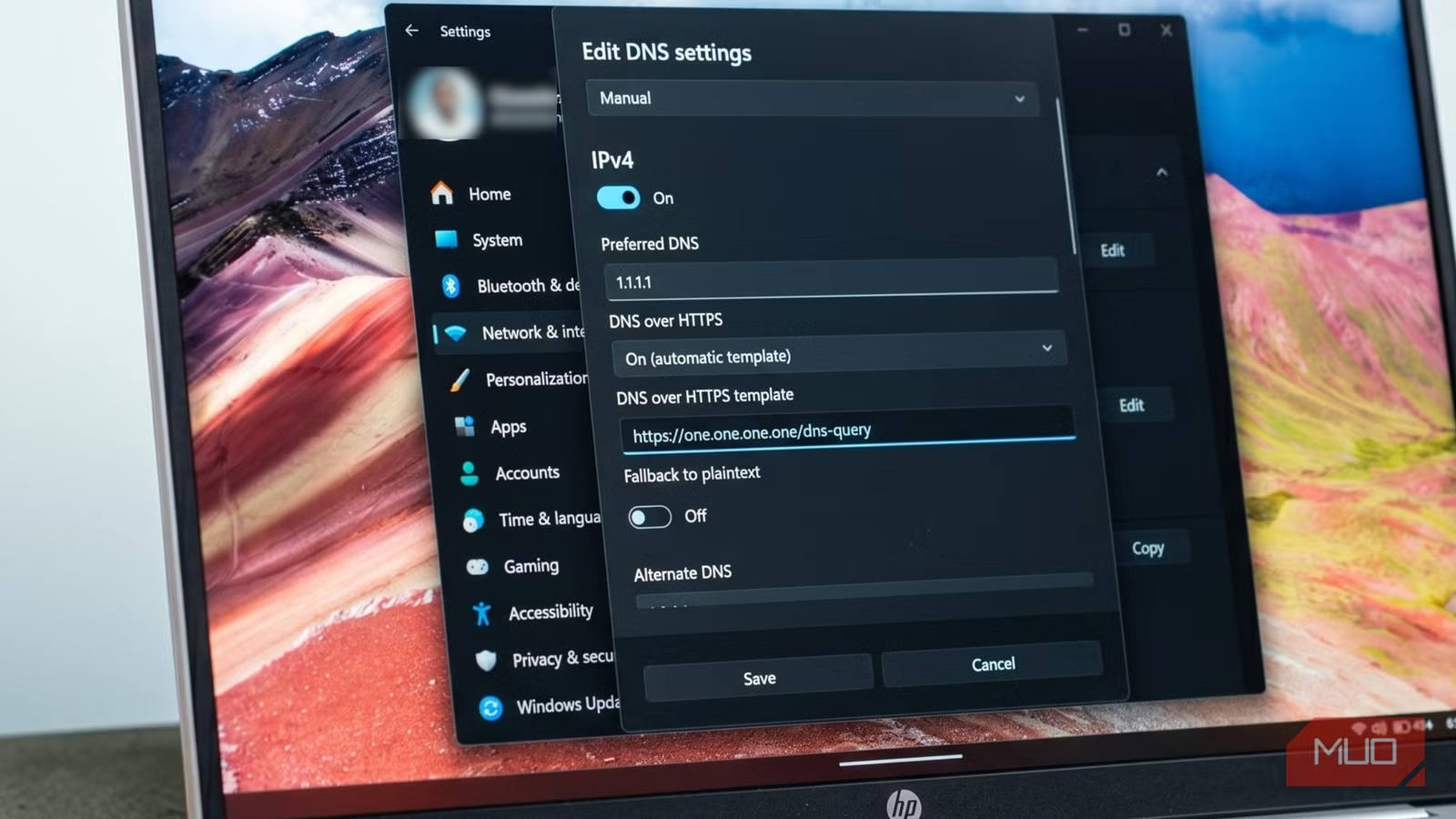
- عند DNS server assignment اضغط Edit وغيّر القائمة من Automatic (DHCP) إلى Manual.
- فعّل IPv4 وأدخل عنوان خادم DNS موثوق؛ مثلاً Cloudflare: المفضّل 1.1.1.1 والبديل 1.0.0.1، أو Google: 8.8.8.8 و8.8.4.4.
- من قائمة DNS over HTTPS اختر On (automatic template).
- كرّر الخطوات لـ IPv6 إن أردت تغطية كاملة، ثم احفظ.
بعد الحفظ، ستظهر كلمة Encrypted بجوار عنوان الخادم؛ هذا تأكيدك الفعلي أن الإعداد يعمل ولم يُهمَل.

احذر: المتصفح قد يتجاوز إعدادات النظام
متصفحات مثل Chrome وFirefox تدير إعدادات DNS الخاصة بها بشكل مستقل. إن لم تتحقق من إعدادات المتصفح، قد يستمر في استخدام DNS غير مشفّر أو خادم مختلف. تأكد من تفعيل Secure DNS داخل المتصفح أو اضبطه ليستخدم إعدادات نظام التشغيل.
هل اختفت بياناتك فعلاً؟
لا. التشفير ينقل الثقة من مزود الإنترنت إلى مزود DNS الذي اخترته. Cloudflare أو Google يستطيعان نظرياً رؤية استفساراتك، لكنهما يخضعان لسياسات خصوصية صارمة ويحذفان السجلات خلال ساعات. الفارق أنك انتقلت من طرف أُجبرت عليه (مزود الاتصال) إلى طرف اخترته بنفسك.
رأي Logicity
تفعيل DoH خطوة ذكية لكنها ليست عباءة إخفاء. في منطقة الخليج حيث تتوسع مشاريع التحول الرقمي وتتزايد المخاوف من تتبّع البيانات، يمثّل هذا الإعداد طبقة حماية إضافية منخفضة التكلفة. المؤسسات التي تريد خصوصية أعمق قد تحتاج إلى تشغيل خادم DNS داخلي أو استخدام VPN موثوق بجانب DoH.
الأسئلة الشائعة
هل يبطئ DNS over HTTPS سرعة التصفح؟
الفارق لا يُلاحظ غالباً؛ زمن الاستفسار يزيد بضعة ميلي ثوانٍ فقط، ومزودون مثل Cloudflare يملكون بنية تحتية سريعة عالمياً.
هل يعمل DoH مع جميع التطبيقات أم المتصفح فقط؟
عند تفعيله على مستوى النظام في ويندوز 11، يشمل معظم التطبيقات التي تستخدم مكدس الشبكة الافتراضي، لكن بعض التطبيقات قد تتجاوزه بإعداداتها الخاصة.
ما الفرق بين DoH وDoT؟
كلاهما يشفّر استفسارات DNS؛ DoH يستخدم المنفذ 443 (نفس منفذ HTTPS) فيصعب حجبه، بينما DoT يستخدم المنفذ 853 ويسهل تمييزه وحظره.
هل أحتاج VPN بعد تفعيل DoH؟
DoH يحمي استفسارات DNS فقط؛ مزود الإنترنت لا يزال يرى عناوين IP التي تتصل بها. لإخفاء حركة المرور بالكامل، تحتاج VPN.
هل تحتاج مساعدة في التطبيق؟
إن كنت تدير شبكة مؤسسية أو تريد نشر إعدادات DNS مشفّرة على نطاق واسع، تواصل مع فريق Logicity للحصول على استشارة تقنية مخصصة.
فاطمة الزهراء
كاتبة تقنية متخصصة في الذكاء الاصطناعي
أُنتِج هذا المقال بمساعدة الذكاء الاصطناعي وراجعه فريق التحرير في لوجيسيتي. اعرف المزيد في سياسة التحرير.