Key Takeaways
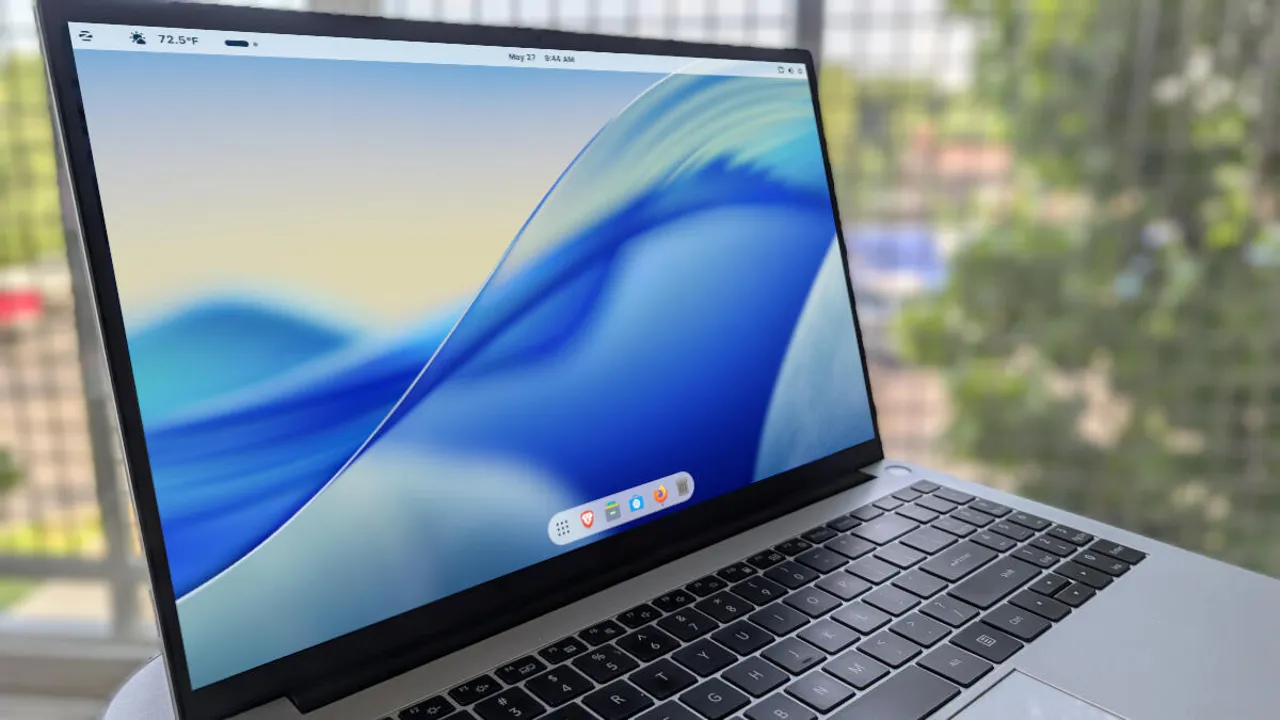
- ZorinOS includes built-in tools to replicate macOS appearance without paying for Pro
- The free method requires enabling GNOME layout, moving titlebar buttons, and activating Zorin Dash
- Linux desktop market share hit 4.4% in 2025, with ZorinOS now shipping pre-installed on Acer laptops
If you want macOS aesthetics without paying Apple prices, ZorinOS can get you close. The Linux distribution includes built-in layout options that mimic both Windows and macOS interfaces, and while the paid Pro version ($47.99) makes it a one-click affair, the free version can achieve nearly the same result with about five minutes of configuration.
Why bother with ZorinOS?
Linux desktop usage crossed 4.4% market share in early 2025, up from roughly 3% two years prior. That's still a fraction of Windows' 72% dominance, but the growth reflects real momentum. ZorinOS specifically targets users migrating from Windows or macOS. The distribution's pitch is simple: familiar interface, no licensing fees, and the ability to revive hardware that Apple or Microsoft have abandoned.
Acer now ships ZorinOS pre-installed on select laptops. That's notable. OEM partnerships are rare for Linux distributions, and Acer's marketing explicitly positions ZorinOS as a way to "find your freedom from Big Tech." Whether you find that framing compelling or corny, the practical benefit is clear: you can run modern software on older machines without paying $479 for a new MacBook Air.
The Pro shortcut (and its catch)
ZorinOS Pro costs $47.99 and includes premium desktop layouts, including a macOS clone. Open the Zorin Appearance app, click the macOS layout, done. The problem: that license doesn't transfer to future major releases. When ZorinOS 19 ships, Pro users on version 18 would need to pay again to keep the same convenience on the new release.
If you plan to stick with one release for its full five-year support cycle, that's fine. If you prefer running the latest version, the Pro license becomes a recurring cost. For organizations deploying across multiple machines, this adds up.
How to get the macOS look for free
The free method takes a few manual steps but produces nearly identical results. Start by downloading the ZorinOS ISO, creating a bootable USB drive, and installing the OS. After installation, open the Zorin Appearance app from the desktop menu.
- Select the GNOME layout, which displays a single top bar instead of a taskbar
- Click Windows in the Appearance app and switch Titlebar Buttons from right to left (macOS puts close/minimize/maximize on the left)
- Open the Extensions app and locate Zorin Dash
- Toggle Zorin Dash to On to enable the dock
- Click the three-dot menu next to Zorin Dash, open Settings, and adjust the icon size on the Position and size tab
That's the core transformation. The top bar handles system functions, the dock sits at the bottom (or side, if you prefer), and the titlebar buttons land where macOS users expect them. You're not getting pixel-perfect Liquid Glass transparency, but the workflow matches.
What you lose without Pro
The free version lacks some polish. Pro includes additional icon themes, more granular appearance controls, and curated wallpapers. You also miss the installation support package and the "professional-grade creative suite" Zorin bundles for Pro users. For most desktop workflows, the free version is sufficient. Creative professionals might want the extra software, but nothing stops you from installing the same applications manually.
Logicity's Take
ZorinOS occupies a smart niche: it's Linux for people who don't want to learn Linux. The macOS layout option matters less as a feature and more as a signal. It tells switchers they won't be stranded in an unfamiliar environment. For IT teams considering Linux deployments, ZorinOS competes with elementary OS (similar macOS-inspired design, free) and Linux Mint (Windows-like, broader hardware support). The Acer partnership suggests ZorinOS has enterprise ambitions beyond hobbyist users.
Should tech teams care?
Desktop Linux still faces the chicken-and-egg problem: limited software support because limited users, limited users because limited software support. But ZorinOS 17.2 can run some Windows applications without modification, and the distribution supports spatial computing headsets. Neither feature matters for most office work. What does matter: Linux machines don't phone home to Microsoft or Apple, they run indefinitely without subscription fees, and they perform well on aging hardware.
For startups managing costs or enterprises standardizing on Linux servers anyway, a matching desktop environment simplifies the stack. ZorinOS won't replace macOS for video editors or Windows for CAD users. But for browser-based workflows, document editing, and development environments, the free alternative keeps looking better.
Frequently Asked Questions
Can ZorinOS run macOS applications?
No. ZorinOS can mimic the macOS interface but cannot run native macOS applications. Some Windows apps work through Wine compatibility, and Linux-native alternatives exist for most common software.
Is ZorinOS free or paid?
Both. ZorinOS Core is free and includes most features. ZorinOS Pro costs $47.99 per major release and adds premium layouts, extra software, and installation support.
Does ZorinOS Pro license transfer to new versions?
No. A Pro license for ZorinOS 18 does not carry over to version 19. Users would need to purchase a new license for each major upgrade.
What hardware does ZorinOS support?
ZorinOS runs on most x86-64 computers, including older machines. Acer ships it pre-installed on select laptops. Minimum requirements are modest: 2GB RAM for the Lite version, 4GB for Core.
How does ZorinOS compare to elementary OS?
Both target macOS switchers with clean, familiar interfaces. ZorinOS offers more layout flexibility (including Windows-like options), while elementary OS commits fully to a macOS-inspired design philosophy.
Need Help Implementing This?
Planning a Linux migration for your team? Logicity covers enterprise deployment strategies, hardware compatibility, and software alternatives. Follow us for practical guidance on desktop Linux adoption.
Source: Latest news
Manaal Khan
Tech & Innovation Writer
Produced with AI assistance and reviewed by the Logicity editorial team. Learn more in our Editorial Policy.




