Key Takeaways
Windows 11 26H2 Search Just Got a BIG Upgrade – No More Ads, Better Results!
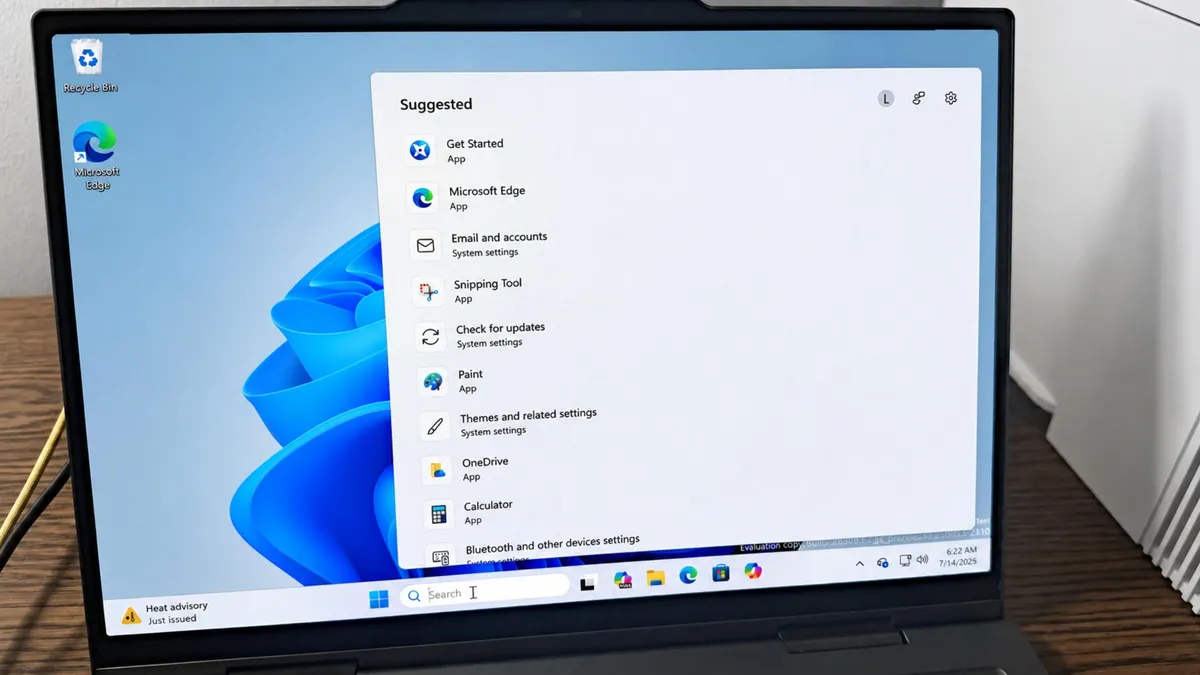
- The redesigned Windows 11 Search removes promotional clutter and displays only suggested searches with clear category labels
- Typo correction now works better, recognizing searches like 'utlook' as 'Outlook'
- The feature is available now in Windows Insider Experimental builds, with broader rollout expected within months
Microsoft has redesigned Windows 11 Search to strip out the noise. The new interface, now available in Windows Insider Experimental builds, ditches trending searches and promotional hooks in favor of a sparse list of suggested searches. Each result shows its name and category, whether it's an app, file, or setting, so you know what you're clicking before you click.
What changed in the new Windows 11 Search?
The current Windows Search panel has a problem: it's cluttered. Trending searches, AI tool promotions, and Microsoft Store pitches compete for attention with the results you actually wanted. Microsoft's redesign takes a different approach. Open the new Search window and you'll see a clean list of suggested searches, nothing else. Each item is labeled by type, so you can immediately tell whether you're looking at an app, a setting, or a file.
Run a few searches and the window remembers them. Your recent queries appear at the top the next time you open Search, letting you jump back to previous results without retyping. The layout stays minimal throughout.
Microsoft also reduced its own promotional presence. The company's blog post acknowledged the goal directly: "You've been asking for search that is faster, more relevant, and easier to use, whether you're opening an app, finding a file, or changing a setting. Because the Windows Search Box is where many people start, we focused first on making results more dependable, easier to scan, and clearer before you click."
How does the improved typo correction work?
The new Search handles mistakes more gracefully. Type "utlook" and Windows will figure out you meant "Outlook." Miss a letter, add an extra one, or swap two characters, and the search still returns what you were looking for. Even two-character queries now pull up relevant matches. Typing "zo" surfaces zoom settings for the Magnifier tool.
This matters for speed. Hunting and pecking through results because you fat-fingered a query adds friction to something you do dozens of times a day. Better typo correction means fewer repeated searches.
Can you control what appears in results?
Yes. Head to Settings, then Privacy and Security, then Search. From there you can toggle web results and Microsoft Store suggestions on or off. The default behavior now prioritizes local files, folders, apps, and settings when they're relevant. Web and cloud results still appear when they're a stronger match, but they no longer crowd out local content by default.
For enterprise environments where employees search for internal documents constantly, this shift toward local-first results could cut down on wasted time. IDC workplace studies have found that workers spend an average of 5 to 6 hours per week searching for files. Faster, more accurate local search directly addresses that problem.
How to enable the new Windows 11 Search today
You'll need to be running a Windows 11 Insider build with the channel set to Experimental. Even then, the feature may not appear automatically. If it doesn't, you can enable it manually.
- Open Settings
- Select Windows Update
- Click Windows Insider Program
- Select Feature flags
- Check the box for "Refined Windows Search"
- Set it to Enabled
After enabling the flag, open Search with the Windows key and you should see the new layout.
When will this reach all Windows 11 users?
Microsoft hasn't committed to a date. The feature is currently in Experimental, which means it's still being tested. If it passes Insider testing without major issues, a general rollout could happen within the next few months. That's a typical timeline for features that graduate from Experimental to general availability.
Logicity's Take
Windows Search has been a pain point for years, slow enough that many power users default to third-party tools like Everything or PowerToys Run. This redesign addresses the UX complaints, but Microsoft still has work to do on raw indexing speed. For organizations managing large file shares, tools like [Notion](https://logicity.in/r/notion) or [ClickUp](https://logicity.in/r/clickup) may still provide faster cross-platform search than relying on native OS features. Watch whether Microsoft improves the backend indexing to match the cleaner frontend.
Disclosure
Some links in this post are affiliate links — Logicity earns a commission if you sign up, at no extra cost to you. We only link products we have used or actively recommend.
Frequently Asked Questions
Is the new Windows 11 Search available to everyone?
Not yet. It's currently limited to Windows Insider Experimental builds. General availability is expected within the next few months if testing goes well.
Do I need to enable anything to get the new Search?
You may need to manually enable the "Refined Windows Search" feature flag in Settings > Windows Update > Windows Insider Program > Feature flags.
Can I turn off web results in Windows Search?
Yes. Go to Settings > Privacy and Security > Search to toggle web results and Microsoft Store suggestions on or off.
Does the new Search fix the slow indexing problem?
Microsoft hasn't announced backend indexing improvements. The update focuses on interface design and result relevance, not indexing speed.
Need Help Implementing This?
If your team needs help optimizing Windows deployment or evaluating productivity tools for enterprise search, contact Logicity for a consultation.
Source: Latest news
Huma Shazia
Senior AI & Tech Writer
Produced with AI assistance and reviewed by the Logicity editorial team. Learn more in our Editorial Policy.




