
Key Takeaways

- DDL commands (CREATE, ALTER, DROP) define database structure while DML commands (INSERT, UPDATE, DELETE) manage the actual data
- The WHERE clause is your best friend for filtering data precisely using operators like BETWEEN, IN, and LIKE
- CASE WHEN statements let you transform data on the fly without changing original records
- Order of operations matters a lot when working with foreign keys and dropping columns
Read in Short
SQL has two main command types: DDL for building database structure and DML for managing data inside those structures. A practical project building a school database is the fastest way to understand how these work together.
So you've probably heard that SQL is essential for anyone working with data. But there's a big difference between knowing that fact and actually understanding how to use it. One developer recently documented their transition from passively viewing data to actively managing it, and their breakdown is genuinely helpful for anyone just getting started.
The project? Building a school management system called "Nairobi Academy" from scratch. And honestly, this kind of practical approach beats reading documentation for hours. Let's break down what they learned.
DDL vs DML: The Two Languages of SQL
Here's the thing most tutorials don't explain well. SQL isn't just one set of commands. It's actually split into different categories based on what you're trying to do. The two big ones are DDL and DML.
| DDL (Data Definition Language) | DML (Data Manipulation Language) |
|---|---|
| Defines database structure | Manages data within structures |
| CREATE - build tables/schemas | INSERT - add new records |
| ALTER - change structure | UPDATE - modify existing records |
| DROP - delete structure | DELETE - remove records |
| Think: building the house | Think: arranging furniture |
The analogy that clicks for most people? DDL is like being an architect who designs the building. DML is like being the person who moves in and rearranges things. You need both, but they serve completely different purposes.
Building the Nairobi Academy Database Step by Step
The developer started with CREATE commands to establish the foundation. First came a schema named nairobi_academy, then three core tables: students, subjects, and exam_results. Nothing fancy yet, just the skeleton.
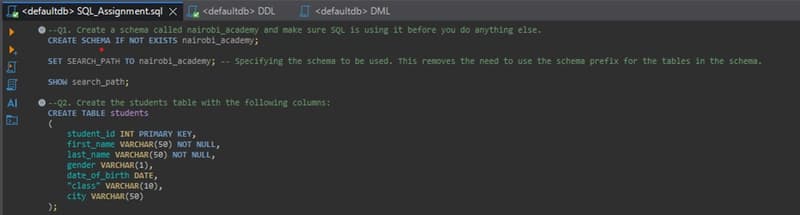
-- Creating the schema
CREATE SCHEMA nairobi_academy;

-- Creating the students table
CREATE TABLE students (
    student_id INT PRIMARY KEY,
    name VARCHAR(100),
    gender CHAR(1),
    city VARCHAR(50),
    class VARCHAR(10)
);
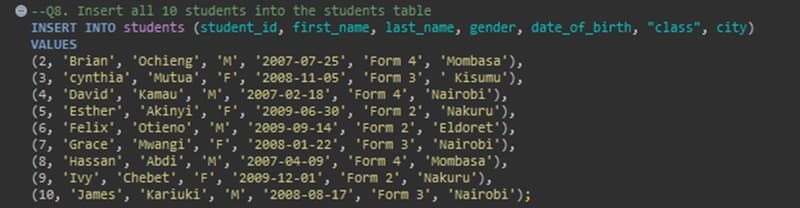
Once the structure existed, INSERT commands populated the tables with actual data. Students, subjects, exam scores. The database started coming to life.
But here's where it gets interesting. Data is rarely static. One of the students in the database relocated from Nakuru to Nairobi. Instead of deleting and re-adding the record, the UPDATE command paired with a WHERE clause handled it cleanly.
UPDATE students
SET city = 'Nairobi'
WHERE name = 'Jane Doe' AND city = 'Nakuru';Why WHERE Matters Here
Without the WHERE clause, this UPDATE would change EVERY student's city to Nairobi. That's a nightmare scenario. Always double-check your WHERE conditions before running UPDATE or DELETE commands.
The WHERE Clause: Your Precision Tool
Look, the WHERE clause is probably the most powerful filtering tool you'll use in SQL. It's what separates "give me everything" from "give me exactly what I need." And there are several operators that make it flexible.
- Comparison operators (=, >=, <) for exact matches and ranges. Finding all female students? WHERE gender = 'F'. High achievers with 70+ marks? WHERE marks >= 70.
- BETWEEN for clean range filtering. Need exams from a specific date window? BETWEEN '2024-03-01' AND '2024-03-05' reads so much better than two separate conditions.
- IN for checking against lists. Instead of writing WHERE city = 'Nairobi' OR city = 'Mombasa' OR city = 'Kisumu', just use IN ('Nairobi', 'Mombasa', 'Kisumu').
- LIKE for pattern matching with wildcards. Finding subjects containing 'Studies'? Use '%Studies%'. Names starting with A or E? Use 'A%' or 'E%'.
-- Finding students from major cities
SELECT * FROM students
WHERE city IN ('Nairobi', 'Mombasa', 'Kisumu');

-- Finding subjects with 'Studies' in the name
SELECT * FROM subjects
WHERE subject_name LIKE '%Studies%';If you're learning SQL to build data-driven applications, you might also be interested in building AI agents that can execute commands automatically.
CASE WHEN: Transforming Data Without Changing It
This is the part that honestly blew my mind when I first learned SQL. The CASE WHEN statement lets you apply conditional logic inside a query. You're creating new labels and categories on the fly, but the original table stays untouched.
For the Nairobi Academy project, CASE WHEN handled two practical scenarios.
- Converting numeric marks into grade labels. Scores 80+ became 'Distinction', 60-79 became 'Merit', and everything else got a 'Pass'. The raw numbers stayed in the database, but the query output showed meaningful categories.
- Classifying students into 'Senior' (Form 3/4) or 'Junior' (Form 1/2) groups based on their class column. Again, no data changed. The transformation happened only in the query results.
SELECT
    name,
    marks,
    CASE
        WHEN marks >= 80 THEN 'Distinction'
        WHEN marks >= 60 THEN 'Merit'
        ELSE 'Pass'
    END AS grade_label
FROM exam_results;The Tricky Parts Nobody Warns You About
The developer's reflection touched on something important. Order of operations matters way more than you'd expect, especially when foreign keys are involved.
Think about it. If your exam_results table references student_id from the students table, you can't just delete a student record whenever you want. The foreign key relationship will block you. You'd need to delete the related exam results first, or set up cascading deletes from the beginning.
Same thing with dropping columns. Try to drop a column that's referenced elsewhere and SQL will throw an error. The fix usually involves understanding the dependency chain and working backwards.
Common Beginner Trap
Naming a new column the same as an existing one during ALTER TABLE will cause errors. Always check existing column names before adding new ones. Sounds obvious, but it catches a lot of people.
Where to Go From Here
Mastering these basics opens up so much. Once you're comfortable with DDL and DML, the next logical steps are JOIN operations to combine tables, aggregate functions like COUNT and SUM, and eventually subqueries and views.
But don't rush it. The fundamentals covered here, creating structures, manipulating data, filtering with precision, and transforming output, these are the building blocks for everything else. Get these right and the advanced stuff becomes way more approachable.
Frequently Asked Questions
What's the difference between DELETE and DROP?
DELETE removes rows of data from a table (DML). DROP removes the entire table structure itself (DDL). Big difference!
Can I undo an UPDATE or DELETE command?
Only if you're using transactions with ROLLBACK capability. Otherwise, those changes are permanent. Always test on a backup first.
Why use IN instead of multiple OR statements?
IN is cleaner, easier to read, and often performs better. Compare WHERE city IN ('A','B','C') to WHERE city='A' OR city='B' OR city='C'.
Learning SQL? AI tools like ChatGPT can actually help you write and debug queries. Understanding their limits helps you use them effectively.
The best advice from this whole exercise? Build something real. A school database, an inventory system, a personal finance tracker. Whatever. The concepts only stick when you're solving actual problems, not just reading about them.
Source: DEV Community
Manaal Khan
Tech & Innovation Writer
Produced with AI assistance and reviewed by the Logicity editorial team. Learn more in our Editorial Policy.