Key Takeaways
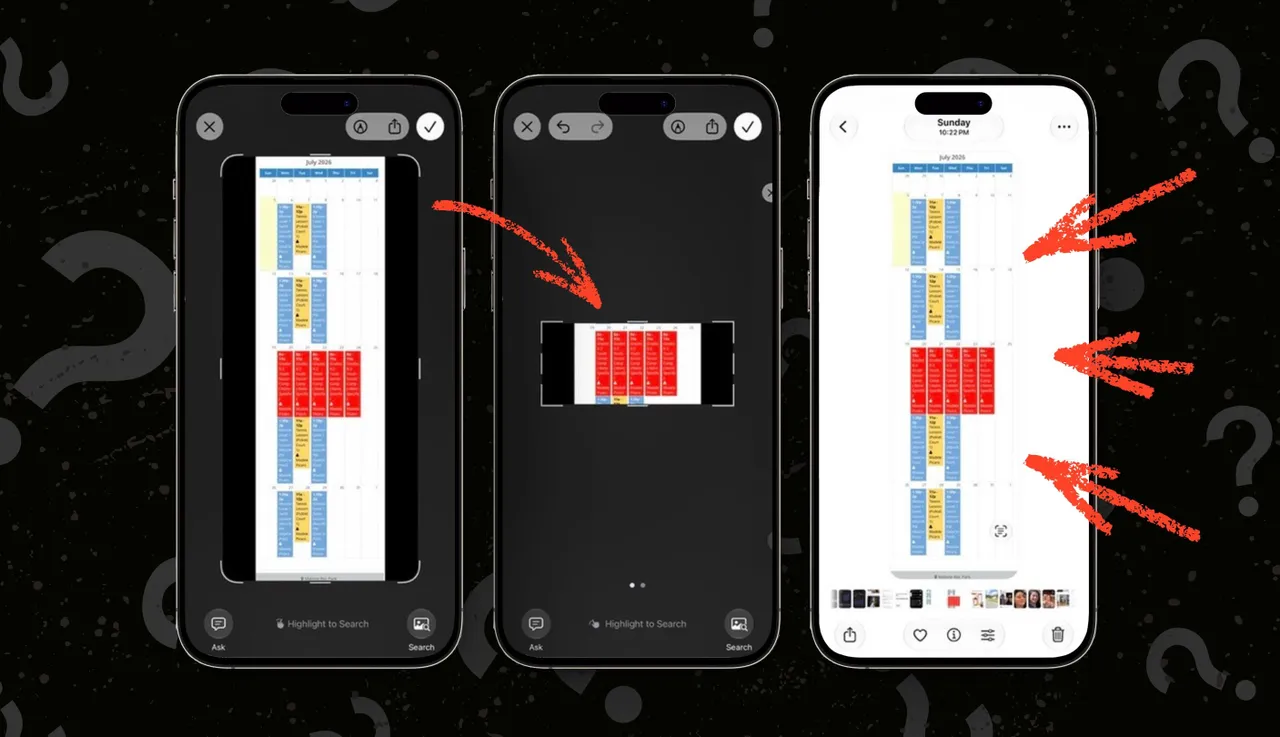
- iOS 26 and early iOS 27 betas have a bug that saves full screenshots instead of cropped versions
- This is a privacy risk when cropping to hide sensitive information like addresses or account details
- Installing iOS 27 developer beta 3 fixes the issue, but the workaround is to crop via the Photos app instead
A bug in iOS 26.5.2 and early iOS 27 developer betas silently saves full screenshots even after users crop them, potentially exposing information they tried to hide. The issue was confirmed by ZDNet's Elyse Betters Picaro, who discovered that cropped screenshots reverted to the original full image when saved or shared. iOS 27 developer beta 3, released earlier this week, appears to fix the problem.
What happens when you crop a screenshot on affected iPhones
The normal workflow is straightforward: take a screenshot, tap the crop button on the full-screen preview, drag the handles to select the portion you want to keep, and hit Done. The cropped version saves to Photos.
Except now it doesn't. On affected devices, the preview shows the crop correctly, but iOS saves the original full screenshot instead. Worse, users don't notice until after they've already shared the image. That's exactly what happened to Picaro, who cropped out sensitive information before sending a screenshot to a friend, only to realize afterward that the full image was shared.
This isn't an edge case. Multiple iPhone users reported the same behavior on Reddit, TikTok, and Apple forums. The pattern is consistent: the crop appears to work in the preview interface, but the saved file is the original uncropped image.
Why this is a privacy problem, not just an annoyance
People crop screenshots for a reason. Sometimes it's aesthetic. Usually it's privacy. They're hiding an address, a phone number, a message preview, a browser tab showing something embarrassing, a Slack notification revealing company information, or banking details visible in the corner.
When iOS appears to accept the crop but silently discards it, users share information they explicitly tried to remove. That's not a minor inconvenience. It's a breach of user expectation that could expose personal data to unintended recipients.
This echoes a similar vulnerability from 2023. The "Acropalypse" bug affected Google Pixel phones and Windows 11's Snipping Tool, allowing recovery of cropped image data from PNG files. Apple has historically positioned itself as the privacy-first platform. A bug that undermines screenshot cropping contradicts that positioning.
The only confirmed fix: iOS 27 beta 3
Installing iOS 27 developer beta 2 didn't resolve the issue for Picaro. But iOS 27 developer beta 3, released this week, did. After updating, cropped screenshots saved correctly on repeated tests.
That said, installing beta software on your primary device is risky. Early iOS betas break apps, drain battery, and introduce new bugs. If you depend on your iPhone for work, waiting for the public beta or the stable iOS 27 release is the safer call.
Workaround if you can't update
If you're stuck on iOS 26.5.2 or an earlier beta, there's a manual workaround. Don't crop from the screenshot preview. Instead, let the full screenshot save to Photos, open it in the Photos app, tap Edit, crop it there, and save. The edited version will retain the crop.
It's tedious. It adds steps to a workflow that should be instant. But it's the only way to ensure your cropped screenshots actually stay cropped until Apple pushes a stable fix.
One additional tip: enable full-screen screenshot previews if you haven't. Go to Settings > General > Screen Capture and turn on Full-Screen Previews. This makes it easier to catch issues before sharing.
Check your screenshots before sharing
Until Apple releases a stable fix, treat every cropped screenshot as suspect. Open Photos and verify the image before sending it anywhere. This adds friction, but it's better than accidentally sharing your home address or that Slack message you meant to hide.
Logicity's Take
This bug is small in scope but significant in implication. Apple's brand is privacy. When core features like screenshot cropping fail silently, it erodes trust in the platform's reliability. For teams sharing annotated screenshots internally, via [Slack](https://logicity.in/r/slack) or other tools, this is a reminder to double-check sensitive images before hitting send. The broader lesson: even mature, polished software has edge cases. Verify your outputs.
Disclosure
Some links in this post are affiliate links — Logicity earns a commission if you sign up, at no extra cost to you. We only link products we have used or actively recommend.
Frequently Asked Questions
Which iOS versions have the screenshot cropping bug?
The bug has been confirmed on iOS 26.5.2, iOS 27 developer beta 1, and iOS 27 developer beta 2. iOS 27 developer beta 3 fixes the issue.
How do I fix cropped screenshots not saving on iPhone?
Either update to iOS 27 developer beta 3, or use the workaround: save the full screenshot to Photos, open it in the Photos app, and crop it using the Edit function.
Is this bug a privacy risk?
Yes. If you crop a screenshot to hide sensitive information and then share it, the recipient may receive the full original image with all hidden details visible.
Should I install iOS 27 beta to fix this?
Only if you're comfortable with beta software risks like app crashes, battery drain, and instability. Otherwise, wait for the public beta or stable release.
Has Apple acknowledged the iOS screenshot cropping bug?
Apple has not publicly commented on the bug, but the fix in iOS 27 developer beta 3 suggests they are aware of it.
Need Help Implementing This?
If your team needs guidance on mobile device management, screenshot policies, or secure communication workflows, reach out to Logicity for consulting recommendations.
Source: Latest news
Manaal Khan
Tech & Innovation Writer
Produced with AI assistance and reviewed by the Logicity editorial team. Learn more in our Editorial Policy.




