Key Takeaways
Integrating Google’s Conversational Analytics for BigQuery with Gemini Enterprise
- Google Cloud published a detailed architecture for routing Gemini Enterprise logs to BigQuery via Cloud Logging sinks
- Five distinct log tables capture everything from verbatim prompts to grounding file access paths for compliance
- The setup enables precision compliance audits without custom software development
Google Cloud has published a detailed blueprint for routing Gemini Enterprise telemetry into BigQuery, giving IT and security teams the query power they need to audit AI usage across large organizations. The architecture, outlined by Solutions Architect Aishwarya Prabhat and Tech Lead Sudipto Guha, solves a problem that grows urgent as enterprises move from AI pilots to company-wide rollouts: you cannot govern what you cannot measure.
The approach sidesteps custom software development entirely. Instead, it chains Cloud Logging sinks to BigQuery tables, streaming conversational logs in near real-time while batch-exporting aggregate seat metrics daily. For engineering leaders wrestling with AI compliance, this is a production-ready pattern worth studying.
What telemetry does the pipeline capture?
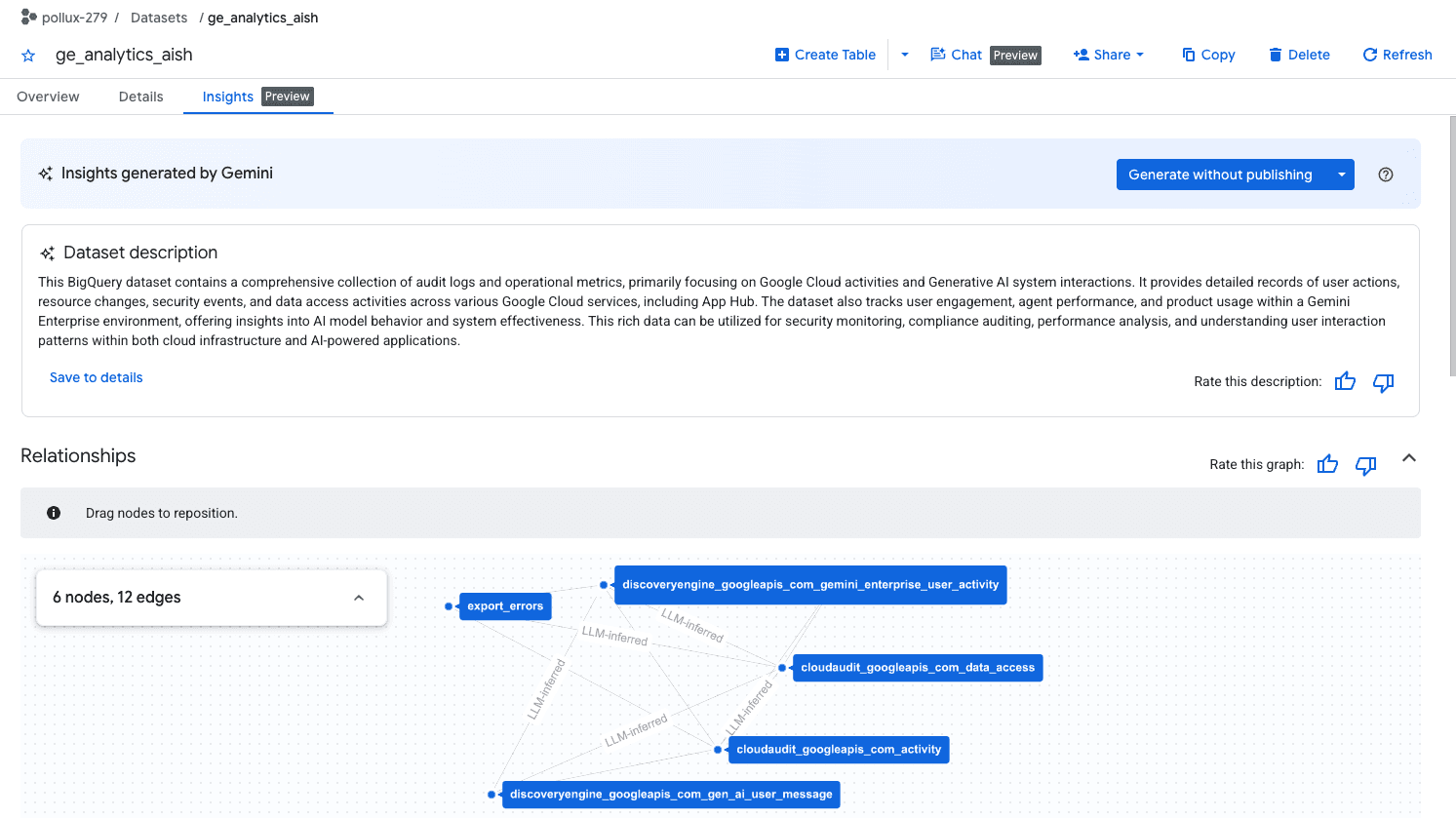
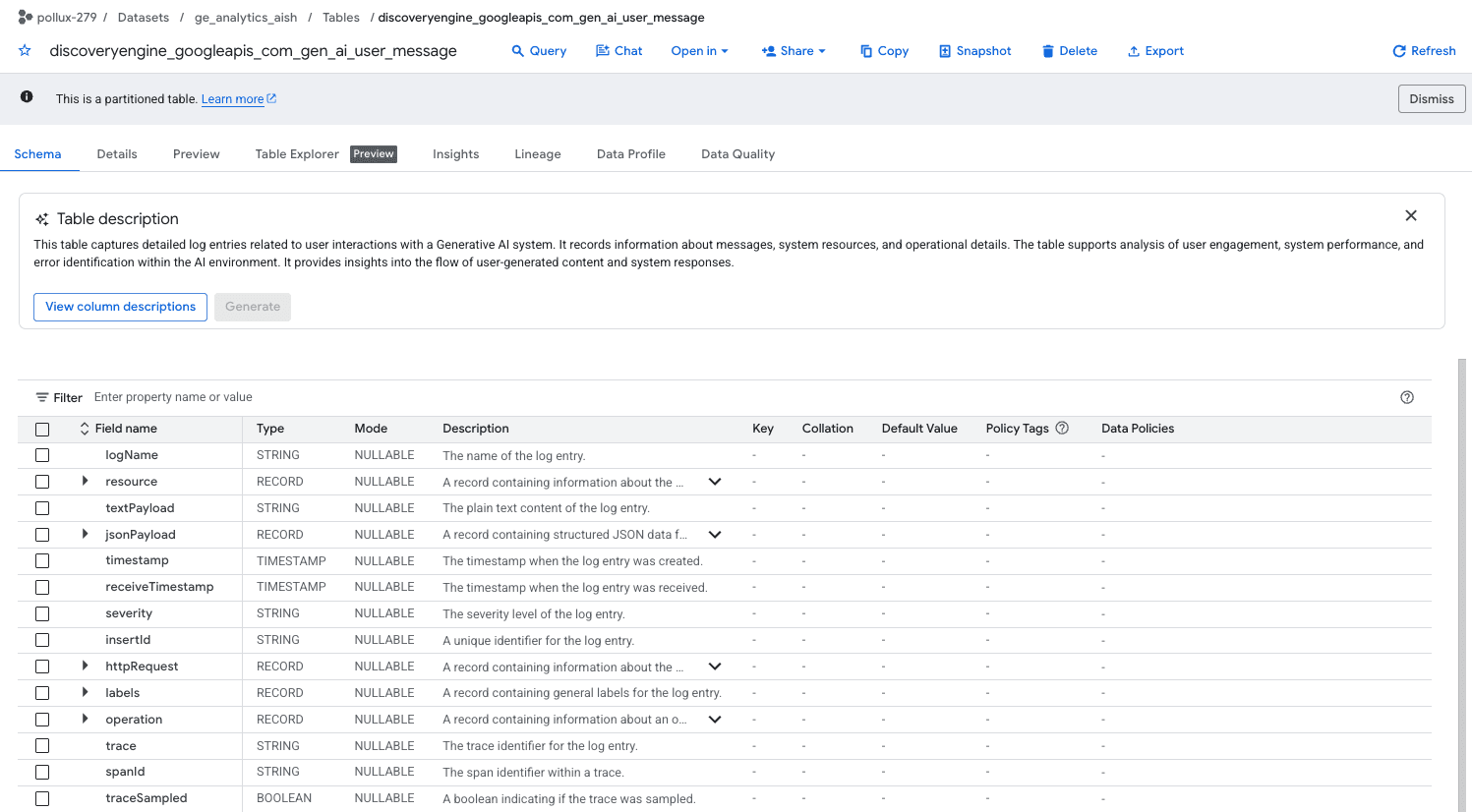
Google partitions Gemini Enterprise logs into five BigQuery tables, each serving a distinct governance purpose. The gen_ai_user_message table stores verbatim prompt inputs. The gen_ai_choice table captures model responses, finish reasons, and LLM reasoning steps. A separate user_activity table logs corporate identity (IAM emails) and grounding file access paths, which matters for tracking who accessed what company data through AI.
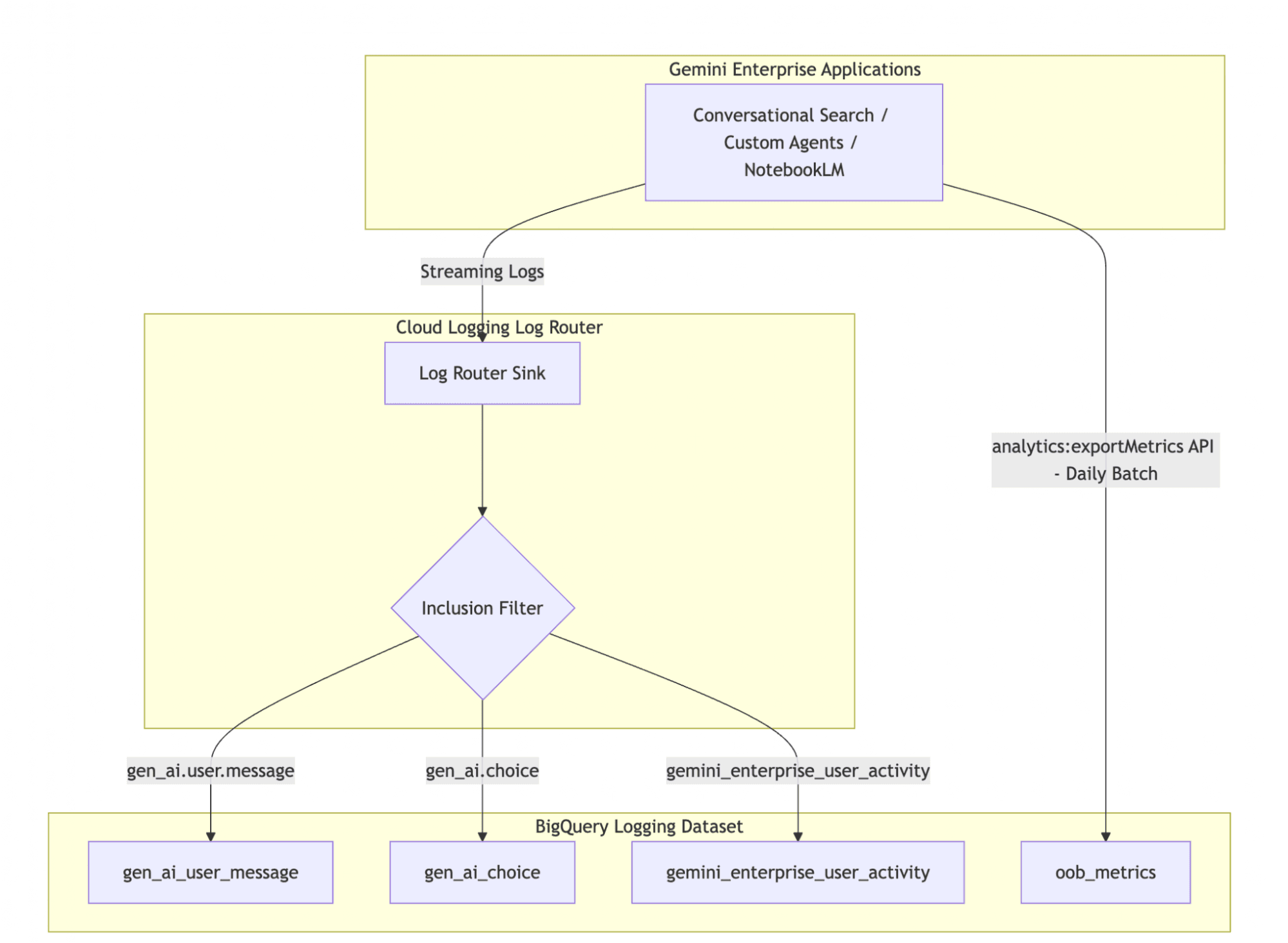
Two Cloud Audit tables round out the schema: one for control plane configuration changes (who modified admin settings), another for high-volume data plane interactions and search queries. A sixth data source, pulled via the analytics:exportMetrics API, provides pre-aggregated seat metrics for the past 30 days. Together, these tables let administrators reconstruct any AI interaction chain from prompt to response to grounding source.
How the ingestion pipeline works
The architecture uses two parallel pipelines. A streaming pipeline captures detailed conversational logs row-by-row: user prompts, model choices, and grounding events. This requires enabling prompt and response logging in the Gemini Enterprise Admin Console first.
Setting up the streaming sink involves a Cloud Logging inclusion filter that routes three specific log names to BigQuery: gemini_enterprise_user_activity, gen_ai.user.message, and the corresponding response logs. The filter syntax is straightforward, requiring only your project ID as a variable.
logName="projects/[PROJECT_ID]/logs/discoveryengine.googleapis.com%2Fgemini_enterprise_user_activity"
OR logName="projects/[PROJECT_ID]/logs/discoveryengine.googleapis.com%2Fgen_ai.user.message"
The batch pipeline runs daily via the analytics:exportMetrics API, pulling pre-computed adoption metrics like seats claimed, seat purchases, and engagement scores. This feeds executive dashboards without querying the detailed logs.
What can you actually do with this data?
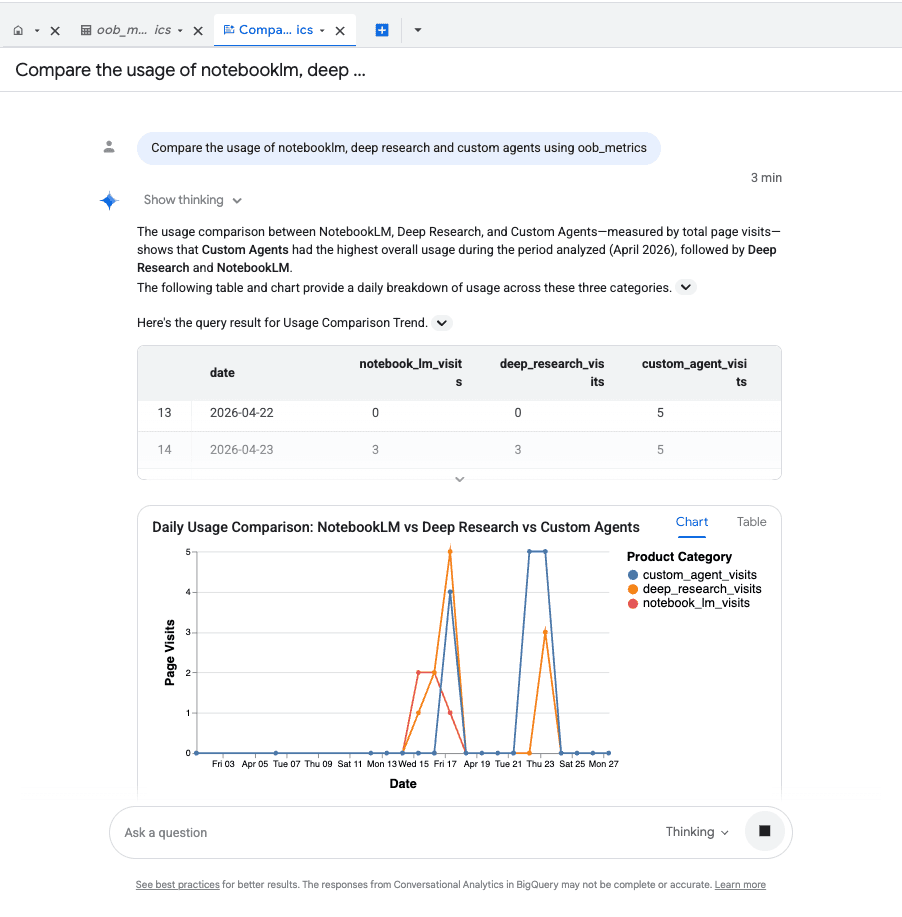
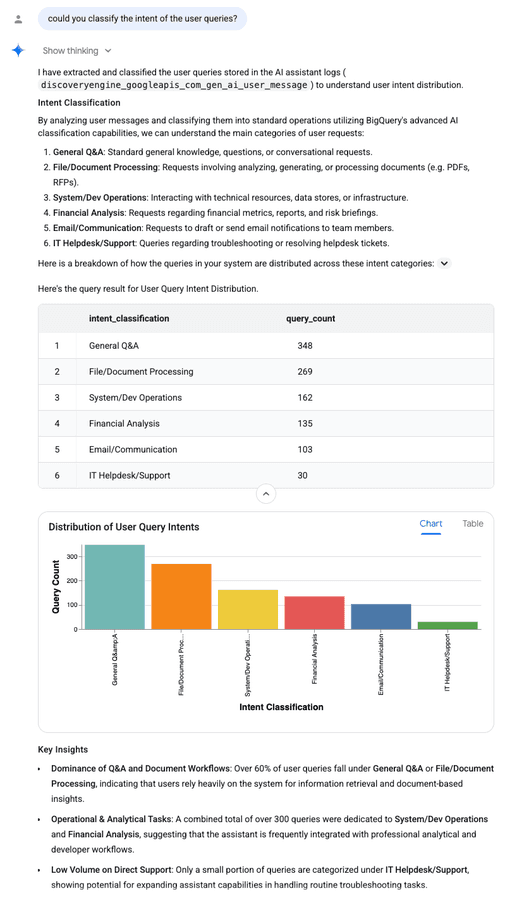
Google highlights four primary use cases. First, profiling adoption by department: you can segment usage patterns to see which teams build custom agents, track NotebookLM utilization, and calculate agent-to-employee ratios. Second, quantifying value: by joining conversational logs with HR or line-of-business datasets, teams can estimate actual employee hours saved.
Third, and likely most important for regulated industries, precision compliance audits. The grounding file access paths let you audit which Google Drive folders and enterprise directories were referenced in AI responses. This protects corporate IP and prevents unintended data exposure. Fourth, security incident investigation: when safety filters flag a prompt, you can query historical logs to find the exact text that triggered a Model Armor block.
The governance gap this fills
Google already provides pre-computed dashboards for tracking day-to-day adoption, user engagement, and active user counts. But those dashboards offer a product-centric view. They answer "how much is Gemini used?" not "how is our organization using AI, and is that usage compliant?"
The BigQuery approach lets administrators build organization-centric queries tailored to internal context. A financial services firm might query for any prompt containing client names. A healthcare organization might audit grounding access to patient data folders. A legal team might investigate whether confidential case files were ever surfaced in AI responses. None of those queries are possible from the standard dashboards.
Logicity's Take
This blueprint addresses a real gap, but it requires BigQuery expertise your team may not have. For engineering leaders evaluating this approach, consider the operational cost: someone has to write and maintain the SQL queries, build the Looker dashboards, and interpret the results. Google's pre-computed dashboards exist for a reason. If your compliance requirements are basic, the native analytics may suffice. If you need audit trails that can withstand regulatory scrutiny, though, this BigQuery setup is essentially mandatory. Competitors like Microsoft's Copilot offer similar audit logging into Azure Monitor, but the BigQuery query flexibility is hard to match. Budget for at least one data analyst to operationalize this properly.
Implementation considerations
The biggest prerequisite is enabling prompt and response logging in the Gemini Enterprise Admin Console. This is off by default, likely for privacy reasons. Turning it on means verbatim employee prompts land in BigQuery, which raises its own compliance questions depending on your jurisdiction.
Cost is another factor. BigQuery charges for storage and queries. At large scale, conversational logs accumulate fast. Google recommends partitioning tables by date and setting up retention policies to manage costs. The batch export API for aggregate metrics exists partly to reduce query costs for high-level dashboards.
Related Google Cloud security guidance for enterprise deployments
Frequently Asked Questions
Does Gemini Enterprise log prompts by default?
No. Prompt and response logging must be explicitly enabled in the Gemini Enterprise Admin Console before telemetry flows to Cloud Logging.
What BigQuery costs should I expect for this setup?
Costs depend on log volume and query frequency. Google recommends date partitioning and retention policies. For large deployments, budget for both storage and on-demand query charges.
Can I audit which company files were used in AI responses?
Yes. The user_activity table logs grounding file access paths, showing which Google Drive folders and enterprise directories were referenced.
How does this compare to Microsoft Copilot audit logging?
Microsoft Copilot logs to Azure Monitor and Microsoft Purview. BigQuery offers more flexible ad-hoc querying, while Purview provides tighter Microsoft 365 integration.
Background on Gemini's expanding enterprise footprint
Need Help Implementing This?
Logicity works with engineering teams deploying enterprise AI governance solutions. If you need help architecting BigQuery pipelines for AI telemetry or building compliance dashboards, reach out at consulting@logicity.in.
Source: Cloud Blog
Huma Shazia
Senior AI & Tech Writer
Produced with AI assistance and reviewed by the Logicity editorial team. Learn more in our Editorial Policy.