Key Takeaways
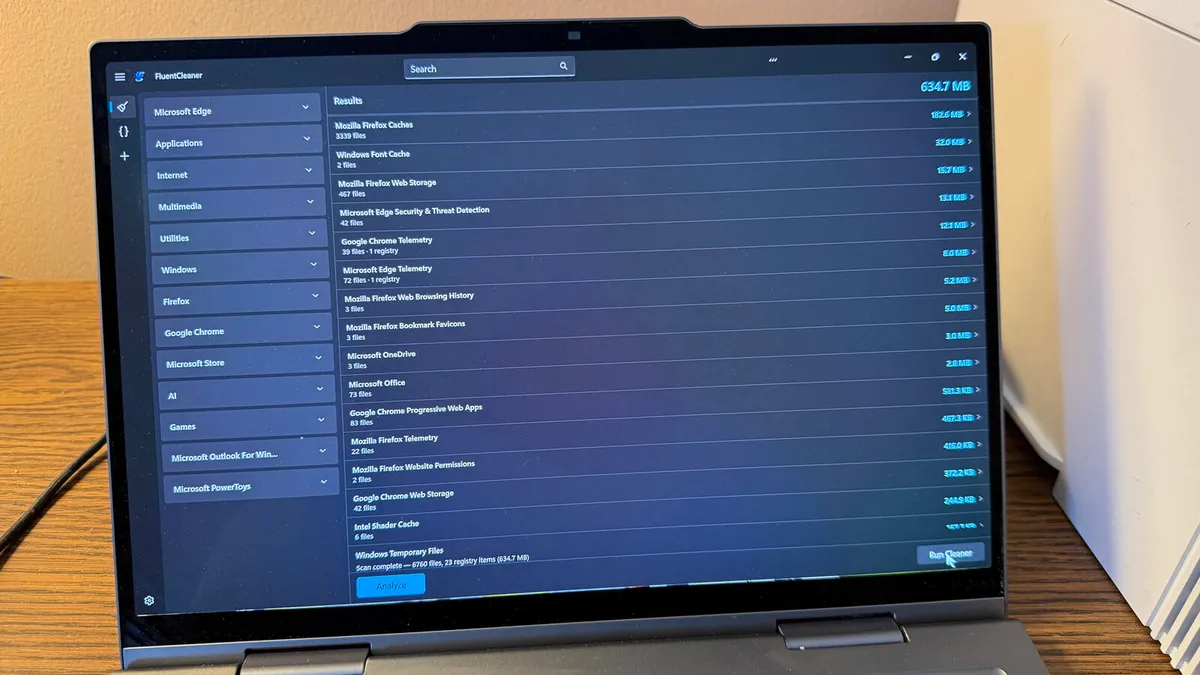
- Fluent Cleaner is a free, portable utility that removes junk files from Windows 10 and 11 without requiring installation
- The tool targets temp files, cache data, leftover logs, and unused Registry entries across multiple categories
- Unlike CCleaner, it has no bundleware, no VPN upsells, and no telemetry
A free Windows utility called Fluent Cleaner promises to clear out temp files, junk data, and old Registry entries without the bloat that plagued its predecessors. The tool runs as a portable .exe file, requires no installation, and explicitly avoids the bundleware and upsells that turned CCleaner into the thing it once fought against.

What does Fluent Cleaner actually remove?
The utility scans your Windows environment across several categories: temporary files, browser caches, leftover logs, and unused Registry entries. After the analysis, you can remove everything at once or review each category individually before deletion.
This matters because Windows accumulates garbage over time. Every app install and uninstall leaves traces. Cache files pile up. The average PC accumulates 30-50 GB of junk over one to two years of normal use. Microsoft's built-in Disk Cleanup tool handles some of this, but its interface looks like it was designed in 2005. Storage Sense automates the process but offers limited control.
Fluent Cleaner sits between them: more control than Storage Sense, a modern Fluent Design interface, and none of the installation overhead.
Why not just use CCleaner?
CCleaner's fall from grace explains why utilities like Fluent Cleaner exist. Piriform's tool was once the go-to recommendation for PC maintenance. Then Avast acquired it in 2017. The software now pushes VPN upsells on every launch, bundles additional apps, and costs $29.95 per year for the Pro version.

The Fluent Cleaner developer addresses this directly on the GitHub page: "FluentCleaner targets things that are unambiguously junk: cache files, temp data, leftover logs. It deliberately avoids the feature creep that turned CCleaner from a focused utility into bloatware with a VPN upsell on every launch."
The tool also skips telemetry. No tracking, no partner apps, no toolbars.
How to use Fluent Cleaner
Download the FluentCleaner-win-x64.zip file from the utility's GitHub page. Unzip it, navigate into the FluentCleaner-win-x64 folder, and run FCleaner.exe. That's it. No installer, no setup wizard, no reboot.
Microsoft Defender SmartScreen may flag the executable since it lacks a commercial code signature. Click "More info" and then "Run anyway" to proceed. This warning is common for open-source tools distributed outside the Microsoft Store.
Once the interface loads, you can run a full analysis or scan individual categories. Review what the tool plans to delete before clicking the cleanup button. Registry cleaners in particular can remove entries that some applications still reference.

The caveats
Registry cleaning remains controversial. Microsoft has never endorsed third-party Registry cleaners, and some IT professionals argue they provide negligible performance gains while introducing risk. Fluent Cleaner's developer claims to target only "unambiguous" junk, but you should still review deletions before confirming.
The tool also lacks the deep integration of paid alternatives. BleachBit, another open-source option, offers more granular control over application-specific caches. Windows' own Storage Sense runs automatically without user intervention. Fluent Cleaner fills a middle ground: manual control, modern interface, zero cost.
Logicity's Take
For IT teams managing fleet PCs or founders cleaning up developer workstations, Fluent Cleaner is worth bookmarking. It won't replace proper disk management policies, but it's a fast way to reclaim space without installing yet another monitoring service. The real value is what it doesn't do: no subscription, no telemetry, no installer residue. Compare this to CCleaner Pro at $30/year or Iolo System Mechanic at $50/year. For occasional cleanup, free and portable wins.
Frequently Asked Questions
Is Fluent Cleaner safe to use?
The tool is open-source and available on GitHub, so you can inspect the code. It has no telemetry and requires no installation. However, always review what it plans to delete before confirming, especially Registry entries.
Does Fluent Cleaner work on Windows 10?
Yes. The utility supports both Windows 10 and Windows 11.
How is Fluent Cleaner different from Windows Disk Cleanup?
Fluent Cleaner uses a modern Fluent Design interface, scans more categories including Registry entries, and offers one-click removal. Disk Cleanup is older, has a dated UI, and focuses primarily on system files.
Is Fluent Cleaner better than CCleaner?
It depends on your needs. Fluent Cleaner is free, portable, and has no upsells. CCleaner offers more features but costs $30/year for Pro and has been criticized for bundleware since Avast acquired Piriform.
Why does Windows Defender SmartScreen block Fluent Cleaner?
SmartScreen flags executables without commercial code signatures. This is common for open-source tools. You can bypass it by clicking More info and then Run anyway.
Need Help Implementing This?
Managing PC fleets or standardizing cleanup tools across your team? Reach out to our consulting partners for IT automation strategies that scale beyond manual utilities.
Source: Latest news
Manaal Khan
Tech & Innovation Writer
Produced with AI assistance and reviewed by the Logicity editorial team. Learn more in our Editorial Policy.




