Key Takeaways
COSMIC Desktop's NEW Frosted Glass Effect | Pop OS Gets a Stunning Visual Upgrade!
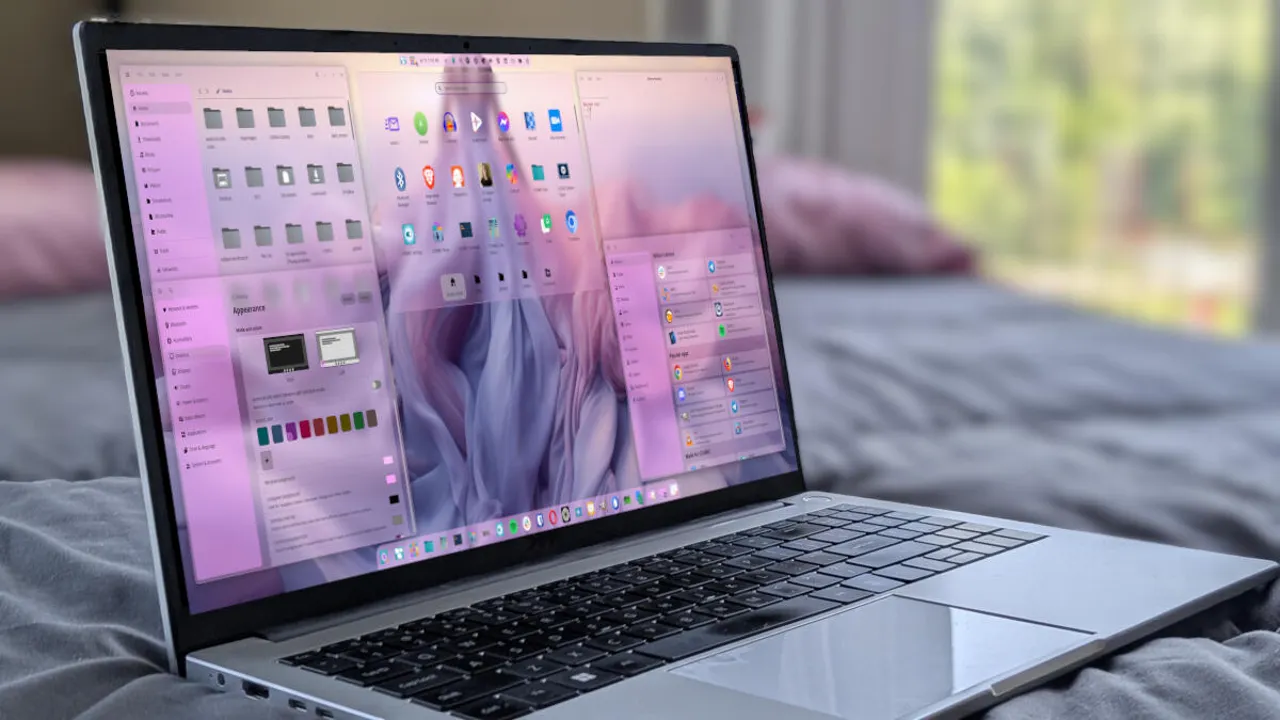
- System76's COSMIC desktop now features Frosted Glass, a transparency effect that rivals and arguably surpasses Apple's Liquid Glass
- The feature is available now for Pop!_OS 24.04 users through a simple system update
- COSMIC is built entirely in Rust, making it one of the first major desktop environments using this memory-safe language
System76 just released Frosted Glass for its COSMIC desktop environment, and early testing suggests it delivers what Apple's Liquid Glass promised but didn't quite achieve. The effect adds soft, blurred transparency to windows and UI components across Pop!_OS, creating a layered visual depth that makes macOS look dated by comparison.
Jack Wallen at ZDNet put it bluntly after testing: COSMIC's Frosted Glass is what he thought macOS's Liquid Glass was supposed to be. That's a strong claim considering Apple announced Liquid Glass as a major UI overhaul at WWDC 2025, positioning it as the future of interface design across iOS, iPadOS, and macOS.
What exactly is Frosted Glass?
The feature applies a soft, blurred transparency to windows and various UI elements. Think of the blur effect you see on Android's app drawer or certain macOS menus, but applied consistently across the entire desktop experience. The COSMIC terminal, file manager, text editor, system monitor, and app launcher all receive this treatment.
Users can customize the effect granularly. The settings panel lets you enable Frosted Glass for specific elements, adjust frost thickness, and modify glass opacity. Want aggressive blur on your terminal but subtle transparency elsewhere? You can do that.
How to enable it on Pop!_OS
If you're running Pop!_OS 24.04, getting Frosted Glass takes about two minutes. Open the COSMIC Store, click Updates, and apply the available upgrades. After a reboot, navigate to Settings > Desktop > Style > Frosted Glass. The sidebar lets you toggle the effect for individual UI elements.
The COSMIC Store itself receives the Frosted Glass treatment after the update, so you'll see the effect immediately.
Why this matters beyond aesthetics
COSMIC represents something unusual in desktop computing: a ground-up rewrite using Rust, a memory-safe programming language that's gaining traction in systems programming. System76 started development in 2021, and the pace of progress has surprised observers. The company has nearly 20 years of Linux hardware and software experience, but building an entire desktop environment from scratch is ambitious.
Linux desktop usage hit 6.4% market share in 2024, an all-time high. That's still niche compared to Windows and macOS, but it signals growing interest in alternatives. Visual polish has historically been Linux's weak point in mainstream perception. COSMIC changes that calculus.
Apple's Liquid Glass suddenly looks conservative
Apple had the opportunity to push desktop UI forward with Liquid Glass. The result is good, not great. It applies translucent glass-like effects to interface elements, but the execution feels restrained. System76, with far fewer resources, delivered something bolder.
This isn't to say Liquid Glass failed. Wallen applied it to both his MacBook Pro and Apple Studio and likes the result. But side by side, he found Liquid Glass looks "drab and boring" compared to Frosted Glass. Apple now has a higher bar to clear if it wants to maintain its reputation for design leadership.
Logicity's Take
For CTOs and IT leads evaluating desktop environments, COSMIC signals that Linux desktops have crossed a threshold. The "Linux is ugly" objection no longer holds. System76's Rust-based architecture also means better memory safety and potentially fewer crashes in the compositor layer. The real question is application compatibility, but if your team runs primarily web-based tools or has flexible software requirements, Pop!_OS with COSMIC deserves evaluation. System76 hardware runs $1,000-$3,500 depending on configuration, but Pop!_OS itself is free and runs on any compatible machine.
The broader competition for desktop attention
KDE Plasma has been the benchmark for beautiful Linux desktops, gradually approaching Apple's polish over the years. COSMIC just jumped ahead of both. The tables have turned, as Wallen put it, and other desktop environments now have catching up to do.
Whether this matters to enterprise deployments depends on your priorities. For developer teams who care about their daily environment, or companies that want to project a certain technical image, the Linux desktop just became significantly more attractive. Apple's UI advantage was never about raw functionality. It was about perceived quality. That perception just took a hit.
Frequently Asked Questions
Is COSMIC Frosted Glass available on other Linux distributions?
Currently, Frosted Glass is available through Pop!_OS 24.04. COSMIC is being developed by System76 specifically for Pop!_OS, though other distributions may package it in the future.
Does Frosted Glass affect system performance?
Transparency effects typically require GPU compositing, which adds some overhead. However, COSMIC's Rust-based architecture is designed for efficiency. Users can adjust frost thickness and opacity to balance visual appeal with performance.
How does COSMIC compare to KDE Plasma?
KDE Plasma has been the traditional leader in Linux desktop aesthetics. COSMIC is newer, built from scratch in Rust, and with Frosted Glass now offers visual effects that surpass KDE's current offerings.
Can I try COSMIC without installing Pop!_OS?
System76 provides Pop!_OS ISO images that can be run as live systems from a USB drive, letting you test COSMIC and Frosted Glass without installing anything to your hard drive.
If you're evaluating hardware for a Linux deployment, this roundup covers current all-in-one options
Need Help Implementing This?
Considering a Linux deployment for your team? Logicity helps tech leaders evaluate desktop environments and migration strategies. Reach out for a consultation on whether COSMIC and Pop!_OS fit your organization's needs.
Source: Latest news
Huma Shazia
Senior AI & Tech Writer
Produced with AI assistance and reviewed by the Logicity editorial team. Learn more in our Editorial Policy.




