Key Takeaways
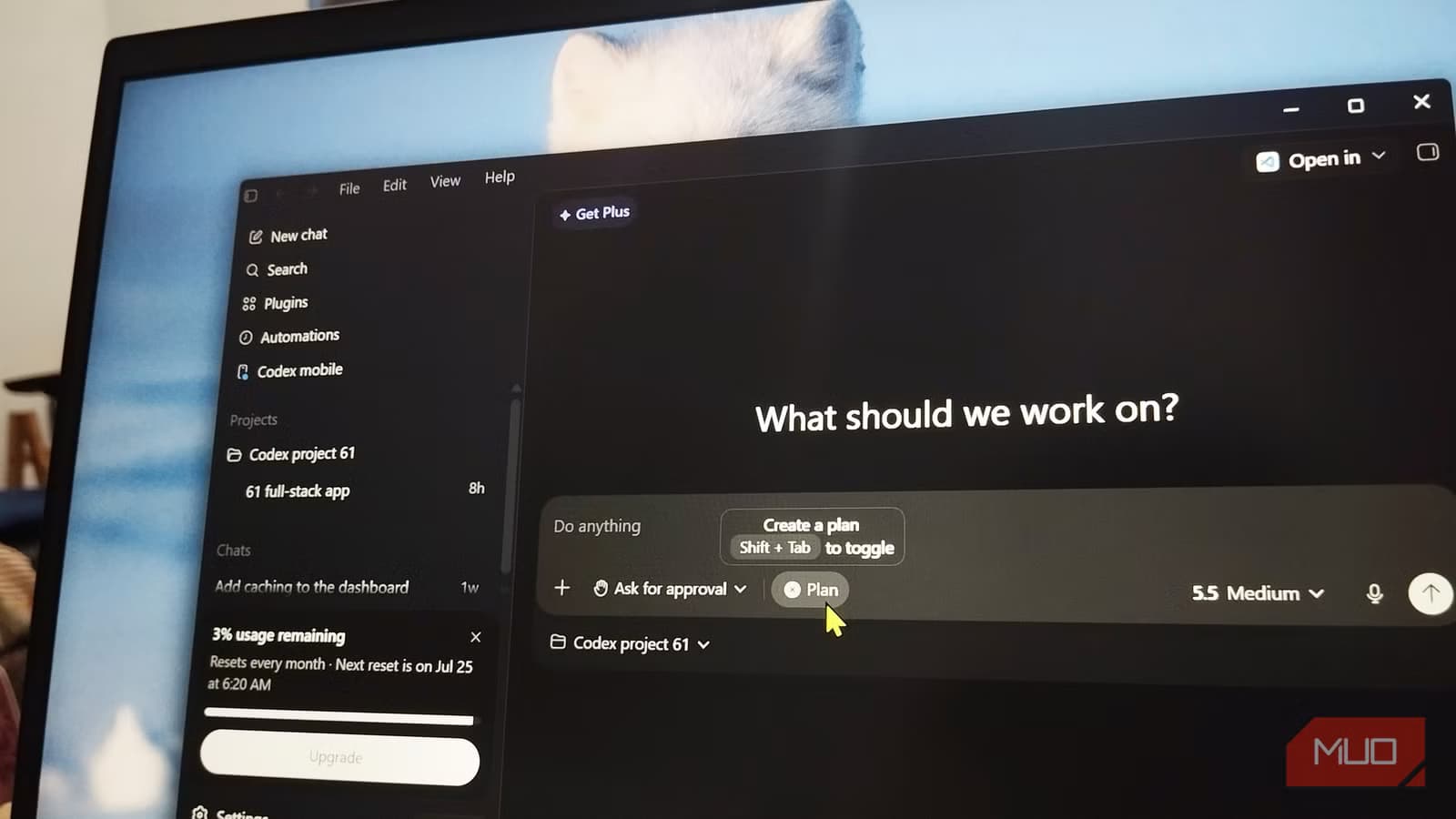
- Codex plan mode reads your entire project before proposing changes, eliminating context loss from manual handoffs
- The feature asks clarifying questions when prompts are vague, catching gaps before they become wrong code
- Four reasoning levels let developers balance speed against thoroughness for different task complexity
A developer workflow that once required two AI tools now fits into one. OpenAI's Codex plan mode lets the CLI tool read a project, propose changes, and wait for approval before writing anything. For one MakeUseOf writer, this single feature killed his habit of planning builds in Claude before moving to Codex for execution.
The shift matters because it addresses a real friction point in AI-assisted coding: context loss during handoffs between tools.
What problem does Codex plan mode solve?
Yasir Mahmood, writing for MakeUseOf, describes a common two-tab workflow. He would open Claude to reason through a build: what to do first, which files to touch, where things might break. Once satisfied, he'd carry that plan to Codex for the actual coding.
The problem? He was describing his project to Claude from memory. Folder layouts, naming conventions, which files mattered. Then Codex would reconstruct half that context on its own anyway. Every handoff lost something, and Mahmood was the one carrying it across.
Plan mode eliminates the handoff entirely. One toggle in the Add menu flips Codex from doer to planner. It gathers context from your actual codebase, proposes a plan, and stays read-only until you approve. Nothing changes on disk while you're still deciding.
How does the approval system work?
The feature gives developers three levels of control. "Ask for approval" requires sign-off before any file edit or internet access. "Approve for me" only stops for risky operations. "Full access" removes the guardrails entirely.
Mahmood tested it with a simple prompt: "Add input validation to the signup form." Codex read the relevant files, laid out a short plan, and waited. He approved, and it built. The value is in that pause. The AI shows its work before it does the work.
What happens when your prompt is vague?
This is where plan mode surprised Mahmood most. When he sent a fuzzy request, Codex questioned it instead of guessing wrong. He tested it explicitly:
“I want to add caching, but I haven't worked out the details. Challenge my assumptions and ask whatever you need before you plan it.”
— Yasir Mahmood, prompt to Codex
Codex interviewed him. Should the cache live in memory or survive a restart? How long should entries last? Which calls were worth caching? How should stale data get cleared? These are exactly the questions Mahmood used to answer in his Claude planning chat. Now they happen where the code lives.
The gaps a developer would usually leave unsaid get caught before they become wrong code.
How do reasoning levels affect the output?
Plan mode includes a reasoning control with four settings: Low, Medium, High, and Extra High on GPT-5.5. A quick edit gets Low. Anything with real moving parts gets Extra High, where Codex spends noticeably longer working through the problem before proposing anything.
The tradeoff is straightforward: more reasoning means longer waits but more careful plans. For complex refactoring or architectural decisions, the extra time pays off. For fixing a typo, it's overkill.
Does this actually replace Claude for planning?
For Mahmood's workflow, yes. The key difference is project awareness. Claude couldn't see his codebase; he had to describe it. Codex reads the actual files, understands the actual structure, and asks questions grounded in what exists rather than what he remembers.
That said, Claude still has its strengths. For pure reasoning about abstract problems, for brainstorming architectures before any code exists, or for conversations that don't involve a specific codebase, Claude remains useful. Plan mode wins when you already have a project and want to modify it thoughtfully.
| Aspect | Claude Planning | Codex Plan Mode |
|---|---|---|
| Project context | Manual description from memory | Reads actual codebase |
| Context loss | Every handoff loses detail | No handoff needed |
| Question handling | Separate conversation | Inline with code |
| Execution | Requires separate tool | Same tool, one toggle |
What's the broader implication?
The shift reflects a pattern in AI tooling: integrated beats fragmented. Developers don't want to orchestrate multiple specialized tools if one tool can handle the full loop. Plan mode merges thinking and doing without sacrificing the safety of seeing plans before they execute.
OpenAI released Codex CLI as open source under the Apache 2.0 license in April 2025. It runs locally, handles sandboxed execution, and now handles planning too. For developers already using Codex, plan mode costs nothing extra to try.
Logicity's Take
The real win here isn't that Codex got smarter. It's that context finally stays where it belongs. Every time a developer describes their codebase from memory to an AI, they're doing the model's job for it, badly. Plan mode forces the tool to read before it writes, which should have been the default from the start. Expect competitors to copy this pattern quickly.
Frequently Asked Questions
Is Codex plan mode free to use?
Codex CLI is open source and free to download. Plan mode is a built-in feature. API costs for the underlying model still apply depending on your OpenAI usage tier.
Can Codex plan mode work offline?
Codex CLI runs locally, but plan mode requires API calls to OpenAI's models for reasoning. The sandboxed execution happens on your machine; the intelligence comes from the cloud.
Does plan mode work with all programming languages?
Codex CLI supports any language it can read as text files. The quality of its plans depends on the model's training data for that language, so mainstream languages get better results.
How does plan mode compare to GitHub Copilot?
Copilot focuses on inline code completion. Plan mode is about higher-level reasoning: understanding project structure, proposing multi-file changes, and asking clarifying questions before acting.
Need Help Implementing This?
Setting up AI coding workflows for your team? Logicity can connect you with developers who've integrated Codex, Cursor, and similar tools into production environments. Reach out through our contact page.
Source: MakeUseOf
بديل مفتوح المصدر لـ Claude Design: أداة Open Design الجديدة
المقال الجديد يتحدث عن موضوع مختلف تماماً: بديل مفتوح المصدر لـ Claude Design يُدعى Open Design، طورته فرق nexu-io تحت رخصة Apache-2.0. هذا يختلف عن مقالنا الذي يتناول وضع Plan mode في Codex كبديل لـ Claude في التخطيط البرمجي.
Huma Shazia
Senior AI & Tech Writer
Produced with AI assistance and reviewed by the Logicity editorial team. Learn more in our Editorial Policy.






