Key Takeaways
- Smart plugs remain the easiest entry point to home automation, with the Kasa Mini 4-pack offering solid value at $38
- The Ting Fire Sensor at $99 monitors electrical hazards before they become fires, making it a genuine safety investment
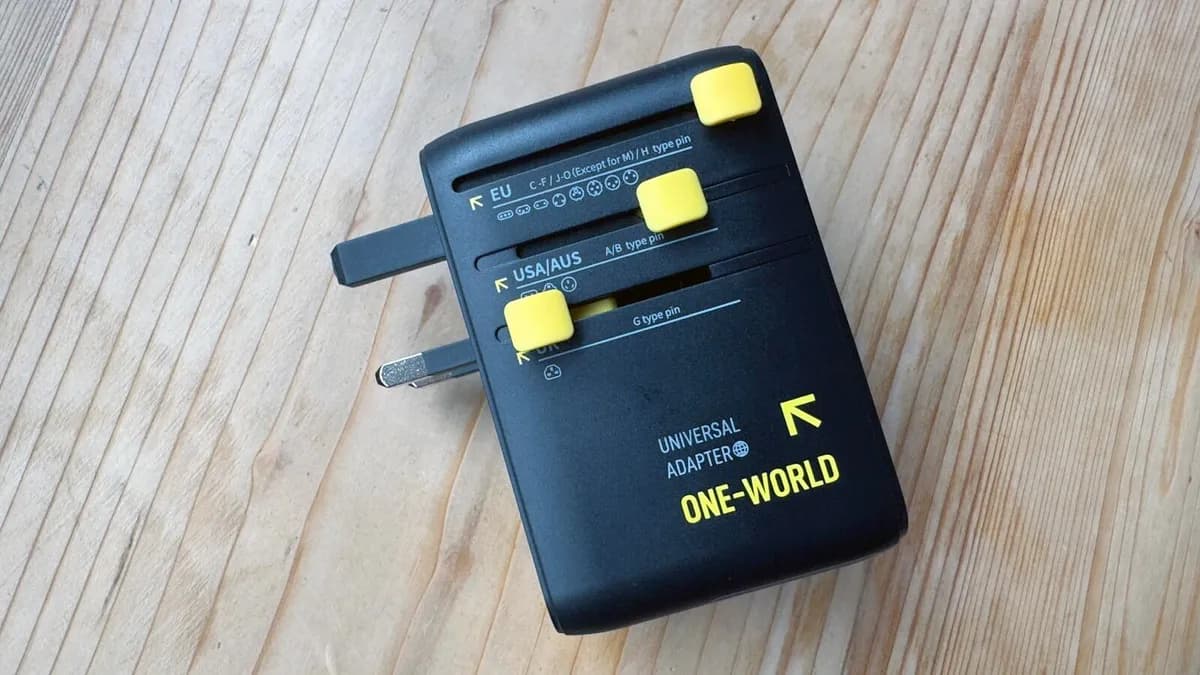
- Universal travel adapters like the Baseus 70W eliminate the need to pack multiple chargers across 200+ countries
Wall outlets were once revolutionary. Now they fade into the background behind voice assistants and smart displays. But the humble outlet remains the power source for everything in your home, and a handful of inexpensive plug-in gadgets can make those outlets work significantly harder.
ZDNET's Kayla Solino recently tested eight plug-in devices ranging from $10 outlet extenders to a $99 fire sensor. The selection spans convenience gadgets and genuine safety equipment, all sharing one trait: they plug directly into existing outlets without any wiring.
Which plug-in gadgets actually solve problems?
The list breaks into three categories: power expansion, smart home control, and safety. Each solves a different pain point.
For power expansion, the Merkury Slim Wall Adapter ($10) adds USB-A and USB-C ports to any outlet. It sits flush against the wall, which matters if you have furniture near outlets. The Anker 33W 2-Port Wall Charger ($19) delivers faster charging but takes up more space. And the Baseus 70W Universal Travel Adapter ($40) works in over 200 countries with a built-in USB-C cable, eliminating the cable-hunting ritual that plagues every business trip.
For smart home control, the Kasa Smart Plug Ultra Mini 4-pack ($38) remains a ZDNET editor favorite. These plugs connect to Wi-Fi and let you automate lamps, fans, or kitchen appliances through the Kasa app or voice commands. Maria Diaz, ZDNET's smart home reviewer, uses them year-round. The plugs are small enough that stacking two on a duplex outlet actually works.
Why is a fire sensor on this list?
The Ting Fire Sensor ($99) stands apart from the convenience gadgets. It monitors your home's electrical system for micro-arcs, loose wiring, and other hazards that precede electrical fires. The US sees over 3,300 deaths annually from home electrical fires. Ting detects problems before they ignite and alerts you through its app.
At $99, it costs more than the other gadgets combined. But if you work from home surrounded by expensive equipment, or if your house has older wiring, the math shifts. Ting's value proposition is insurance, not convenience.
What about surge protection?
The Anker Flat Surge Protector ($28) sits between your equipment and the outlet, absorbing voltage spikes before they reach your devices. Unlike power strips with surge protection claims, this one lies flat against the wall and provides multiple outlets plus USB ports. For a home office with a laptop, monitor, and peripherals, it is baseline protection.
Surge protectors degrade over time as they absorb spikes. The $28 price point makes replacement every few years reasonable.
The specialty picks
Two gadgets target narrower audiences. The Zevo Insect Trap ($18) uses UV light to attract and trap flying insects without chemicals or noise. It plugs into any outlet near windows or doors. The Whisko LitterGuard Pro ($40) monitors cat litter boxes and alerts you when they need cleaning.
Neither qualifies as essential tech. But both demonstrate how plug-in gadgets have expanded beyond power delivery into sensors and environmental monitoring.
What's the smart plug market doing?
The global smart plug market is projected to reach $146.67 billion by 2030, growing at 31.4% annually. That growth tracks with broader smart home adoption. Fifty-three percent of US households now use at least one smart home device, and smart plugs remain the lowest-friction entry point. They require no rewiring, no hub, and no technical knowledge beyond downloading an app.
Daniel Wroclawski, Smart Home Editor at Consumer Reports, calls smart plugs "the gateway drug to smart home adoption" because they deliver immediate value for under $15 per plug.
Logicity's Take
For tech decision-makers outfitting home offices or small team spaces, the Kasa 4-pack and Anker surge protector cover the basics under $70 total. The Ting sensor makes sense for anyone in a building with pre-2000 wiring or frequent power fluctuations. Skip the insect trap and litter monitor unless you have the specific problem they solve. If you're automating beyond plugs, platforms like [Zapier](https://logicity.in/r/zapier) or [Make](https://logicity.in/r/make) can tie smart home triggers into your work tools, though that's a separate rabbit hole.
Disclosure
Some links in this post are affiliate links — Logicity earns a commission if you sign up, at no extra cost to you. We only link products we have used or actively recommend.
Frequently Asked Questions
Do smart plugs use electricity when idle?
Yes, but minimal amounts. Most smart plugs draw 1-2 watts on standby. Over a year, that adds roughly $2-3 to your electricity bill per plug. The energy savings from automating devices often offsets this.
Can surge protectors protect against lightning strikes?
Not direct strikes. Consumer surge protectors handle voltage spikes from grid fluctuations or nearby strikes. A direct hit will overwhelm any plug-in device. For full protection, whole-house surge protectors installed at the breaker panel are necessary.
Are USB outlet extenders safe to leave plugged in?
Yes, provided they carry UL or ETL certification. Quality extenders from brands like Anker, Belkin, or Merkury include overcurrent protection and heat management. Avoid no-name imports without certification marks.
How often should you replace surge protectors?
Every 3-5 years, or after any significant surge event. Surge protectors absorb energy through metal oxide varistors, which degrade with each spike. Some models include indicator lights showing protection status.
Do smart plugs work without Wi-Fi?
Most require Wi-Fi for initial setup and remote control. Some, like certain Zigbee or Z-Wave plugs, work through a hub instead. Once set up, scheduled automations typically run locally even if Wi-Fi drops.
Need Help Implementing This?
Building out a home office or small workspace? Logicity covers the tools and workflows that make remote work functional. Subscribe for weekly coverage of hardware, automation, and productivity systems.
Source: Latest news
Manaal Khan
Tech & Innovation Writer
Produced with AI assistance and reviewed by the Logicity editorial team. Learn more in our Editorial Policy.




