Key Takeaways
Gaming Upgrades That ACTUALLY Make A Difference
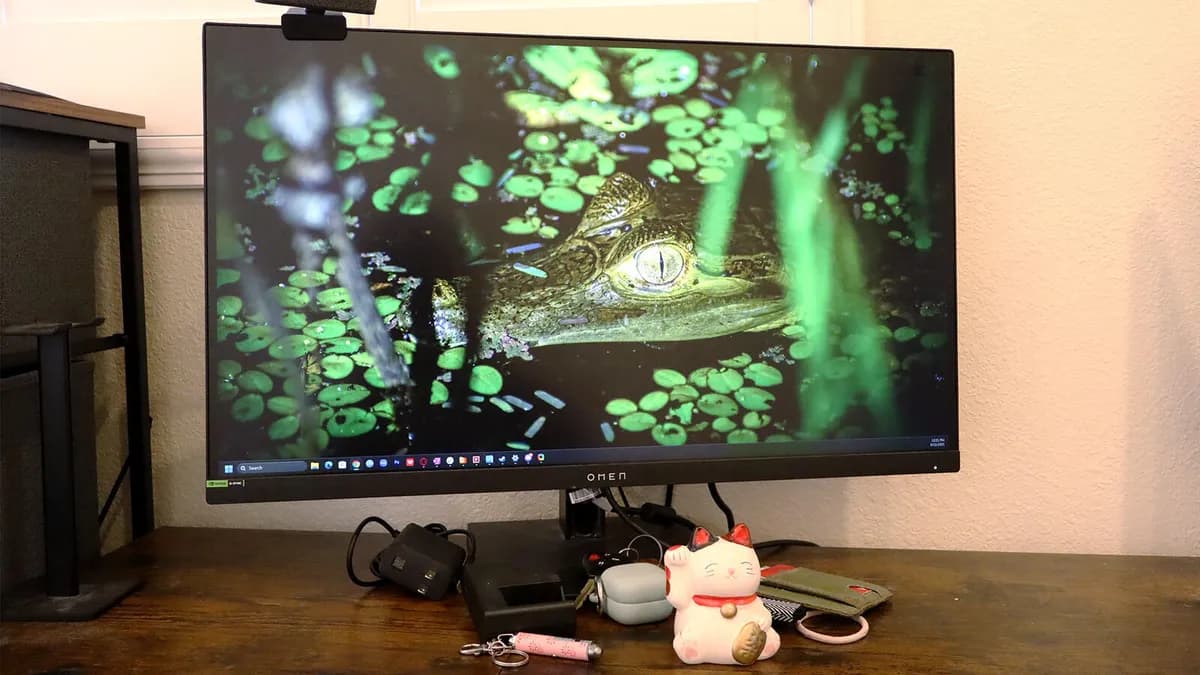
- The HP Omen 27K monitor doubles as a capable work screen for photo and video editing at around $610
- Memory foam cushions and lightweight frames matter more than specs for multi-hour gaming sessions
- External SSDs like the Samsung T9 solve storage bottlenecks as game file sizes balloon past 100GB
The gaming accessories market hit $8.89 billion in 2023 and is racing toward $15.67 billion by 2030. Most of that money gets wasted on flashy RGB and brand logos. After years of daily PC gaming, ZDNET staffer Cesar Cadenas has narrowed his essentials to five products he actually keeps using. His picks prioritize comfort during long sessions, reliability over months of abuse, and performance that justifies the price.
Why peripherals matter more than specs suggest
Conversations about gaming rigs fixate on GPUs, CPUs, and frame rates. The peripherals connecting you to all that horsepower get treated as afterthoughts. That's backwards. A $150 headset or monitor upgrade often transforms your experience more than a marginal graphics card bump. The right monitor immerses you; the right headphones let you play for hours without ear fatigue; the right controller makes every input feel impactful.
Cadenas tested dozens of accessories over the years. These five earned permanent spots in his setup.
HP Omen 27K: A monitor that works double shifts
The HP Omen 27K is a 27-inch 4K IPS panel with a 144Hz refresh rate and 1ms response time. It supports both AMD FreeSync Premium and Nvidia G-SYNC, eliminating screen tearing regardless of your graphics card. Colors are rich enough that Cadenas uses it for photo and video editing during work hours.
At around $610, it's not cheap. But it frequently drops to $350 during sales. At that price, you're getting a display that handles sprawling RPGs, fast-paced shooters, and professional creative work. Few monitors serve both roles this well.
HyperX Cloud III: Comfort that survives multi-hour sessions
Gaming sessions often stretch past the three-hour mark. Ear fatigue becomes the limiting factor, not boredom. The HyperX Cloud III addresses this with memory foam ear cushions, a padded headband, and a lightweight aluminum frame that distributes pressure evenly.
Sound quality backs up the comfort. The 53mm angled drivers deliver clear audio positioning, critical for competitive shooters where footsteps mean the difference between a kill and a death screen. The wired connection avoids the latency and battery anxiety of wireless alternatives.
HyperX Alloy Origins: Mechanical keys that last
Mechanical keyboards have become standard for serious PC gamers. The HyperX Alloy Origins earned its spot through durability and tactile feedback. After years of use, the switches still register consistently. The compact form factor leaves desk space for wider mouse movements, a real advantage in FPS games where low sensitivity settings demand sweeping arm motions.
An estimated 45 million mechanical gaming keyboards sell globally each year. Most fail within 18 months from switch degradation or keycap wear. The Alloy Origins has outlasted three of Cadenas's other peripherals.
Xbox Series X controller: The PC-friendly standard
Not every game plays better on mouse and keyboard. Racing games, platformers, and third-person action titles feel more natural with a controller. The Xbox Series X controller works natively with Windows, eliminating driver headaches. Its textured grips and responsive triggers handle long sessions without cramping.
Microsoft's controller has become the de facto standard for PC gaming. Most games display Xbox button prompts by default. Fighting against that ecosystem creates unnecessary friction.
Samsung T9 Portable SSD: Storage that travels
Modern game installs routinely exceed 100GB. Call of Duty: Modern Warfare III demands over 200GB. Internal storage fills fast. The Samsung T9 portable SSD provides fast external storage with transfer speeds that make loading times tolerable. It's small enough to pocket, making LAN parties and gaming at a friend's place practical again.
External SSDs also simplify upgrades. When your primary drive fills up, you add capacity without cracking open your case or cloning drives.
Logicity's Take
Cadenas's list skips mice entirely, which is surprising given their importance for FPS accuracy. Logitech's G Pro X Superlight 2 ($160) and Razer's DeathAdder V3 ($90) dominate that category. His picks lean toward products that serve dual purposes: the Omen 27K for work and play, the T9 for storage and portability. For tech decision-makers building out gaming lounges or employee wellness spaces, this dual-use philosophy cuts procurement costs. The $8.89 billion accessories market suggests employees are already buying this gear themselves. Providing quality peripherals as perks delivers real value.
What makes a gaming accessory worth keeping
The common thread across these five products: they solve real problems rather than chasing specs. The Omen 27K's color accuracy matters because professionals need monitors that work overtime. The Cloud III's memory foam matters because three hours of gaming shouldn't leave your ears throbbing. The T9's portability matters because game libraries have grown unwieldy.
Flashy features sell peripherals. Boring reliability keeps them in your setup for years.
Frequently Asked Questions
What refresh rate do I need for competitive gaming?
Most competitive players target 144Hz minimum, with serious esports competitors using 240Hz or 360Hz monitors. For casual gaming, 60Hz remains playable but noticeably less smooth.
Are wired gaming headphones better than wireless?
Wired headphones eliminate latency and battery concerns. Wireless technology has improved, but competitive players still prefer wired connections for guaranteed zero-delay audio.
Do gaming accessories work with both PC and console?
Most modern accessories support multiple platforms, but compatibility varies. Xbox controllers work natively with Windows. PlayStation controllers require additional software on PC. Always check compatibility before purchasing.
How much should I spend on gaming peripherals?
Budget $100-150 each for a quality headset, keyboard, and mouse. Monitors range from $300-800 for gaming-grade displays. Spending more delivers diminishing returns unless you're competing professionally.
Is external SSD storage fast enough for gaming?
Modern portable SSDs with USB 3.2 or Thunderbolt connections deliver loading times comparable to internal drives. USB 3.0 connections create noticeable bottlenecks with current games.
Expanding your gaming setup often requires more ports than your PC provides
Need Help Implementing This?
Building out a gaming space for your team or evaluating peripheral standards for your organization? Reach out to our team at Logicity for vendor comparisons and procurement guidance.
Source: Latest news
Manaal Khan
Tech & Innovation Writer
Produced with AI assistance and reviewed by the Logicity editorial team. Learn more in our Editorial Policy.