Niagara Launcher Theme Studio: Android Productivity Wins
Key Takeaways
- Theme Studio enables custom branding and consistent UI across team devices
- Community theme sharing reduces design overhead for IT departments
- Niagara's focus on minimalism directly supports digital wellness initiatives
Read in Short
Niagara Launcher just released Theme Studio, a powerful customization tool that lets users create, save, and share custom themes. Combined with their rebrand to Mellowdrop Studio, this positions Niagara as the go-to Android launcher for productivity-focused users. For businesses, this means better options for device standardization, employee digital wellness, and reduced app fatigue.
What Is Niagara Launcher Theme Studio?
Niagara Launcher has built its reputation on one core promise: making your phone less addictive by making it more efficient. Unlike traditional launchers that fill your screen with app grids and widgets, Niagara uses a vertical list design that surfaces only what you need.
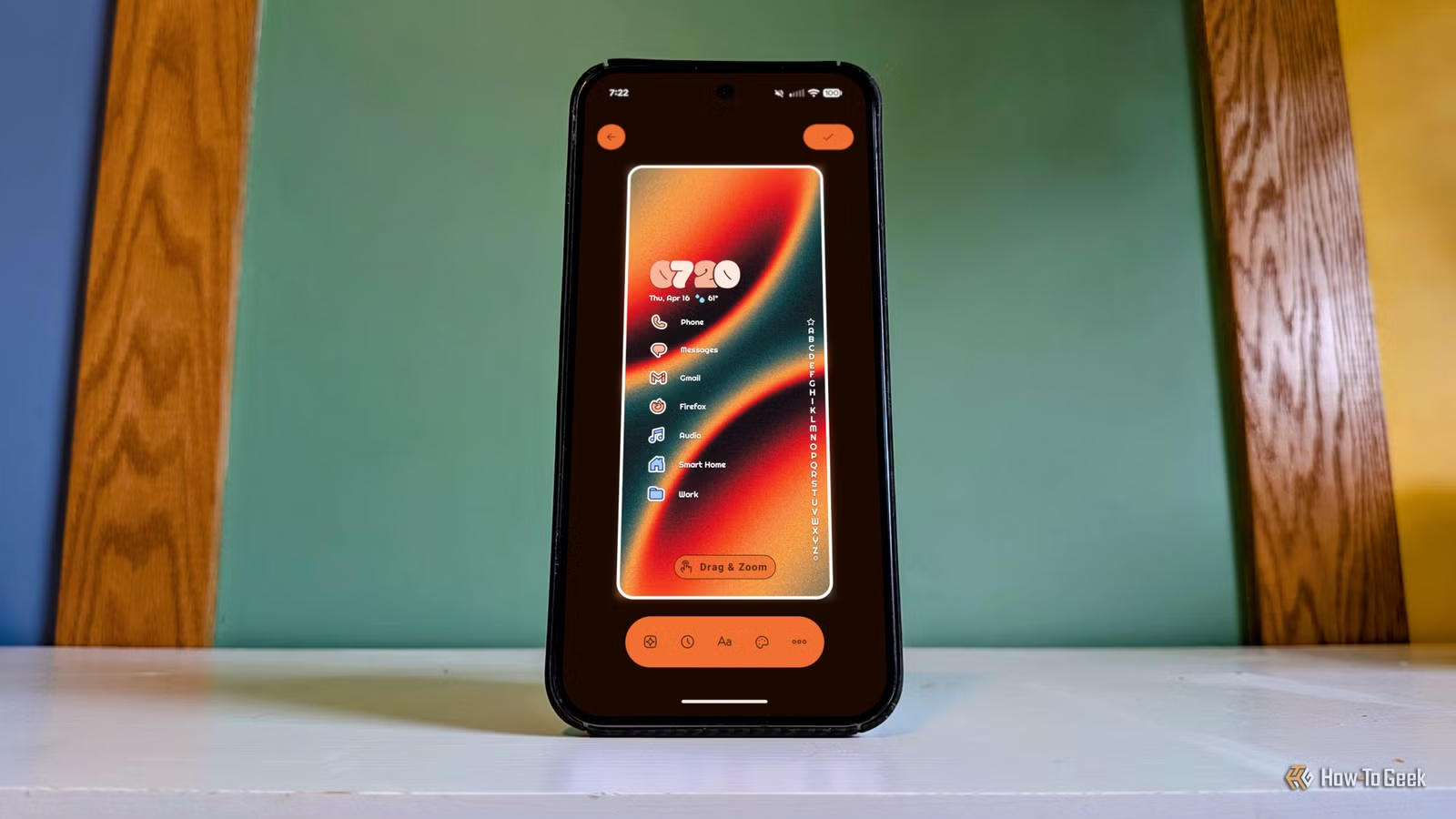
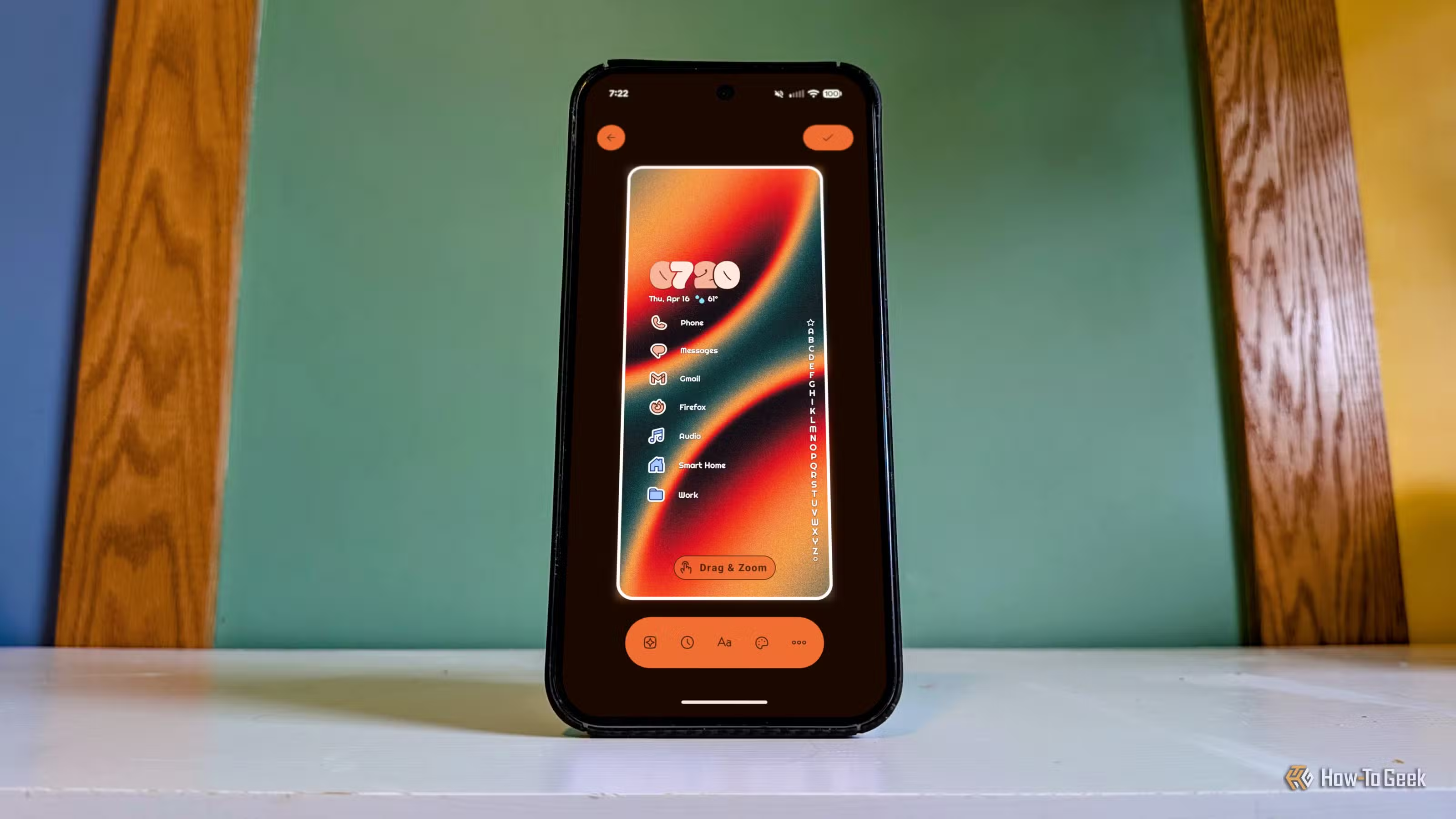
The new Theme Studio takes this philosophy further. Users can now customize wallpapers, app icons, clock styles, text appearance, fonts, and global settings. Every theme you create gets saved, letting you switch between work and personal setups instantly. But here's where it gets interesting for teams: you can share themes with colleagues or publish them to the entire Niagara community.
Why Should Business Leaders Care About Android Launchers?
The average knowledge worker checks their phone 96 times per day. That's once every 10 minutes during waking hours. Each check fragments attention, and research from UC Irvine shows it takes 23 minutes to fully refocus after an interruption.
Android launchers sit at the center of this problem. The default launcher on most devices is designed for engagement, not efficiency. It wants you scrolling, tapping, and staying on screen longer. Niagara flips this model entirely.
The Business Case for Minimal Launchers
Companies investing in employee wellness and focus time should consider launcher policies as part of their digital wellness strategy. A distraction-reducing launcher costs nothing but can recover hours of productive time weekly.
For organizations that provide company phones or have BYOD policies, standardized launchers offer another benefit: consistency. When your sales team all use the same launcher setup, IT support becomes simpler and onboarding gets faster.
How Does Niagara Launcher Theme Studio Work?
Getting started with Theme Studio is straightforward. Navigate to Settings, then Themes, then Create Theme. From there, the customization options unfold in a logical sequence.
- Choose and position your wallpaper
- Customize app icon styles and shapes
- Select clock display preferences
- Adjust text appearance and fonts
- Configure global settings for consistency
- Save your theme for instant switching later
The sharing functionality currently runs through Niagara's Discord server, which has become a thriving community. This community-driven approach means you can browse hundreds of user-created themes before building your own. For IT teams, this translates to free design resources. Find a theme that matches your brand colors, tweak it slightly, and distribute it to your team.
Niagara Launcher vs Nova Launcher: The Competitive Shift
The Android launcher market just experienced a significant shake-up. Nova Launcher, long considered the gold standard for power users, has seen declining support since its acquisition. This created a vacuum that Niagara is now filling.
| Feature | Niagara Launcher | Nova Launcher |
|---|---|---|
| Design Philosophy | Minimal, vertical list | Traditional grid-based |
| Theme Customization | Theme Studio with sharing | Individual settings only |
| Active Development | Strong (Mellowdrop Studio) | Slowed post-acquisition |
| Learning Curve | Low (intentionally simple) | Moderate to high |
| Community Features | Discord + theme sharing | Limited |
| Price | Free with Pro option | Free with Prime option |
For businesses that previously standardized on Nova Launcher, now is the time to evaluate alternatives. Niagara's active development and community focus suggest long-term viability. The company's rebrand to Mellowdrop Studio and fresh website signal serious investment in the product's future.
Another example of mobile software evolving toward proactive, minimal-friction user experiences
What Does the Mellowdrop Studio Rebrand Mean?
After 10 years as a side project turned serious product, the team behind Niagara Launcher has formalized their operation under the name Mellowdrop Studio. This isn't just a cosmetic change. It signals organizational maturity that enterprise customers look for when evaluating software dependencies.
The rebrand includes a new logo and website, but more importantly, it represents a commitment to the product's future. For companies considering Niagara for device fleets, this provides reassurance that the launcher won't disappear or stagnate like some competitors have.
Implementation Strategy for IT Teams
Rolling out a new launcher across an organization requires planning. Here's a practical approach that minimizes disruption while maximizing adoption.
Phased Rollout Recommendation
Start with a pilot group of 10-15 users who express interest in productivity tools. Let them test Theme Studio for two weeks and gather feedback before broader deployment. This creates internal champions who can help onboard colleagues.
- Create 2-3 approved themes that align with company branding
- Document the installation and setup process with screenshots
- Establish a feedback channel for early adopters
- Plan a 30-day evaluation period before full rollout
- Consider Niagara Pro licenses for power users who want advanced features
The beauty of Niagara's approach is that it doesn't require MDM software or complex deployment tools. Users can install it from the Play Store and apply your shared theme in under five minutes. This low-friction adoption path works well for BYOD environments where you can't mandate device configurations.
Like launcher customization, the right development tools can significantly impact team productivity
Cost Analysis: Is Niagara Launcher Pro Worth It?
Niagara Launcher offers a free tier that covers most functionality. The Pro version unlocks additional features like more icon customization options, notification badges, and priority support. For individual users, the decision is straightforward. For organizations, the math gets more interesting.
✅ Pros
- • Free tier sufficient for basic productivity gains
- • Pro pricing is reasonable for additional features
- • No per-seat enterprise licensing complexity
- • Theme sharing works across free and Pro users
❌ Cons
- • No official enterprise management features yet
- • Theme distribution relies on Discord (for now)
- • Limited to Android devices only
- • Some advanced customization requires Pro
For most organizations, starting with the free version makes sense. Only upgrade specific users to Pro if they need features like custom gestures or advanced notification controls. This tiered approach keeps costs minimal while still delivering productivity benefits.
The Bigger Picture: Mobile Productivity in 2026
Theme Studio represents a larger trend in mobile software: giving users control over their digital environment. As remote and hybrid work becomes permanent, the devices employees carry aren't just communication tools. They're productivity platforms that deserve the same attention as laptop configurations.
Smart organizations are already thinking about mobile experience as part of their IT strategy. This includes everything from standardized apps to launcher configurations to notification management policies. Niagara's Theme Studio makes the launcher piece of that puzzle much easier to solve.
Strategic cost optimization applies to both cloud infrastructure and employee productivity tools
Frequently Asked Questions
Frequently Asked Questions
How much does Niagara Launcher cost for business use?
Niagara Launcher is free for most use cases. The Pro version costs a one-time fee (typically under $10) or can be accessed via subscription. There's no special enterprise pricing, which actually simplifies procurement. You can deploy the free version organization-wide and only purchase Pro licenses for users who need advanced features.
Can we create branded themes for our company?
Yes. Theme Studio lets you customize wallpapers, colors, fonts, and icon styles. Create a theme matching your brand guidelines, then share it with employees through the Niagara Discord community or direct file sharing. This gives you consistent device appearance without MDM complexity.
Is Niagara Launcher secure for corporate devices?
Niagara Launcher is a home screen replacement, not a system-level modification. It doesn't access sensitive data beyond what any launcher needs (app list, notifications if enabled). The launcher has been available on the Play Store for years with no security incidents. For highly regulated industries, consult your security team, but risk is minimal.
How long does it take employees to adapt to Niagara?
Most users adapt within 2-3 days. The vertical list design is intuitive, and the search functionality means you can always find apps quickly even while learning. The biggest adjustment is mental: accepting that you don't need 50 apps visible on your home screen. Plan for a one-week adjustment period in your rollout timeline.
Will Niagara Launcher continue to be supported long-term?
The recent rebrand to Mellowdrop Studio and 10-year track record suggest strong commitment. Unlike Nova Launcher, which struggled after acquisition, Niagara remains independent and actively developed. Theme Studio is their biggest feature release in years, indicating continued investment in the product.
The Bottom Line for Decision Makers
Niagara Launcher's Theme Studio isn't going to revolutionize your business overnight. But it represents a low-cost, low-risk opportunity to improve mobile productivity across your organization. The combination of distraction-reducing design, easy customization, and community sharing makes it worth evaluating.
For companies already struggling with employee focus and digital wellness, a launcher change might sound trivial. It's not. The home screen is the first thing employees see dozens of times daily. Making that experience calmer and more intentional compounds into real productivity gains.
Start with a small pilot. Create a company theme. Measure whether users report feeling less distracted. The data will tell you whether to expand from there.
Need Help With Mobile Productivity Strategy?
Logicity helps organizations optimize their technology stack for productivity and efficiency. Whether you're evaluating launcher options, building digital wellness policies, or standardizing mobile experiences across teams, our advisory services can accelerate your decision-making. Reach out to discuss your specific challenges.
Source: How-To Geek
Huma Shazia
Senior AI & Tech Writer
اقرأ أيضاً

رأي مغاير: كيف يؤثر اختراق الأمن الداخلي الأميركي على شركاتنا الخاصة؟
في ظل اختراق عقود الأمن الداخلي الأميركي مع شركات خاصة، نناقش تأثير هذا الاختراق على مستقبل الأمن السيبراني. نستعرض الإحصاءات الموثوقة ونناقش كيف يمكن للشركات الخاصة أن تتعامل مع هذا التهديد. استمتع بقراءة هذا التحليل العميق

الإنسان في زمن ما بعد الوجود البشري: نحو نظام للتعايش بين الإنسان والروبوت - Centre for Arab Unity Studies
في هذا المقال، سنناقش كيف يمكن للبشر والروبوتات التعايش في نظام متكامل. سنستعرض التحديات والحلول المحتملة التي تضعها شركات مثل جوجل وأمازون. كما سنلقي نظرة على التوقعات المستقبلية وفقًا لتقرير ماكنزي

إطلاق ناسا لمهمة مأهولة إلى القمر: خطوة تاريخية نحو استكشاف الفضاء
تعتبر المهمة الجديدة خطوة هامة نحو استكشاف الفضاء وتطوير التكنولوجيا. سوف تشمل المهمة إرسال رواد فضاء إلى سطح القمر لconducting تجارب علمية. ستسهم هذه المهمة في تطوير فهمنا للفضاء وتحسين التكنولوجيا المستخدمة في استكشاف الفضاء.