Gemini App for Mac: Google's Free AI Desktop Tool
Key Takeaways
- Free AI desktop assistant with instant keyboard shortcut access (Option + Space)
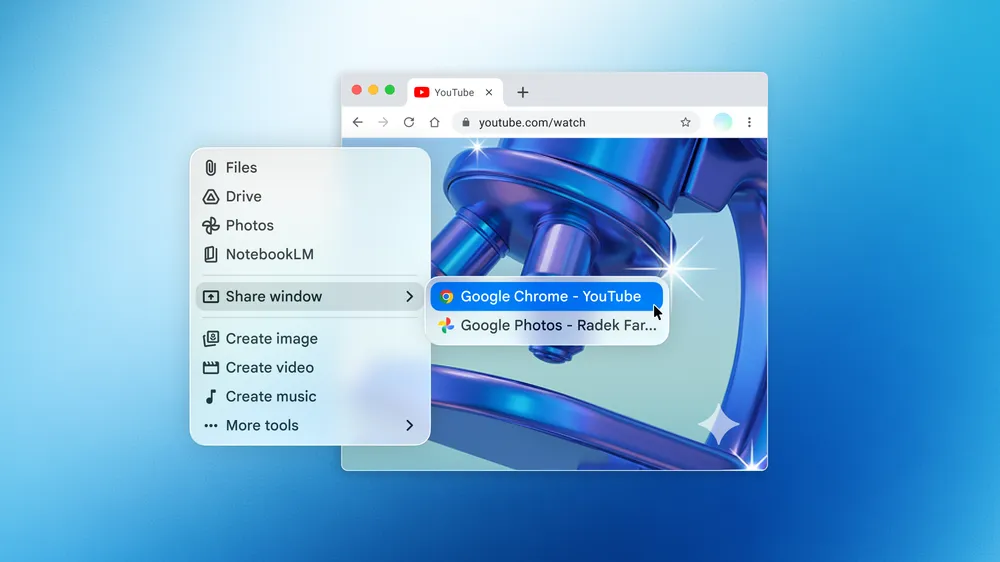
- Screen sharing lets Gemini analyze whatever you're working on in real-time
- Integrates with Google Drive, Photos, and NotebookLM for seamless file access
Read in Short
Google launched a free native Gemini app for Mac that sits one keyboard shortcut away from any workflow. Business impact: Your team gets instant AI research, document summarization, and content generation without leaving their current task. No subscription required for basic features.
Why the Gemini App for Mac Matters for Business
Here's what actually changed this week: Google took Gemini out of the browser and put it on your desktop. That sounds incremental until you watch someone use it. One keyboard shortcut (Option + Space) and you're talking to an AI that can see your screen, pull files from Google Drive, and generate everything from research reports to video content.
For business leaders evaluating AI tools, this move signals Google's serious play for the productivity market. They're not just competing with ChatGPT's web interface anymore. They're going after the workflow itself.
The timing matters too. Microsoft has Copilot baked into Windows and Office. Apple's own AI features are rolling out across macOS. Google needed a desktop presence, and now they have one that works across their entire ecosystem.
What Can Gemini on Mac Actually Do?
Let's cut through the marketing and look at the practical capabilities that matter for business use cases.
- Screen sharing analysis: Show Gemini a complex diagram, spreadsheet, or document and ask for summaries, insights, or explanations
- File integration: Pull content from Google Drive, Photos, and NotebookLM directly into conversations
- Deep Research: Automated research compilation that synthesizes multiple sources
- Content generation: Create images, videos, and music for marketing and presentations
- Canvas: Collaborative workspace for longer documents and projects
The screen sharing feature deserves attention. Your financial analyst can pull up a complex quarterly report and ask Gemini to explain the key variances. Your marketing team can share a competitor's landing page and get instant copy analysis. Your engineers can screenshot error logs and get debugging suggestions. All without copying, pasting, or switching windows.
Executive Summary: Gemini Mac App
Google's first desktop AI app is free, requires macOS 15+, and launches instantly via keyboard shortcut. Core value proposition: AI assistance without workflow interruption. Best for teams already in Google's ecosystem who want faster access to AI capabilities across documents, research, and content creation.
How Does Gemini for Mac Compare to ChatGPT?
Business leaders keep asking me the same question: Should we standardize on ChatGPT or Gemini? Here's an honest comparison for the Mac desktop experience.
| Feature | Gemini Mac App | ChatGPT Desktop |
|---|---|---|
| Price | Free (basic), Gemini Advanced for more | Free tier, Plus at $20/month |
| Keyboard shortcut | Option + Space | Configurable |
| Screen sharing | Native, built-in | Available with vision |
| Google Workspace integration | Deep (Drive, Photos, NotebookLM) | Limited |
| Microsoft 365 integration | Limited | Better with Copilot |
| Content generation | Images, video, music | Images, code emphasis |
| macOS requirement | macOS 15+ | macOS 14+ |
The real differentiator isn't features. It's ecosystem. If your company runs on Google Workspace, Gemini's native integrations will save meaningful time. If you're a Microsoft shop, the calculus changes. Most organizations won't go wrong with either, but picking one and standardizing reduces training overhead and support complexity.
The Business Case for Desktop AI Tools
Why does having AI on the desktop matter when browser tabs work fine? Three reasons that show up in actual productivity data.
- Context switching costs add up. Studies consistently show that every application switch costs 20-30 seconds of refocus time. Multiply that by dozens of daily AI queries and you're looking at real productivity loss.
- Screen context changes everything. Describing what you're looking at takes time and loses nuance. Showing it to an AI and asking a question is faster and more accurate.
- Integration depth matters. When AI can pull from your file systems and cloud storage natively, you skip the copy-paste dance that slows down complex research tasks.
Desktop AI tools aren't revolutionary on their own. But they remove friction from workflows your team already uses. And in productivity software, small friction reductions compound into significant time savings.
If you're optimizing cloud costs, this breakdown shows where teams actually save money
Implementation: Getting Your Team Started
Rolling out a new tool across a team is where good intentions meet messy reality. Here's a practical approach for Gemini Mac adoption.
One thing I'd flag: The screen sharing feature means employees might inadvertently share sensitive information with Google's AI. Your security and compliance teams should weigh in before broad deployment. Most organizations will want clear guidelines about what can and can't be shown to external AI tools.
What Google's Desktop Push Means for AI Strategy
Zoom out for a moment. Google releasing a Mac app tells us something about where AI assistants are heading in 2026 and beyond.
The browser era for AI tools is ending. Every major player is building native apps, system integrations, and OS-level hooks. Microsoft has Copilot in Windows. Apple has Apple Intelligence in macOS. Google now has Gemini as a standalone app. The battleground is shifting from 'which AI is smartest' to 'which AI is most accessible in your workflow.'
For business leaders, this means your AI tool decisions are becoming platform decisions. The AI you choose will likely be the one that integrates best with your existing infrastructure. That's not necessarily bad, but it's worth recognizing as you evaluate options.
“The most capable AI that nobody uses is less valuable than a good AI that's one keystroke away. Accessibility is becoming the competitive advantage.”
— Enterprise software pattern, 2026
Another example of AI moving from cloud services to native applications
Limitations and Honest Concerns
No tool review is complete without addressing what doesn't work well. Here's what I'd watch out for with Gemini on Mac.
✅ Pros
- • Free tier is genuinely useful, not a crippled demo
- • Google ecosystem integration is seamless if you're already there
- • Screen sharing removes significant friction from AI queries
- • Keyboard shortcut access actually changes usage patterns
❌ Cons
- • Requires macOS 15, which some enterprise fleets haven't updated to yet
- • Google's track record on product continuity makes some IT leaders nervous
- • Data privacy questions around screen sharing need policy attention
- • Less mature than ChatGPT in some coding and technical use cases
The macOS 15 requirement will be a real blocker for some organizations. Enterprise Mac fleets often run one or two versions behind for stability. If you're still on macOS 13 or 14, budget time for OS updates before deployment.
Frequently Asked Questions
Frequently Asked Questions
How much does the Gemini Mac app cost for business use?
The basic Gemini Mac app is free worldwide. For advanced features and higher usage limits, Google offers Gemini Advanced as part of Google One AI Premium at $19.99/month per user. Enterprise pricing through Google Workspace varies by agreement.
Is Gemini for Mac secure enough for enterprise data?
Google applies its standard enterprise security practices to Gemini. However, the screen sharing feature means users could inadvertently expose sensitive data. Most enterprises should establish clear usage policies before deployment and review Google's data handling terms with legal and compliance teams.
How long does it take to deploy Gemini Mac across a team?
Technical deployment is quick, often under a day for IT to push the app. The real timeline depends on your compliance review process and training needs. Budget 2-4 weeks for a thoughtful rollout that includes security review, pilot testing, and basic user guidelines.
Should we switch from ChatGPT to Gemini?
Not necessarily. If ChatGPT is working well for your team, switching has real costs in retraining and workflow adjustment. Consider Gemini if you're heavily invested in Google Workspace, need the specific integrations it offers, or want to reduce per-user costs. Many organizations use both for different purposes.
What's the minimum Mac requirement for Gemini?
Gemini requires macOS 15 (Sequoia) or later. This may require OS updates for enterprise fleets running older versions. Verify your Mac hardware supports macOS 15 before planning deployment.
More on mobile productivity tools that complement desktop AI workflows
The Bottom Line for Business Leaders
Google's Gemini Mac app is a solid free tool that solves a real problem: getting AI assistance without breaking your workflow. For teams in the Google ecosystem, it's an easy recommendation. For everyone else, it's worth a pilot to see if the integrations and screen sharing capabilities fit your needs.
The bigger story is the shift toward native AI applications. Browser-based AI isn't going away, but the future looks like AI that's embedded in your operating system and one shortcut away from wherever you're working. Plan accordingly.
Download the app at gemini.google/mac and test it against your actual workflows before making deployment decisions. The best evaluation is always your team's real use cases, not feature comparisons on paper.
Need Help Implementing This?
Logicity helps business leaders navigate AI tool decisions and deployments. From security reviews to team training, we've guided dozens of organizations through AI adoption. Reach out if you want a structured approach to evaluating Gemini, ChatGPT, or other AI tools for your specific needs.
Source: The Decoder / Maximilian Schreiner
Huma Shazia
Senior AI & Tech Writer
اقرأ أيضاً

رأي مغاير: كيف يؤثر اختراق الأمن الداخلي الأميركي على شركاتنا الخاصة؟
في ظل اختراق عقود الأمن الداخلي الأميركي مع شركات خاصة، نناقش تأثير هذا الاختراق على مستقبل الأمن السيبراني. نستعرض الإحصاءات الموثوقة ونناقش كيف يمكن للشركات الخاصة أن تتعامل مع هذا التهديد. استمتع بقراءة هذا التحليل العميق

الإنسان في زمن ما بعد الوجود البشري: نحو نظام للتعايش بين الإنسان والروبوت - Centre for Arab Unity Studies
في هذا المقال، سنناقش كيف يمكن للبشر والروبوتات التعايش في نظام متكامل. سنستعرض التحديات والحلول المحتملة التي تضعها شركات مثل جوجل وأمازون. كما سنلقي نظرة على التوقعات المستقبلية وفقًا لتقرير ماكنزي

إطلاق ناسا لمهمة مأهولة إلى القمر: خطوة تاريخية نحو استكشاف الفضاء
تعتبر المهمة الجديدة خطوة هامة نحو استكشاف الفضاء وتطوير التكنولوجيا. سوف تشمل المهمة إرسال رواد فضاء إلى سطح القمر لconducting تجارب علمية. ستسهم هذه المهمة في تطوير فهمنا للفضاء وتحسين التكنولوجيا المستخدمة في استكشاف الفضاء.