CVE Vulnerability Tracker: How to Build an Automated Security Dashboard with Notion and Kestra
Key Takeaways
- CVEs are Common Vulnerabilities and Exposures, basically known security flaws in software that could be exploited
- Using plugin defaults in Kestra keeps your workflow clean and future-proof when working with multiple Notion tasks
- Notion's rich text fields expect an array of objects, not simple strings, which trips up many developers
- You can combine Notion page and database plugins to build a complete vulnerability tracking system
Read in Short
This tutorial walks you through building an automated CVE vulnerability tracker using Notion and Kestra. You'll learn how to handle Notion's quirky API data types, set up plugin defaults for cleaner code, and integrate AI to prioritize which security flaws need immediate attention.
So here's the thing. There are people working in tech right now who don't know what a CVE is. Not the acronym part, that's forgivable. We've got way too many of those floating around. I'm talking about developers who don't realize CVEs are actual vulnerabilities. Security flaws. The kind of stuff that keeps your security team up at night.
This revelation hit one developer hard enough that she decided to do something about it. Build a tracker. Make it automated. And then share the whole process with the rest of us.
What's a CVE Anyway?
CVE stands for Common Vulnerabilities and Exposures. It's basically a standardized naming system for publicly known security flaws. When you hear about a major security bug like Log4Shell or Heartbleed, they all have CVE IDs assigned to them. Think of it as a universal catalog of 'things that could go very wrong with your code.'
The Enterprise Developer Experience
If you've ever worked in a large enterprise IT organization, you know the drill. Code scanning initiatives. Security-minded coding practices. Mandatory training modules that seem to multiply every quarter. And with all that awareness comes something else entirely: anxiety.
Did you leave your source code vulnerable? Did that library you chose three months ago just show up on a vulnerability report? Is your production system running something that hackers already know how to exploit? These questions will haunt you. They're part of why some developers eventually leave enterprise environments altogether.
But running away from security doesn't make it less important. That's where automation comes in.
Building the CVE Tracker
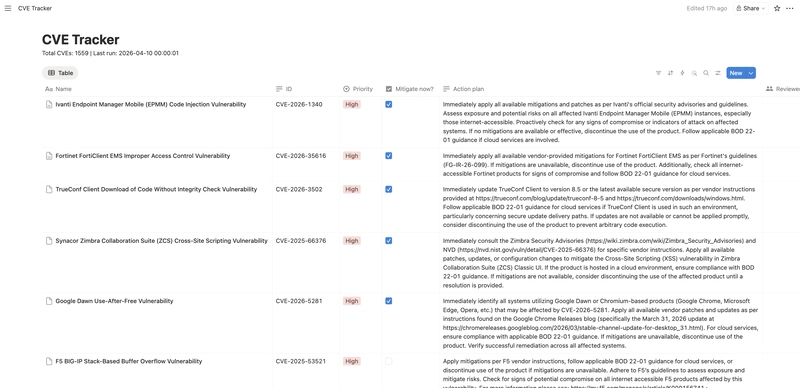
The solution here combines Notion's database functionality with Kestra's workflow automation. Both the Notion page and database plugins come into play, including some fun quirks around data types that'll trip you up if you're not paying attention.
Let's break down the key pieces.
Setting Up Plugin Defaults
Here's your first pro tip. If you're planning to run multiple tasks with Notion plugins, especially several database operations, you're going to reuse certain values constantly. The database ID. Your API token. These don't need to be repeated in every single task definition.
pluginDefaults:
  - type: io.kestra.plugin.notion
    values:
      apiToken: "{{ secret('NOTION_SECRET') }}"
      databaseId: "{{ secret('NOTION_CVE_DB') }}"
This approach does two things. First, it keeps your workflow readable. When you're scanning through dozens of tasks, you don't want to wade through repeated configuration blocks. Second, it's basically future-proofing. Need to add more Notion tasks later? They'll automatically inherit these defaults.
The example workflow only uses three tasks across both plugins. But imagine scaling that up. Clean defaults become essential pretty fast.
If you're building automation systems that talk to multiple APIs like Notion, understanding the differences between API protocols will help you debug issues faster.
The Rich Text Gotcha
Okay, this is where things get weird. Notion's API has some data type expectations that aren't exactly intuitive. Take rich text fields. You might think you're just passing a string. A CVE ID. An action plan. Simple text, right?
Nope.
Rich text fields want an array of objects. Even when you're just passing what is, for all practical purposes, a plain string. The structure looks like this:
ID:
  rich_text:
    - text:
        content: "{{ json(parent.taskrun.value).cveID }}"
See that array wrapper? And the nested object structure? You need that even for the simplest text content. The Notion API docs become your best friend here, because guessing this format isn't happening.
The Full Database Item Creation
Here's where everything comes together. Creating a complete item in your CVE tracking database means handling multiple field types in a single operation. Rich text for IDs and action plans. Select dropdowns for priority levels. And checkboxes for that all-important "mitigate now" flag.
- id: send_to_notion
  type: io.kestra.plugin.notion.database.CreateItem
  title: "{{ json(parent.taskrun.value).vulnerabilityName }}"
  properties:
    ID:
      rich_text:
        - text:
            content: "{{ json(parent.taskrun.value).cveID }}"
    Priority:
      select:
        name: "{{ outputs.ask_ai[parent.taskrun.value].predictions | first | jq('.priority') | first }}"
    "Mitigate now?":
      checkbox: "{{ outputs.ask_ai[parent.taskrun.value].predictions | first | jq('.mitigate_now') | first }}"
    "Action plan":
      rich_text:
        - text:
            content: "{{ outputs.ask_ai[parent.taskrun.value].predictions | first | jq('.action_plan') | first }}"
Notice how different field types have different syntax requirements. Select fields use a name property. Checkboxes take a boolean directly. Rich text needs that array structure we talked about. Each one follows its own rules.
AI Integration Bonus
This workflow includes an AI step (ask_ai) that analyzes each CVE and returns predictions for priority level, whether immediate mitigation is needed, and a suggested action plan. The jq expressions pull these values from the AI response and pass them to Notion.
Data Types Quick Reference
| Notion Field Type | What You Might Expect | What It Actually Wants |
|---|---|---|
| Rich Text | A string | Array of text objects |
| Select | A string | Object with name property |
| Checkbox | true/false string | Boolean value |
| Title | A string | String (this one's actually simple) |
Why This Matters for Your Team
Look, vulnerability management isn't glamorous work. Nobody's showing off their CVE dashboard at conferences. But it's the kind of foundational stuff that separates organizations that get breached from ones that don't.
Having an automated system means you're not relying on someone to manually check vulnerability databases every morning. You're not waiting for that email from your security vendor that might get lost in the noise. The system watches, categorizes, and flags issues based on actual risk assessment.
- Automatic CVE ingestion from vulnerability feeds
- AI-powered priority assessment based on your specific environment
- Centralized tracking in a tool your team already uses (Notion)
- Historical record of vulnerabilities and how they were addressed
Getting Started
- Set up a Notion database with fields for CVE ID, vulnerability name, priority, mitigate now checkbox, and action plan
- Create a Kestra workflow with plugin defaults for your Notion credentials
- Add tasks for fetching CVE data from your preferred source
- Integrate an AI step for priority assessment if you want automated triage
- Configure the database creation task with proper field mappings
Building dashboards often requires complex UI interactions. This tutorial covers similar patterns for managing state in workflow-style applications.
Final Thoughts
The kicker? This whole setup exists because someone was genuinely surprised that people in tech don't understand CVEs. That frustration turned into something useful. A working system. A video tutorial. And hopefully, a few more developers paying attention to security.
If you've been putting off vulnerability tracking because it seems complicated, this is your sign. The tools exist. The plugins work. And honestly, the peace of mind is worth the afternoon it takes to set this up.
Your future self, the one who doesn't have to explain a breach to leadership, will thank you.
Frequently Asked Questions
Do I need coding experience to build this CVE tracker?
Basic familiarity with YAML and API concepts helps, but the Notion and Kestra documentation walks you through most of it. If you can copy configuration blocks and modify values, you can build this.
Can I use a different database instead of Notion?
Kestra has plugins for various services. You could adapt this workflow for Airtable, Google Sheets, or even a traditional database with the right plugin configuration.
How often should the automation run?
Daily is reasonable for most teams. Critical infrastructure might warrant more frequent checks. Set the schedule based on your risk tolerance and how quickly you can actually respond to new vulnerabilities.
Source: DEV Community
Huma Shazia
Senior AI & Tech Writer
اقرأ أيضاً

رأي مغاير: كيف يؤثر اختراق الأمن الداخلي الأميركي على شركاتنا الخاصة؟
في ظل اختراق عقود الأمن الداخلي الأميركي مع شركات خاصة، نناقش تأثير هذا الاختراق على مستقبل الأمن السيبراني. نستعرض الإحصاءات الموثوقة ونناقش كيف يمكن للشركات الخاصة أن تتعامل مع هذا التهديد. استمتع بقراءة هذا التحليل العميق

الإنسان في زمن ما بعد الوجود البشري: نحو نظام للتعايش بين الإنسان والروبوت - Centre for Arab Unity Studies
في هذا المقال، سنناقش كيف يمكن للبشر والروبوتات التعايش في نظام متكامل. سنستعرض التحديات والحلول المحتملة التي تضعها شركات مثل جوجل وأمازون. كما سنلقي نظرة على التوقعات المستقبلية وفقًا لتقرير ماكنزي

إطلاق ناسا لمهمة مأهولة إلى القمر: خطوة تاريخية نحو استكشاف الفضاء
تعتبر المهمة الجديدة خطوة هامة نحو استكشاف الفضاء وتطوير التكنولوجيا. سوف تشمل المهمة إرسال رواد فضاء إلى سطح القمر لconducting تجارب علمية. ستسهم هذه المهمة في تطوير فهمنا للفضاء وتحسين التكنولوجيا المستخدمة في استكشاف الفضاء.